
You are using an out of date browser. It may not display this or other websites correctly.
You should upgrade or use an alternative browser.
You should upgrade or use an alternative browser.
[Beta Testers] AI Writer - GPT-3 Based - Relevant Content
- Thread starter Cognitive
- Start date
- Status
- Not open for further replies.


cpakingno1
Regular Member
- Jun 5, 2011
- 387
- 97
Interested, I am using other AI services for blog post

- Jun 5, 2018
- 971
- 539
Interested to give it a go.

vanessasweet
Regular Member
- Jan 8, 2012
- 226
- 32
Can i give it a try?

dandan594594
Elite Member
- Jan 31, 2013
- 1,664
- 1,238
Interested
Tested almost all AI content writing tools, so clearly gauge how good your tool works.
Tested almost all AI content writing tools, so clearly gauge how good your tool works.
Sending another batch of invites this evening.
I have not received it
 can I get it?
Cognitive
Regular Member
- Mar 11, 2015
- 401
- 222
Small update today: added loading animations on the article setup pages (each time the web app does something in the background, the loading animation is displayed to the user)
Also, today I received the following question from one of our beta-testers:
Is there a way I can use this tool to create list post? Like "7 Reasons why you should use AI writer"?
I sent this guide through PM but I think it could be useful to other users, as well. Also, it can be applied to any type of blog post/ article:
There are 2 ways of doing this:
A. You can use the Basic module to generate a list of 7 reasons.
1. Open the Basic longform module and input this prompt exactly:
 2. Click on the Generate button and you should get something like this:
 3. If you want to expand the content for each idea/ reason, copy all of them in a different document.
4. Paste the first one back in the longform text box and click Generate. For best results, make sure you edit what the AI has generated (if needed) and, before each time you click Generate, enter your own input in order to steer the AI towards your desired output. If you don't like what the AI has generated, just delete the new output and click Generate again.
5. Repeat step 4 for each idea (paste back in the longform editor and continue to generate text, edit it etc).
B. The better solution: use the Relevanto or Relevanto+ modules. In this case I used Relevanto+
1. Enter this prompt on the article setup page:
 Click on "Generate Titles".
2. After the titles have been generated, I edited the second title (they can be edited right on this page) to include "7 reasons why you should use an AI writer" as well, and picked this title.
3. Now, the Relevanto engine would start generating your intros, according to the selected title and the context mentioned at the beginning of this setup. Choose the best intro for your article (they can be edited here, as well, but this time I didn't change anything in it)
 4. In the longform writing module of Relevanto+, the selected title and the selected intro will already be displayed. In the below mentioned image, I just clicked one time on the Generate button and got this:
 5. If you want to expand the content for each idea/ reason, copy all of them in a different document.
6. Paste the first one back in the longform editor and click Generate. For best results, make sure you edit what the AI has generated (if needed) and, before each time you click Generate, enter your own input in order to steer the AI towards your desired output.
7. Repeat step 6 for each idea (paste back in the longform editor and continue to generate text).
The next steps are optional:
8. Use the intro paragraphs already generated in the Sub-Topics/ Related Content section. They can have a great potential for building your H2/ H3 content in your article. The Relevanto AI engine learns these related topics from People Also Asked and Related Searches in SERPs. Then, it continues to learn from the top actors it identifies for each of this related topic.
So, click on one of the sub-topics in the related section of Relevanto+
 9. In this example, I clicked on " What are the benefits of writing in AI?" and picked the second intro paragraph already generated by the Relevanto AI engine. After clicking on its "choose" button, it has been added this in the longform editor:
 10. I clicked on "Generate" after adding the sub-topic intro paragraph (although I should have added my input before clicking on Generate, but the content was already pointed in the "direction" I needed) and I got this:
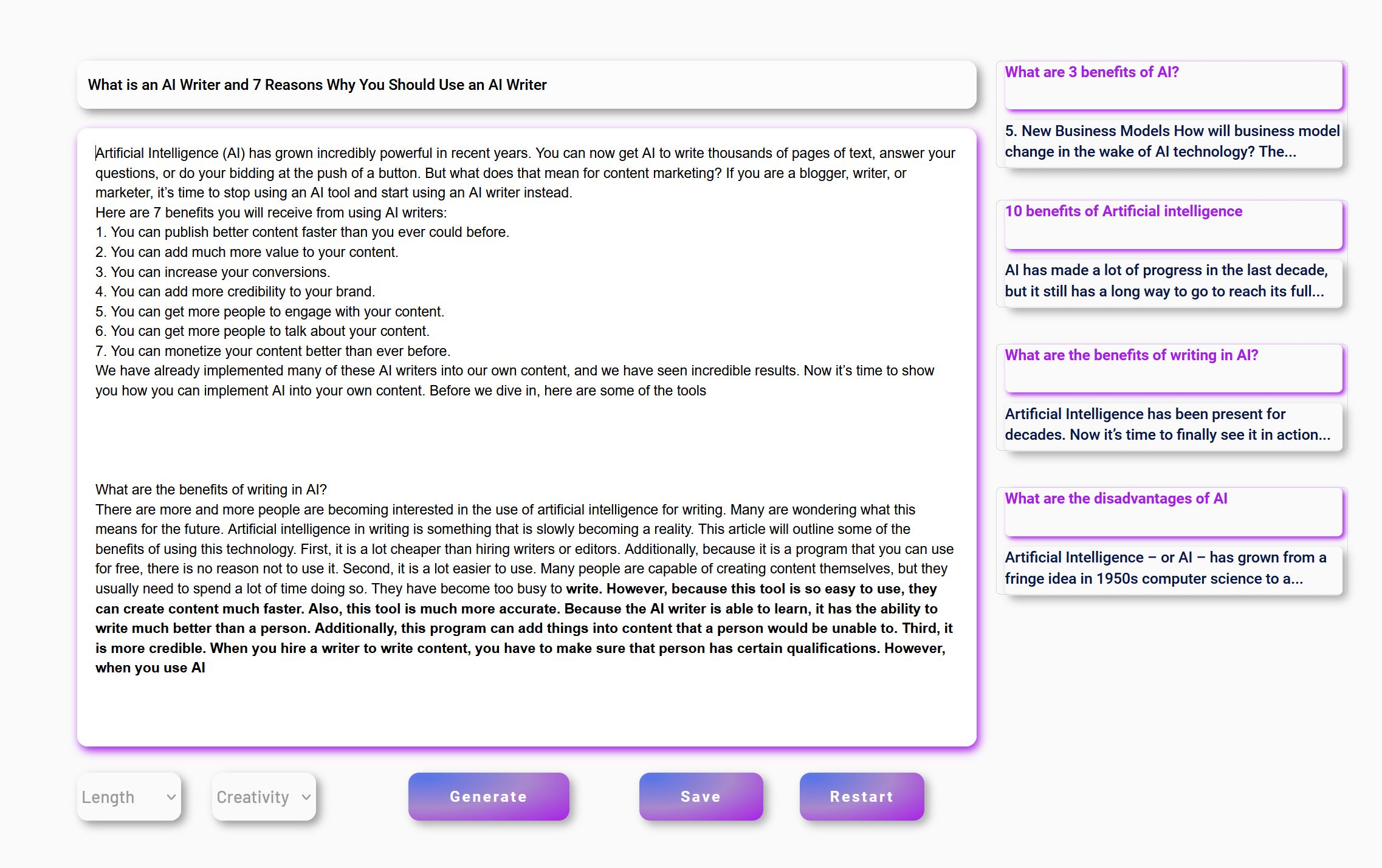 11. I would continue building this article by repeating a combination of the steps 7-10
Note: using the intro paragraphs from the related topics section not only makes your work easier and allows you to build your articles faster, but it also adds context to your article and this context helps a lot the AI when it comes to generating relevant outputs.
Also, today I received the following question from one of our beta-testers:
Is there a way I can use this tool to create list post? Like "7 Reasons why you should use AI writer"?
I sent this guide through PM but I think it could be useful to other users, as well. Also, it can be applied to any type of blog post/ article:
There are 2 ways of doing this:
A. You can use the Basic module to generate a list of 7 reasons.
1. Open the Basic longform module and input this prompt exactly:
4. Paste the first one back in the longform text box and click Generate. For best results, make sure you edit what the AI has generated (if needed) and, before each time you click Generate, enter your own input in order to steer the AI towards your desired output. If you don't like what the AI has generated, just delete the new output and click Generate again.
5. Repeat step 4 for each idea (paste back in the longform editor and continue to generate text, edit it etc).
B. The better solution: use the Relevanto or Relevanto+ modules. In this case I used Relevanto+
1. Enter this prompt on the article setup page:
2. After the titles have been generated, I edited the second title (they can be edited right on this page) to include "7 reasons why you should use an AI writer" as well, and picked this title.
3. Now, the Relevanto engine would start generating your intros, according to the selected title and the context mentioned at the beginning of this setup. Choose the best intro for your article (they can be edited here, as well, but this time I didn't change anything in it)
6. Paste the first one back in the longform editor and click Generate. For best results, make sure you edit what the AI has generated (if needed) and, before each time you click Generate, enter your own input in order to steer the AI towards your desired output.
7. Repeat step 6 for each idea (paste back in the longform editor and continue to generate text).
The next steps are optional:
8. Use the intro paragraphs already generated in the Sub-Topics/ Related Content section. They can have a great potential for building your H2/ H3 content in your article. The Relevanto AI engine learns these related topics from People Also Asked and Related Searches in SERPs. Then, it continues to learn from the top actors it identifies for each of this related topic.
So, click on one of the sub-topics in the related section of Relevanto+
Note: using the intro paragraphs from the related topics section not only makes your work easier and allows you to build your articles faster, but it also adds context to your article and this context helps a lot the AI when it comes to generating relevant outputs.


crazyStrap
Junior Member
- Apr 21, 2021
- 115
- 34
Hi,
I am interested, currently I am using Jarvis Boss Mode, Frase and WriteCream.
I used to have ShortlyAI, GoCopy, WriteSonic and Nichesss.
Mostly I have been using ShortlyAI and Jarvis together with either MarketMuse or Frase.
I do not have 100 posts as I have more experience with AI than with SEO and hence I prefer listening to talking.
I am interested, currently I am using Jarvis Boss Mode, Frase and WriteCream.
I used to have ShortlyAI, GoCopy, WriteSonic and Nichesss.
Mostly I have been using ShortlyAI and Jarvis together with either MarketMuse or Frase.
I do not have 100 posts as I have more experience with AI than with SEO and hence I prefer listening to talking.


seowarrior008
Senior Member
- Feb 7, 2012
- 930
- 248
Already used Conversion AI and Ryter
If got a chance to test your tool, I much appreciate it.
cheers
If got a chance to test your tool, I much appreciate it.
cheers


west555
Senior Member
- Dec 4, 2011
- 1,004
- 456
I would love to try this out.
Am writting a sh*t load of content curently with Jarvis (tested most of them but stuck with jarvis so i know them inside out), however am not fully satisfied.
If there are some spots left count me in, you will get a detailed review, and feedback
Am writting a sh*t load of content curently with Jarvis (tested most of them but stuck with jarvis so i know them inside out), however am not fully satisfied.
If there are some spots left count me in, you will get a detailed review, and feedback

- Status
- Not open for further replies.