Hey guys! The last few months I've come across quite a few threads where new members/existing members were asking what certain terms mean and how to do certain things in regards to Black Hat SEO.
This thread will hopefully inform those of you who are not familiar with some of these terms and guide you in the correct direction in your paths as future SEO millionaires.
What is Black Hat SEO?
Black Hat SEO is the manipulation of search results against a search engine's natural algorithm
. Basically, Black Hat SEO is giving a website "somewhat" unnatural metrics in order to improve your position in the search engines.
This is done in multiple ways. One of the modern & popular ways to do this is buying
PBN links.
A
PBN is a
private blog network. A
private blog network is a collection of websites that all point to each other in order to pass on the authority to a singular (or sometimes multiple) websites. Placing content with your link inside of it would pass some of the PBN link juice on to your website.
How does that work, you ask? Each website that is inside of the
PBN is on separate hosting, with different IP addresses & different accounts. There is actually a good thread on how to set up a
PBN, https://www.blackhatworld.com/seo/the-no-nonsense-guide-to-building-your-pbn-in-2017.944503/.
But John, where do members get all of the content for these PBNs? You can either:
A. Pay a writer to write the content. (recommended)
B. Scrape the content, spin it to a unique level, and edit any grammar issues out. (I recommend using https://www.grammarly.com/ for editing grammar, it's just easy to work with).
C. Write it yourself. Here is a guide for creating good SEO content: https://www.blackhatworld.com/seo/guide-3-steps-on-making-your-content-stand-out-engage-better-make-more-money-1518-words.1110081/
If you chose option B, then you'll want to find an article scraper that best suits your needs.
List of article scrapers:
http://www.scrapebox.com/article-scraper-plugin(Need to buy https://www.blackhatworld.com/seo/scrapebox-the-ultimate-serp-scraper-auto-blog-commenter-with-prstorm-mode.129096/ FIRST to use, which is recommended)
https://www.blackhatworld.com/seo/gsa-content-generator-superb-article-vid-img-scraper-spinner-multi-language-more-discount.928791/ (Comes with free trial from
@s4nt0s ) - Note: Is also an article spinner/link embedder.
https://seocontentmachine.com (Comes with free trial)
https://codecanyon.net/item/wordpress-automatic-plugin/1904470
List of article spinners:
https://smallseotools.com/article-rewriter/ (Free)
https://www.spinrewriter.com/ (Free Trial)
https://wordai.com/ (Free Trial)
https://chimprewriter.com/ (Free trial)
http://www.spinnerchief.com/ (Has a free version & paid)
Plagiarism checkers:
http://www.spinnerchief.com/ (Free)
https://www.grammarly.com/plagiarism-checker (Sign up Required)
https://www.copyscape.com/ (Recommended, paid but cheap)
https://www.duplichecker.com/ (Free but less tested as the other options by myself)
Proxies
For some/most of the tools above, you will need proxy/proxies. What are proxies, you ask?
A proxy is essentially used to mask your IP address and allow you to send & transmit information without revealing your location. Proxies can either be scraped or they can be bought outright.
A guide for basic proxy use: https://www.blackhatworld.com/seo/quick-guide-proxy-basics-101-for-noobs.1124640/
A guide for setting up your own proxy server: https://www.blackhatworld.com/seo/never-buy-proxies-again-setup-your-own-proxy-server.872539/
List of proxy scrapers:
http://www.scrapebox.com/proxy-harvester (Comes WITH Scrapebox and has a tutorial)
https://www.blackhatworld.com/seo/gsa-proxy-scraper-scrape-thousands-of-proxies-built-in-port-scanner-much-more.766654/ (Free trial)
https://github.com/constverum/ProxyBroker (Github link, Python-based scraper)
There are also MANY reputable & knowledgable proxy providers on the BHW marketplace as well.
Keyword Research
What is keyword research? Keyword research is the practice of checking the search volume of particular keywords and analyzing the websites already ranking for those keywords. This is done in order to see how much effort it would take for your website to be on the first page for those keywords. Seems simple enough, right?
Let's get down into it.
Note: This will be a short guide into keyword research with links to even bigger guides throughout. This is aimed at beginner's looking to learn about keyword research & competition analysis.
There are a few tools that have been recommended by other members here and are also about to be recommended by me:
SEOQuake - A useful browser add-on that attaches a bar with multiple metrics for websites you're either viewing or are listed in a Google/Bing search. https://www.seoquake.com/guide/index.html.
SEOMinion - Another browser add-on that assists with the analysis of On-Page SEO and several other factors. https://www.youtube.com/watch?v=V3OGUOSyrfQ.
MozBar - With this browser add-on, you can do custom searches by search engine, view on-page metrics, export the SERP data to a CSV, and much more. https://moz.com/help/research-tools/mozbar/overview.
AHrefsBar - Great for keyword research. Country specific, detailed search results and competition analysis with individual site metrics view similar to SEOQuake. https://www.youtube.com/watch?v=AyWi352p8NI.
Keywords Everywhere - Search volume, related keywords, and metrics analyzer. Free keyword tool, very easy to use. https://keywordseverywhere.com/videos.html.
Special mention: If you're having trouble finding a niche, https://www.blackhatworld.com/seo/hekkes-niche-selection-guide.819406/ by
@hekke, as it's top-notch for newcomers looking for niches.
Search Volume & Why It's Important
For this, I am going to be using a combination of UberSuggest, LongTailPro, and Ahrefs.
The search volume numbers you will see used on these tools is comprised of 1-year search data and then broken down into 12 parts. So, basically, these tools show how many searches each keyword receives on a monthly basis.
So, with that being said, what do we want here, John?
We want a good amount of search volume with a medium to low amount of competition. Now, it's obvious what good search volume is, but what makes a keyword medium - low competition?
We analyze several factors of the top ranking websites for the keyword. The factors that I analyze are:
- The number of backlinks/Backlink Quality/Referring domains.
- Length of content/On-Page SEO for the page(s) ranking.
- Age of the domain (not always 100% important, but can be).
- Domain Authority (DA), Page Authority(PA), and Trust Flow (TF).
- History of the SERP
First, we navigate over to https://app.neilpatel.com/en/ubersuggest/keyword_ideas. Generally, I use this tool to help gather quick search volume for specific keywords, get keywords grouped together, and see the social media activity for websites ranking for those keywords.
Note: For this short guide, I am going to look at difficult keywords to rank in order to show you what to look for and also to not "out" someone else's keywords/website.
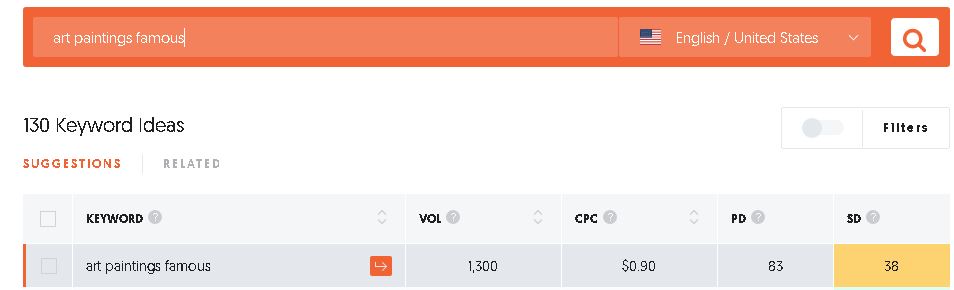
In this first image is https://app.neilpatel.com/en/ubersuggest/keyword_ideas. On the left side of the screen will be keywords, search volume, CPC, Paid Ad Difficulty, and Search Difficulty (how hard it would be to rank):
So, here you can see I chose to look at the keyword "
Art Painting Famous". 1,300 searches, $0.90CPC, 83 PD, and 38 SD. Not bad, but it will have heavy competition though. Usually, anything above 25 on this scale is a medium-difficulty keyword in my experience/opinion.
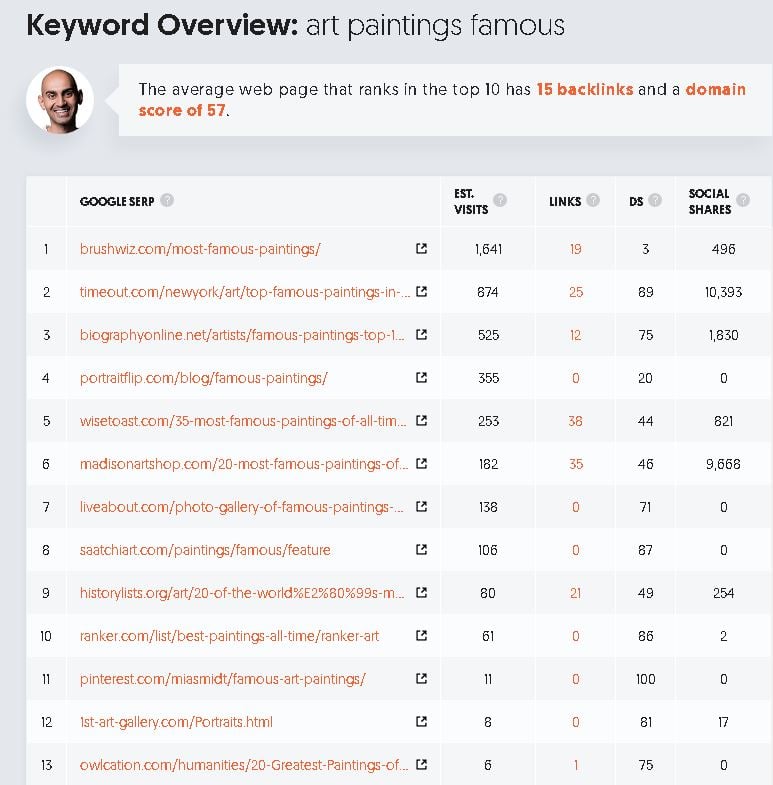
On the right-hand side of the screen, you'll see the SERP results for the keyword that you click on. I clicked on "art paintings famous", and this is what shows:
The first thing you need to look at with this keyword is the number of social shares on the right end of the image. That is a significant amount of social activity. This image shows the estimated received visits of the pages ranking for the keyword, the number of links recognized for this page, the domain score, and the number of social shares.
Websites like timeout and biographynet will take more effort and money to beat in the rankings.
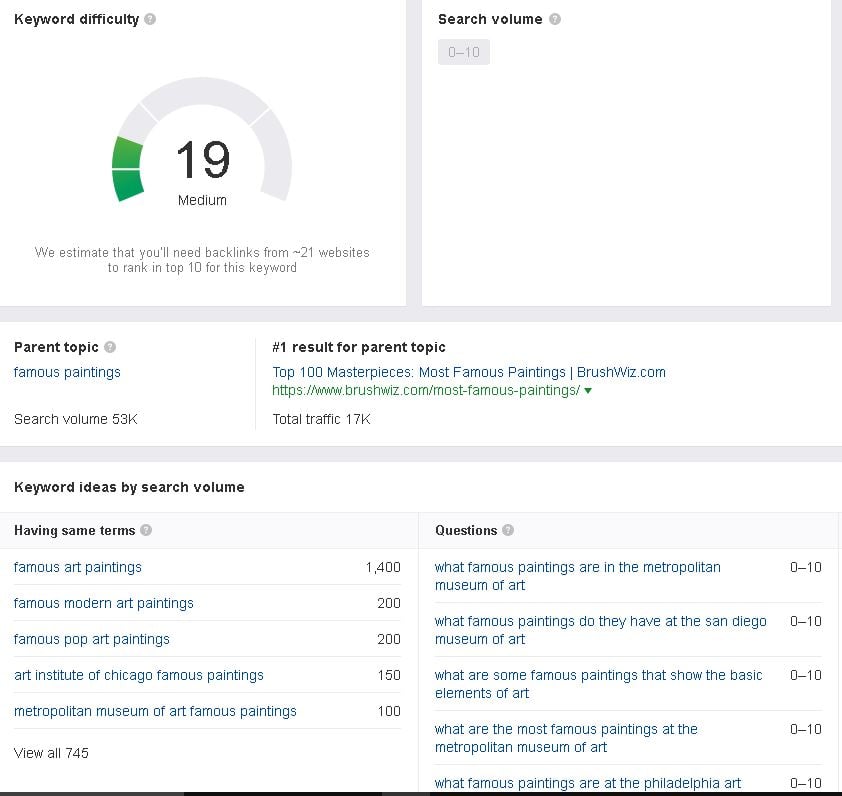
Ahref's shows that the keyword is easy to rank and also provides other keyword suggestions as well:
As you can see here, there are many keywords related. I am posting the image above to illustrate that Ahre's is a necessary tool to have but also to show the supposed difficulty of this keyword.
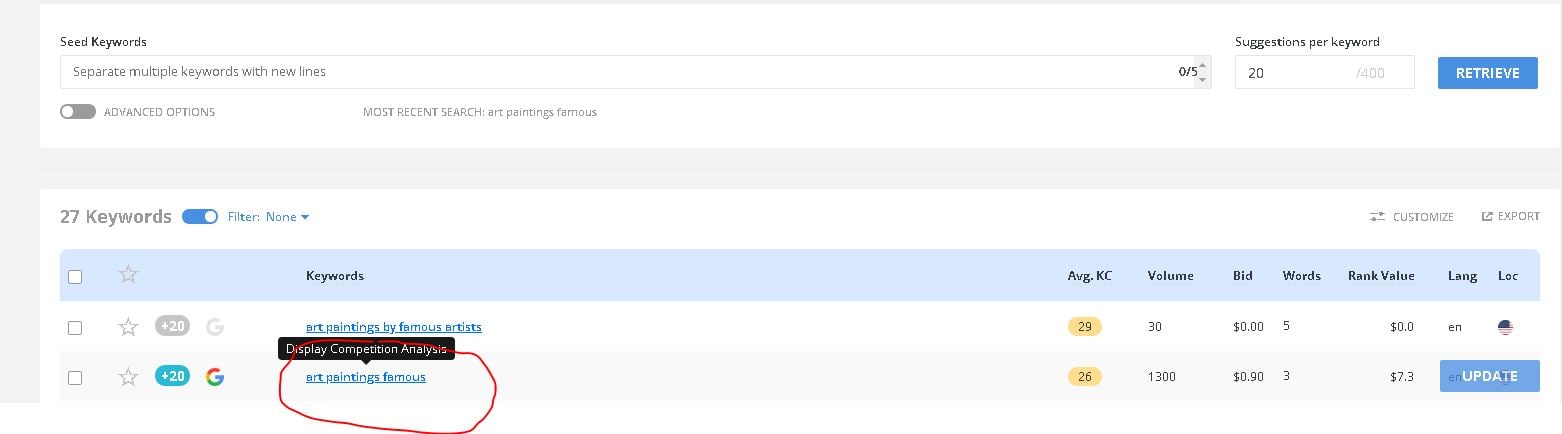
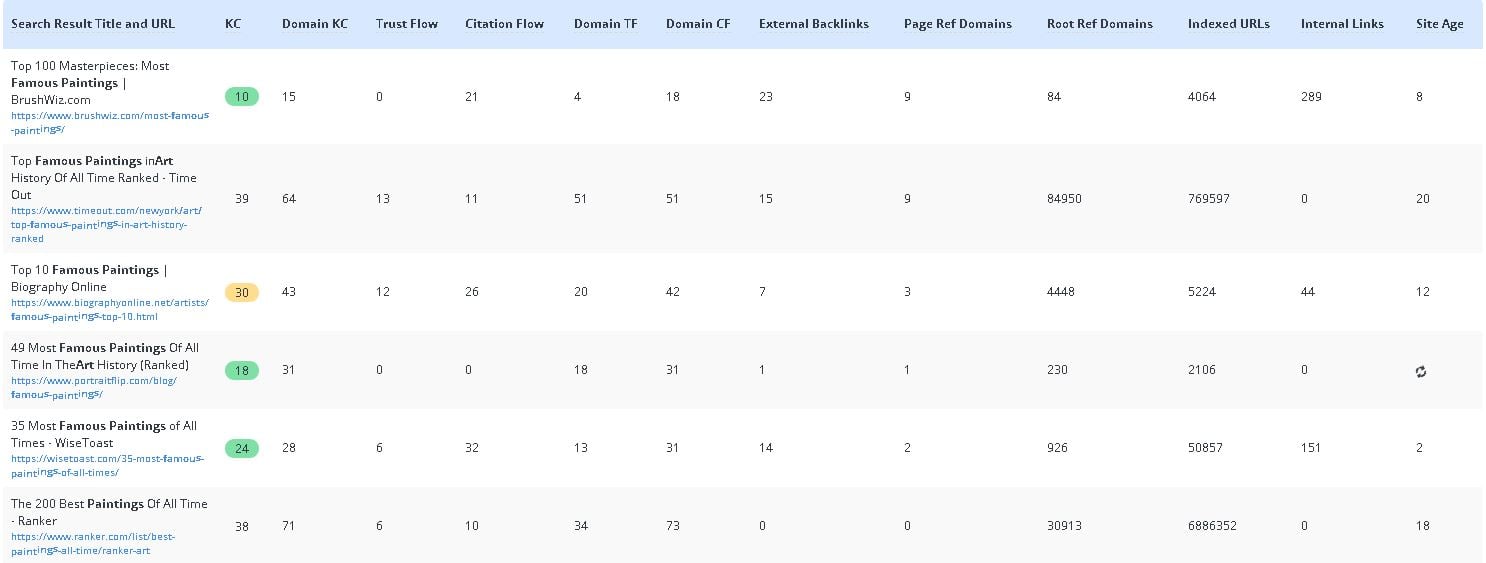
The information for the screenshot above is not enough and we're gonna need more. So, we're heading over to LongTailPro. I enjoy LTP because of the analytics that it provides.
The first result is BrushWiz with 84 referring domains, 4k+ indexed URLs, and 200+ internal links. The 2nd and 3rd result both have above 4k referring domains with 5k+ indexed URLs.
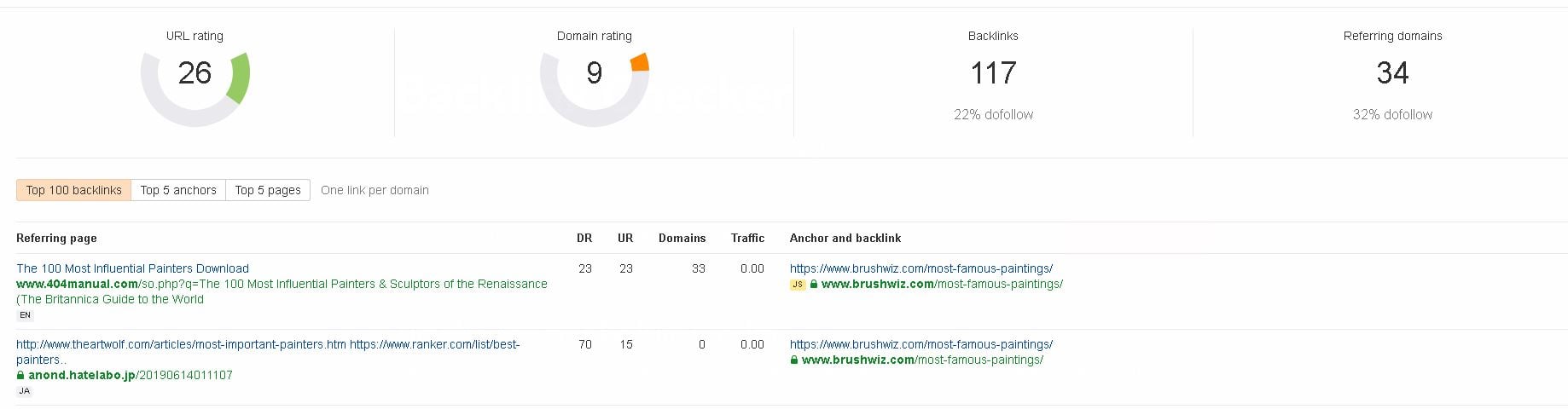
With that information, we take the first URL and head on over to AHREFs free backlink tool:
The backlinks for this aren't as good as I'd have assumed, however they are still pretty good. So, this keyword would take a long to rank #1 for. But wait, what about the other spots?
Our first screenshot from UberSuggest shows that the 4th and 5th results for this keyword get around 250-355 visits per month for this one keyword.
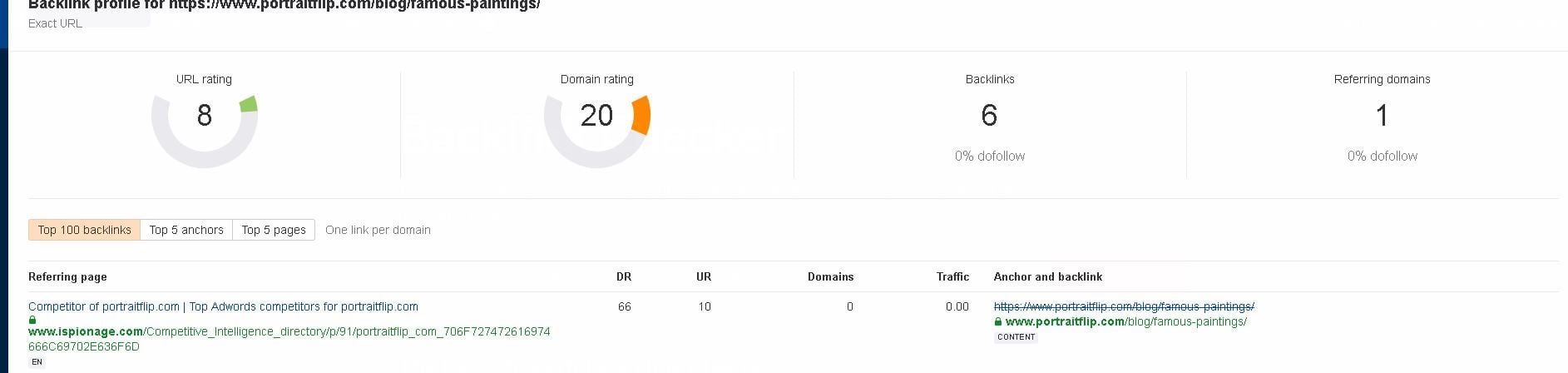
So, we take the URL for the 4th result, and run it through the backlink checker from AHREFS:
This screenshot shows significantly fewer backlinks that the others. It's still a strong domain, however, it has less external SEO done to it than the others on the list and has 0 social shares. The 5th result has 600 social shares but those numbers - take them with a grain of salt. It's probably slightly more than the numbers showing. It's my opinion that this is ranking because of the content.
Now at this point, we're going to look inside of Ahref's and compare results. I recommend that if you buy ANY SEO tool, that it be https://ahrefs.com/pricing-plans.
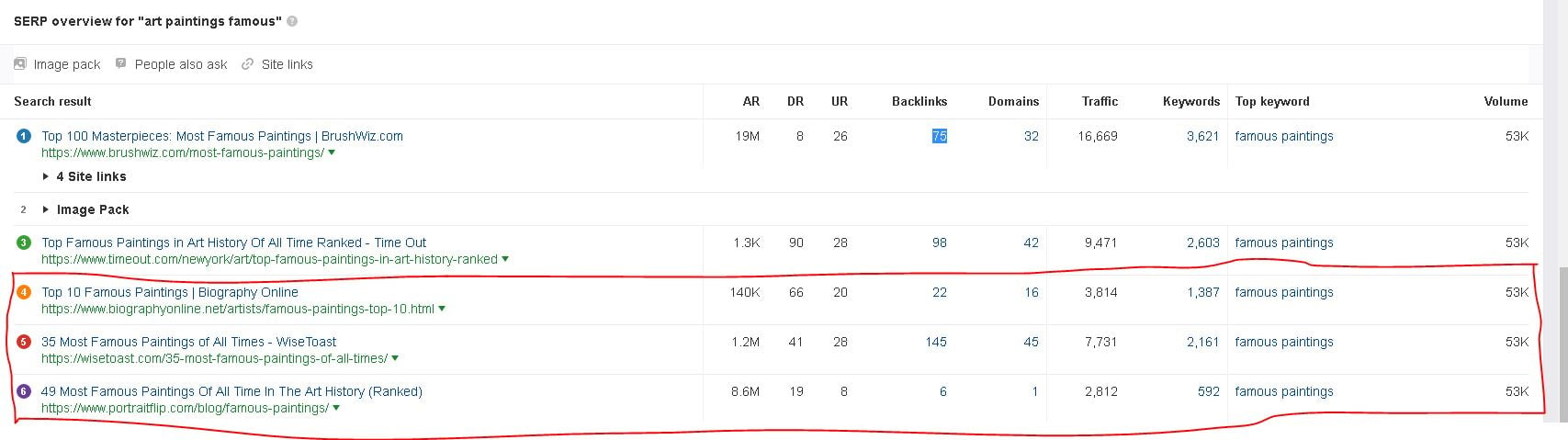
Here are the SERP results according to Ahref's:
Those bottom three that I have circled in red are the 4th, 5th, and 6th results for the keyword "
Art Paintings Famous" according to Ahref's. So, as you can see, not one result there has more than 150 backlinks. The domains themselves are relatively strong.
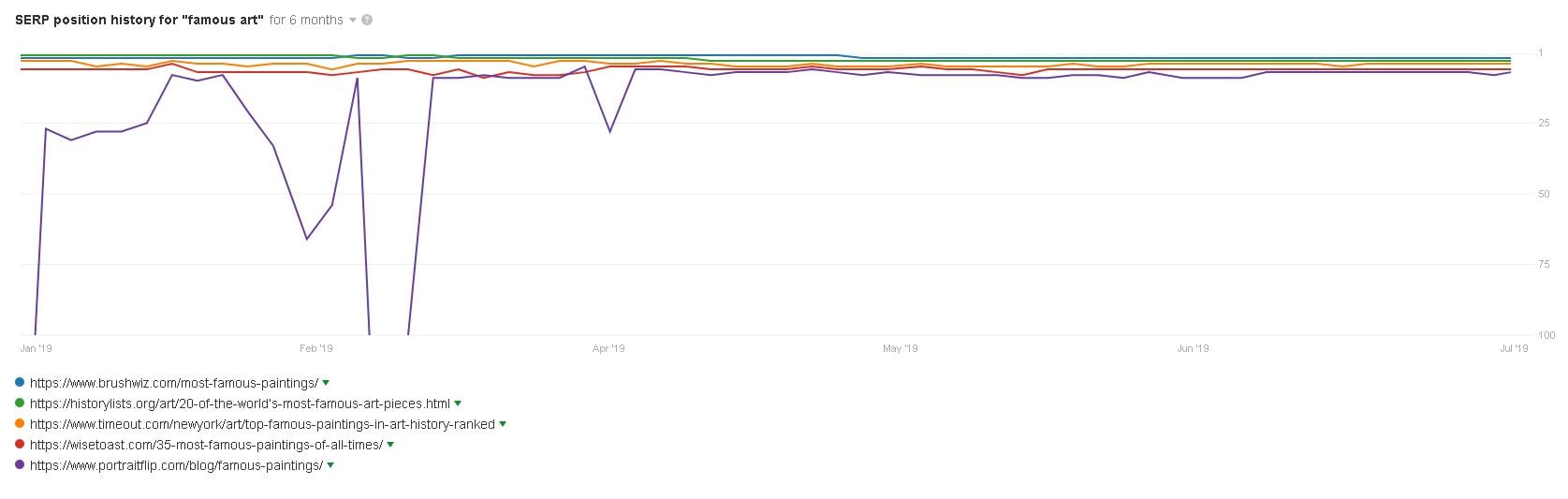
Now that we've shown multiple tools showing similar results and metrics, let's check the SERP history for a related keyword. Checking the SERP history shows how comfortable Google is with the results they're showing for that keyword. Let's see:
There is no SERP history available for the current keyword as Ahref's is not showing it to me. So we're going to do it for a related keyword: "Famous Art":
Keyword Research Conclusion
As you can see here, this keyword would take time, effort, and money to rank for. However, this is how you do some of the research. This is what medium to
high competition looks like. The above information is how you figure out whether or not a keyword is worth ranking for. You don't want to go up against bigger websites right away as a beginner.
It IS possible to outrank large authority websites as illustrated here: https://www.authorityhacker.com/site-architecture/
However, if you're just starting out, it's recommended that you go for longtail or LSI keywords with less competition.
Longtail Keyword: A long-tail keyword is a keyword that aims to capture search traffic from a specific, often 3+ word search query. Long-tail keywords are used to target niche demographics rather than mass audiences
LSI: LSI (Latent Semantic Indexing) Keywords are conceptually related terms that search engines use to deeply understand content on a webpage. More on LSI keywords here.
Keyword Research Tools:
UberSuggest - Free
Keywords Everywhere - Free
Keyword Shitter - Free
Answer The Public - Free
Keyword Planner - Free
ScrapeBox - Paid
Ahrefs - Paid
SEMRush - Register & Paid
Also, just to be thorough, here are multiple other keyword research threads with in-depth information from members here:
https://www.blackhatworld.com/seo/ultimate-guide-how-to-analyse-serp-and-keyword-competition.1118710/
https://www.blackhatworld.com/seo/hackos-2018-keyword-research-manifesto.1000213/
https://www.blackhatworld.com/seo/guide-analyze-your-seo-competition-without-spending-a-dollar.1074066/
https://www.blackhatworld.com/seo/guide-k3yw0rd-r3s34rch-keyword-research-2018.1005589/
https://www.blackhatworld.com/seo/the-beginners-guide-to-free-keyword-research.1067718/
https://www.blackhatworld.com/seo/well-kept-secret-how-the-top-seos-build-their-anchor-text-in-backlinks.1118984/ - This is about building healthy anchor text, which is important as well.
Backlinks
A backlink is a link placed within an area of another website as a hyperlink to your website. The purpose of this is to simulate a "buzz" inside of the search engines about your website. For your website, you want a diverse link portfolio. That means that your website should have links from multiple sources.
Backlinks should also be
tiered. What that means is:
A 1st tier backlink (tier 1) points directly to your website with a hyperlink and should be from a high metrics domain. (Facebook/Twitter/Other Web 2.0s/Strong Guest Blog with high metric).
A 2nd tier backlink (tier 2) points to your tier 1 backlink.
An example of a backlink is:
View attachment 117738
This is a straight link to a Youtube video placed on a Tumblr blog. Be sure to use anchor text when placing backlinks to your money site. Make sure to use multiple types of anchor text as well.
What is anchor text? Anchor text is the highlighted text inside of a hyperlink. See below.
View attachment 117739
This is a blog comment backlink and "Wholesale food packaging" is the anchor text.
Below I will list the types of backlinks and software to help you create them.
Types of backlinks:
Web 2.0.
Blog comments.
Social bookmarks.
Contextual backlinks.
Editorial backlinks.
Guest posts.
Guest post bio links.
Webinar backlinks.
Forum profile links
Web 2.0 Link sources:
Tumblr.com
Wordpress.com
Blogspot.com
Sites.Google.com
LiveJournal.com
Xing.com
Web.com
Wix.com
Medium.com
Here is a thread explaining Web 2.0s & a list: https://www.blackhatworld.com/seo/updated-web-2-0-sites-list-no-2.1121599/
Here is a thread with many, many, MANY web 2.0's: https://www.blackhatworld.com/seo/new-web2-0-blog-list-over-100-updated.393145/
Another/Original source: https://trafficcrow.com/web-2-0-sites-list/
Social Bookmarks link sources:
Reddit.com
Tumblr.com
Pinterest.com
Plurk.com
StumbleUpon.com
Scoop.it
Flipboard.com
Myspace.com
Slashdot.org
Fark.com
Delicious.com
Here is a full list of 180+ social bookmarking sites: https://tricksforgeeks.com/top-180-free-social-bookmarking-site-list-2019/
List of threads with guides on backlinks from specific, high DA/PA websites:
https://www.blackhatworld.com/seo/method-get-backlinks-from-ibm-bluemix-for-free.1131338/
https://www.blackhatworld.com/seo/tutorials-juicy-contextual-links-on-dr-80-96-sites.1128822/
https://www.blackhatworld.com/seo/get-da70-backlink-free-7gb-cloud-storage.1127947/
https://www.blackhatworld.com/seo/tutorials-new-high-dr-link-juices.1126787/
https://www.blackhatworld.com/seo/method-get-free-backlinks-on-ms-azure-da90.1124055/
https://www.blackhatworld.com/seo/how-to-create-a-97-da-do-follow-wiki-backlink-3-more.1133962/
https://www.blackhatworld.com/seo/get-da93-do-follow-contextual-links.1118042/
https://www.blackhatworld.com/seo/method-obtain-da58-and-pa29-df-indexable-backlink.1060988/
https://www.blackhatworld.com/seo/method-how-to-get-backlink-from-wikipedia.1103830/
https://www.blackhatworld.com/seo/free-do-follow-contextual-backlinks-on-artstation-da87.1119441/
Thanks
@Rachmaninoff and
@blackwalker !
Backlink creation tools
Some of these types of backlinks can be created automatically with software. You need proxies AND content for this, so see above for resources regarding that.
Backlink creation tools:
https://www.blackhatworld.com/seo/scrapebox-the-ultimate-serp-scraper-auto-blog-commenter-with-prstorm-mode.129096/ (blog commentor, proxy scraper, web 2.0 scraper).
https://www.blackhatworld.com/seo/gsa-search-engine-ranker-extremely-powerful-linkbuilding-software-free-5-day-trial.447629/ (Large backlink creation software with add-ons for article scraping/spinning).
https://rankerx.com/homepage/
http://autofillmagic.com/
https://kontentmachine.com/
http://www.senuke.com/pro/ (Not as good as the above but can still be used).
Backlink checkers (check to see if backlink is indexed):
https://ahrefs.com/backlink-checker (Free to use)
https://smallseotools.com/backlink-checker/ (Free to use)
https://moz.com/link-explorer (10 free link queries per month after signing up)
https://neilpatel.com/backlinks/
https://www.semrush.com/features/backlinks/
https://cognitiveseo.com/site-explorer/
https://majestic.com/about/backlinkchecker
https://www.seo-spyglass.com/
Note: There are also many reputable link package sellers in our https://www.blackhatworld.com/forums/#the-marketplace.73.
There is also a detailed guide on how to create link structures here: https://www.blackhatworld.com/seo/how-to-rank-a-quick-guide-for-newbies.781273/
Indexing Backlinks
If you're creating backlinks, getting the backlinks indexed is priority one, because if they aren't, you're wasting your time. Backlinks that are indexed will theoretically pass '
link juice' onto your website or other backlink tiers.
I am going to list first, the backlink indexing strategy which has worked for me. I am also going to list the multiple methods that other members of this forum stand behind.
Method 1: Indexing services/Social media.
Step 1: Submit links to http://speed-links.net
This indexing service has been the best for me. It's also pretty cheap. Take your backlinks to Speed-Links and submit them after you register an account.
New accounts get to use 50 links for free. So, if you cannot pay for their services, you can just continuously register new accounts with different emails.
Speedlinks has a drip-feed option as well.
Other indexing services that are working:
http://gindex.me/en/
https://indexinject.com/user/login
http://bulkaddurl.com/
http://elitelinkindexer.com/
Along with these, @ghengis_khan has a thread in which he is testing indexing services: https://www.blackhatworld.com/seo/99-of-indexing-services-are-a-scam.1121676
Afterwards, posting to social media has proved to be beneficial. Facebook, Twitter, and sometimes Pinterest.
After you have posted the backlink/backlinks, head on over to http://addmefast.com/, https://www.followlike.net/, https://like4like.com/, https://traffup.net/, or any other similar social media sharing website and start a campaign for your social media post that contains your backlink.
This can also be done on Reddit. Though, spammy backlinks won't work and will most likely be deleted by subreddit moderators and the upvotes/cross-subreddit posting costs more than the above mentioned social media sites.
Step 2: Submit links to Google Search Console.
This step is more for web 2.0s (Tumblr, Blogger/Blogspot, etc), but it works and has worked for me.
Method 2: Submitting to https://medium.com/
Original credit for this method going to @Rahuldev09
First Step
Step 1. Sign up for Medium.com
Step 2. Copy and spin post related to your backlinks or you can write it by your self also
Step 3: Click on the story and Add new story in medium.com and then paste your article
Note: Article length should be according to your links, says if you have 8 links then 800-1000 words article would be fine. I suggest you not put more than 8 links in one post.
Step 4: Paste your link leaving one-one paragraphs, saying Read also, or check out
Step 5: Now, make it natural by making some words bold and linking other authority sites or adding one image
Step 6: Publish it and add some tags which are popular to make your link index faster.
But process doesn't over here
Now, Second Step(simple and easy)
Step 1: Go to google and type site:https://medium.com/ [your keyword] and then choose one post
Step 2: Go Comment section of the post and paste your links there(I am talking about the same link which you have pasted on Step First). They will not remove your link, just paste it as it is.
Note: Don't Paste more than 4 links in one comment of one post. use another article and paste there.
Step 3: Add some tags, Popular tags. And Publish it there.
Method 3: The sitemap video trick
Original credit for this method going to @tiiberius
You're going to need a self hosted WordPress site for this.
1. Install plugin Google XML Sitemap for Videos.
2. Publish one post with random YouTube video embed. (no need to do this if you already have posts with YouTube embeds)
3. Go to Tools -> Video Sitemap
4. Click Generate Sitemap
5. DON'T ping Google (yet) and don't close the page.
6. Go to your cPanel or whatever server back-end soft you're using and locate file (on the new tab): sitemap-video.xml
7. Edit the content of the file
- you will see one or more <url> blocks like this.
Code:
<url>
 <loc>http://yourweb20site.com/awesome-web20-page/</loc>
 <video:video>
  <video:player_loc allow_embed="yes" autoplay="autoplay=1">http://www.youtube.com/v/u8qFAGLBJfE</video:player_loc>
  <video:thumbnail_loc>http://i.ytimg.com/vi/u8qFAGLBJfE/hqdefault.jpg</video:thumbnail_loc>
  <video:title>A Variety Of Tips And Tricks To Make Working With Lawyers Easy</video:title>
  <video:description>A Variety Of Tips And Tricks To Make Working With Lawyers Easy</video:description>
  <video:duration>619</video:duration>
  <video:publication_date>2014-05-07T17:10:36+00:00</video:publication_date>
   <video:category>General</video:category>
 </video:video>
 </url>
- what interests you is the <loc>URL</loc>
- you will see your blog URLs there. Change it to your web 2.0 page
Code:
<loc>http://yourweb20site.com/awesome-web20-page/</loc>
- if you want to submit more than one URLs you must copy the whole <url> block and change the URL in the <loc> tag. Like so:
Code:
<url>
 <loc>http://yourweb20site.com/awesome-web20-page/</loc>
 <video:video>
  <video:player_loc allow_embed="yes" autoplay="autoplay=1">http://www.youtube.com/v/u8qFAGLBJfE</video:player_loc>
  <video:thumbnail_loc>http://i.ytimg.com/vi/u8qFAGLBJfE/hqdefault.jpg</video:thumbnail_loc>
  <video:title>A Variety Of Tips And Tricks To Make Working With Lawyers Easy</video:title>
  <video:description>A Variety Of Tips And Tricks To Make Working With Lawyers Easy</video:description>
  <video:duration>619</video:duration>
  <video:publication_date>2014-05-07T17:10:36+00:00</video:publication_date>
   <video:category>General</video:category>
 </video:video>
 </url>
<url>
 <loc>http://yourweb20site.com/awesome-web20-page-22222/</loc>
 <video:video>
  <video:player_loc allow_embed="yes" autoplay="autoplay=1">http://www.youtube.com/v/u8qFAGLBJfE</video:player_loc>
  <video:thumbnail_loc>http://i.ytimg.com/vi/u8qFAGLBJfE/hqdefault.jpg</video:thumbnail_loc>
  <video:title>A Variety Of Tips And Tricks To Make Working With Lawyers Easy</video:title>
  <video:description>A Variety Of Tips And Tricks To Make Working With Lawyers Easy</video:description>
  <video:duration>619</video:duration>
  <video:publication_date>2014-05-07T17:10:36+00:00</video:publication_date>
   <video:category>General</video:category>
 </video:video>
 </url>
<url>
 <loc>http://yourweb20site.com/awesome-web20-page-33333/</loc>
 <video:video>
  <video:player_loc allow_embed="yes" autoplay="autoplay=1">http://www.youtube.com/v/u8qFAGLBJfE</video:player_loc>
  <video:thumbnail_loc>http://i.ytimg.com/vi/u8qFAGLBJfE/hqdefault.jpg</video:thumbnail_loc>
  <video:title>A Variety Of Tips And Tricks To Make Working With Lawyers Easy</video:title>
  <video:description>A Variety Of Tips And Tricks To Make Working With Lawyers Easy</video:description>
  <video:duration>619</video:duration>
  <video:publication_date>2014-05-07T17:10:36+00:00</video:publication_date>
   <video:category>General</video:category>
 </video:video>
 </url>
- it's all wrapped in the </urlset> tag make sure to NOT remove it at the end
- YouTube video and other content can be the same (works for me ) but if you want to be hardcore you can change them to relevant ones
- there shouldn't be any problem about submitting all URLs in the same file, from the same root (I do it all the time) - however, for maximum safety you might wanna spread them over few more sites.
8. Go back to WordPress Video Sitemap page
9. Click
XML Sitemap highlighted link to preview your sitemap
- you should see thumbnails of your video(s) and when you hover over them links to your web 2.0s, if you don't something needs fixing
10. Submit your sitemap - click the
ping Google highlighted link
I suggest you try it with 5 sites and see how it goes. Then do the rest.
Expired Domains & 301 Redirects
What is an
expired domain? An expired domain is a domain that has expired beyond the original 1-year domain registration (or however long it's registered for) but is still within the grace period to allow you to renew the domain. These domains can be bid on.
A
deleted domain name is a domain name that has expired & went beyond the grace period to renew, and is now able to be registered again.
A
dropped domain name is a domain that has expired, has gone beyond the grace period, and has been dropped by the registrar. You can acquire these through a domain backorder. Godaddy and other domain name providers provide this service.
An
auctioned domain name is a domain name that the seller believes has value and has put up for an auction.
But John, how do you know what domains are worth something and what domains are worth nothing? Simple.
You do your research. You're looking to buy an
aged,
high domain authority/rating(DA/DR),
high page authority (PA), and that is
NOT penalized by Google. This is also known as "high metrics".
Step 1: Find an expired domain name.
Where you can buy expired domains:
auctions.godaddy.com (costs $15 per year to use their service, worth it in my opinion).
ExpiredDomains.net
DomCop.com
SnapNames.com
Dropcatch.com
Scrapebox also has an http://www.scrapebox.com/expired-domain-finder. Note: You need to have Scrapebox purchased before you can purchase that plugin.
Step 2: Check to see if your domain is available to be purchased.
Step 3: Check to see if it has some backlinks or a domain rating using https://ahrefs.com/backlink-checker or Majestic. Analyze the backlinks that show up. You can spot a spammy backlink a mile away, so make sure to check them.
Next, check the anchor text of those backlinks. Ensure that there are not any spammy anchor text. Any Chinese, Japanese, or Russian anchor text is a bad sign, and you shouldn't buy that domain.
Step 4: Check the domain name in google's search engine to see if any pages are still indexed by typing "site:yourdomain.com" into the search bar.
Also, check to see if anything spammy comes up in Google by typing in "Yourdomain.com" in the search bar.
Step 5: Check the Archive.org data to see what type of content was previously hosted on that specific domain.
Also, use http://research.domaintools.com/ to check the content history of a domain. Use both, being thorough never hurts.
Step 6: Check the WhoIS information to see how many times the domain has changed registrars and attempt to determine why it's for sale/expired. Domain names that have been parked or "Domain parking" are okay.
That is a basic version of what you need to do.
There is a more detailed guide for this with a better step-by-step break down here: https://www.blackhatworld.com/seo/guide-12-signs-of-bad-expired-domain-for-pbn-or-how-shit-hides.1087337/
and a domain flipping guide here: https://www.blackhatworld.com/seo/extensive-guide-for-domaining-evaluation-registration-expired-domains-tools-for-domaining-etc.1063152/
301 Redirects
A 301 redirect is directing a user who types in a URL to another URL of your choosing. The idea behind this is to point domains with high metrics to another domain in order to receive some "juice". How do you determine a good domain for a 301 redirect?
Basically, the same way as described above for finding expired domains worth buying. Search for a good amount of high-quality backlinks. Check each like to make sure it isn't spammy and doesn't have spammy anchor text.
Check the WhoIS history and Archive.org history for the domain.
If it passes every step above and seems as if the domain is of high enough quality, you can create the redirect if you have access to the domain.
There is a simple guide for that here: https://www.creare.co.uk/blog/seo-advice/how-to-301-to-a-new-domain
What is Grey Hat SEO?
Grey Hat SEO is a combination of White Hat SEO & Black Hat SEO. Essentially, paying a service provider to write your articles is essentially grey hat. Google wants you to be knowledgable about subjects that are represented on your website. The lines between grey hat and white/black are somewhat blurry and differ from person to person.
https://moz.com/learn/seo/duplicate-content and https://en.wikipedia.org/wiki/Article_spinning
can be considered grey hat as well as black hat.
Upon writing a long Grey Hat paragraph(s) here, I found this basic SEO guide by Ahrefs. Very solid information here and will help you understand where the line of Blackhat & Greyhat SEO are: https://ahrefs.com/blog/seo-tutorial/
Terms & Definitions:
SERPs: Search Engine Results Pages.
Example: "I'm number one in the SERPs for this keyword".
Ranking: Your website's position within one or more pages for a keyword.
Example: "My website is ranking on page 2 for this keyword".
Keyword Stuffing: Adding your keyword into an article an unnatural amount of times in order to appear in the searches for that keyword.
Example Keyword: Build a table
"This how you
build a table. I will now teach you how to
build a table. When you learn how to
build a table, you will then have a built table".
That is keyword stuffing.
Link Juice: The value of authority passed on from one website to another through a hyperlink.
Cloaking: Showing a page to the search engines and a different page to the user.
Example: Putting keywords & other text throughout the design of the website using the same color as the background.
Bait & Switch Content: This involves getting a page to rank with relevant content and then once it's ranking, switch out the content with something else (ads, Clickbank, etc).
Proxies: A proxy is essentially used to mask your IP address and allow you to send & transmit information without revealing your real location.
Anchor Text: Anchor text is the highlighted text inside of a hyperlink
PBN: A private blog network, which is a collection of websites that all point to each other in order to pass on the authority to a money website.
Backlink: A link placed within an area of another website as a hyperlink to your website
Tutorials for the tools listed above:
https://www.youtube.com/user/looplinescrapebox/playlists
http://docu.gsa-online.de/search_engine_ranker/tutorials
https://www.youtube.com/watch?v=2m7a6_b6rb0 & https://www.youtube.com/watch?v=4UeNJlCo-CU (Couldn't find anything more recent than these)
http://autofillmagic.com/tutorials/
https://www.inetsolutions.org/wordai-ultimate-tutorial-honest-review-innovative-content-spinning-software/
https://www.creare.co.uk/blog/seo-advice/how-to-301-to-a-new-domain
Final thoughts
Do your due diligence in regards to Blackhat SEO and don't be afraid to ask questions. All of us have started in the exact same place and we all had to learn what we know now. Don't be afraid to get your hands dirty and get some of this Black Hat money. It's out there, believe me.
I'm almost 100% sure I forgot something so if I left out anything or something has become outdated, feel free to let me know, and I'll attempt to add/remove/change it in!
Cheers and good luck with your IM journey/projects!