
LeftyLuke
Regular Member
- Jun 13, 2017
- 281
- 62
I would unless it is a very big accountWould you guys suggest to block all the people following >4000 people?

I would unless it is a very big accountWould you guys suggest to block all the people following >4000 people?


Would you guys suggest to block all the people following >4000 people?
Would love some assistance with this. I have purchased and refunded 3 different username scrapers!
Does anybody know a tool to mass block followers? I've been going through followliker, but they don't seem to have that function?
I used cleaner app for iphone. you could check whether you wanted to block ghost followers or inactive users or manually pick accounts from the list.
Yehh I tried the cleaner app, paid for the premium but didn't work well on larger accounts
I've got 14k, so definitely small.. is really trivial getting rid of the ghost followers without loosing the good ones (some interacting ones are even following 2.5-3k people)
thanks a lot
instagram is cleaning those big inactive bot accounts anyway;p so we could just wait haha
Amazing guide. I urge you to make more! I would def take the time to read.
Nope that would be too drastic, however after doing the all the checks that I suggested and then you want to filter those private users who aren't liking your pics then sure go ahead block at those following more than 4k people.
What do u need help with ?
Not sure of any free option.
That's too time consuming and manual work, that's why I wrote the method.
Too much manual work eh ?
Yeah get rid of those ghost followers, it should be better.
Cheers !
Instagram is cleaning bots of people who sell followers, most of the followers that you gained via follow/unfollow will survive this purge.
Thanks !

You can't do that with FL. However, if you are good with excel, you can filter out what is on column, Last Active from Instagram manager to find your current active users.However, I am using FollowLiker as my automation bot. How to I configure the settings to only like users who have been active within the last 30-60 days?

You would need to upload it as 'user's photos' in the scrape photos section.I did everything stated on Exel. But I'm using Follow Liker by Importing my .txt file into scraped users and leaving only the Like feature on. Would this work as intended?
I finally have my list of unengaged followers which is around 5000, something must have gone wrong because I'm sure there's a lot more than 5000...either way I will get the proccess correct and do it until it's perfect.
However, what proccess will I need to follow for step 5 if I'm using follow liker?
1. Import list of unengaged followers into Scraped users
2. Only select the like option
Is it that simple?
Thank you!
Are you saying that I should leave alone who is not private? But in that case I don't understand your first post guide, because at one point you say block everyone who was "last active 60 days ago", but the scraper can only determine this by the last upload... of the public ones and not of the private users!
So I scraped all of my followers and users who engaged with my last 10 posts. I followed your instructions to obtain the list of unengaged followers. I then placed the list into imristo's Instagram data grabber and it gave me their followers, followings and whether they are private or not. I then removed all the private users and placed the non private users into a .txt file.
However, I am using FollowLiker as my automation bot. How to I configure the settings to only like users who have been active within the last 30-60 days?
As it stands, I only clicked the Like button on the first page, imported my .txt file into Scraped Users and used general settings for Like Limit/Delay Like etc. Usually the option comes to filter out users to like but I think you need to Scrape the users for this feature. I didn't Scrape the users as I already have a list of Scraped Users for Follow Liker to work with.
Would be a huge help if you can direct me on what settings to use. I really want to boost my engagement!
@tux im interested as well. i've been lurking for a few months on BHW but just created an account. if you could drop me a pm or give me your telegram that would be swell. thanks
@tux me too ! Please dm me !
@DarkInvoker
- How to filter active users in the past xx months -
Here is another supplemental steps after you have created step 4. This may help out some of you who aren't sure what to do next or wants to further defined your list.
*You really should also sort users who have posted in 2 months as well and not just use non private users as your final list to input into the bot. If you have 10K+ users, most are probably inactive and you will be wasting your time liking their photos and they not liking yours.*
Here are the steps to obtain your followers who has posted in the last 60 days or whatever you want if your bot doesn't have this filter built in.
[I included screenshots and detailed instructions for those who are not familiar with Excel. For those who are, you can skim through it easily.]
What is needed:
Excel
**Make sure you have a backup copy before continuing in case you mess up at some point and the data is all screwed up.**
Step 1:
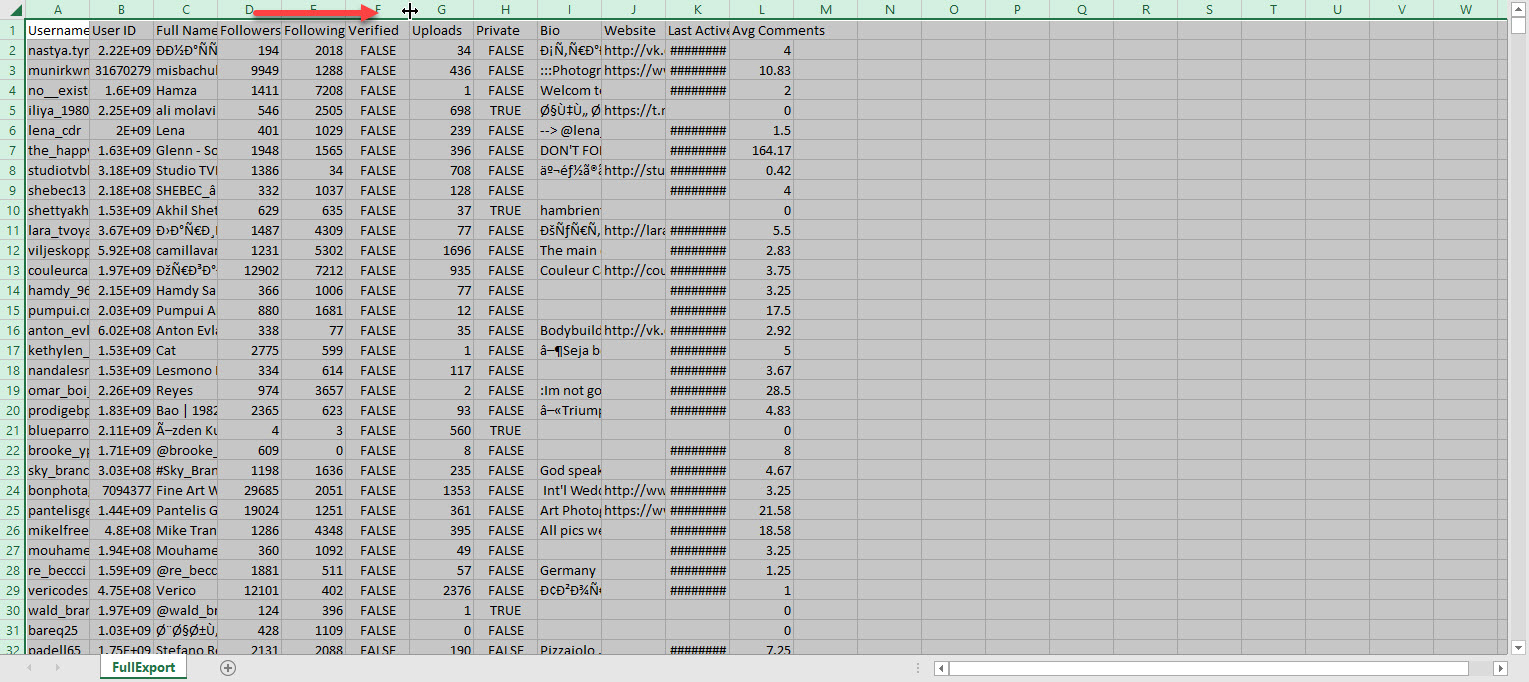
The first thing you do after you have saved your 'FullExport' file from Instagram Manager software in step 4 is to open it up in Excel and save a new copy in .xlsx format.
With the file opened as .xlsx you will noticed the text are all bunched up. We will format it so we can see the hidden text.
Highlight the very top row where you see the alphabets and hover your mouse in between any column letters and double click.
Step 2:
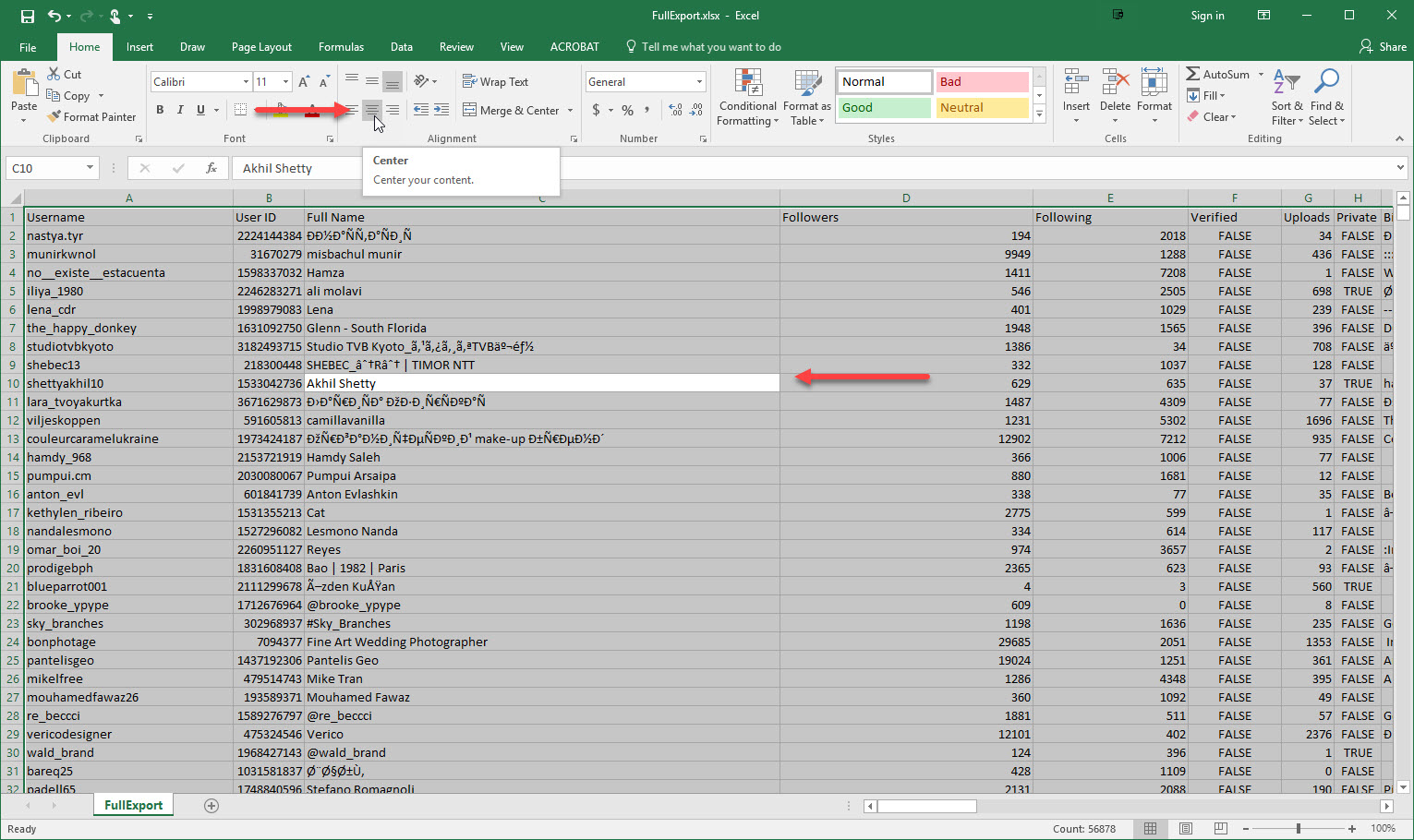
Click on any cell and ctl+a to select all. Select align center as shown to center the cells. You may need to shorten some of the column as it maybe too long.
Step 3:
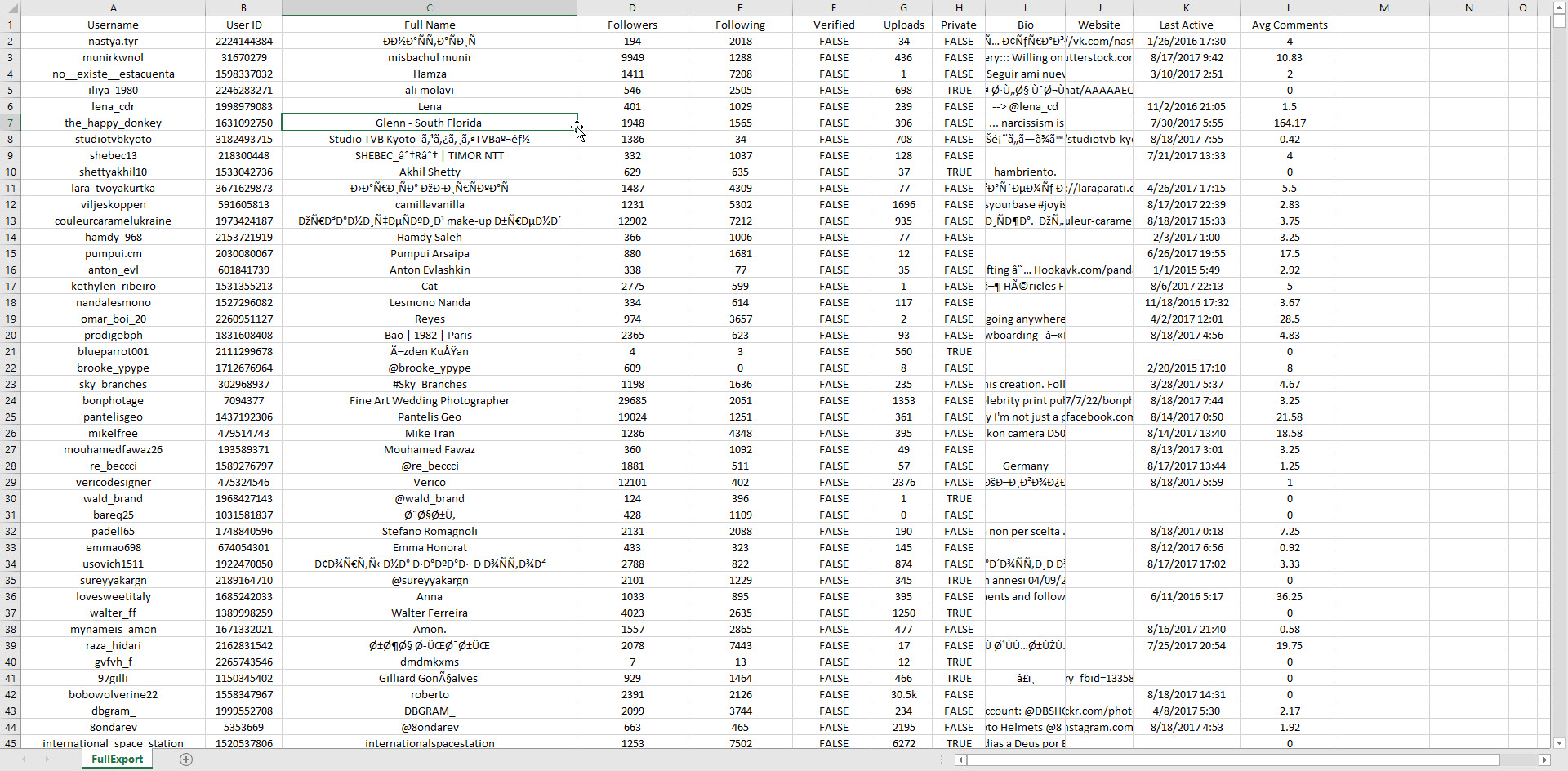
At this point, your file should look somewhat like mine. All centered and neatly formatted. The bio, and website columns are hidden as shown. It is not necessary to view in it's entirely as we do not need these columns anyways.
Step 4:
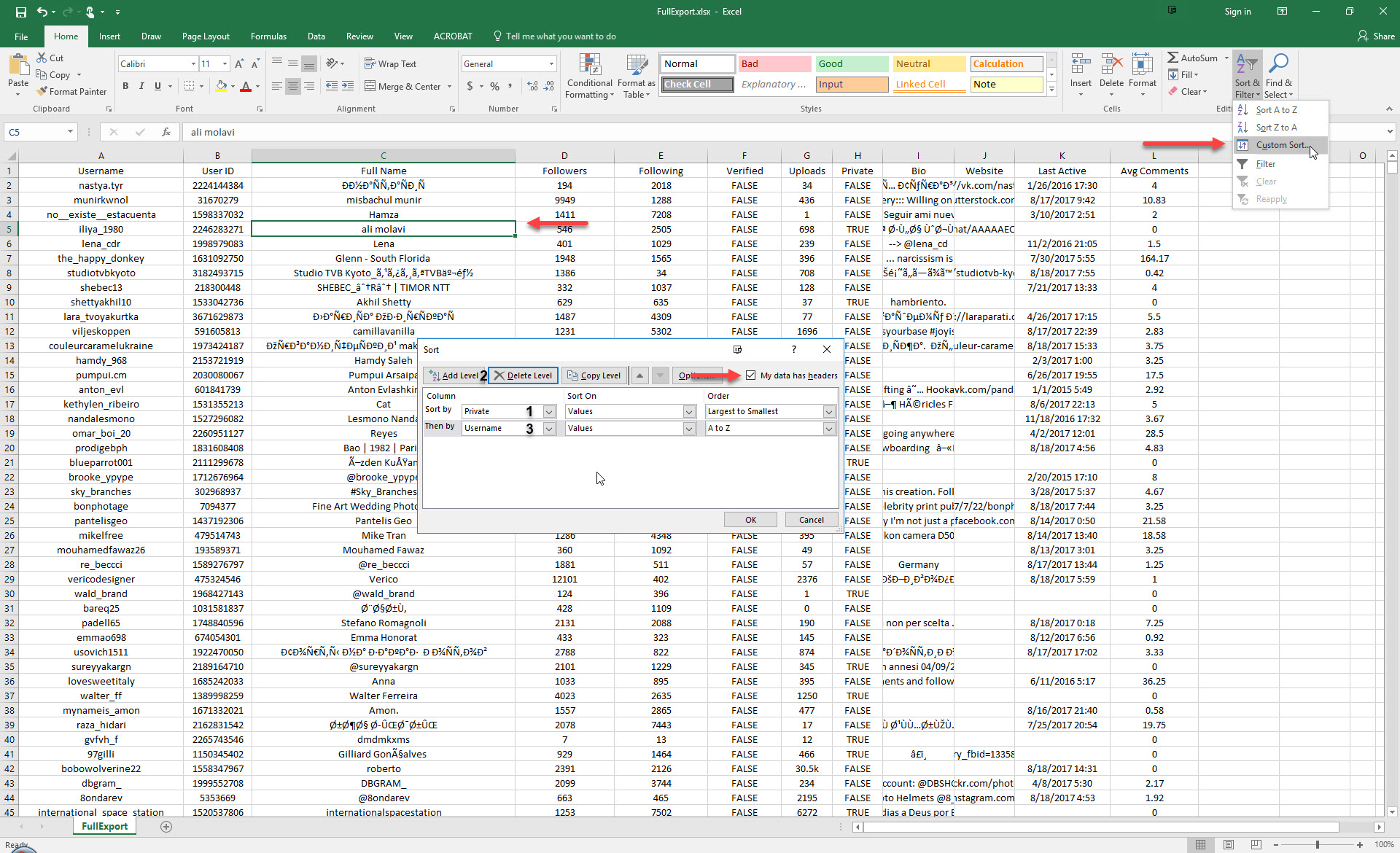
From here, we will start sorting our users. Click on any cell. Click Sort & Filter, Custom Sort.
Make sure 'My data has headers' is checked.
Duplicate what I have below in the sort dialogue.
Click ok when done.
Step 5:
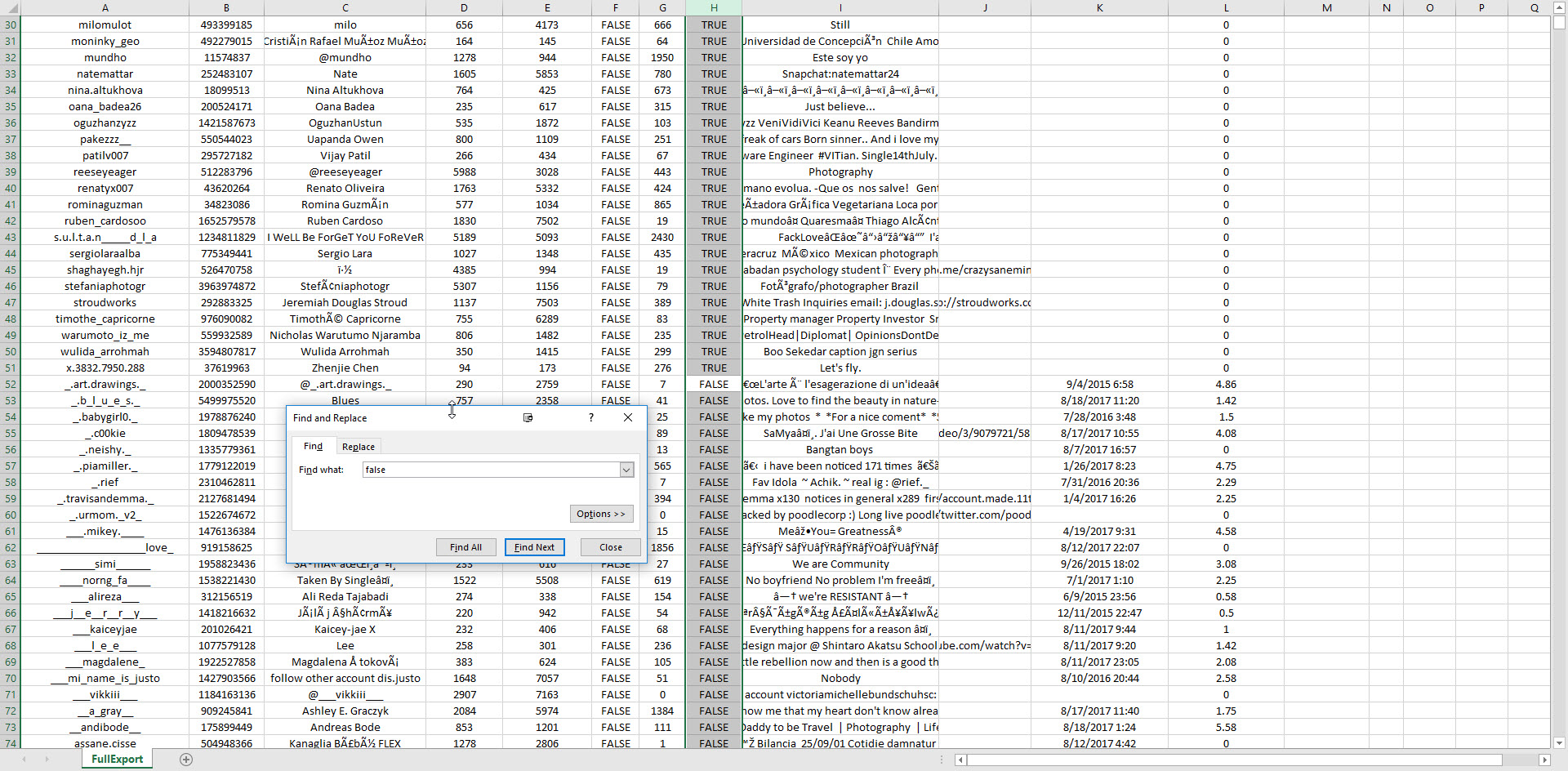
The users are sorted by column, Private. You should see all false and true grouped as shown below. Before we start, let's delete all the Private users. We can't like their photos if you have already unfollow them.
Select the Private column and ctrl+f to bring up the find dialog box.
Copy what I wrote in the image below and click find next.
This will bring you to the last private user (TRUE).
Select all the data that is TRUE and either move mouse up or down to highlight and delete.
You should now have only Non Private users (FALSE).
Step 6:
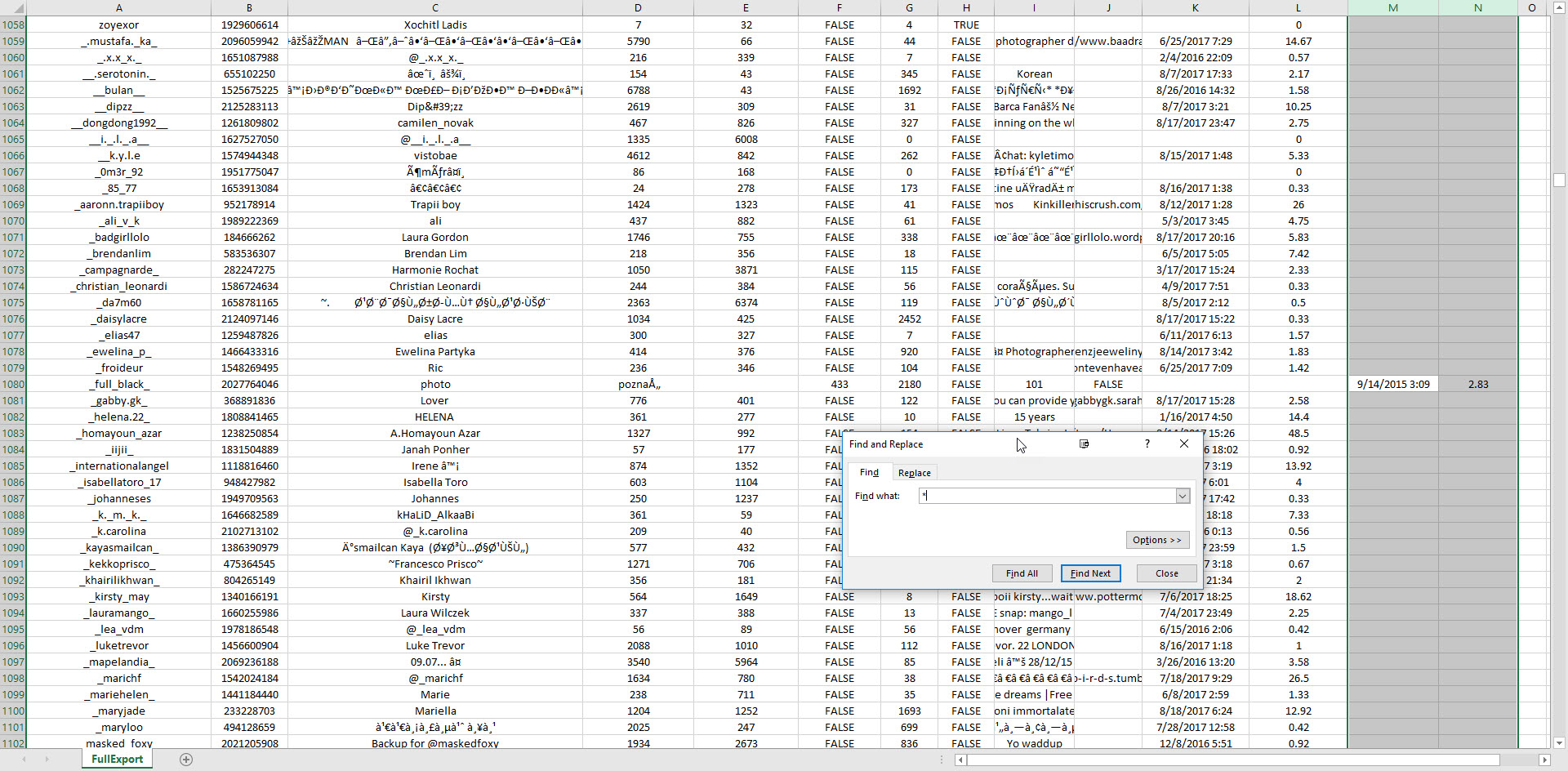
We need to clean up columns M & N. There will be some data that isn't in the correct columns. So, we will find and cut and paste them where they belong.
Select columns M, N and ctrl+f to bring up the find dialogue.
In the Find What: type '*'. This will find any text that are in these 2 columns.
Cut and paste them to their correct columns.
It needs to be in the Last Active and Avg Comments columns.
Repeat the steps above from selecting columns M & N until there isn't any more.
Step 7:
At this point, we have tidy up the file and presorted it. We will create multiple sheets dividing the users up by most recent active based on months.
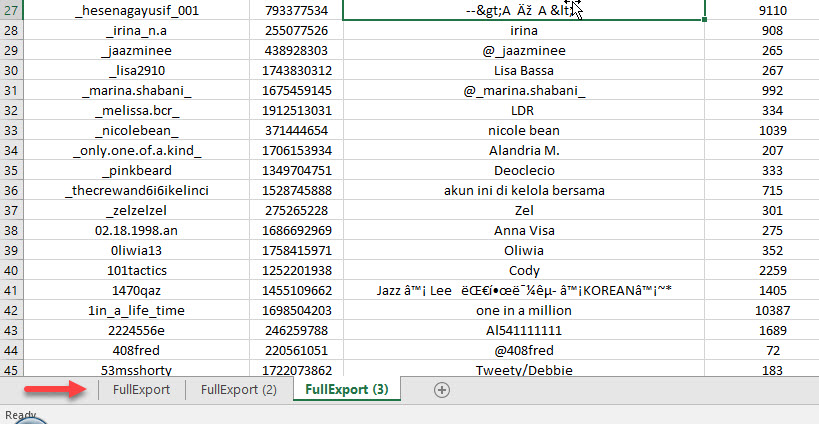
Where you see FullExport sheet below, mouse over the sheet, left click+ctrl and slide to the right to duplicate the sheet. Do this 3 times.
Step 8:
Select one of the sheets and ctrl+a and press delete key to delete all. We will use this sheet to paste in our desire active users based on months. Now select another sheet and select column Last Active and ctrl+f to bring up the find dialog box. Same procedures as we did to delete the private users. In the find what, type '2016', and click find next. This will bring you to the last users of 2017.
From here you can choose whether you want to select only up to 2 months or 3 months back. Selet your desire users and all its data.
Ctrl+x.
Select the blank sheet and click on the very top corner cell and ctrl+v.
Delete all columns starting from B and on. What you will have is only usernames listed.
This will be the list of users to be place in your bot.
Save this sheet as a .csv file.
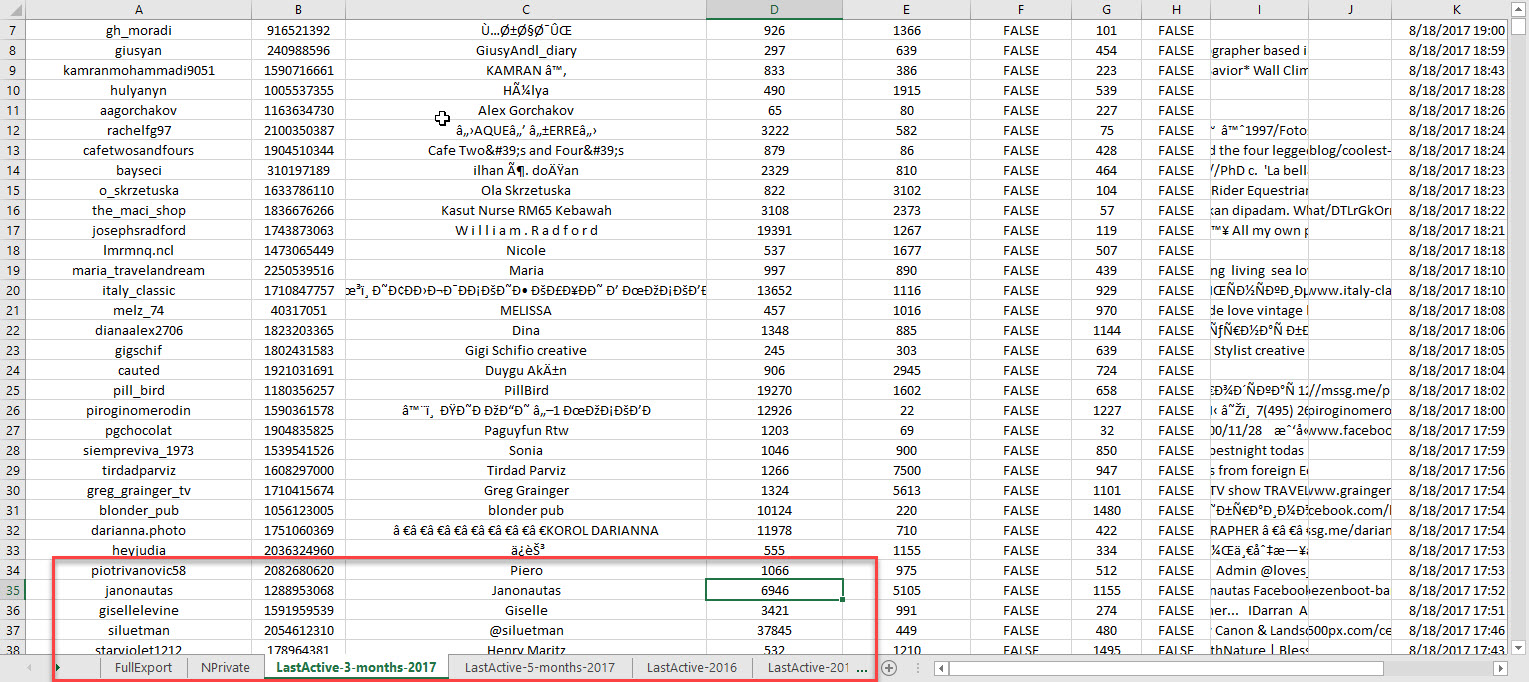
I have sorted my users by 3 months back and kept any old users incase I need them. See image.
Step 9:
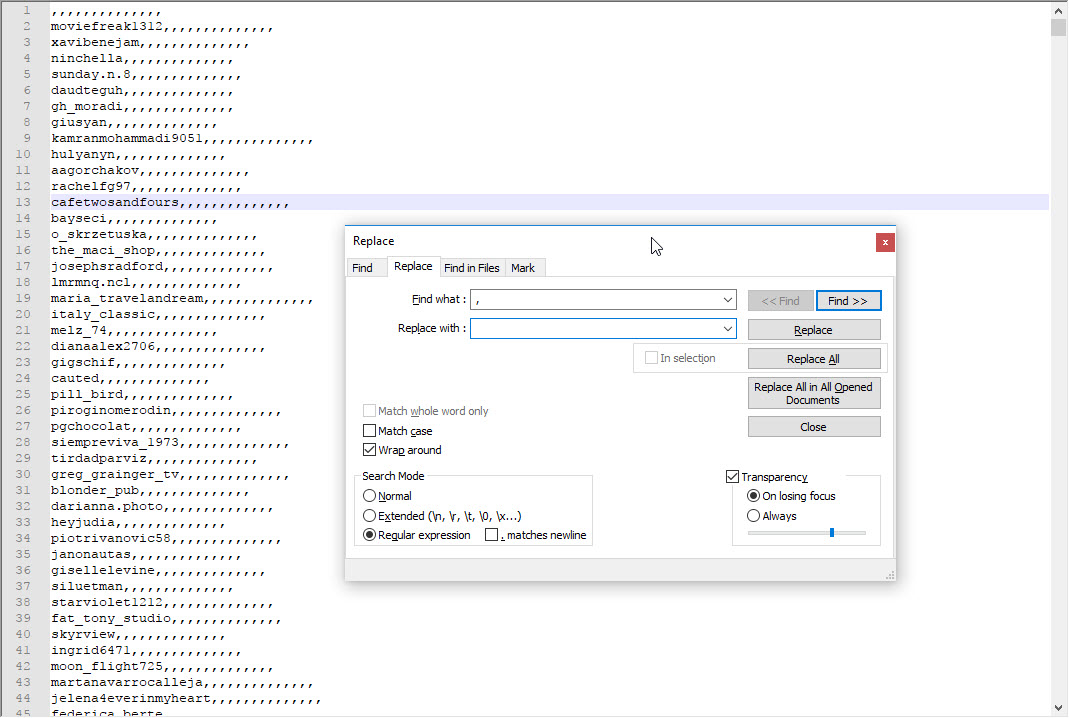
Lastly, Excel may leave loads of ','(commas) when you save the file as .csv. If you do see ',', you can delete them using notepad++ (free).
Open the .csv file in notepad++.
ctrl+h.
Copy what I wrote in the image below.
Click replace all.
Ctrl+End and delete all the empty lines with ',' as well.
Now you have a clean .csv file with only username ready to import into your bot.
Good luck. Hope this bring back your enagemments.

do you still get banned if you have a bot that auto follows back?
Perfect ! Thanks for the share.
do you still have a copy of instagram manager , downloaded the zip file but it looks empty
I did everything stated on Exel. But I'm using Follow Liker by Importing my .txt file into scraped users and leaving only the Like feature on. Would this work as intended?
You would need to upload it as 'user's photos' in the scrape photos section.
Is there a way to see the last activity of a private user? If not, the "cleaning" point of the guide, is referred to the public ones that haven't posted in the past 60 days?


