
DMWD
Supreme Member
- Feb 1, 2013
- 1,214
- 193
Try Robot Chat Messenger Bot free for 7 days at https://digitalmarketingwebdesign.com/robot-chat-free-trial.


Anymore discounts?


Hey! Very interested in the bot, just got the trial version 2 days ago - can you let me know for how long the 70% discount will last? Also, are there any tutorials on how to set it up properly?
I have a page where I want to set up a flow where when someone visits my page, the bot will automatically send them a message with multiple options, etc...
I tried to google and youtube the Robot chat messenger bot, but nothing - maybe any suggestions on similar software tutorials?
Quick Question: Can i message lead that i acquired previously?
I'm asking this because some other platforms only allow to message leads acquired after the software auth on the page.
Thanks
Can I use it to manage multiple pages. I ask this question because I have a large customer base I manage accounts for.
Please give me discount code
Hi can I have the discount code, I want to order,
good work guys! i have tried the trial,
Happy NEW YEAR to everyone!
Hi, I and my friend purchased the bot several days ago, but it says you need to accept the payment manually? I have also sent a support email regarding some functionality questions, but without any reply. Can you please check on those so we can start working on our project?

is this a lifetime deal updated for life ?

Great response! You should create a guide on selling bots to businesses...
I am working on more tutorials and a guide to show how to earn with Robot Chat Messenger Bot.
Would this work for about ten or fifteen pages?

Glad I was able to help you get everything sorted out.
Regarding offensive comments, you can only hide or delete them. However, you do not have to enter in any comments.
You can use a generic reply for all if you are looking to just reply to any comment.
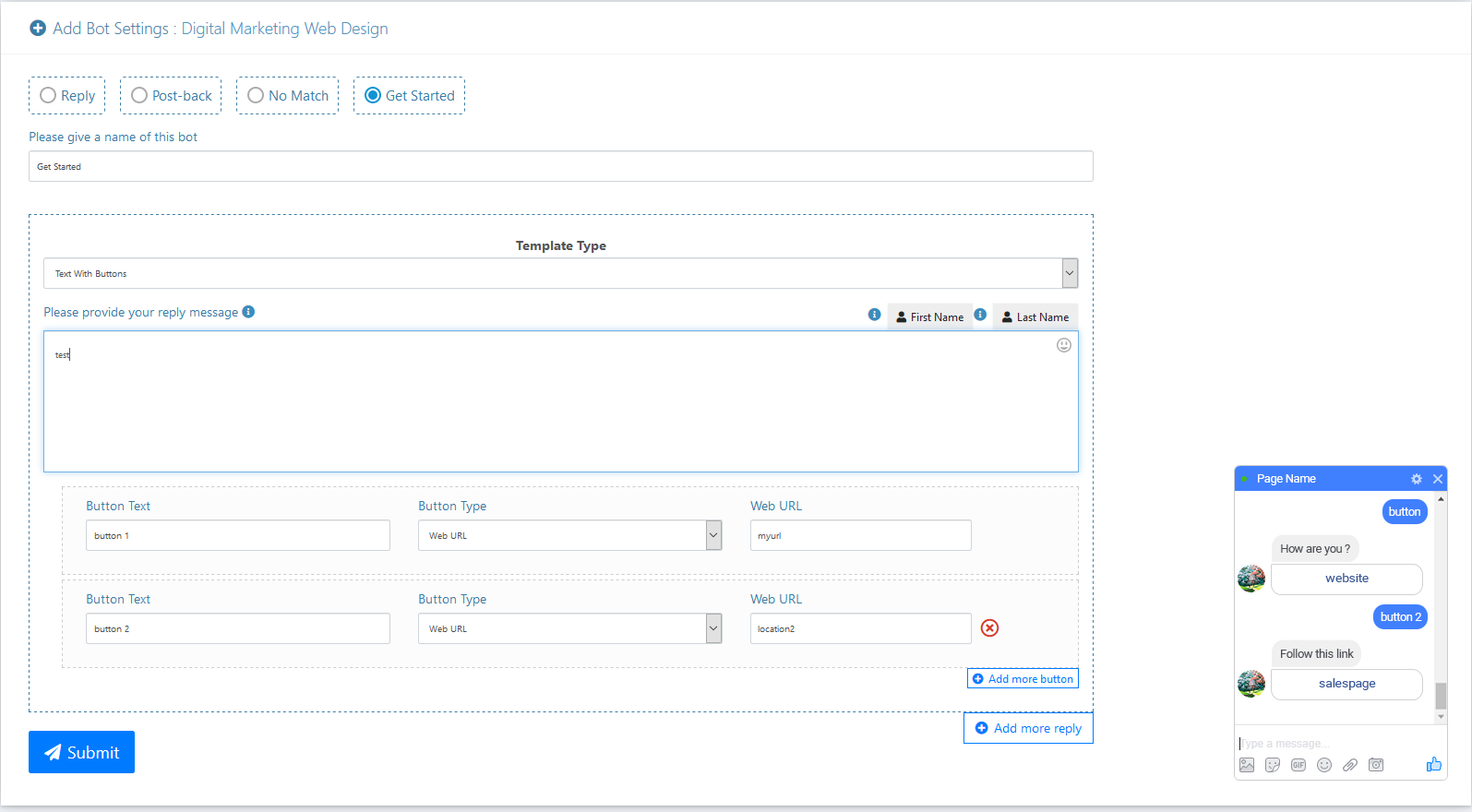
Regarding "Get Started" and Postbacks.
It all depends on how you structure your bot.
So if you use button replies, you can use the Postback template to continue the flow.
You can also have the bot respond to the "Get Started" prompt with a text greeting that invites the user to use keywords. You then create separate flows for those keywords.
There are not limitations to how you can create and continue a flow since you can utilize keyword based responses and Postback templates.
Postbacks are bot templates you have created within the Messenger Bot section under Template Manager.
Use these templates to continue flows with your users based upon their responses or button clicks.
So in your "Get Started" flow you mentioned wanting to start with a button based reply.
You can insert a URL into the button reply as we went over before or you can insert in a Postback reply.
The Postback can be anything that a usual flow contains such as text, text with buttons, image, audio, file, and more. This allows you to control the flow and continue it in an organized manner, effortlessly.
99% of orders are processed instantly, as was this order.
For anyone else planning to order, it is imperative you have access to the email you enter in for your payment in order to receive your login details.
I enjoyed our conversation earlier.
This is a deal for a one-time payment for unlimited access to Robot Chat Messenger Bot's 1 Account Marketing Plan. You will receive free updates to the features within that plan for the lifetime of your account.
This deal allows you to import up to 3 Facebook accounts.
However, each Facebook account can manage an unlimited number of pages that is under that account.
Here is how I use Robot Chat Messenger Bot everyday:
I use it for myself in my businesses for automating post actions and the messenger bot aspect for automating communication through messenger.
I create and sell the messenger bots to clients. I use my personal Facebook account to manage all of the businesses, because it will not get banned since I am not doing anything that is not legitimate. I have not had any problems with a large amount of completely different Facebook pages being managed under my personal account.
I am able to manage all of these pages under one Facebook account and create 1 messenger chat bot per client, but collect residual commissions on that bot. You can collect a one-time fee if you are more comfortable with that.
Other ways you can continue to earn is helping clients get setup with moderating their posts and replying to them automatically to funnel leads into their messenger leads list.
There are also numerous tutorials available, you can find them in the notifications tab or in the dashboard menu of Robot Chat Messenger Bot.
Some are also available here:
Article tutorial at https://digitalmarketingwebdesign.c...bot-tutorial-the-best-facebook-messenger-bot/
Video tutorials at https://digitalmarketingwebdesign.com/getting-started-robot-chat-bot-messenger/
I will try to put together a short guide on more ways on how to earn with Robot Chat Messenger Bot and post it in the thread soon.
You can save 70% off on Robot Chat Messenger Bot and get it for $39.99 instead of $149.99 at https://digitalmarketingwebdesign.com/robot-chat-messenger-bot/.
If you find it useful, we also have an affiliate program where you can earn commissions for your referrals at https://digitalmarketingwebdesign.com/affiliate-program/.
Thanks again for your interest in Robot Chat Messenger Bot!


