Quick on-page SEO. Get to top-10 with under-performing pages.

skeye

Junior Member
Joined
Dec 17, 2015
Messages
197
Reaction score
166
Let me show you how to boost pages by expanding keyword pool for internal linking without spending weeks to work on keywords.

This method cuts "manual labor" at least by half, if not more.
It's instant if you're half-assing like I do (it still works for me so far).

I'll write a step by step guide, with pictures, so there won't be too much stuff to read and it should be pretty simple.

1. Run your domain through serpstat.

No picture here, just go to serpstat.com and enter your domain. I'll use blackhatworld.com.

2. Go to tree view:
Xoq8LSU

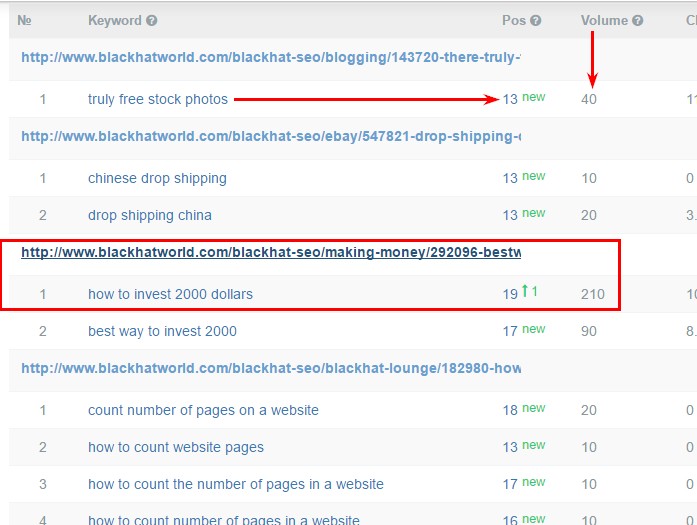
It shows a list of pages of blackhatworld. For each page there's a list of keywords for which it ranks in top-100. You can see the exact position for a keyword in the Pos. column.

3. Filter the results to show only the keywords you rank for 11-20 (or 2nd page). Filter button is on top of the list.
Tolk4To


4. Results:
YohFExK


Done. Now you know what keywords on what pages to push. Use internal linking with keywords from the list as anchor and boom – you're on the 1st page.
Some pages have tons of keywords in 11-20 ranking bracket and can bring a lot of organic traffic when worked:
8gNRopg
 
Not too much technical and I like the way you explained it with screenshots. But, I believe there is more to it right?
 
Not too much technical and I like the way you explained it with screenshots. But, I believe there is more to it right?
As for keyword research, that's it. Of course the domain should rank for some keywords in order for this to work, so it won't work for a new website.
And, obviously, you need to set up internal linking correctly and etc.

But, if you're just a SEO guy working for someone, you can export all that data after applying a filter and just be like: "hey. here's a list. it has pages and keywords for these pages, go get 10,000 internal links for each of those keywords".
 
And Thanks OP for the Contribution.

Not too much technical and I like the way you explained it with screenshots. But, I believe there is more to it right?
Agreed. Think so.
 
And Thanks OP for the Contribution.


Agreed. Think so.
You're welcome. Glad someone found it at least interesting :)
There really isn't that much to it. What it does is allows to find these pages and keywords without analyzing pages one by one and checking ranks for the keywords for each page. You get the same results but spend 100x less time.
 
Nice share op. Is there any limitation to use it?

Actually ahrefs can do the same thing and it's simpler and faster. But it's limited if you don't have any subscription.
 
Nice share op. Is there any limitation to use it?

Actually ahrefs can do the same thing and it's simpler and faster. But it's limited if you don't have any subscription.
Same here. Limited on free use. I actually didn't know it can be done in Ahrefs, can you share a short guide? I'm not too familiar with ahrefs but I think someone in the office has a subscription to it, so I'd love to give it a go.
 
This is cool, thanks for sharing I will try that with a few of my sites ;)
 
Same here. Limited on free use. I actually didn't know it can be done in Ahrefs, can you share a short guide? I'm not too familiar with ahrefs but I think someone in the office has a subscription to it, so I'd love to give it a go.

On ahrefs type your domain and hit enter => on the left sidebar select Organic Keywords => filter it by Position from 11 to 20. There you go.

You can do a lot of sneaky things with this beast. :D
 
On ahrefs type your domain and hit enter => on the left sidebar select Organic Keywords => filter it by Position from 11 to 20. There you go.

You can do a lot of sneaky things with this beast. :D

Thanks, mate. Learning a lot today :D
So, I got this list,
OfmitIQ

it shows keywords for pages but I can't sort by page. Is there a way to do that without excel?
The best part of my method is that it gives a ready to use list, like here's a page and here's all of the page's keywords. In ahrefs it seems like I have to do that manually for each page. Or am I missing something?
 
Thanks, mate. Learning a lot today :D
So, I got this list,
OfmitIQ

it shows keywords for pages but I can't sort by page. Is there a way to do that without excel?
The best part of my method is that it gives a ready to use list, like here's a page and here's all of the page's keywords. In ahrefs it seems like I have to do that manually for each page. Or am I missing something?

Thanks, OP. I'll probably give it go.
And I don't think you can do that in Ahrefs, without matching pages to keywords manually.
 
I thought of another use for this thing, but I need to know if there's a tool where I can analyze like 1000 keywords or more at a time and get results on their search volumes? I don't feel like starting another topic for this.
 
Thanks, mate. Learning a lot today :D
So, I got this list,
OfmitIQ

it shows keywords for pages but I can't sort by page. Is there a way to do that without excel?
The best part of my method is that it gives a ready to use list, like here's a page and here's all of the page's keywords. In ahrefs it seems like I have to do that manually for each page. Or am I missing something?

You were right apparently. There's no sort it by page. I think I missed that part. Way to go OP!
 
Great site, and good research thanks for sharing it, i have already started using it.
 
Selecting good keywords that is to be unique is a difficult one. This tool will help to know the keyword competition of the competitors site at instant as you say. I hope it will help for me. Let me do research with this. Nice share mate.
 
I believe there is more to it right? Not too much technical and I like the way you explained it with screenshots.
 
I believe there is more to it right? Not too much technical and I like the way you explained it with screenshots.
Did you just reword the first comment? Looks like a very clever bot.

I'll answer just in case. There's nothing else, that's it on the SEO part. You can export the data and had it over to developers so they start working on interlinking.
 
Back
Top