Permanently Closed Marketplace Sales Thread

Status
Not open for further replies.
Good to see a vet-product like this still going strong. Hope to be placing my order soon as I know it's a priceless tool for anyone to have in their arsenal.
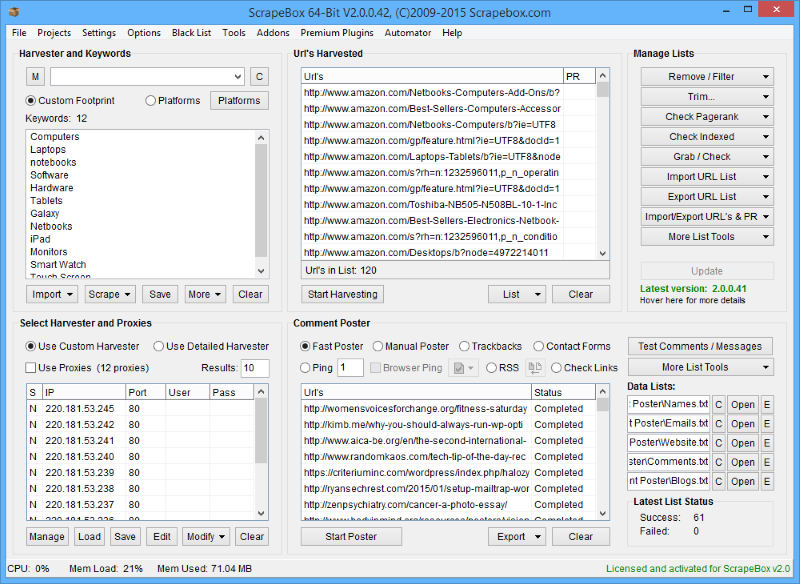
ScrapeBox v2.0

"Scrape - Check - Ping - Post"
scrapebox-interface.png


"Harvest"

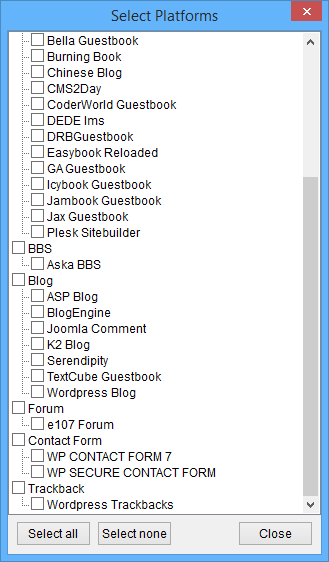
Harvest thousands of URL?s from Google, Yahoo and Bing in seconds! With inbuilt footprints for finding Wordpress and Movable Type blog posts, you can gather lists of links that are highly relevant to your keywords and niche. Great for researching competitors, finding new blogs to comment on, doing product research or even gathering facts and info for your next blog post or article.

Don?t want Wordpress or Movable Type URL?s? No problems, you can enter your own custom search Footprints and ScrapeBox will store these so you can build up your own Footprint Library for future use. For example you can store site:.gov and ScrapeBox will search amongst the 242 Million indexed pages on .gov domains that are currently listed in just Google alone. Or you could add site:yourdomain.com to keep track of the amount of pages Search Engines have indexed on your site, or extract those URL?s so you can obtain backlinks to them all to rank and dominate your competition.

Built-in Footprints
harvester.png

Custom Footprint Library
footprint-library.png


Multiple, Rotating Proxies!

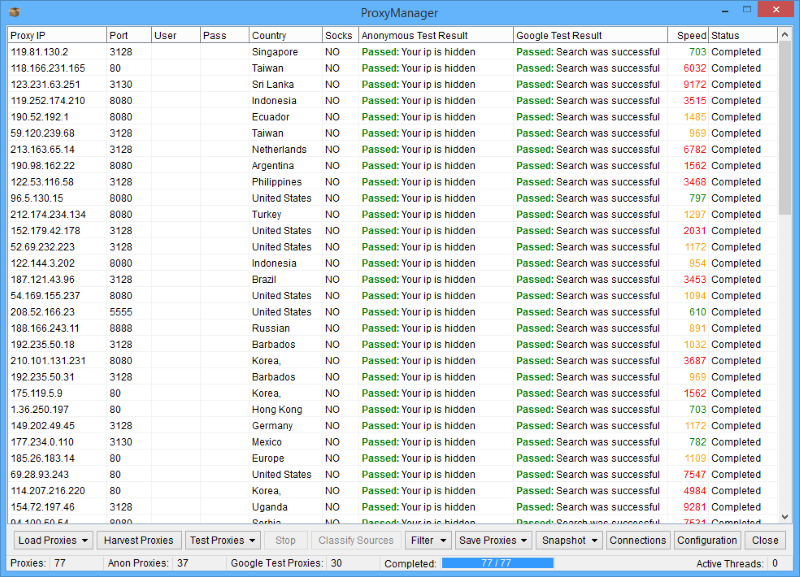
Proxy Support, of course ScrapeBox wouldn?t let you go harvesting without it. You can Import, Export or just Paste in proxy lists, tick to use Proxies and ScrapeBox will perform all it?s Harvesting, Pinging, Pagerank Checking and Comment Posting operations through proxies so your real IP never encounters the dreaded ?Automated Queries? messages we are all familiar with when conducting intensive keyword research. Also supports Private Proxies with User/Pass authentication and has a built-in proxy verifier.
proxies.png


List Management - Pagerank Checking

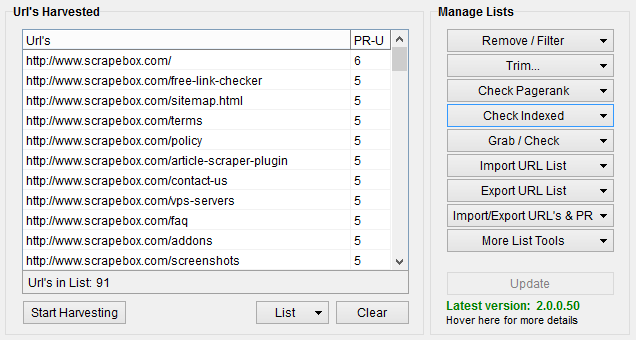
Found a High Pagerank Blog? You can harvest every page on the blog with the harvester and then check the Pagerank of every page. You can trim your list of subpages down to the root domain.com version, you can also bulk check the Pagerank of domains and subpages through proxies to prevent being blocked. ScrapeBox will also let you export your URL?s complete with Pagerank, this is great for keeping a record of the Pagerank for every page on your site. When Google updates Pagerank again, you can compare your lists to see which pages have risen.
urls-pagerank.png


Ping aka PRStorm Mode

Ping Mode aka PRStorm Mode allows you to send referrer hits through proxies and leave your domain as the referrer. This is extremely useful if you want your domain to show up in the referral logs of other sites, the recent visits widgets on sites, artificially increase your traffic to show affiliate programs and many other uses such as drive up ?views? on your articles so they appear on most popular lists and receive more exposure.
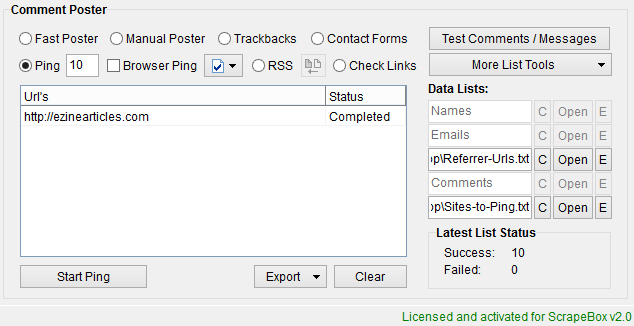
prstorm-mode1.png


Mass Comments - Wordpress & Movable Type

Are you in desperate need of backlinks? The ScrapeBox blog commenter doesn?t just post on your own blogs, you can post comments on any Wordpress or Movable Type blogs at the click of a button. With the Harvester component in ScrapeBox, you can use the built-in search footprints (or your own custom ones) to find thousand of blog posts in Google, Yahoo and Bing that are directly related to your niche and keywords. ScrapeBox can then post to all these blogs at the click of a button. This will help boost your exposure in all the search engines, receive a higher Pagerank and send a flood of traffic to your sites from readers of the thousands of blogs clicking your link in the comments.
mass-poster.png


Just $67 on our BHW Page!

https://www.paypal.com/cgi-bin/webscr?cmd=_s-xclick&hosted_button_id=8850641


Further Info

ScrapeBox has been tested on Windows XP, Windows Vista, Windows 7, Windows 8 and Windows 10 as well as Windows Server 2003, 2008 and 2012 on both 32 and 64 Bit. If you have any troubles with the application, please contact us immediately. ScrapeBox has internal crash analysis, it can create error logs with information to fix it which you must email to us so we can resolve it for you. If you do this, and in the event we are unable to get ScrapeBox up and running on your system we will issue you a refund.

ScrapeBox is a one-time purchase, it is NOT a monthly or yearly subscription. ScrapeBox is a single PC license with one free license reset per month. Critical problems will be addressed immediately, tweaks, enhancements and minor fixes will be done as soon as the number of outstanding items in the list warrant a new build.

Note: ScrapeBox is Digitally Signed by VeriSign and we are accountable for our applications.

http://www.scrapebox.com/bhw​
 
Good to see a vet-product like this still going strong. Hope to be placing my order soon as I know it's a priceless tool for anyone to have in their arsenal.

Thank you very much, ScrapeBox is in to it's 11th year and still new features are being added. :)

Does anyone have links to Scrapebox tutorials, from basic to advanced? Thanks

The best place to check tutorials is the channel "Scrapebox Guides Tuts Loopline"

https://www.youtube.com/user/looplinescrapebox/videos

New video out today on the ScrapeBox Screenshot Creator


Also new version of the addon released with the option to saves images with the domain name in the filename.
 
Hey, how exactly does the Google Image Grabber work?

I'm looking to grap just the first image in Google search but it seems to grab an image, that I can't even find manually. I've tried without proxies as well.

Edit:

I realized it has to do with the language setting. Is there some way I can change that for the addon?
 
Last edited:
Does anyone know if Google Competition Finder can be automatized so that I don't have to manualy click Start/Recheck button all the time?

Would it be possible to add a counter to for example set the number of rechecks to 35 ?

Or a loop that stops when the Status is Completed in all the fields?

This would help a lot. Alternatively, as I own the Automator plugin also, can this option be added for Automator at least?

Regards,
Zatoichi
 
Hey, how exactly does the Google Image Grabber work?

I'm looking to grap just the first image in Google search but it seems to grab an image, that I can't even find manually. I've tried without proxies as well.

Edit:

I realized it has to do with the language setting. Is there some way I can change that for the addon?

There's no additional setting for this, however if you use a proxy from the location you want the image search to be from Google should show relevant results for that location.

Does anyone know if Google Competition Finder can be automatized so that I don't have to manualy click Start/Recheck button all the time?

Would it be possible to add a counter to for example set the number of rechecks to 35 ?

Or a loop that stops when the Status is Completed in all the fields?

This would help a lot. Alternatively, as I own the Automator plugin also, can this option be added for Automator at least?

Regards,
Zatoichi

This has been added to the next version of the Competition Finder.

There is a coupon code for Plugin Bundle-Bundle of 5 Plugins?

Please contact support regarding this.

Also sorry folks, today our primary server had another network card issue. Since it was replaced a month ago it's never been good and has really started suffering from packet loss. The datacenter is sourcing a new card, but being the weekend it's taking a bit longer then i had hoped. But we are working on it, along with that the additional load on the backup server is causing it to run slow.

So if you want to transfer your license to another machine, it would be best to hold off for a day if possible and leave it on the machine it's already working on. I'll update when the issue is resolved.
 
There's no additional setting for this, however if you use a proxy from the location you want the image search to be from Google should show relevant results for that location.

Well that's the thing, even if I use no proxy it doesn't show the same results as if I'm doing it manually in the browser. It looks to me as if the TLD is what makes the difference.

When I do .com or .country manually it gives me different results.
 
Any discounts or coupons avaliable?

The link on the first post takes you to the discount page where you can purchase ScrapeBox for $67 for a lifetime license, with free updates.

Hi, How i can create loop job in automator plugin? if we cant, add ability please.

This feature exists, you can just add a Loop condition to your job as the last step and select it as either a continuous loop or a Counter loop which can be done XXX times.

o3uKRmb


Also we have resolved the issues with our backup server, however the primary server is still experiencing issues with packet loss. The datacenter have scheduled for today to physically move the server to another rack and switch which will hopefully have things back to 100%.
 
Thank you very much, ScrapeBox is in to it's 11th year and still new features are being added. :)


The best place to check tutorials is the channel "Scrapebox Guides Tuts Loopline"

https://www.youtube.com/user/looplinescrapebox/videos

New video out today on the ScrapeBox Screenshot Creator


Also new version of the addon released with the option to saves images with the domain name in the filename.

Can I use this feature for looking up the screenshot of expired domains?
 
Can I use this feature for looking up the screenshot of expired domains?

No sorry, this isnt retrieving the image from somewhere it's actually loading the page and taking the screenshot. I guess if you had the Wayback URL's of expired domains you could load those and have it take the screenshot of how the page used to appear.
 
Automator --) auto shutdown computer. I want after completing the Automator. Scrapebox automatically shuts down my computer.
 
Dear @Sweetfunny would you be so kind and update Scrapebox Mass Url Shortener?
At the moment out of 20 shortening services only 3 are working. Seems the services that are not
working are either dead or offline. This is a very handy addon, but it seems like it has been abandoned.

Thank you very much in advance!
 
Hi I would like to submit a suggestion for Link extractor addon : when we use proxies, if SB encounters a dead proxies it doesn't extract links from page because there is a proxy error. Instead of markink the page as error SB should use another proxy in the list, and extract the links.
Thanks
 
Any chance to implement some sort of autosave into the page scanner addon?
It is such a useful tool to have and it's a shame this small problem makes it a hassle to use.

Roughly 80% of the time I get stuck with some open connections and I can not save any data whatsoever which basically means I have to restart the whole process again and pray it doesn't get stuck again.

Implementing something similar to the link extractor autosave feature would be gold.

Thank you
 
Any chance to implement some sort of autosave into the page scanner addon?
It is such a useful tool to have and it's a shame this small problem makes it a hassle to use.

Roughly 80% of the time I get stuck with some open connections and I can not save any data whatsoever which basically means I have to restart the whole process again and pray it doesn't get stuck again.

Implementing something similar to the link extractor autosave feature would be gold.

Thank you

for link extractor you can go to the session_addon folder and find your scraped links there in a txt file.
Maybe it's the same for page scanner too
 
Status
Not open for further replies.
Back
Top