I'm confused about hosting servers and IPs

tazarbm

Elite Member
Executive VIP
Jr. VIP
Joined
Oct 28, 2020
Messages
11,635
Reaction score
14,468
Hey peeps!

I'm struggling understanding something, and I wondered if you could help me figure it out...

More specifically, I have a hosting plan with some hosting company (which I shall not name, so please don't ask, especially since it's not relevant to my question), and when I purchased that plan I specifically chose a New York server. In the meantime, that hosting provider had migrated to different servers, and now I need to update the DNS / nameservers / IPs, and the new (recommended) servers that I need to update in my domain's settings point to a website that ends in the .pt ccTLD, which means Portugal, which means that my domain will not be pointing to the NY server anymore??

Can someone please make me understand whether I got this right and I'm genuinely being screwed over, or I'm misunderstanding how this works? Moreover, I checked the new IPs that I am recommended to use as DNS for my domain and apparently those IPs are owned by some Asian company.

So, I'm really confused about how the IPs can belong to an Asian company, the servers that I need to use as DNS for my domain end in the .pt TLD, but my domain can hopefully still be hosted on NY server. Can someone clear up this confusion for me?

Thanks in advance!
 
The .pt ccTLD has nothing to do with where your server is hosted, I can have a .se hosted in Thailand if I want. Just do what they say and change your nameservers to the .pt nameservers.
 
The .pt ccTLD has nothing to do with where your server is hosted, I can have a .se hosted in Thailand if I want. Just do what they say and change your nameservers to the .pt nameservers.
got it!

And thanks for the mental relief :)
 
Hey peeps!

I'm struggling understanding something, and I wondered if you could help me figure it out...

More specifically, I have a hosting plan with some hosting company (which I shall not name, so please don't ask, especially since it's not relevant to my question), and when I purchased that plan I specifically chose a New York server. In the meantime, that hosting provider had migrated to different servers, and now I need to update the DNS / nameservers / IPs, and the new (recommended) servers that I need to update in my domain's settings point to a website that ends in the .pt ccTLD, which means Portugal, which means that my domain will not be pointing to the NY server anymore??

Can someone please make me understand whether I got this right and I'm genuinely being screwed over, or I'm misunderstanding how this works? Moreover, I checked the new IPs that I am recommended to use as DNS for my domain and apparently those IPs are owned by some Asian company.

So, I'm really confused about how the IPs can belong to an Asian company, the servers that I need to use as DNS for my domain end in the .pt TLD, but my domain can hopefully still be hosted on NY server. Can someone clear up this confusion for me?

Thanks in advance!
Like the old man said above, the nameservers are just a gateway to tell whoever asks where your server is located.
It can be a .ro domain as well, has no relevance.

What you are interested in is checking where does the A record point to. That's your main IP, and that's the one it should be saying NY City.
It's like Cloudflare.

You get two funny named nameservers, and those two point wherever you tell them to point.
Here are some commands for you to check manually.
https://www.whatsmydns.net/dns-lookup/a-records
 
Right - so basically hosts will do that from time to time (changing servers). This is because a lot of software will occassionally reach EOL (end of life) or discontinue support for an existing OS. Or the hardware reaches it's EOL. As technology advances, both of these upgrades are more and more seamless. But when undertaking something like this - a web host will often use that time to work out a more optimised deal.

So for instance, they could negotiate a better deal with a datacenter or secure a better deal on snazzy new server hardware. Or maybe something as rudimentary as them moving to a new billing operation.

//

What your host wants you to is basically point to their new authoritative DNS server.

An authoritative DNS server is basically what manages everything for your domain.

- This is where tazarbm.com gets converted to 22.22.22.12
- This is where the mailing server (MX) is managed. So you could use Google Workspace or Microsoft 365
- This is where you set your CNAME records. So clients.tazarbm.com can point to a custom invoicing panel.
- This is where you setup subdomains etc.

//

Now if you use something like cPanel - your hosting server often becomes your DNS server (They are no longer seperate). This is the reason why you can go into the cPanel zone editor and setup sub-domains, CNAMEs et al from within there.

But these authoritative servers can exist seperately as well.

A very good example of it being Cloudflare. Now Cloudflare is a reverse proxy. It acts as a middleman for all the traffic that passes from anywhere to your server (via your domain).

They achieve this by running a DNS Server.

So instead of pointing at your hosting provider's nameservers, your domains will point to nameservers provided by Cloudflare such as glen.cloudflaredns.com or maya.cloudflaredns.con

And from within Cloudflare - you will manage everything else. You will setup an A record to point to your hosting's server. And everything else (setting up Google mail etc.) or creating a CNAME record will now happen at Cloudflare. The zone editor within your cPanel will no longer work.

This is especially useful when you don't use something like cPanel or Plesk or don't run your own DNS server. (A basic LAMP installation at something like DigitalOcean or Vultr or Linode, for example).

Most registrars also offer complimentary DNS services. So when you register a new domain, if they're pointed to the registrar's default nameservers - you can setup A records or CNAME records from within the registrar interface.

//

Now most hosting providers avoid the dreaded nameserver change.

Simply because it's a lot of friction. The number of support tickets from confused website owners rises exponentially.

The old server and the new server has to be synchronised regularly and frequently (so clients don't end up losing data).

And it's basically a lot of work.

But as companies grow - they tend to want to assimilate things that are all over. Maybe they want to introduce new servers into the play. Or setup a dedicated domain to manage nameservers (like Cloudflare has cloudflaredns.com) or are building a new SOP and want to streamline things at their best and become future-ready.

Hence the change. Maybe they're originally from Portugal or they scored a great deal on a .pt domain and want to run a dedicated DNS server for all their clients. Or maybe it's some GDPR thing.

The TLD extension doesn't matter for the server location. A DNS server with a .pt or a .in or a .uk extension can point to a server located in the US or India or anywhere else.

When a user types in tazarbm.com - the zone file is queried and the system sees ns1.hosting.pt and sends the user there. The DNS server at ns1.hosting.pt understands the kind of request coming in and responds accordingly.

Written on a phone. Please excuse typos and/or brevity.
 
Right - so basically hosts will do that from time to time (changing servers). This is because a lot of software will occassionally reach EOL (end of life) or discontinue support for an existing OS. Or the hardware reaches it's EOL. As technology advances, both of these upgrades are more and more seamless. But when undertaking something like this - a web host will often use that time to work out a more optimised deal.

So for instance, they could negotiate a better deal with a datacenter or secure a better deal on snazzy new server hardware. Or maybe something as rudimentary as them moving to a new billing operation.

//

What your host wants you to is basically point to their new authoritative DNS server.

An authoritative DNS server is basically what manages everything for your domain.

- This is where tazarbm.com gets converted to 22.22.22.12
- This is where the mailing server (MX) is managed. So you could use Google Workspace or Microsoft 365
- This is where you set your CNAME records. So clients.tazarbm.com can point to a custom invoicing panel.
- This is where you setup subdomains etc.

//

Now if you use something like cPanel - your hosting server often becomes your DNS server (They are no longer seperate). This is the reason why you can go into the cPanel zone editor and setup sub-domains, CNAMEs et al from within there.

But these authoritative servers can exist seperately as well.

A very good example of it being Cloudflare. Now Cloudflare is a reverse proxy. It acts as a middleman for all the traffic that passes from anywhere to your server (via your domain).

They achieve this by running a DNS Server.

So instead of pointing at your hosting provider's nameservers, your domains will point to nameservers provided by Cloudflare such as glen.cloudflaredns.com or maya.cloudflaredns.con

And from within Cloudflare - you will manage everything else. You will setup an A record to point to your hosting's server. And everything else (setting up Google mail etc.) or creating a CNAME record will now happen at Cloudflare. The zone editor within your cPanel will no longer work.

This is especially useful when you don't use something like cPanel or Plesk or don't run your own DNS server. (A basic LAMP installation at something like DigitalOcean or Vultr or Linode, for example).

Most registrars also offer complimentary DNS services. So when you register a new domain, if they're pointed to the registrar's default nameservers - you can setup A records or CNAME records from within the registrar interface.

//

Now most hosting providers avoid the dreaded nameserver change.

Simply because it's a lot of friction. The number of support tickets from confused website owners rises exponentially.

The old server and the new server has to be synchronised regularly and frequently (so clients don't end up losing data).

And it's basically a lot of work.

But as companies grow - they tend to want to assimilate things that are all over. Maybe they want to introduce new servers into the play. Or setup a dedicated domain to manage nameservers (like Cloudflare has cloudflaredns.com) or are building a new SOP and want to streamline things at their best and become future-ready.

Hence the change. Maybe they're originally from Portugal or they scored a great deal on a .pt domain and want to run a dedicated DNS server for all their clients. Or maybe it's some GDPR thing.

The TLD extension doesn't matter for the server location. A DNS server with a .pt or a .in or a .uk extension can point to a server located in the US or India or anywhere else.

When a user types in tazarbm.com - the zone file is queried and the system sees ns1.hosting.pt and sends the user there. The DNS server at ns1.hosting.pt understands the kind of request coming in and responds accordingly.

Written on a phone. Please excuse typos and/or brevity.
duuuuude, I see what you did here, don't think that I'm not aware :D

Thanks for the free course on DNS and nameservers :)
 
duuuuude, I see what you did here, don't think that I'm not aware :D

Thanks for the free course on DNS and nameservers :)

images
 
It's just like your race and your nationality.

You can be an American live in the US, or an American live in the UK.

So two different things.
 
A tip would be to change your Nameservers to Cloudflare's free plan, then just change the IP (A records, etc) when needed. it gives you extra layer of protection and faster connectivity.
 
It's just like your race and your nationality.

You can be an American live in the US, or an American live in the UK.

So two different things.
I see... well, that's actually a very good way of putting it, makes a lot of sense :)

A tip would be to change your Nameservers to Cloudflare's free plan, then just change the IP (A records, etc) when needed. it gives you extra layer of protection and faster connectivity.
yeah, I got the same recommendation in the email they've sent after migration, but I preferred the old fashioned way (logging into Namesilo, go to "Change Nameservers" and replace the old nameservers with the ones with the .pt extension). And it works, so I'm good for now (especially since I never use Cloudflare)
 
oh come on, you have to know what I'm alluding to! Like, for example, my last week's statement of how you don't post a lot? :D

Haha not at all man.

Most of the decent stuff I post is usually in the form of replies and seldom threads.

I remember posting an entire guide on how to change your SSL certificate provider in Cloudflare (can't be done from within the panel and has to be a programmatic request) in one of @Scorpion Ghost threads.

I distinctly remember this because that response was shared as a verbatim thread in one the more famous paid forums by one of their senior members who was then quickly called out.

Edit - Found it - https://www.blackhatworld.com/seo/cloudflare-is-not-using-cloudflare-ssl.1391439/post-15086057 :)
 
(especially since I never use Cloudflare)
You should really consider using Cloudflare as a DNS provider, they are really fast around the world. I use their free DNS service without their CDN service so no proxy thru them. Compare them at DNSperf
 
Haha not at all man.

Most of the decent stuff I post is usually in the form of replies and seldom threads.

I remember posting an entire guide on how to change your SSL certificate provider in Cloudflare (can't be done from within the panel and has to be a programmatic request) in one of @Scorpion Ghost threads.

I distinctly remember this because that response was shared as a verbatim thread in one the more famous paid forums by one of their senior members who was then quickly called out.

Edit - Found it - https://www.blackhatworld.com/seo/cloudflare-is-not-using-cloudflare-ssl.1391439/post-15086057 :)
oh yeah, I do remember that post, it might actually be the one that got me into yo... err.... your expertise :D

Anyway, the fact that I said that I don't see you posting too much it was meant as a joke, I genuinely don't care how often or little you post if your replies are valuable (and they always are), so we're good :)

You should really consider using Cloudflare as a DNS provider, they are really fast around the world. I use their free DNS service without their CDN service so no proxy thru them. Compare them at DNSperf
you're not the 1st one to recommend this, but I don't know, man, I just don't like all these new technologies (cloud hosting for example). I don't understand them and when I don't understand something I stay the fuck away from it (yes, I'm a scaredy cat :p)
 
oh yeah, I do remember that post, it might actually be the one that got me into yo... err.... your expertise :D

Anyway, the fact that I said that I don't see you posting too much it was meant as a joke, I genuinely don't care how often or little you post if your replies are valuable (and they always are), so we're good :)


you're not the 1st one to recommend this, but I don't know, man, I just don't like all these new technologies (cloud hosting for example). I don't understand them and when I don't understand something I stay the fuck away from it (yes, I'm a scaredy cat :p)
yes, you should at least use cloudflare DNS service. there is no competition in this field and it's free.
 
You should really consider using Cloudflare as a DNS provider, they are really fast around the world. I use their free DNS service without their CDN service so no proxy thru them. Compare them at DNSperf
hey, buddy! I just took a look at Cloudflare (yeah, you got me curious about it yesterday), and I'm noticing something that I don't like and which - from past experience with other similar services - I know that it's bad, so I would like your honest opinion on this.

More specifically, I just noticed that the free plan has paid addons that you can purchase, "optionally" of course. But like I said, from past experience with other similar services, I know that when a company has paid addons as "optional" and they're offering a free plan then the free plan is not really free because it will not function properly without the paid addons. It's a marketing gimmick for sure.

So, my question to you is this: how fast and safe will my sites be with the free plan of CF when compared to the paid plans of shared hosting for example? Can you shed a bit of light on this for me?
 
So, my question to you is this: how fast and safe will my sites be with the free plan of CF when compared to the paid plans of shared hosting for example? Can you shed a bit of light on this for me?
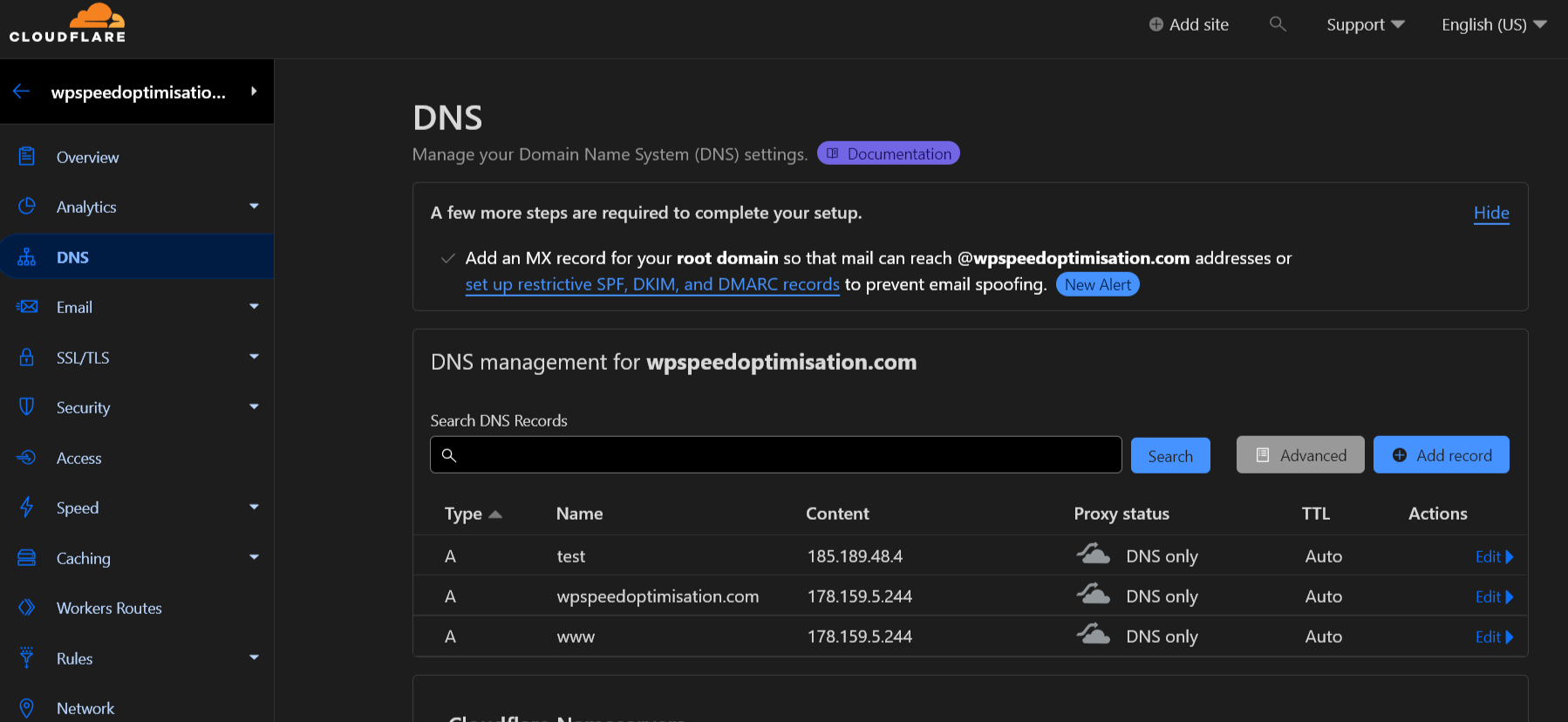
You just use their free plan for the DNS nothing else, your hosting still remains the same and you do not need any add-ons since you just use their DNS service with no proxy. I use the free plan for all my domains. See image as an example, example is without mail settings.

cloudflare-dns.png
 
You just use their free plan for the DNS nothing else, your hosting still remains the same and you do not need any add-ons since you just use their DNS service with no proxy. I use the free plan for all my domains. See image as an example, example is without mail settings.

cloudflare-dns.png
in other words, I'm routing my traffic through CF first?? What's the benefit of doing this instead of using my hosting's server directly?
 
in other words, I'm routing my traffic through CF first?? What's the benefit of doing this instead of using my hosting's server directly?
Much faster DNS time, instead of routing it thru your hosts slow (often) DNS, and every domain in one place for settings and so on.
 
Much faster DNS time, instead of routing it thru your hosts slow (often) DNS, and every domain in one place for settings and so on.I
I see... Well, I will give them a try with the next website that I set up and see how it goes :)

Thanks for the tip!
 
Back
Top