TheVigilante
Banned - Multiple Rules Violations
- Aug 31, 2010
- 14,993
- 16,105
That was never a doubt but should have been in VIP sectionMethod killing spree?
Soon as it's shared it's gone.


That was never a doubt but should have been in VIP sectionMethod killing spree?
Soon as it's shared it's gone.

That section is sort of dead. :/That was never a doubt but should have been in VIP section

That section is sort of dead. :/
I shared something there today and nobody gave a f*ck lol.

That section is sort of dead. :/
I shared something there today and nobody gave a f*ck lol.

Its been public since 2011. So yeah its been dead years nowWell this method is dead now that it's public. So.... Good going?
Its been public since 2011. So yeah its been dead years now

Saw the same post you saw and tested this at the time.. literally days after that post Google started to adjust how they work with aws. Great method to learn fromI first found about this method a couple of months back after coming across this.
Anybody who has worked with AWS before can figure this method out in 5 minutes.
First of all, let's get a glimpse of what you'll be able to achieve once you're done reading this.

The URL will be something like https://s3.amazonaws.com/xyz/keyword.html
You can either use this as a parasite or simply for a backlink. Whatever floats your boat. If you don't know what a parasite is, check out this amazing guide by @710fla
It's also quite easy to index these kinds of pages, just use 'Request Indexing' after adding to the Search Console.
When I figured this out, I thought I'll offer this as a service on BHW but I figured I'll be too busy with college till May 19' and after that, I'll be working on starting my own SEO Agency. So here's how you do this.
Firstly, make an account on AWS and add your credit card information. This should be pretty easy to achieve.
After logging into your account navigate to S3

You should see something like this

Click on '+Create Bucket' button and use the following settings

The name of the bucket is important, use your primary keyword here. Also, make sure to select N. Virginia as the region or you'll end up with a domain with lesser authority.
Now, hit next two times and use the following settings
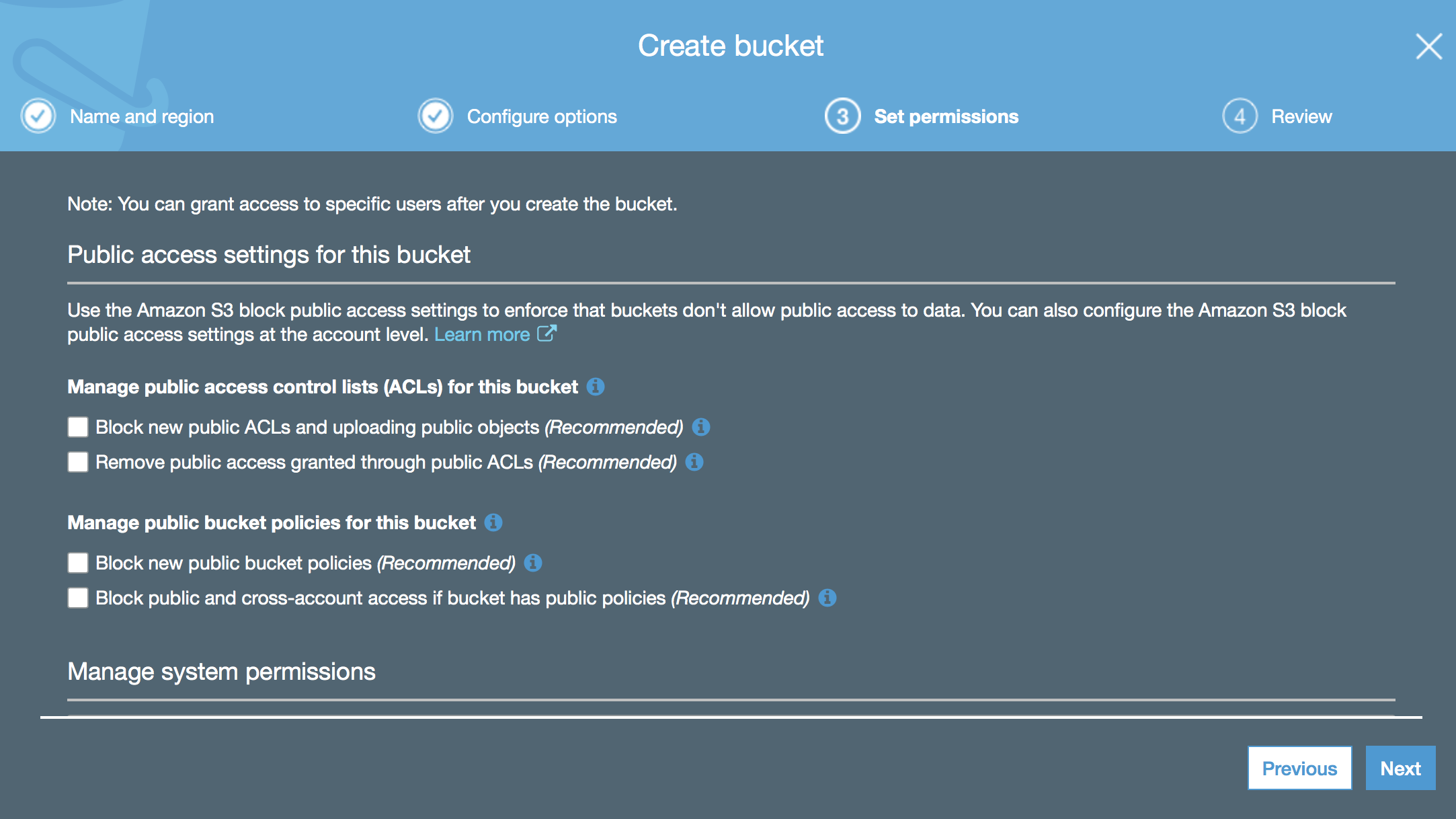
Keep hitting next and finish creating your bucket.
Next, click on your bucket once and hit 'Permissions'
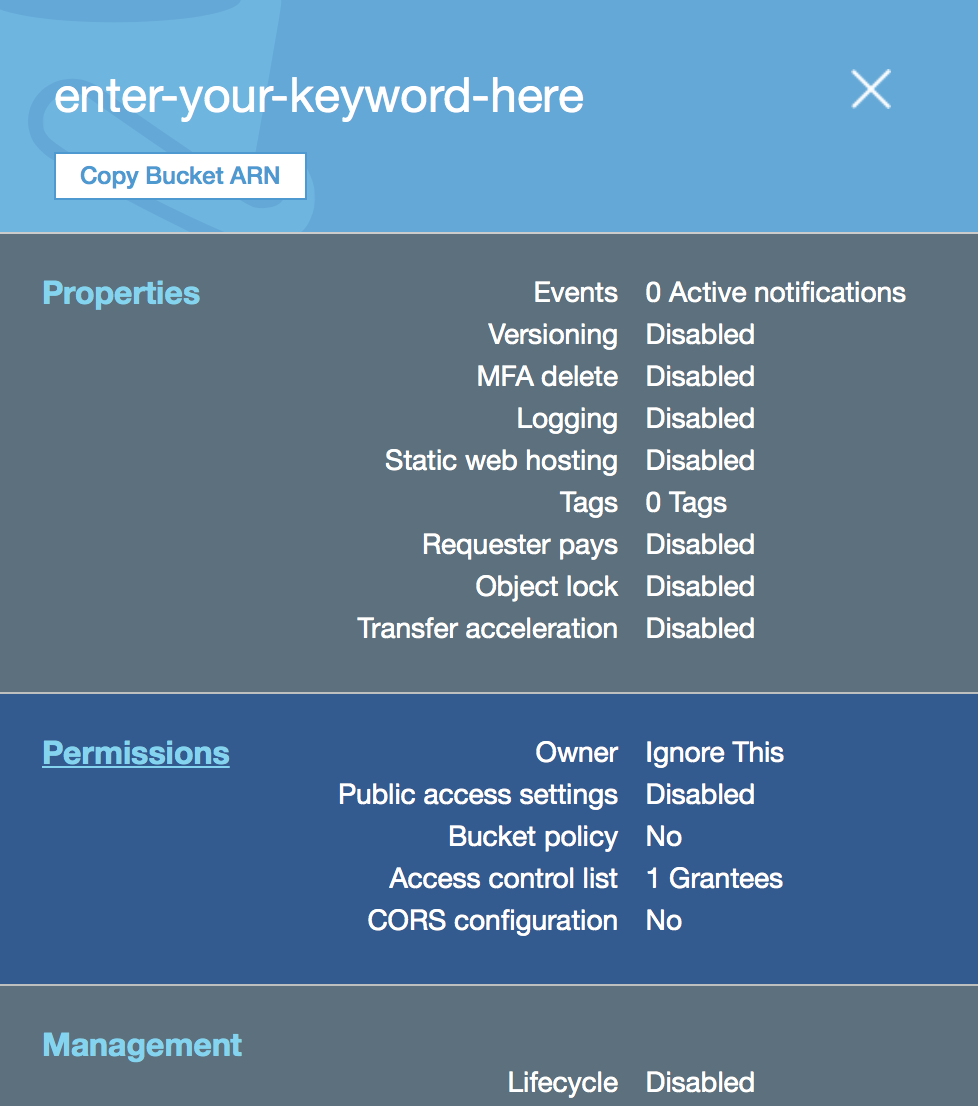
You'll end up on this page, click 'Access Control List'
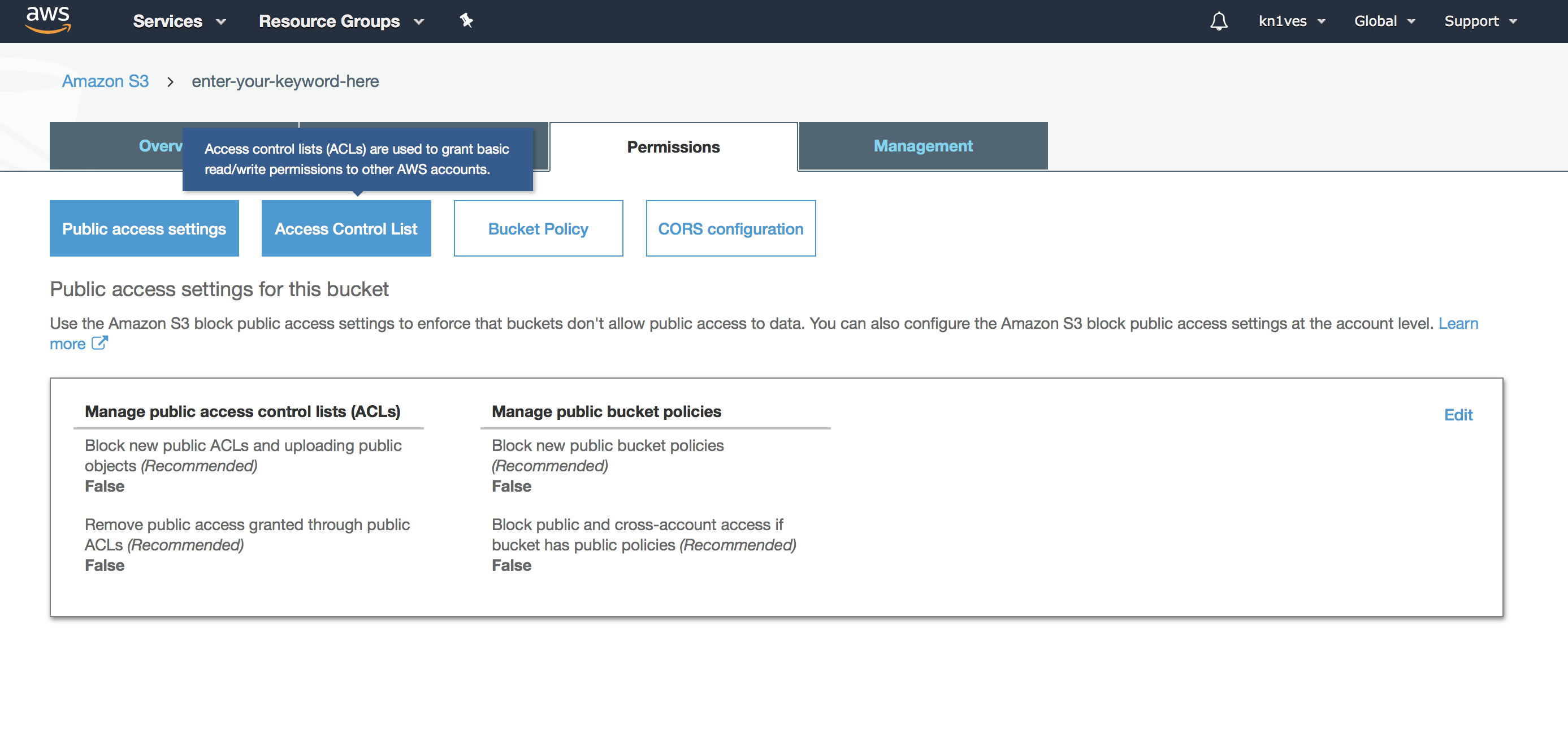
Scroll down and click on the highlighted portion as shown
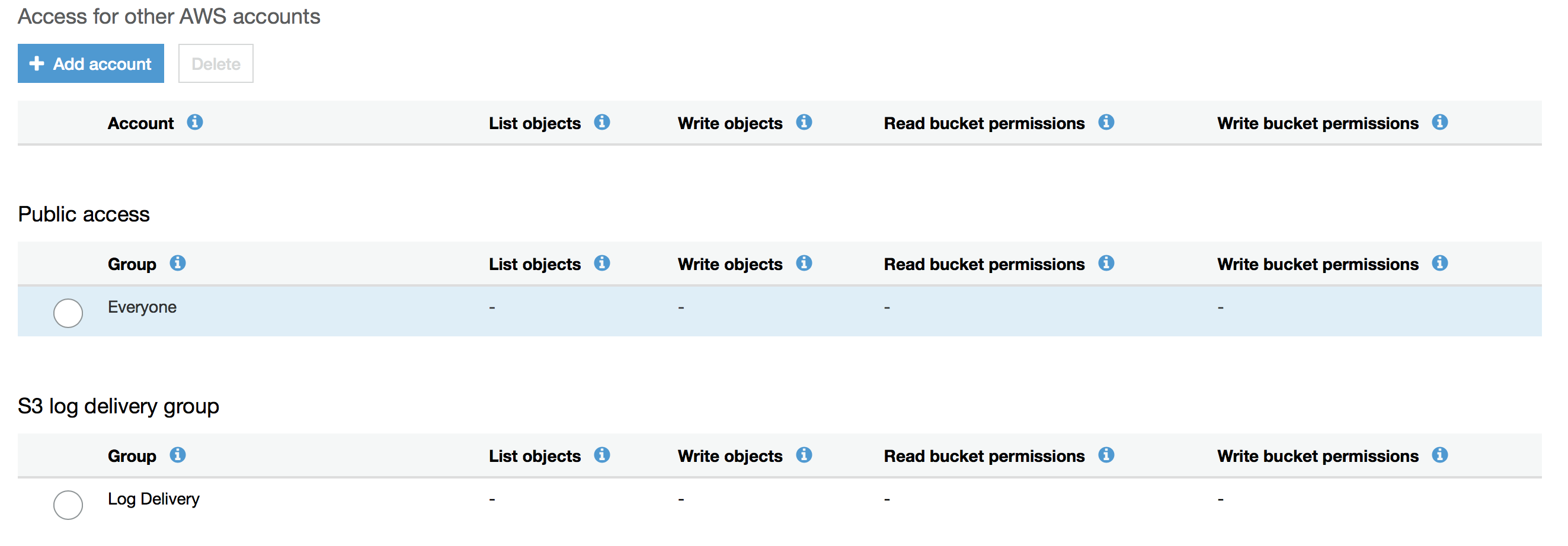
After doing this, copy the following settings and hit 'Save'

If you are seeing this, you've done everything correctly as of now

Now, you need a static HTML page, you can get by either coding it yourself or hiring someone to do it for you. You can also use some plugin which converts WP to static code (haven't tried this though).
Once you have this, you need to upload these files.
First, go to the 'Overview' tab and hit the 'Upload' button, then, upload all the necessary files for you static web page

Hit 'Next' and again, copy my settings (lol)

Hit 'Upload' and your files will be uploaded. If you see this kind of screen then you're doing everything correctly
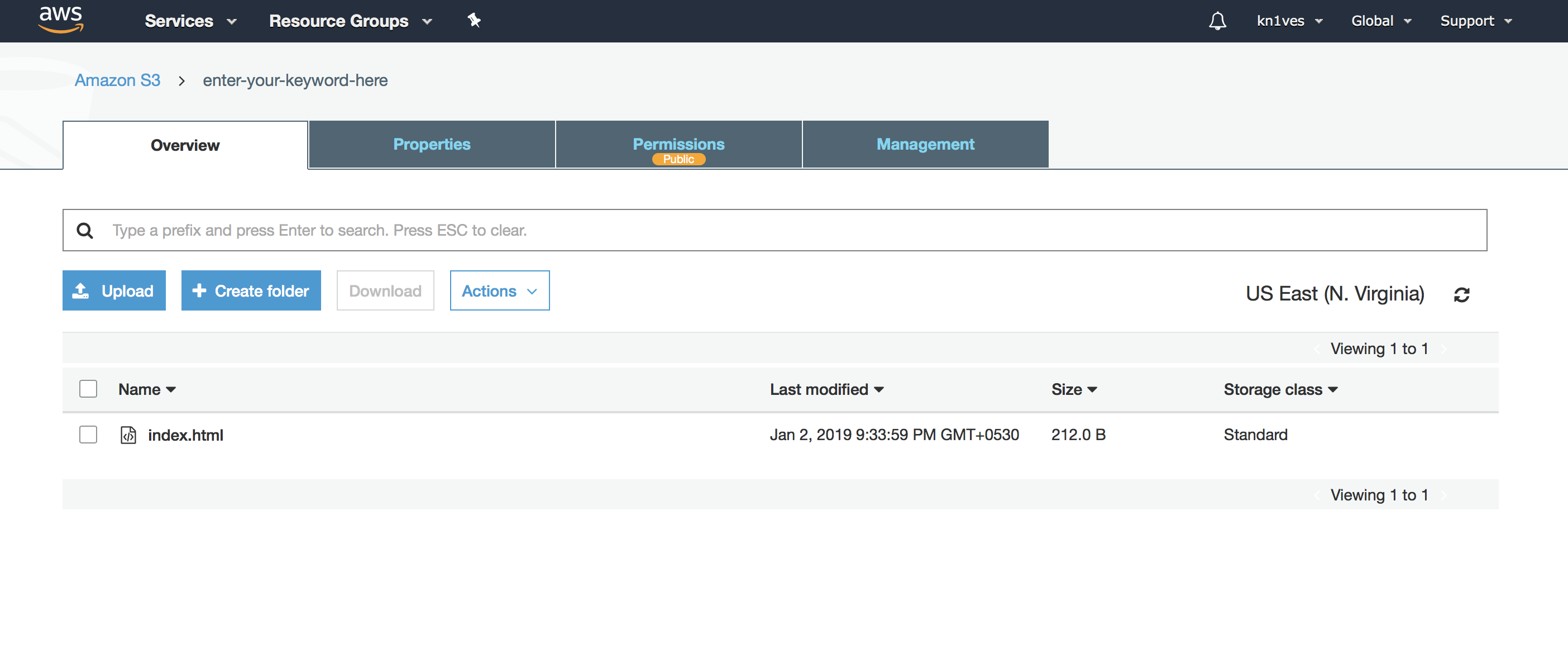
That's it you're done. Here is the webpage:http://s3.amazonaws.com/enter-your-keyword-here/index.html
You can get really creative with this method, in my college internet access is restricted by disabling certain domains like youtube by the administrator. I used this as a reference (XD) for one of my exams as AWS wasn't banned lol.
https://s3.amazonaws.com/cajunb/important.pdf
This means that you can even create PDF backlinks using this. If you have a unique idea using this method, I'd love to hear it from you in this thread.
As I said, you can add this in the Search Console and index it within hours. Just upload the verification file as well.
I hope this helped you, if you run into some troubles, please don't PM me, post it in the thread instead.
The whole point of the person showing the links was to get them handled. It's clearly competitive and they wanted to expose their competition.. that's feared towards the article the op posted and not the op btw.. when I read the article at the time I thought the same thing. I tried it and surpassingly it did rack within a few hours. Then literally a few days after all the links got handled by Google the article went viral when a big seo blog shared it. It's still a great meeting to LEARN from. There are other ways pointed out here and I also do agree to an extent some things should stay hidden.I'm trying to make a point about this kind of thread in a general sense.
Someone recently found a very valuable link source and simply posted it.
I mean, why the hell don't people make money or at least post it to a reserved sub-forum?
Make it a subtle post, make it generic, give people ideas without showing the actual URLs.
Sharing the exact thing simply destroys it for everyone.
A method like this is worthless.
The whole point of the person showing the links was to get them handled. It's clearly competitive and they wanted to expose their competition.. that's feared towards the article the op posted and not the op btw.. when I read the article at the time I thought the same thing. I tried it and surpassingly it did rack within a few hours. Then literally a few days after all the links got handled by Google the article went viral when a big seo blog shared it. It's still a great meeting to LEARN from. There are other ways pointed out here and I also do agree to an extent some things should stay hidden.

Awesome share. Is it still viable? How does medium compare to github wiki in your experience?

Stop spamming the forum dude.Thanks for sharing

Thanks for the guide. I don't know is i am the only one who facing this problem or Amazon has updated this thing for everyone.
like earlier when i upload HTML file in the bucket it open page like this https://s3.amazonaws.com/xyz.html Now when i am uploading it's opening like xyz.s3.amazonaws.com/abcd.html
Can anyone help me with this?

