Any server side coding expert with knowledge on websites here?

Nw_Work

Senior Member
Joined
Nov 23, 2019
Messages
906
Reaction score
345
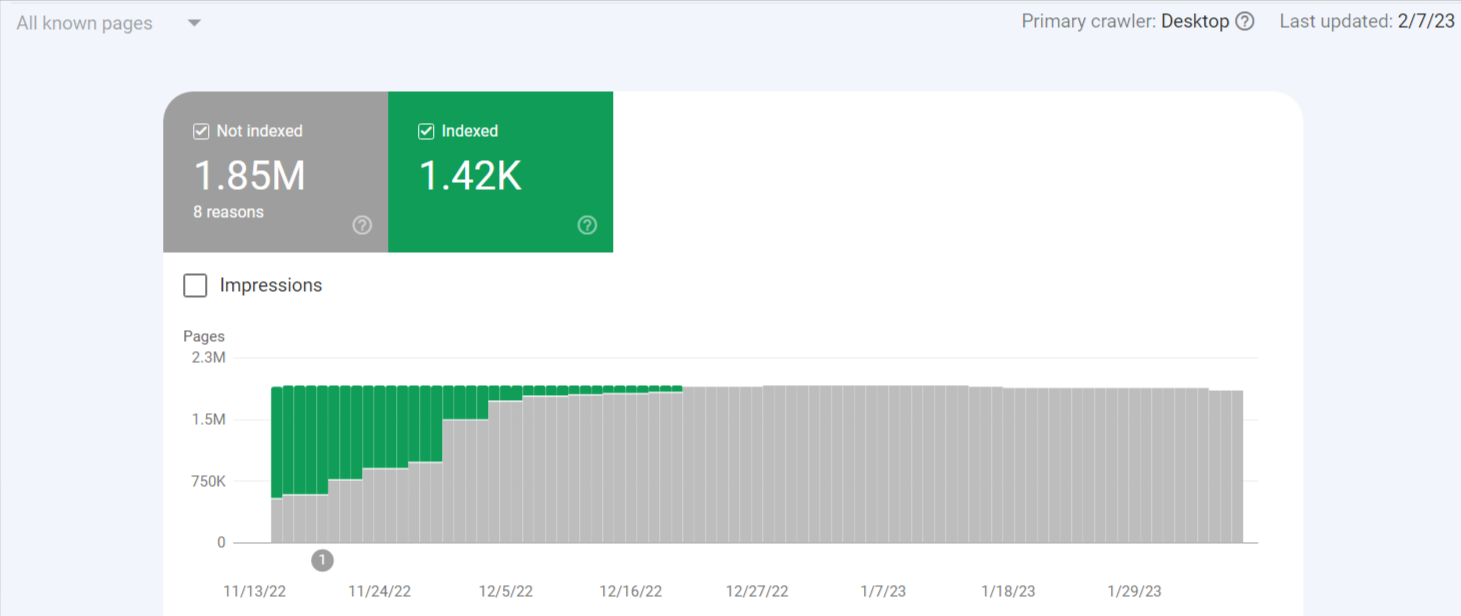
In sticky situation with this code which has been installed when a hacker managed to get in and wordfence and other tradional security plugins was unable to pinpoint source, now 2FA for login is setup and all users were forced logged out but still that code running in background thought cleaned it up after deleted several suspicious and modified files and edited out malicious codes from wp-config files etc but I geuss I didn't find actual source any advice how to fix by oneself from any one who has successfully delt with this before

The hack auto creates pages and redirects indexed page search engine clicks to spammy blogs etc
1676145543462.png
 
Check to see what is in your .htaccess file. Redirects can be done in there. You also can check to see if the hosting service have a backup for your site. You might have to do a restore from an earlier date.
 
Check to see what is in your .htaccess file. Redirects can be done in there. You also can check to see if the hosting service have a backup for your site. You might have to do a restore from an earlier date.
.htaccess was cleaned up earlier but saw that this code regenrates itself, backup restore not an option since overwrote old backups thinking got rid of the threat but it had remained and repopulated it seems.. Need to find and pinpoint it down and get rid of it hope anyone has good methods or solution that can be self implemented
 
.htaccess was cleaned up earlier but saw that this code regenrates itself, backup restore not an option since overwrote old backups thinking got rid of the threat but it had remained and repopulated it seems.. Need to find and pinpoint it down and get rid of it hope anyone has good methods or solution that can be self implemented
Maybe someone else can help. Hard to know then for me since I am not looking at the files. You just have to comb through everthing,
 
From my experience with Malware like this, it is easier to simply remove every single file in that website and restore from a backup.

If u want to go through the hard way (Maybe for research reasons. Or to create ur own Malware cleaner), u will need to examine every single file on the website.

Not Every single PHP file or Every single Executable. But every single file. Including txt files, images, videos etc. Because some malware are known to hide their core code in files like that. Especially the ones that regenerates deleted files.
 
If u want to go through the hard way (Maybe for research reasons. Or to create ur own Malware cleaner), u will need to examine every single file on the website.
I think that would be the best way.
I mean, knowing the reasons of that will help to understand the nature of problem and take some precocious in advance to prevent them in the future.
 
In my experience, These malwares are due to nulled plugins or themes installed from unknown sources.
you have very little opportunities to find the exact cause,
but A plugin called Gotmls in WordPress repo will help you out in this. I used this tool on many infected sites and find it very useful.
scan the whole site with this at least it will put you in right direction
 
In my experience, These malwares are due to nulled plugins or themes installed from unknown sources.
you have very little opportunities to find the exact cause,
but A plugin called Gotmls in WordPress repo will help you out in this. I used this tool on many infected sites and find it very useful.
scan the whole site with this at least it will put you in right direction
Gotmls I think I tried but can't remember will try it again as per recommendation
 
Back
Top