Advice Needed For LAN Setup

noellarkin

Senior Member
Joined
Mar 14, 2021
Messages
1,006
Reaction score
1,492
I've recently scaled up my local VPS setup, from 8 to 16 machines, running windows, primarily for botting operations.
Right now they're all connected via WLAN, but I'm considering switching them all over (in addition to my primarily work computer) to a wired ethernet LAN, because
1) I feel that might reduce the power usage of these systems, I can disable the WiFi
2) improve transfer and internet speeds + stability
Am I correct in these assumptions?
If yes, my next question is, what's the cheapest way to do this? I know next to nothing of networking, and I'm checking prices for LAN switches online, and theres a significant price jump for switches that have more than 8 ports (I'll need 17 for my setup - - 16 + 1 for my main computer). Can I buy multiple LAN switches and hook them up to each other?
 
buy 2-3 wireless routers you dont need switches. Hard wire them from the source router. Hard wire these 2-3 wireless routers to your server/device

Test the speed, but am sure there will be 2-5% latency which will affect the speed but not much
 
buy 2-3 wireless routers you dont need switches. Hard wire them from the source router. Hard wire these 2-3 wireless routers to your server/device

Test the speed, but am sure there will be 2-5% latency which will affect the speed but not much
Thanks - - to clarify, you're suggesting wireless routers because they accomplish the same thing but at lower cost? Or are they operationally better than buying one of those NetGear ethernet LAN hubs>
 
Thanks - - to clarify, you're suggesting wireless routers because they accomplish the same thing but at lower cost? Or are they operationally better than buying one of those NetGear ethernet LAN hubs>
Yes exactly they accomplish the same tasks. Plus they are easy to handle. Yes NetGear or DLink routers are cheaper
 
exactly this is what i meant, also try a splitter from one port to test speed difference. If you can manage with a splitter you can do 4 x 2 times per router.
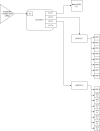
router setup - Copy.drawio.png

as in this?
 
(I'm guessing by splitter you meant an ethernet cable splitter, not an ethernet hub)
 
yes this

Yes ethernet cable splitter actually
Okay, one more thing - - right now, I'm using TightVNC to remotely access the other systems on the WLAN from my main computer. They all have assigned IPs, one per system, from 192.168.0.11, 12, 13 ...etc
If I use this cascading system with splitter cables, does that mess with the IP configuration?
 
Okay, one more thing - - right now, I'm using TightVNC to remotely access the other systems on the WLAN from my main computer. They all have assigned IPs, one per system, from 192.168.0.11, 12, 13 ...etc
If I use this cascading system with splitter cables, does that mess with the IP configuration?
this i will vaguely comment by saying you will have definitely have to reconfigure the system. I am not 100% sure
 
No offense, but there is some poor advice being given here.

If you're looking for speed + reliability, always, always use wired over wireless. And for the love of god, do NOT use Ethernet cable splitters! This was bad practice 20 years ago, never mind today. With the low cost of switches and Cat 6 cabling you should look to get a decent 24 or 48 port Gigabit switch (second hand off Ebay is fine) and cable each of your VPS up to this switch, then simply connect the switch to the router, job done. No need to over complicate things and none of your devices will need their IP addresses amending.
 
https://www.comptia.org/certifications/network
Try to download the videos of this course. It will help you understand these from support point of view to troubleshoot etc
Thank you!
I'll go through it.


choosing MikroTik routers and learning routerOs basics can be a good investment.
Thanks, I'm looking into this - - MikroTik looks like a company that produces routers, managed switches etc and RouterOS seems to be software you can install on a PC to make it function like a router (when using internet connection sharing I'm guessing). Unfortunately, MikroTek is pretty expensive for me, they're not available locally, but I'm guessing NetGear,TPLink,DLink etc would suffice?
 
No offence, but there is some poor advice being given here.

If you're looking for speed + reliability, always, always use wired over wireless. And for the love of god, do NOT use Ethernet cable splitters! This was bad practice 20 years ago, never mind today. With the low cost of switches and Cat 6 cabling you should look to get a decent 24 or 48 port Gigabit switch (second hand off Ebay is fine) and cable each of your VPS up to this switch.
Hey, thanks - - my initial post was asking about wired ethernet cable LAN.
I've found that most switches are really cheap upto 16 ports and then the price skyrockets (not sure why), and they seem to use up more power as well. Is there a way around this? can I use 2x 16 port switches instead of a single 24 port?
 
Hey, thanks - - my initial post was asking about wired ethernet cable LAN.
I've found that most switches are really cheap upto 16 ports and then the price skyrockets (not sure why), and they seem to use up more power as well. Is there a way around this? can I use 2x 16 port switches instead of a single 24 port?

Hi, i'm not sure which country you're in, or which sites you're using, but Ebay has plenty of good options, such as this for £30 :

https://www.ebay.co.uk/itm/39412655...Kh0D5vm9cXjVJ+K3pOgFrBksnyvb|tkp:BFBMluzqu7xg
That switch is quite old, but it will give you Gigabit speeds at a very low cost, there are tons of other options out there for a similar Cisco Catalyst or D-Link or something.

If you did want to use 2 x 16 port switches though thats absolutely fine also, just connect each one to your router, no other configuration required.
 
Hi, i'm not sure which country you're in, or which sites you're using, but Ebay has plenty of good options, such as this for £30 :

https://www.ebay.co.uk/itm/39412655...Kh0D5vm9cXjVJ+K3pOgFrBksnyvb|tkp:BFBMluzqu7xg
That switch is quite old, but it will give you Gigabit speeds at a very low cost, there are tons of other options out there for a similar Cisco Catalyst or D-Link or something.

If you did want to use 2 x 16 port switches though thats absolutely fine also, just connect each one to your router, no other configuration required.
Well this is pretty cheap and widely available where I live:
https://www.tp-link.com/us/home-networking/16-port-switch/tl-sf1016d/
Regarding the setup, is this what it ought to look like?
router setup - Copy (2).drawio.png
 
No offense, but there is some poor advice being given here.

If you're looking for speed + reliability, always, always use wired over wireless. And for the love of god, do NOT use Ethernet cable splitters! This was bad practice 20 years ago, never mind today. With the low cost of switches and Cat 6 cabling you should look to get a decent 24 or 48 port Gigabit switch (second hand off Ebay is fine) and cable each of your VPS up to this switch, then simply connect the switch to the router, job done. No need to over complicate things and none of your devices will need their IP addresses amending.
No offense, OP wanted a cost effective option, splitters were never bad from personal experience but i know most networking/Voip providers were always against this. I tell this from experience working in VoIP and networking industry as early as 2011.

Switch is not as good as a router for limiting broadcasts
 
Your diagram is perfect, that will work fine. However, those TP Link switches are only 100MB. They will work fine, but if you're looking for maximum performance, I'd be looking at 1GB options instead, they will obviously be a little more expensive.
 
Back
Top