30 Day Challenge ► To help me keep sane while helping you make money

Yesterday was chaotic, so I missed a day and will make two posts today instead! :)


Day 15
Halfway through!!! YAAY!!


► How to edit Facebook ad after it gains engagement

This has been around for years, but people still don't know about it.

Imagine you run an ad and gain some engagement when you realize you made a mistake in your copy or you figure out/get an idea to create a different message.

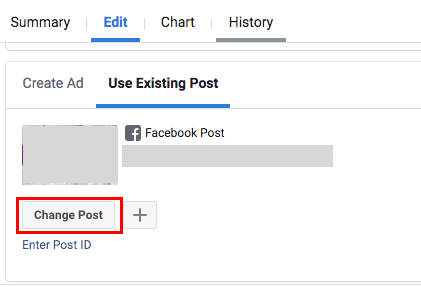
Once you run ads, you are not able to edit the copy. The solution is to 'unlink' the post from the ad.


Steps:
  1. Open your ad in a separate tab
  2. Open ads manager - open ad you want to change the copy
  3. Change post
    1PCirJ8
  4. Publish
  5. Refresh your post you want to edit (1) + edit
  6. Go back to 3 and change back to post you edited
  7. Publish

Since you do this in a span of a few minutes, you won't ruin your data or anything that is already optimized in your campaigns. At least I never had any problem, and the cost was the same.


That's it for today! :)
 
Missed a day or two :confused: But will hopefully get back on track.


Day 17


► Importance of retargeting campaigns


Most people don’t buy on the first visit. To boost your sales, you have to set up campaigns and remind them about your offer. 90% of the time retargeting campaigns will bring you the highest ROAS, better CTR, lower CPC, and of course, low CPA.

Customers came to the site for different reasons, and they visit different products/categories. The pages they visit represent different interest.

If you set up a simple retargeting campaign on Facebook, Google, and choose a native platform as Outbrain or Taboola, you will cover 80-90% of the internet. Don't overthink. Start small and build up things; you don't have to be everywhere right from the start.


A few important things:
  • Don't include everyone in your campaigns. Create different audiences and retarget them based on where in the buying process they are.
  • Frequency. This is important. You don't want people to get annoyed by seeing your ads multiple times per day and think you are desperate.

Best audiences to retarget:
  • All-time visitors or visitors of a specific page (Non-buyers)
  • Anyone who engaged with your Facebook page/IG/watched a video
  • People who abandoned cart
  • Your email list/customer file
  • Existing customers (Buyers)
If using Facebook always create LAA out of visitors and buyers.


Two must-have retargeting campaigns that can be implemented very quickly (low-hanging fruits ready to be collected):
  • Facebook Dynamic Ads - to remind them of what they visited. In order to run this, you need to set up a product catalog first. Shopify/Wocommerce have plugins that can help with that. To improve conversions of your bestsellers, create a custom image/video.

  • Google Dynamic Remarketing - similar to FB Dynamic ads. Include images, and bid more on visitors that are further in the funnel (like ATC).

If you have A LOT of traffic, especially in the EU, you should apply for Criteo. It' the best retargeting company I used which can bring you visitors back for a few cents per click even in very competitive markets.


That's it for today! :)
 
Day 18


► Best marketing book ever written


Today I'm sharing (in my opinion) the best marketing book ever written. If you have to read ONE marketing book, this is 100% the one.

Money Making Secrets of Marketing Genius Jay Abraham - a hard copy is expensive (a few hundred $), and I found it in a PDF version available online → http://infoweasels.com/seminar/JAYABRAHAM-XBOOK.pdf

Jay Abraham is a marketing genius specialized in direct response marketing. If you don't know him, I recommend to do some research and watch some videos.

This book is old and was written by one of his student who used a pan name Mr. X. He gathered everything that he learned from him, made a ton of money, and published the book. Jay, of course, sued him and eventually managed to get the copyrights.

This will take you back in time, and you will learn some fundamental marketing tactics used decades ago, but can be implemented in any business today.


That's it for today! :)
 
keeping my eyes open for this thread, new knowledge + implementation, thank you very much sincerely, mate!;)
 
It will take me longer than I planned to complete this challenge but I'm not giving up!

Day 20


► Give visitors what they want based on what they are searching on your website

Almost every website has search functionality. If you set up site search tracking in Google Analytics, you will be able to see what are visitors looking for on your website, get ideas for new content, improve your existing content based on keywords that didn't have good enough results, etc.

Do you have a store? Get ideas for your new products and improve your product page descriptions.


First, you have to turn on site search functionality:

Admin → View Settings → Site Search Settings
  • Turn on site search
  • Enter your query parameter in the input box
  • Click Save
smy7BjG


You can find the Site Search report under Behavior.


That's it for today! :)
 
Thank you for your wonderful journey, got lot to learn from your journey.
Best wishes!
 
Day 21


► 5-star reviewers ad boost

Running an ad on Facebook with reviews of your customers in a comment section will boost your ad, credibility, decrease your ad spend, ...

Simple steps:
1. Export emails of best reviewers and create a custom audience
2. Create and run an ad to that audience - you will get amazing reviews/comments on your ads from your previous buyers. (Objective: Reach)
3. Create new campaigns and use the same ad ID with the best social proof possible

Bonus:
- Create LAA of 5star reviewers and repeat no.3
- Retarget 5-star custom audience with new products - they already love you! = great ROAS

That's it for today! :)
 
Day 22


► Improve the Conversion Rate on your store by redirecting your customers to the checkout


We don't want customers to 'wander' around the page. We want them to get to and through the checkout as soon and as fast as possible.

Redirect your customers to the checkout page after they click 'Buy Now.' This could help you push your customers for the purchase and save your customers time for completing the order transaction.


This works best if you have:
  • General store
  • A store where at least 80% of customers buy only one product
  • High ticket products
  • For a product with no variables

Have a post-purchase system in place (upsell app, email sequence, upsell/cross-sell retargeting,...) to get higher AOV.

Important: This doesn't work for every store! Pay attention to your numbers with the help of Google Analytics. Always test only one major change at the time, so you have more control and a better perspective on what actually worked.

That’s it for today! :)
 
Day 23


► 2 Must have Google Ads campaigns for every store

Campaigns
1. Remarketing - Google Dynamic Remarketing (similar to FB Dynamic ads)
Include images, and bid more on visitors that are further in the funnel (like ATC). Test different products/offers all the time. + Display Ads.

2. Google Shopping Ads - easy to implement, and still very cheap.


You should:
  • Have Google Analytics linked to Adwords - this will be very handy to create audiences.
  • Do competitor research and look for what/how they are advertising - copy, offer, etc.
That's it for today! :)
 
Day 24


► Improve checkout experience and boost the Conversion rate

Most common reasons people abandon cart:
  • Shipping or any other extra cost (taxes)
  • No option to checkout as a guest (forced to open an account)
  • Slow delivery time
  • Complicated checkout process
  • No trustworthy

Simple tricks to improve checkout:
  • Provide free shipping
  • If you can customize checkout page, you should remove header menu and footer links (we don't want them to wander around the site)
  • Include email or phone (in the header)
  • Offer an option to checkout as guest
  • Provide multiple payment methods
  • Show them how much they saved
  • Make them feel secure (100% guarantee, free returns, testimonials, ...)
  • Improve site speed

Bonus
  • Install Google Analytics, HotJar, ... and analyze what your customers are doing on your site!
  • Recover abandoned carts with emails and retargeting campaigns!

That's it for today! :)
 
Day 25


► Power of Decoy Effect in marketing


What is the decoy effect?

From Wikipedia
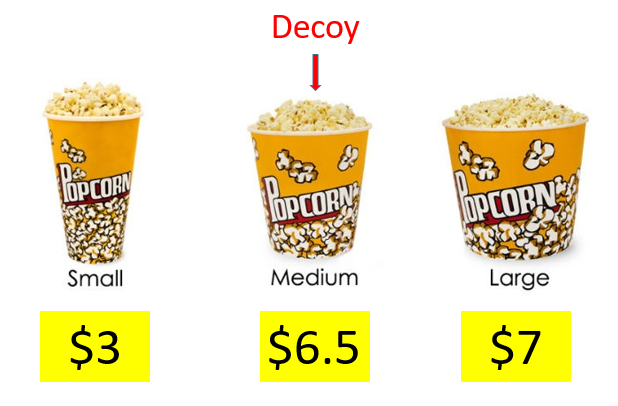
In marketing, the decoy effect (or attraction effect or asymmetric dominance effect) is the phenomenon whereby consumers will tend to have a specific change in preference between two options when also presented with a third option that is asymmetrically dominated.


Basically, it's a pricing strategy which with the use of psychology boosts sales of higher-priced products. With this approach, you are influencing customers' decisions by offering a third option.

This can be implemented almost anywhere and will be best explained with some great examples.


SrdbUHu


LS6lDtF

-----

h7BAaBh

63t6Jzb


----

That's it for today! :)
 
Day 26


► Get better results from your Facebook Lookalike Audiences.


Lookalike Audiences are performing very well lately, especially in the competitive markets. Always test as many LAA's as you can, stack them to improve targeting or use them to narrow down broad audience.

Below I will list best Lookalike audiences that can improve your targeting:
  • LAA of higher spenders → import a CSV of top spenders OR use an LTV option directly under custom audience, and create an LAA.

  • LAA of Buyers, IC, ATC, website visitors

  • LAA of email subscribers → import CSV file and create LAA.

  • LAA of people who spend time on your site → create an audience based on Visitors By Time Spent/Top 25% and create an LAA.

  • LAA of people who watched at least 75% video.

  • LAA of everyone who engaged with your post or ad in the last year.

  • LAA of Facebook fans.

That's it for today! :)
 
Day 27


► Personalized Images for Email Campaigns


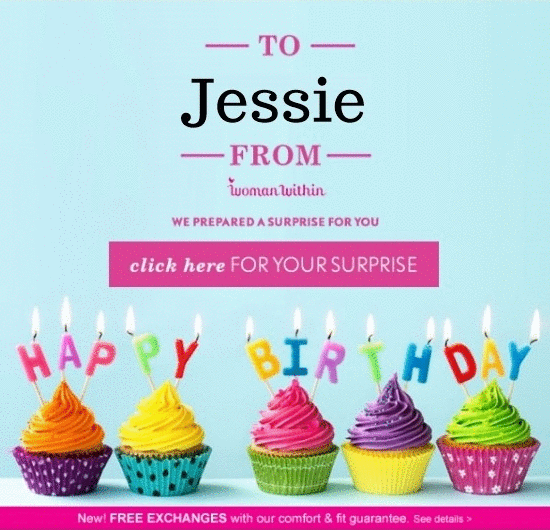
If you want to succeed with email marketing, you have to personalize your emails as much as possible, adding dynamic content.

Today I'm sharing a cool tool that can personalize images for your email campaigns. There are a lot of tools out there, but I've used https://niftyimages.com

This works very well for all kinds of campaigns, especially birthdays. I've tested a ton of images, and the best that worked is a person holding a sign with a subscriber's name in it.

4AdLRy5


That's it for today! :)
 
Back
Top