This isn't my work i just found modified versions of the code on github. look here hxxps://github.com/instagrambot/instabot (sorry can't post active links)do you have that codes?

You are using an out of date browser. It may not display this or other websites correctly.
You should upgrade or use an alternative browser.
You should upgrade or use an alternative browser.
[Tutorial] Setting up a FREE Instagram bot: instabot.py
DAMarius505
Newbie
- Mar 2, 2017
- 18
- 0
This isn't my work i just found modified versions of the code on github. look here hxxps://github.com/instagrambot/instabot (sorry can't post active links)
Thank you, I will check that out

Craig Douglas
Junior Member
- Jan 23, 2017
- 125
- 23
Hi Big44, I have downloaded these scripts. Could you tell me how to run them? it seems to be a different process than OPs scripts. I really just need to run the get_users_following script. Can you tell me how to get this done? I am not the best with python. I use kali linux.This isn't my work i just found modified versions of the code on github. look here hxxps://github.com/instagrambot/instabot (sorry can't post active links)


abraarukuk
Junior Member
- Mar 13, 2017
- 161
- 46
i am using office computer when i try to install python it says need elevation because my pc connected with server computer and asking for Domain password. Any idea t0 overcome this.Introduction
So you want to bot Instagram, but wouldn't like to throw hundreds of $$$ into the overpriced GUI tools that everyone on BHW seems to prefer? Worry no more! Vodkacola will help you spam the shit out of this social network, for FREE!
In this thread I will share the tool(s) I personally ended up using, and how to set them up, step by step.
What we will set up is an Amazon micro instance which runs these python scripts created by our lovely friend LevPasha: https://github.com/LevPasha/instabot.py
What features does this bot have?
-Follow by hashtags
-Unfollow
-Like by hashtags
-Comment by hashtags
-Custom follow and like limits
-Unlimited account support
-Proxy support
What using this bot requires?
-a PC
-Ability to read
What using this bot does NOT require?
-Coding skills
-Paying monthly fees for a motherfucking computer program
-Paying for anything at all
-Clicking referral links from some bullshit BHW tutorial thread
Setting up AWS Micro instance (optional):
In this part we will set up a server where the scripts can run when your computer or internet is turned off.
1: Register to Amazon Web Services as a free tier user: https://aws.amazon.com/free/
2: Set up billing alerts as instructed here: http://docs.aws.amazon.com/awsaccountbilling/latest/aboutv2/free-tier-alarms.html
3: Launch the virtual machine where you will run the bots, as instructed here: http://aws.amazon.com/getting-started/tutorials/launch-windows-vm/
Installing Python
Next you need to install Python either into your PC or the Amazon virtual machine you just set up. I'm not going to explain this myself, the internet is full of tutorials for this stuff!
Using instabot.py
1: Download instabot.py files: https://github.com/LevPasha/instabot.py/archive/master.zip
2: Extract the .zip to your desktop / porn folder / wherever
3: Locate the file called "example.py"
4: Right click
5: Open with notepad
6: Edit in your account info, tags, follow and like limits
7: Save as "opensourcebotsfuckyeah.py"
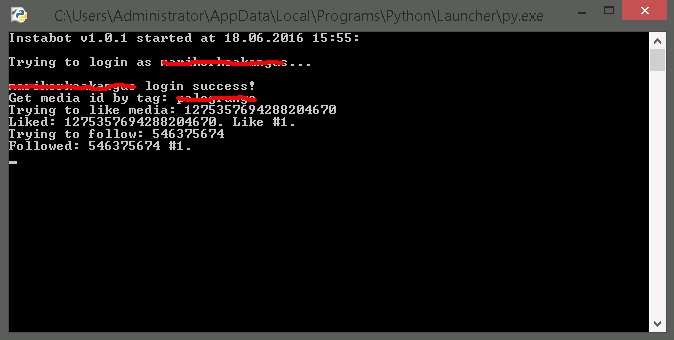
8: Run the file you just saved. If everything went right you should see a terminal like this:
9: Go outside and spend the money you just saved at a liquor store
TheVigilante
Banned - Multiple Rules Violations
- Aug 31, 2010
- 14,993
- 15,173
I am bookmarking this.

pip install -U instabot should solve it.ImportError: No module named 'instabot . where is the problem
Hi Big44, I have downloaded these scripts. Could you tell me how to run them? it seems to be a different process than OPs scripts. I really just need to run the get_users_following script. Can you tell me how to get this done? I am not the best with python. I use kali linux.
It tells you on the git page, read it
Craig Douglas
Junior Member
- Jan 23, 2017
- 125
- 23
Forgive my ignorance but it have read the entire git page to no avail. I am still unclear on how to run get_following. Do I run a "pip install instabot" and then run a "get_users_following" how does the script sign into Instagram? Any help is appreciated.pip install -U instabot should solve it.
It tells you on the git page, read it
abraarukuk
Junior Member
- Mar 13, 2017
- 161
- 46
Bookmarked!! Thanks man.
abraarukuk
Junior Member
- Mar 13, 2017
- 161
- 46
Introduction
So you want to bot Instagram, but wouldn't like to throw hundreds of $$$ into the overpriced GUI tools that everyone on BHW seems to prefer? Worry no more! Vodkacola will help you spam the shit out of this social network, for FREE!
In this thread I will share the tool(s) I personally ended up using, and how to set them up, step by step.
What we will set up is an Amazon micro instance which runs these python scripts created by our lovely friend LevPasha: https://github.com/LevPasha/instabot.py
What features does this bot have?
-Follow by hashtags
-Unfollow
-Like by hashtags
-Comment by hashtags
-Custom follow and like limits
-Unlimited account support
-Proxy support
What using this bot requires?
-a PC
-Ability to read
What using this bot does NOT require?
-Coding skills
-Paying monthly fees for a motherfucking computer program
-Paying for anything at all
-Clicking referral links from some bullshit BHW tutorial thread
Setting up AWS Micro instance (optional):
In this part we will set up a server where the scripts can run when your computer or internet is turned off.
1: Register to Amazon Web Services as a free tier user: https://aws.amazon.com/free/
2: Set up billing alerts as instructed here: http://docs.aws.amazon.com/awsaccountbilling/latest/aboutv2/free-tier-alarms.html
3: Launch the virtual machine where you will run the bots, as instructed here: http://aws.amazon.com/getting-started/tutorials/launch-windows-vm/
Installing Python
Next you need to install Python either into your PC or the Amazon virtual machine you just set up. I'm not going to explain this myself, the internet is full of tutorials for this stuff!
Using instabot.py
1: Download instabot.py files: https://github.com/LevPasha/instabot.py/archive/master.zip
2: Extract the .zip to your desktop / porn folder / wherever
3: Locate the file called "example.py"
4: Right click
5: Open with notepad
6: Edit in your account info, tags, follow and like limits
7: Save as "opensourcebotsfuckyeah.py"
8: Run the file you just saved. If everything went right you should see a terminal like this:
9: Go outside and spend the money you just saved at a liquor store
i ma getting error, when i run python it opene and close like a flash, am i missing something?

uncutu
Elite Member
- Aug 6, 2010
- 3,506
- 3,349
did you follow the instructions to install python & set up an amzn aws instance?i ma getting error, when i run python it opene and close like a flash, am i missing something?
edit: tested it on my desktop and had same issue. : you're probably missing the 'requests' requirement. installing that fixed it.
1)Download Requests from https://github.com/kennethreitz/requests click on clone or download button
2)Unzip the file in your python directory
3)For windows use command cd to the requests directory you just made then "setup.py install"
4) command cd to the instabot.py directory then "example.py"
Last edited:
abraarukuk
Junior Member
- Mar 13, 2017
- 161
- 46
did you follow the instructions to install python & set up an amzn aws instance?
edit: tested it on my desktop and had same issue. : you're probably missing the 'requests' requirement. installing that fixed it.
1)Download Requests from https://github.com/kennethreitz/requests click on clone or download button
2)Unzip the file in your python directory
3)For windows use command cd to the requests directory you just made then "setup.py install"
4) command cd to the instabot.py directory then "example.py"
haha, my account has been banned because of violating instagram rules.


FOAM
Newbie
- Jan 5, 2017
- 35
- 13
Thanks for posting this but I'm having issues getting the multi_script_CLI.py to run, I'm using a raspberry pi 3 with raspbian, I have both python 2 & 3 installed. The instabot script appeared to install correctly following the read me file provided.This isn't my work i just found modified versions of the code on github. look here hxxps://github.com/instagrambot/instabot (sorry can't post active links)
When I run the command "python multi_script_CLI.py" in terminal I get the following error:
Last login: Fri May 5 05:17:33 2017
pi@databass:~ $ cd instabot-master/examples
pi@databass:~/instabot-master/examples $ python multi_script_CLI.py
2017-05-05 08:50:11,659 - INFO - Instabot Started
2017-05-05 08:50:11,660 - INFO - Multi script run
Traceback (most recent call last):
File "multi_script_CLI.py", line 131, in <module>
print('INSTABOT VERSION: %s ' % bot.version())
File "/usr/local/lib/python2.7/dist-packages/instabot/bot/bot.py", line 133, in version
from pip._vendor import pkg_resources
ImportError: No module named _vendor
pi@databass:~/instabot-master/examples $
I installed the OP's version before hand & it worked perfectly without even trying. Had anyone else received this error & was able to get it running?
FOAM
Newbie
- Jan 5, 2017
- 35
- 13
To answer my own question here is the fix if you're getting the ImportError: No module named_vendor error on a Raspberry Pi using rasbian (Jessie) OS.
Open up terminal & type in:
From your file manager go to the same path above & open bot.py for reference where you need too edit, in Python goto the Edit menu & select "Go To Line" & type in line "133". It should look like this:
In terminal look for this above, when you find it you are going to want to add this exactly like shown:
So you are going to want to add in terminal the line saying "try:" with 8 spacebars in front of it, the line saying "from pip.vendor import pkg resouces" with 12 spacebars in front, the line saying except with 8 spacebars in front, & last the line saying import pkg_resouces with 12 spacebars in front. Press CTRL X & Enter to save it in terminal, you should be able to run the instabot script without issues once done correctly.
Here is the link to the ticket I opened
hxxps://github.com/instagrambot/instabot/issues/189
Open up terminal & type in:
Code:
cd /usr/local/lib/python2.7/dist-packages/instabot/bot
sudo nano bot.py
From your file manager go to the same path above & open bot.py for reference where you need too edit, in Python goto the Edit menu & select "Go To Line" & type in line "133". It should look like this:
Code:
    def version(self):
        from pip._vendor import pkg_resources
        return next((p.version for p in pkg_resources.working_set if p.project_name.lower() == 'instabot'), "No match")
In terminal look for this above, when you find it you are going to want to add this exactly like shown:
Code:
    def version(self):
        try:
            from pip._vendor import pkg_resources
        except ImportError:
            import pkg_resources
        return next((p.version for p in pkg_resources.working_set if p.project_name.lower() == 'instabot'), "No match")
So you are going to want to add in terminal the line saying "try:" with 8 spacebars in front of it, the line saying "from pip.vendor import pkg resouces" with 12 spacebars in front, the line saying except with 8 spacebars in front, & last the line saying import pkg_resouces with 12 spacebars in front. Press CTRL X & Enter to save it in terminal, you should be able to run the instabot script without issues once done correctly.
Here is the link to the ticket I opened
hxxps://github.com/instagrambot/instabot/issues/189
Forgive my ignorance but it have read the entire git page to no avail. I am still unclear on how to run get_following. Do I run a "pip install instabot" and then run a "get_users_following" how does the script sign into Instagram? Any help is appreciated.
This is only for *nix computers:
Run
$ pip install instabot
$ git clone hxxps://github.com/instagrambot/instabot (can't post live links)
$ cd instabot/examples
$ python script-of-your-choosing


swagbasedgodswag
Junior Member
- Mar 5, 2016
- 114
- 33
Question on the AWS setup. Obviously no one wants to be charged. Will this bot ever jeopardize being charged even with the billing alarm that you set? I'm planning on running 3 accounts no proxy. Will it also work for free when the 12 month free trial is over?