How do I fix the broken links?

tazarbm

Elite Member
Executive VIP
Jr. VIP
Joined
Oct 28, 2020
Messages
11,663
Reaction score
14,635
Hi, everyone!

First of all, mods please move this thread where appropriate cause I can't figure out for the life of me where to put it. Thanks :)

Now, on topic... I did create a similar thread yesterday asking about where to 301-redirect some broken URLs and I solved that issue. But now, as I dived deeper into checking the site's problems I'd like to fix them all fast, clean, and for good, but I don't know what the best course of action is for accomplishing this. Which is where I need your input, guys!

More specifically, I have an "autoblog" set up on an expired domain (well, it used be expired before I acquired it some 3 years ago). And I put "autoblog" in quotes because it's barely an autoblog, I just linked it to some software like ArticleForge (but not AF) that has auto-generated 52 pages of GPT-2 gibberish, and now I want to get rid of all this garbage and create some quality content. Basically, I want to turn this autoblog into a legit site because I figured that if this garbage ranks (which it currently does), I might as well turn this site into a legit one, but in order to do this I need to fix all of the issues that GSC, as well as the auditing tool (Screpy) that I'm using discovered.

Now, I don't mind completely wiping the entire site out (as in, uninstalling Wordpress and starting afresh with everything: content creation, site structuring - and yes, I am aware that I'll lose the current rankings but I don't care, etc.)... so, I don't mind doing this from scratch, but I think this will still not fix all of the issues that the site has (broken links, redirects, etc), as depicted in this screenshot:
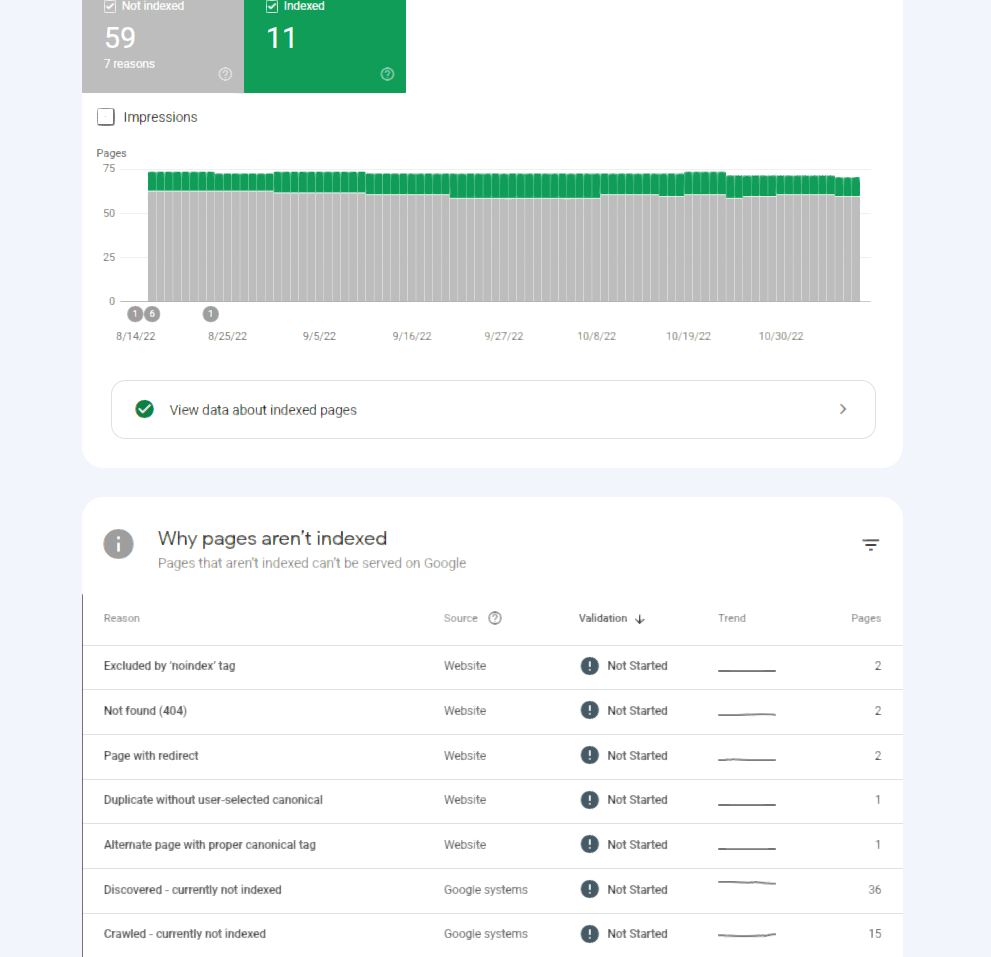
gsc.JPG


And so, this brings me to my actual question: how do I go about solving all of these issues? Is it as simple of a matter as 301-redirecting every unusable / broken link that I found in GSC and Screpy to the homepage, or is there something else that needs to be done? Because, after I re-install WP, the URLs of all 52 posts could still be found by GSC, not to mention URLs that the previous site had, the likes of...

Code:
?utm_source=listennotes.com&utm_campaign=ListenNotes&utm_medium=website
?ref=producthunt
?et_core_page_resource

These are just 3 examples of URLs that GSC detected and they almost definitely belong to the old site because I didn't create any of these, so my thinking is that if these URLs still exist after I have put WP on this domain last year then they're going to persist again after I re-install WP, which is where my problem lies in because such links will be detected as 404 URLs again, and like I said, I don't want to see any of these anymore if I'm going to put time and effort into creating a legit site.

So, what do you peeps think I should do? Just 301 the living hell out of every single URL that GSC and Screpy finds, at cPanel level, then re-install WP, and submit a new sitemap to Google, or is there something else that can be done that is more efficient in eradicating all of these issues?

Let me know...
 
same problem here, anyone willing to share they thought?
 
These are just 3 examples of URLs that GSC detected and they almost definitely belong to the old site because I didn't create any of these

Those URL suffixes are irrelevant as long as you have canonicalized the main page they point to.

For example if the page is


example.com/best-tips-for-peanut-enlargement

And it had the suffix (anything after the question ?❓ mark)

example.com/best-tips-for-peanut-enlargement?ref=ninjaforum.com

The end page must be the same but the important thing here is that the page has the rel=canonical set for such page.
 
Those URL suffixes are irrelevant as long as you have canonicalized the main page they point to.

For example if the page is


example.com/best-tips-for-peanut-enlargement

And it had the suffix (anything after the question ?❓ mark)

example.com/best-tips-for-peanut-enlargement?ref=ninjaforum.com

The end page must be the same but the important thing here is that the page has the rel=canonical set for such page.
what is "end page"? And where do I put the rel=canonical in? And for which page?

I apologize if my questions piss you off but I assure you that I'm genuinely asking them because coding (and technology in general) and me are not good friends, and sometimes I'm dumb as a brick when it comes to this stuff :p
 
what is "end page"? And where do I put the rel=canonical in? And for which page?

When you click on a page with parameter lets say https://example.com/?ref=test it sends you to that exact page.

Now, imagine that your page is https://example.com/category/subcategory/?et_core_page_resource

It must send you to https://example.com/category/subcategory/my-awesome-page

If you see an error 404 there, it means that obviously you don't have this page, but you used to have it. It doesn't mind if it has parameters like
?utm_source=listennotes.com&utm_campaign=ListenNotes&utm_medium=website or ?ref=producthunt or ?et_core_page_resource

Just focus in the page it takes you, in this case: https://example.com/category/subcategory/my-awesome-page

If you see a 404 there, you can do two things
1. Create a new page with that exact URL: https://example.com/category/subcategory/my-awesome-page
2. Create a Redirect (301) to another URL you think fits well for example
From: https://example.com/category/subcategory/my-awesome-page
To: https://example.com/another-awesome-page-i-already-have

About Canonicals. I'm going to assume that you are using Wordpress. Most popular SEO plugins like Yoast, RankMath, already set the canonicals for you
If you check the source page of any page you may see such canonical. Example if you press F12 here in this page (in the computer with Chrome)

1668290096412.png


You will see that in this case, XenForo, already sets canonicals. This is very useful specially to avoid this kind of situations, because you are saying to Google, that

https://example.com/category/subcategory/my-awesome-page?et_core_page_resource
Is exactly the same to: https://example.com/category/subcategory/my-awesome-page

Check more info about canonicals here. But if it looks too technical for you, just know that most SEO plugins in Wordpress simply set canonicals by default, so you don't have to care about it.

I apologize if my questions piss you
NP, we are here to help each other
 
@SirLouen I'll admit that I still don't understand what you mean. But I appreciate you taking the time to enlighten me nonetheless.

I promise I'll go over everything you wrote tomorrow as right now I can barley keep my eyes opened. Thanks again for taking the time to explain it so thoroughly, and rest assured that I'll bug you again tomorrow if there's something that I don't understand

NP, we are here to help each other
that's what I'd like to believe, too but sadly not everyone is of our opinion :)
 
You should ignore most of these GSC errors. Also, you should do manual internal linking and don't worry about the rankings. I have done this pretty much many times and restructuring doesn't hurt.
 
When you click on a page with parameter lets say https://example.com/?ref=test it sends you to that exact page.

Now, imagine that your page is https://example.com/category/subcategory/?et_core_page_resource

It must send you to https://example.com/category/subcategory/my-awesome-page

If you see an error 404 there, it means that obviously you don't have this page, but you used to have it. It doesn't mind if it has parameters like
?utm_source=listennotes.com&utm_campaign=ListenNotes&utm_medium=website or ?ref=producthunt or ?et_core_page_resource

Just focus in the page it takes you, in this case: https://example.com/category/subcategory/my-awesome-page

If you see a 404 there, you can do two things
1. Create a new page with that exact URL: https://example.com/category/subcategory/my-awesome-page
2. Create a Redirect (301) to another URL you think fits well for example
From: https://example.com/category/subcategory/my-awesome-page
To: https://example.com/another-awesome-page-i-already-have

About Canonicals. I'm going to assume that you are using Wordpress. Most popular SEO plugins like Yoast, RankMath, already set the canonicals for you
If you check the source page of any page you may see such canonical. Example if you press F12 here in this page (in the computer with Chrome)

View attachment 232258

You will see that in this case, XenForo, already sets canonicals. This is very useful specially to avoid this kind of situations, because you are saying to Google, that

https://example.com/category/subcategory/my-awesome-page?et_core_page_resource
Is exactly the same to: https://example.com/category/subcategory/my-awesome-page

Check more info about canonicals here. But if it looks too technical for you, just know that most SEO plugins in Wordpress simply set canonicals by default, so you don't have to care about it.


NP, we are here to help each other
Ok, I went through your message with a clear head and I understand at least half of what you're saying. I'll get to this in a moment, but first...

Yes, I use Wordpress, but I'm not using Yoast / RankMath. I'm using the SEO Framework plugin and apparently it does add canonical tags to each page (whatever this tag does). I just checked the homepage and a few internal pages and they all have that tag pre-pended to them. So, I guess I'm good in this regard and don't need to do anything else??

Now, the problem is that some of the errors still persist (although it's probably because my GSC didn't have time to pick up on the canonical changes yet as I just installed this SEO plugin yesterday, so probably that more days / weeks are needed for google to pick these changes up)

But like I said, installing the SEO plugin still didn't fix all issues that I'm noticing in my GSC. And one of those issues is a URL that keeps looping on itself and GSC labels this issue as "multiple redirects", which seems like a fair assessment based on how this URL behaves. In the screenshot that I posted in my initial post GSC mentions this self-looping thing under the "Duplicate without user-selected canonical" tab, and the URL's looks like this:
Code:
https://mydomain.com/?et_core_page_resource=

So, how do I fix this URL? Do I wait days / weeks (if this will even happen on its own) for GSC to pick up the changes made by the SEO plugin, or what's the solution?

Check more info about canonicals here. But if it looks too technical for you, just know that most SEO plugins in Wordpress simply set canonicals by default, so you don't have to care about it.
ah-ha! So that's the deal with canonicals... Well, TIL :)
 
Hey bro

I before met this thing, indeed, those ?!# or whatever shit characters can be perfectly 301 redirected too!

I am not tech, I forgot the code, but I referenced this guide:


https://stackoverflow.com/questions...-htaccess-301-redirect-that-contains-a-symbol
thanks for the guide! And yeah, I already 301'd them all, but I'm not sure if I should wait for Google to make the changes on their own, or whether I should manually update Google myself (and if yes, how.). Do you happen to know?
 
@SirLouen hey, buddy! Just wanted to say that the redirects don't do anything. I tried with plugin, cpanel and .htaccess but these 3 simply won't redirect to anywhere:

Code:
?utm_source=listennotes.com&utm_campaign=ListenNotes&utm_medium=website
?et_core_page_resource
?ref=producthunt

I'm clueless what else to do....
 
@SirLouen I'll admit that I still don't understand what you mean. But I appreciate you taking the time to enlighten me nonetheless.

I promise I'll go over everything you wrote tomorrow as right now I can barley keep my eyes opened. Thanks again for taking the time to explain it so thoroughly, and rest assured that I'll bug you again tomorrow if there's something that I don't understand


that's what I'd like to believe, too but sadly not everyone is of our opinion :)

I'm clueless what else to do....

You don't have to redirect parameters.
Anything behind the # and the ❓ in a URL is not part of such URL itself, are only modifiers.

Since you have TSF, you don't need canonicals then. Now you have to make sure that the URL without the modifiers, exists

Just pick the URL, remove the parameters (any text after the # and the ❓), and see if works and it is not a 404.


In case the URL works without the 404, simply go to GSC to the place you see the Not found (404) and set "Validate Fix", example:

1668340129902.png
 
There are a few ways to fix broken links. One way is to use a link checker tool, which will help you identify and fix broken links on your website.
 
Back
Top