
You are using an out of date browser. It may not display this or other websites correctly.
You should upgrade or use an alternative browser.
You should upgrade or use an alternative browser.
[Exploit] Use AWS As A Parasite


RandomX
Senior Member
- Jul 19, 2017
- 918
- 288
Just go to Google Search Console and click 'Add Property' after that enter the URL https://s3.amazonaws.com/enter-your-keyword-here/
Then when it asks you to verify, choose the download file option and upload that file on S3 the same way as described in the method.
Thank you for your information but i have a problem to add a property on Google Search Console, when i try to add i got this error "Failed to add property "https://s3.amazonaws.com/key_words/" (Invalid site URL)." Is there any solution?
Thank You

kn1ves
Power Member
- Aug 25, 2018
- 711
- 1,249
!! Important !!
I see that Google has updated it's Search Console and it no longers allows users to verify any URL unless you have access to the domain, however, there is a work around:
Use the following link to add property: https://www.google.com/webmasters/verification/home?hl=en and you should be good to go.
Please note that this might not be the optimal method for indexing now as it will be visible to other owners of the domain, try blasting it with links for a safer way to index this property.
I see that Google has updated it's Search Console and it no longers allows users to verify any URL unless you have access to the domain, however, there is a work around:
Use the following link to add property: https://www.google.com/webmasters/verification/home?hl=en and you should be good to go.
Please note that this might not be the optimal method for indexing now as it will be visible to other owners of the domain, try blasting it with links for a safer way to index this property.

Yee
Regular Member
- Dec 31, 2018
- 227
- 58
Do you mean JSON-LD for schema or something else ?
I like this method because I can create a custom Schema for my parasite.


gvncerri
Power Member
- Jun 10, 2011
- 617
- 129
Anybody who has worked with AWS before can figure this method out in 5 minutes.
Please, following your steps the resulting URL has this format: https://bucket-name.s3.amazonaws.com/file-name.html
Did anything change lately?
kn1ves
Power Member
- Aug 25, 2018
- 711
- 1,249
Not sure, maybe something wrong with your region?Please, following your steps the resulting URL has this format: https://bucket-name.s3.amazonaws.com/file-name.html
Did anything change lately?

2makemoney
Regular Member
- Oct 10, 2011
- 467
- 100
Awesome guide. Thanks for sharing. I'm guessing you can do this for as many keywords as you want by making a bunch of buckets?

astro2014
Senior Member
- Feb 7, 2014
- 1,084
- 613
I first found about this method a couple of months back after coming across this.
Anybody who has worked with AWS before can figure this method out in 5 minutes.
First of all, let's get a glimpse of what you'll be able to achieve once you're done reading this.

The URL will be something like https://s3.amazonaws.com/xyz/keyword.html
You can either use this as a parasite or simply for a backlink. Whatever floats your boat. If you don't know what a parasite is, check out this amazing guide by @710fla
It's also quite easy to index these kinds of pages, just use 'Request Indexing' after adding to the Search Console.
When I figured this out, I thought I'll offer this as a service on BHW but I figured I'll be too busy with college till May 19' and after that, I'll be working on starting my own SEO Agency. So here's how you do this.
Firstly, make an account on AWS and add your credit card information. This should be pretty easy to achieve.
After logging into your account navigate to S3

You should see something like this

Click on '+Create Bucket' button and use the following settings

The name of the bucket is important, use your primary keyword here. Also, make sure to select N. Virginia as the region or you'll end up with a domain with lesser authority.
Now, hit next two times and use the following settings
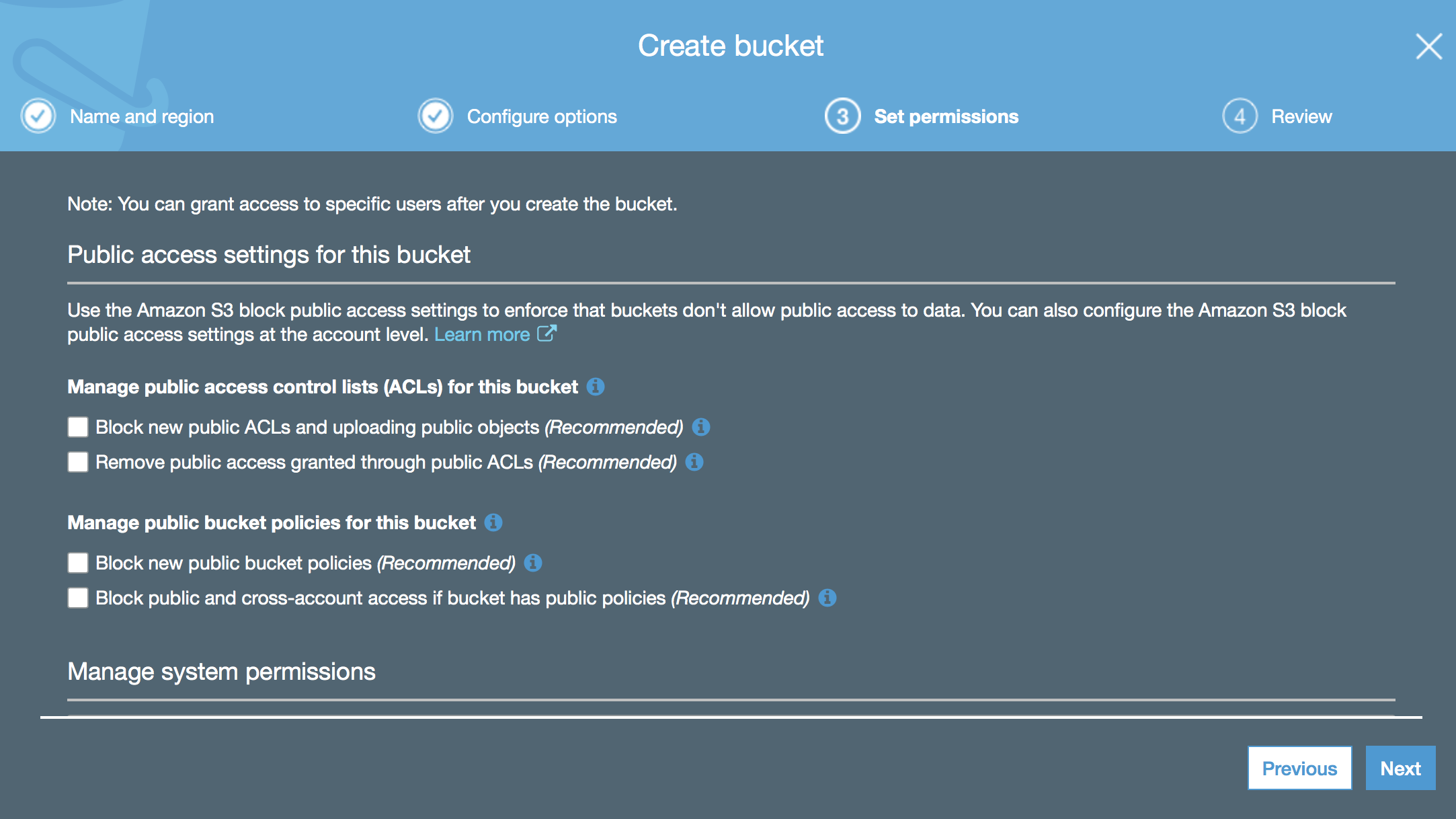
Keep hitting next and finish creating your bucket.
Next, click on your bucket once and hit 'Permissions'
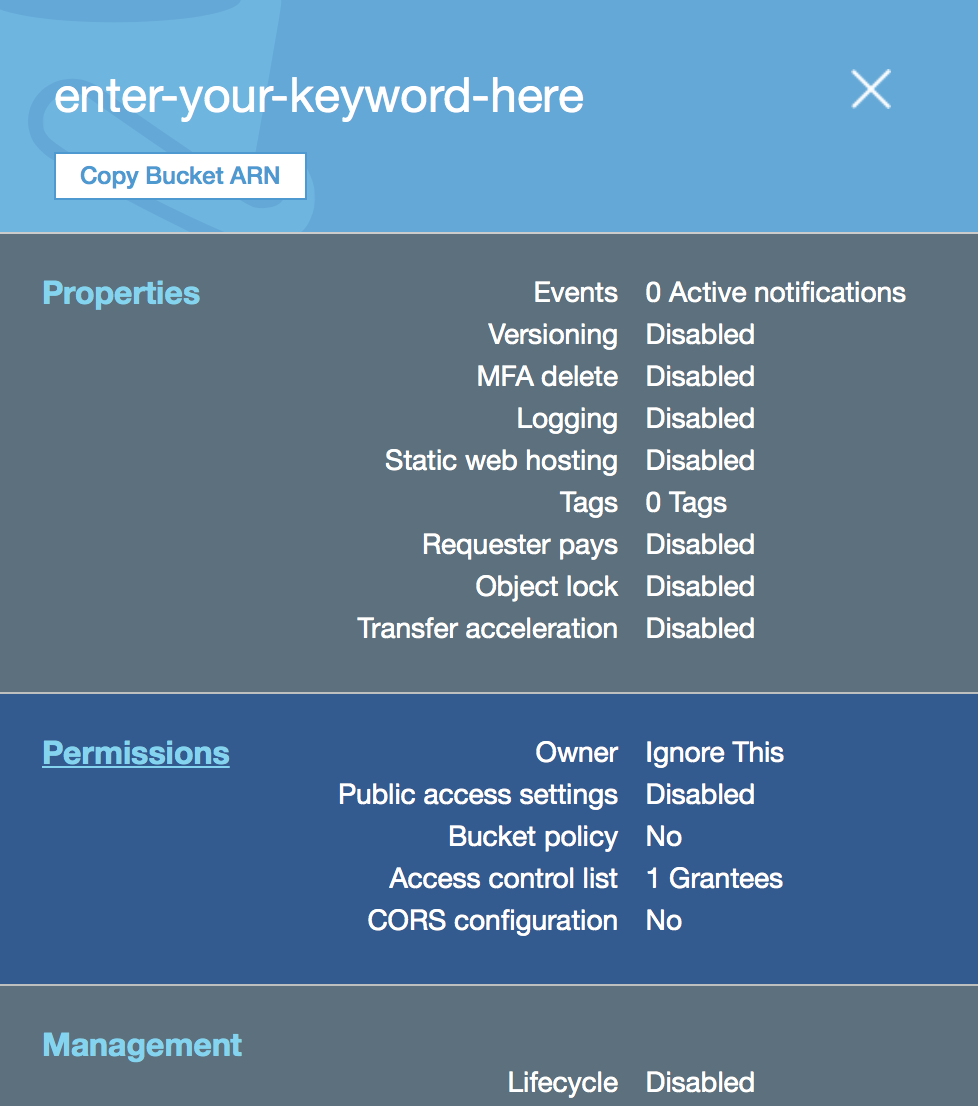
You'll end up on this page, click 'Access Control List'
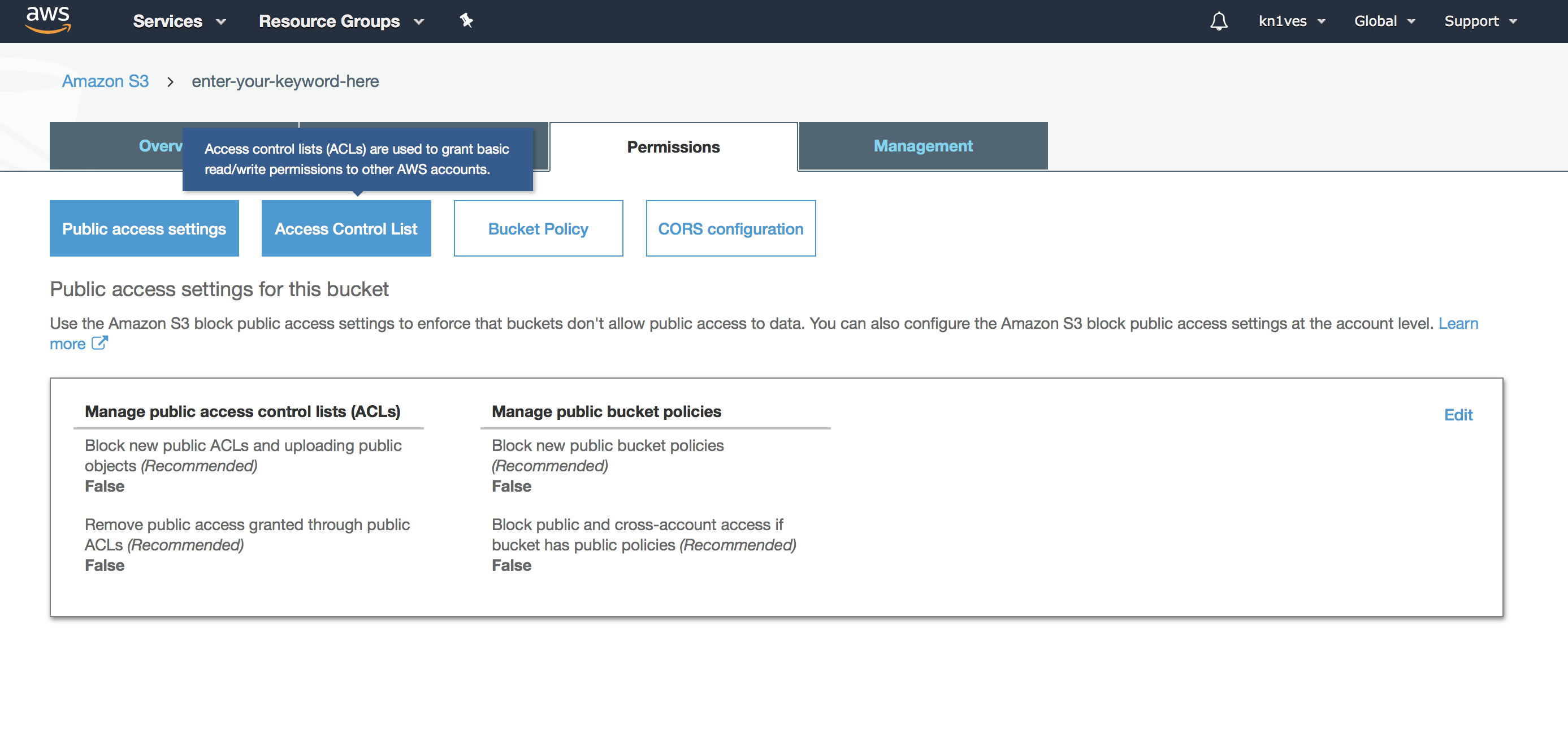
Scroll down and click on the highlighted portion as shown
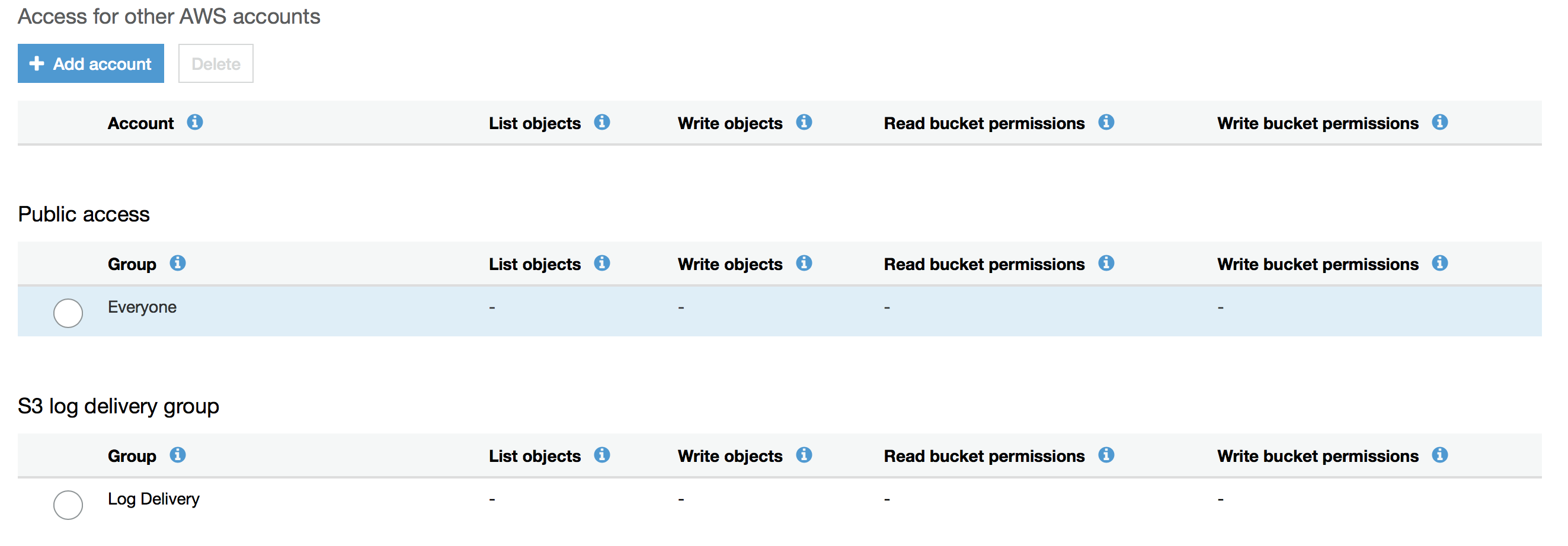
After doing this, copy the following settings and hit 'Save'

If you are seeing this, you've done everything correctly as of now

Now, you need a static HTML page, you can get by either coding it yourself or hiring someone to do it for you. You can also use some plugin which converts WP to static code (haven't tried this though).
Once you have this, you need to upload these files.
First, go to the 'Overview' tab and hit the 'Upload' button, then, upload all the necessary files for you static web page

Hit 'Next' and again, copy my settings (lol)

Hit 'Upload' and your files will be uploaded. If you see this kind of screen then you're doing everything correctly
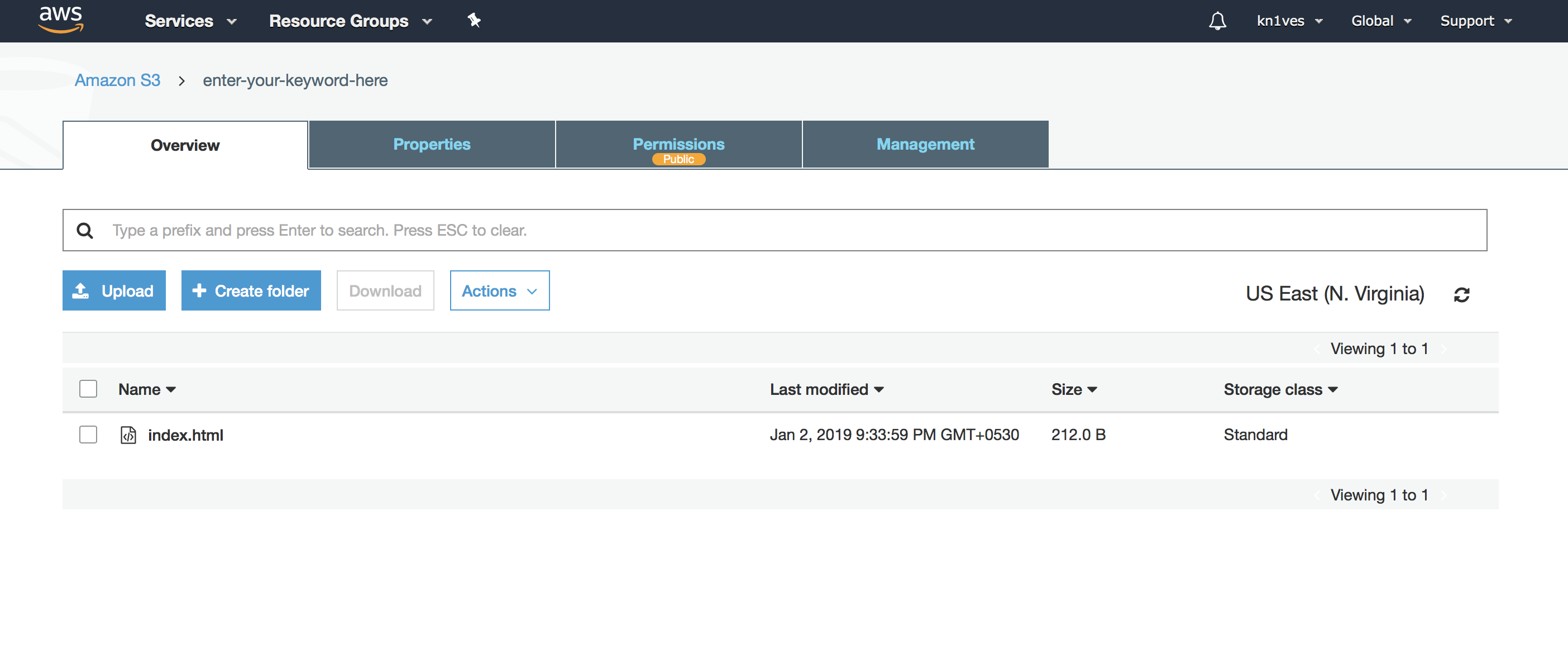
That's it you're done. Here is the webpage:http://s3.amazonaws.com/enter-your-keyword-here/index.html
You can get really creative with this method, in my college internet access is restricted by disabling certain domains like youtube by the administrator. I used this as a reference (XD) for one of my exams as AWS wasn't banned lol.
https://s3.amazonaws.com/cajunb/important.pdf
This means that you can even create PDF backlinks using this. If you have a unique idea using this method, I'd love to hear it from you in this thread.
As I said, you can add this in the Search Console and index it within hours. Just upload the verification file as well.
I hope this helped you, if you run into some troubles, please don't PM me, post it in the thread instead.
I have two questions that I hope someone who knows about this can answer.
1.) Does it cost anything to use this service? I'm asking because credit card information must be provided and I don't want to be charged in the future.
2.) I've been looking for the pages that you have created with this method and that you give as an example, and they are not even indexed in G.
This being so, how can this be useful to, for example, generate visits to a website?
In fact, I googled the keywords "enter your keyword here" "index.html", "cajunb" and "important.pdf" and no AWS-related URLs appear within the first 1000 search results in G.
This then makes me doubt the effectiveness of this method.
I'm sorry if the questions are stupid, but I'm asking precisely because I don't know the answer.

- Jan 25, 2010
- 1,536
- 980
I have two questions that I hope someone who knows about this can answer.
1.) Does it cost anything to use this service? I'm asking because credit card information must be provided and I don't want to be charged in the future.
2.) I've been looking for the pages that you have created with this method and that you give as an example, and they are not even indexed in G.
This being so, how can this be useful to, for example, generate visits to a website?
In fact, I googled the keywords "enter your keyword here" "index.html", "cajunb" and "important.pdf" and no AWS-related URLs appear within the first 1000 search results in G.
This then makes me doubt the effectiveness of this method.
I'm sorry if the questions are stupid, but I'm asking precisely because I don't know the answer.
Indexing is a bit harder but HTML pages index fine using paid indexers. PDFs (oddly) seem to be harder to index with AWS right now.
I ran a few tests recently just to see if the landscape had changed. I wrote highly optimized 100% original content myself (1 page), HTML, images included. Uploaded S3 per the usual parasite method. Blasted a drip of decent quality GSA links (15,000) AND indexed those links.
None of my tests rank in the top 1000 for low competition keywords (including local keywords). If you research the pages that were ranking on S3 or even S3 subdomains overall you can see a very CLEAR drop off point where Google obviously made some sort of internal manual adjustment to the algo to combat this method. Very clear "off a cliff nosedive" pattern across the board.
astro2014
Senior Member
- Feb 7, 2014
- 1,084
- 613
Okay, thanks, but...Indexing is a bit harder but HTML pages index fine using paid indexers. PDFs (oddly) seem to be harder to index with AWS right now.
I ran a few tests recently just to see if the landscape had changed. I wrote highly optimized 100% original content myself (1 page), HTML, images included. Uploaded S3 per the usual parasite method. Blasted a drip of decent quality GSA links (15,000) AND indexed those links.
None of my tests rank in the top 1000 for low competition keywords (including local keywords). If you research the pages that were ranking on S3 or even S3 subdomains overall you can see a very CLEAR drop off point where Google obviously made some sort of internal manual adjustment to the algo to combat this method. Very clear "off a cliff nosedive" pattern across the board.
Does it cost anything to use AWS for this purpose?
Finally, I don't understand if this really works and has a positive impact on a website.
I appreciate it if you can answer this.
- Jan 25, 2010
- 1,536
- 980
Okay, thanks, but...
Does it cost anything to use AWS for this purpose?
Finally, I don't understand if this really works and has a positive impact on a website.
I appreciate it if you can answer this.
No, its free up to a certain threshold, at which point you'll get an email from Amazon saying you've hit your free limit of 'requests' for that month. You won't be charged unless you upgrade plans.
- Jan 25, 2010
- 1,536
- 980
thank you for this, how do i add to search console to index it? thanks much appreciated
Google no longer allows you to add these URLs to GSC. You have to index through other means. I used a paid indexing service.
IMMFROMPORTUGAL
Regular Member
- Nov 9, 2020
- 208
- 87
i think this method is a little dead... this platform lost lots of authority.
