Permanently Closed Marketplace Sales Thread

Status
Not open for further replies.
Hi, What is limit free Moz API ? I can't find anything at their site. How many requests we can make with free API key ?
 
Can I get a trial copy?

We dont have trial copies unfortunately, but please take a look at the hundreds of video's on https://www.youtube.com/user/looplinescrapebox/videos which show many of the features of ScrapeBox.

Hi, What is limit free Moz API ? I can't find anything at their site. How many requests we can make with free API key ?

On this page https://moz.com/products/api/pricing it lists "Free access allows for one request every ten seconds, up to 2,500 rows per month"
 
@Sweetfunny @loopline
Hi guys,
any Idea why RSS generator always gives me somethng like this?
Screenshots attached
9nskf1r
0C9Vp25
 

Attachments

  • 1111.png
    1111.png
    41.4 KB · Views: 61
  • 2222.png
    2222.png
    31.1 KB · Views: 57
Just a quick note, i've been impacted by quite severe bushfires. Fortunately the house was not burned down, however many were not so lucky. As a result it's effected power and internet, cut roads etc. I've come up with a solution to get online which is slower than dial up (which may or may not last), sorry for the delays the past few days as i'm slowly working through the backlog of support.
 
sorting proxies by country does not work in the configurator and proxies that are prohibited are saved
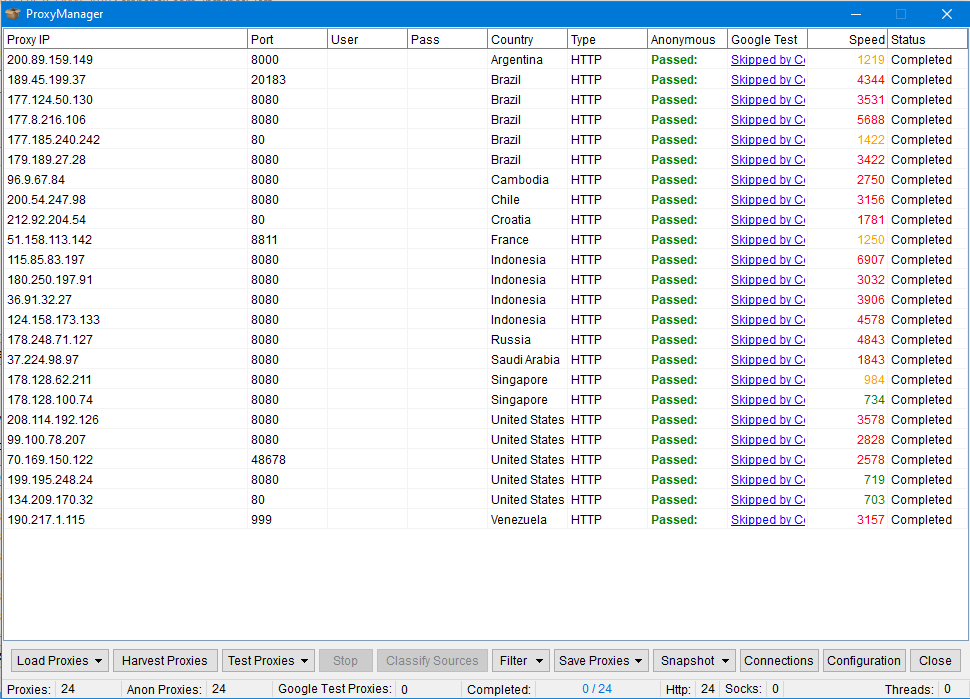
 
You did not understand me.This option does not work.
screenshot2019-11-17007.1573943335.png


For example, if proxies are prohibited for Brazil, then they are not filtered and get into the list.
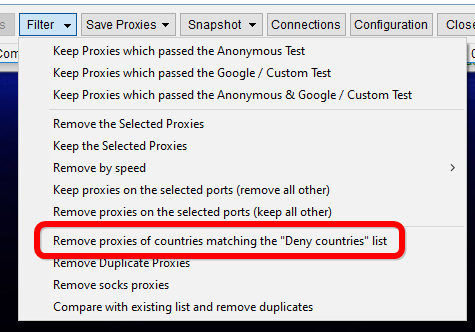
You need to click Filter >> Remove proxies of countries matching the "Deny Countries" list

suXGeqt
 
I recently purchased Automator plugin.

1. Is there a way to abort the command after certain number of seconds?

For example: I run proxy checker and want it to run only 60 seconds after which I want it to abort and continue running the next command in sequence.

2. Is there a command to call another Automator file, run it, and then continue to run next command?

If those options do not exist, how can I submit them as a feature request?
 
I recently purchased Automator plugin.

1. Is there a way to abort the command after certain number of seconds?

For example: I run proxy checker and want it to run only 60 seconds after which I want it to abort and continue running the next command in sequence.

2. Is there a command to call another Automator file, run it, and then continue to run next command?

If those options do not exist, how can I submit them as a feature request?

Unfortunately to implement this would require substantial modifications to all addons and all code called from the Automator function. There's 24 addons compatible with the Automator, so it's like rebuilding 24 separate programs... actually 25 because ScrapeBox needs to be modified too. So at the moment it's not easily possible to add this sorry.
 
How about a workaround, create additional option for proxy harvester and proxy checker only. The option should enable to enter the amount of seconds, and after the time has passed after running the command, send the abort or stop call to the command.

The default should be unchecked state for the timer ofcourse.

Automator should just continue with a next command after that. When I abort manually, this is what automator already does so it most likely doesnt require changes in other than the two mentioned commands.

This is all to speed up the execution of the program when we know that after just about 1 or 2 minutes the software can find enough of working proxy for whatever we need to do. This in turn enables me to do more in shorter amount of time.

Would this be a more managable change?
 
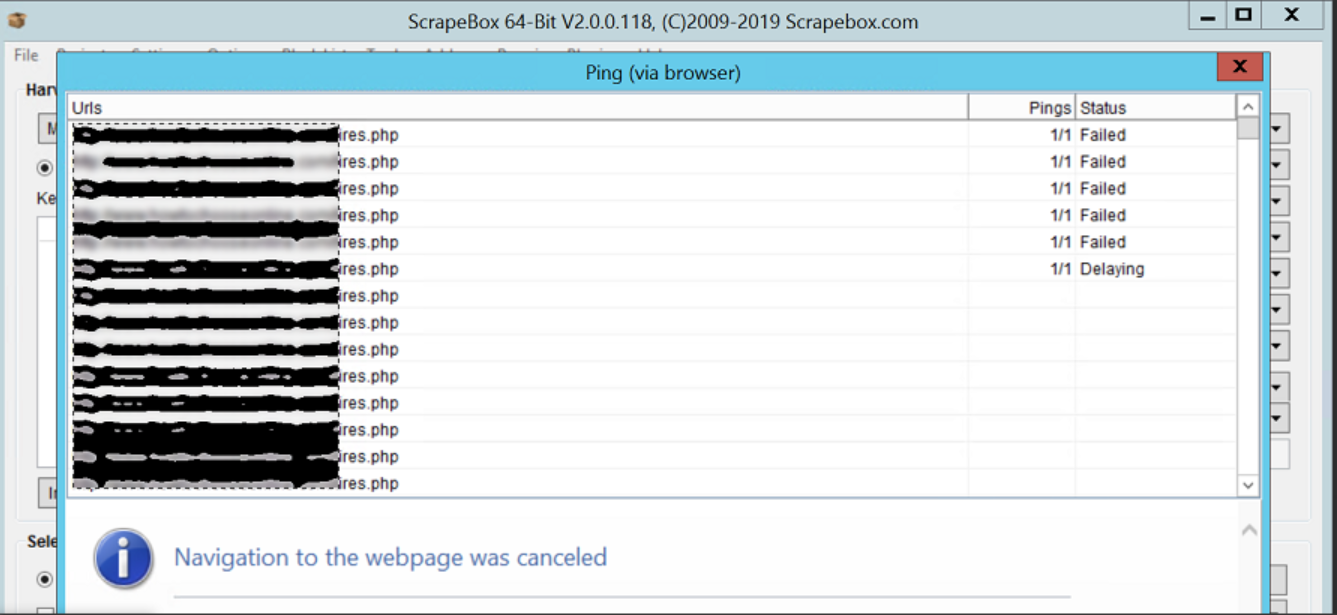
Hi guys I have a problem with the Ping feature, with the option "browser ping" checked it only works without proxies. When I use proxies (scraped with scrapebox, and tested OK a few seconds before) I get these errors, thanks for your help :

4715c4931df55707e4a8c6974e8641eb.png
 
EDIT : it doesnt work without proxies as well.
The only ping feature that works is the one that is not using browser.
 
hi guys,

locking threads is driving me mad
I am so frustrated

Scrapebox always looks like it is working but when finishes I can not do anything (it freezes)

answer from support:

When its “frozen” assuming you can move the window around and everything looks normal but you can’t do anything and the count does change That means that something has locked 1 or more of the threads. This can be security software such as anti-virus, malware checkers and firewalls. So you should whitelist scrapebox in all security software and then you can whitelist the entire scrapebox folder as well.

I installed SB on new computer, I whitelisted (file, and app) in windows defender, and then swithched win.def completly off

no other program is running, no outlook, no microsoft office, no google chrome etc.

but it is still not working, freezes when finish task or when I click STOP, and then I can not export

I saw that many people said the same thing, so my question is

How did you deal with that?

or

Just abandoned using scrapebox?
 
hi guys,

locking threads is driving me mad
I am so frustrated

Scrapebox always looks like it is working but when finishes I can not do anything (it freezes)

answer from support:

When its “frozen” assuming you can move the window around and everything looks normal but you can’t do anything and the count does change That means that something has locked 1 or more of the threads. This can be security software such as anti-virus, malware checkers and firewalls. So you should whitelist scrapebox in all security software and then you can whitelist the entire scrapebox folder as well.

I installed SB on new computer, I whitelisted (file, and app) in windows defender, and then swithched win.def completly off

no other program is running, no outlook, no microsoft office, no google chrome etc.

but it is still not working, freezes when finish task or when I click STOP, and then I can not export

I saw that many people said the same thing, so my question is

How did you deal with that?

or

Just abandoned using scrapebox?

Sometimes it's just a matter of trying to eliminate things. Are you using free proxies? They are renowned for poor connection performance, if you have low quality proxies the results are going to represent that. Are you using quality paid proxies? Have you tried this with and without proxies? How about your DNS settings, some ISP's default DNS may throttle large numbers of connections so changing to a more robust free DNS provider can sometimes greatly assist.

Also your list, if you are hitting multiple URL's from the one site especially using a lot of connection you can essentially perform a DDOS on their site which introduces blocking measures. So you can try as a test using URL's from all completely different sites to eliminate that.
 
Status
Not open for further replies.
Back
Top