Need help to create custom checkout page in wordpress.

anup999

Senior Member
Joined
Feb 21, 2014
Messages
1,123
Reaction score
454
I'm creating a new site and I want custom checkout page there.
I tried to search on the internet but never found a solution.

I created buy now buttons like this. (not my site's screenshot)

Screenshot_1.jpg


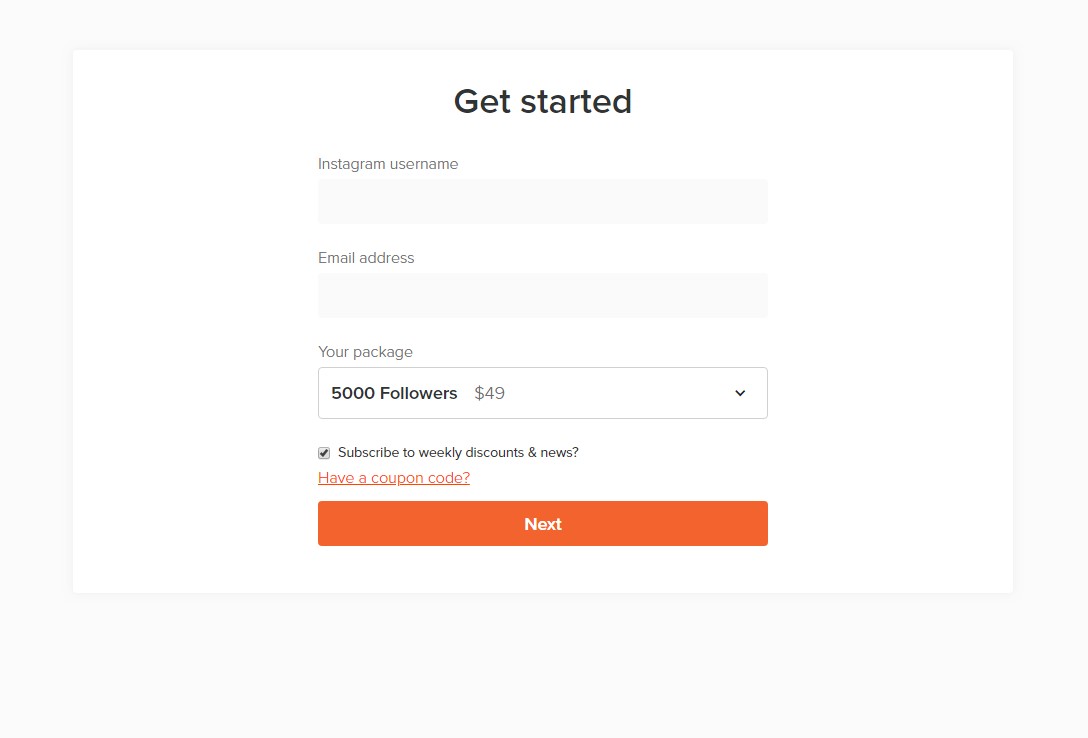
after clicking on choose I want the form like this to appear.
Screenshot_2.jpg


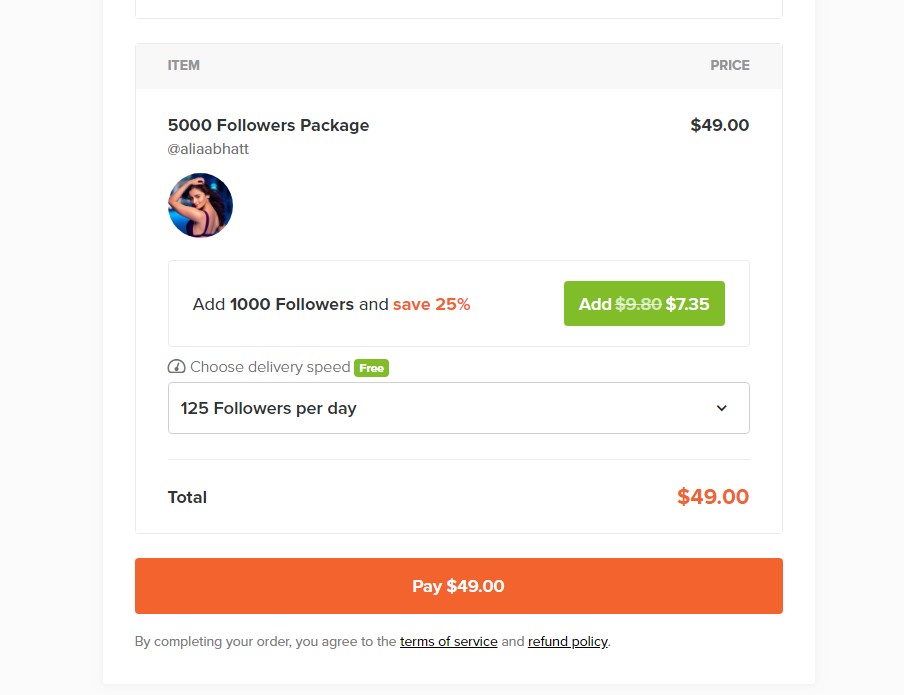
After filling the info then next payment page has to appear
Screenshot_3.jpg


Does anyone have an idea how to do this?
I saw many WordPress sites who have this type of checkout process. But never found how to do this on my own website.
 
Depending on your knowledge of Wordpress. An easy plug in that I use for this type of stuff is WPSimplePay
 
anyway you need install woocommerce
If I understand you correctly
Already installed woo but it dosent have customized product page feature that I mentioned in OP.

Depending on your knowledge of Wordpress. An easy plug in that I use for this type of stuff is WPSimplePay
Thanks for suggestion, but it only helpful for payment not for creating customized forms. Do you know any other.
 
I think I saw a plugin for this kind of checkout before but cant remember the name.
 
I think I saw a plugin for this kind of checkout before but cant remember the name.

If you are using WooCommerce search for "Checkout Field Editor (Checkout Manager) For WooCommerce" by ThemeHigh. I've only use the free/basic version but it does allow you to customize the checkout page to some degree.

If you can tell us a bit about what payment system you're using that would be helpful.
 
@anup999 it has custom forms in the paid version, just not the lite. I currently use this plugin for my custom forms and checkout processes.
 
@anup999 it has custom forms in the paid version, just not the lite. I currently use this plugin for my custom forms and checkout processes.

I'll just add though that you can just create a form above the payment button. That way you don't even have to pay for the pro version, it just means 2 clicks for your customer rather than one
 
If you are using WooCommerce search for "Checkout Field Editor (Checkout Manager) For WooCommerce" by ThemeHigh. I've only use the free/basic version but it does allow you to customize the checkout page to some degree.

If you can tell us a bit about what payment system you're using that would be helpful.

If I have to edit forms on woocommerce checkout, I use the plugin they offer:
https://woocommerce.com/products/woocommerce-checkout-field-editor/

Festinger has it in the vault (check sig link) or give me sometime and I will PM you with one version earlier (of the latest available). You will probably need to design some sort of pricing table using plugin or manually for the first step.
 
If you are using WooCommerce search for "Checkout Field Editor (Checkout Manager) For WooCommerce" by ThemeHigh. I've only use the free/basic version but it does allow you to customize the checkout page to some degree.

If you can tell us a bit about what payment system you're using that would be helpful.
Paypal and razor pay
 
I was looking for this , i could not figure how to do it, especially making the plugin feetch the instag photo profile when aaclient submit his account.
 
You have to install woocommerce and a plugin which will allows you to process payments if I understood good. If you need help send me a PM. I will be able to help you for free.
 
I have seen quite a bit of plugins on themeforest.net that accomplish custom forms. Sorry I can't provide names for them from the top of my head. But as far as free options, the only way is to actually tweak the functions.php and the style.css code.

Have you looked for paid options on ThemeForest?
 
If you are using WooCommerce search for "Checkout Field Editor (Checkout Manager) For WooCommerce" by ThemeHigh. I've only use the free/basic version but it does allow you to customize the checkout page to some degree.

If you can tell us a bit about what payment system you're using that would be helpful.

Good man. Still works.
 
In WP Without any confusion you have to put the direct checout page with the price id in this button but it will go to the checkout
there will be one (if you are using woocomemrce)

or you can apply it with estimate form which will help you with direct checkout
 
You can customize anything with elementor plugin!
Just try Crocoblock for elementor!
 
Back
Top