Permanently Closed Marketplace Sales Thread

Status
Not open for further replies.
Hey! I use backconnected proxies and i get them from url. I add proxies as proxy sourse in proxies harveser and harvest them. But proxies refresh every 30 min. How i can automatically refresh proxy list from url every 30 min in my srapebox?
 
Last edited:
I am on Windows. I received my license August 6th. How recent was the update?

Holy sh*t i just downloaded the update and it works!!!!!! thanks

Yeah update was like a few days go. Always update to the latest version when there is an issue, its often already fixed. ;)

Hey! I use backconnected proxies and i get them from url. I add proxies as proxy sourse in proxies harveser and harvest them. But proxies refresh every 30 min. How i can automatically refresh proxy list from url every 30 min in my srapebox?

Im confused. If you purchased back connect proxies, your generally given a gateway ip(s) and you just put those right in scrapebox as the ips. Then they change automatically on the back end. You don't put them in as sources and harvest them.

WHo is your proxy provider? OR a link to the package you bought would be helpful.
 
Yeah update was like a few days go. Always update to the latest version when there is an issue, its often already fixed. ;)


Im confused. If you purchased back connect proxies, your generally given a gateway ip(s) and you just put those right in scrapebox as the ips. Then they change automatically on the back end. You don't put them in as sources and harvest them.

WHo is your proxy provider? OR a link to the package you bought would be helpful.
I use nosok.org. If I understand correctly, then they open new ports sometimes. I can add them manually and paste them to scrapebox as ip's, but i want to scrape them authomatically from url, which they gave me. And i add this link as a source and scrape them after that form this source. And i wanna scrape this source every 30 min to refresh my proxie list to check new ports:rolleyes:
 
I use nosok.org. If I understand correctly, then they open new ports sometimes. I can add them manually and paste them to scrapebox as ip's, but i want to scrape them authomatically from url, which they gave me. And i add this link as a source and scrape them after that form this source. And i wanna scrape this source every 30 min to refresh my proxie list to check new ports:rolleyes:
ok, well you could do that. You just run more then 1 instance of scrapebox. Like the video, have 1 instance saving proxies to a file all the time and then use the "load proxies from file" and set your minutes to 30. Thats in the harvester, under the proxies drop down.

 
I just purchased the expired domain finder plugin. However, I can't find any download page to download and activate it?
Where and when will i get the expired domain finder plugin?
 
You just need to open Scrapebox and open the %remium Plugin tab in the top menu and go from there.

You do have to wait until support activates it for you though. This can take up to 12 hours.
 
I just purchased the expired domain finder plugin. However, I can't find any download page to download and activate it?
Where and when will i get the expired domain finder plugin?
Did you get it sorted?
 
@loopline hi I have bought scrapebox with BHW coupon.
Got 40% discount. Thank you all.

But I need all the plugins. Do you have the decent DISCOUNT for Plugin Bundle (Bundle of 7 Plugins)?
I want to buy.
And If I buy only one plugin named "Yellow Pages" plugin now, what will be the deal for all 7 bundle next?
Thank you.
Hello, could you share the coupon please, in trying to buy scrapebox but I didn't find any coupons yet
 
Hello, could you share the coupon please, in trying to buy scrapebox but I didn't find any coupons yet

Its in the first post of this thread. There are no coupons, just a unique link.

http://www.scrapebox.com/bhw

Hello, does this work on mac?

Yes there is a mac version, just download the mac version after you pay and it will work on mac. However whatever you choose, windows or mac, thats your license. You can not change between OSs
 
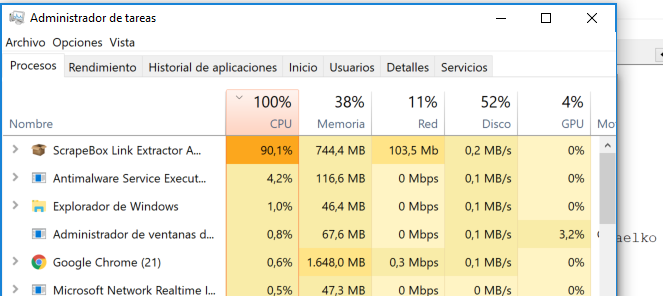
Whatever happened to rewriting SB to be more efficient to resources? I run Link Extractor, looking for external Links and it blows out my i7. I'm cranking it up to 1000 threads, but the processor should handle it I would imagine.

QbCLGR8
 
I've just bought it. So excited! I am eager to test it :)
 
WARNING:

New Link Extractor IS NOT USING proxies! Even if you have proxies selected. I just checked my connections and 100% of them were going directly to the website URLs and not through proxies. If you're running Link Extractor through your home network DO NOT USE it until this is fixed!

WARNING #2:

The "never close out at one connection" issue is seemingly more common now. Careful if you're using big lists, you may have to force ctrl+alt+delete, which will not allow you to save the unfinished URLs.

IRGC1zj


@nycdude, the efficiency of the new link extractor is around the same (if not a little worse) than the old one. However, it does seem to be running more "smoother," but also slower than before.

It also seems to depend on the CPU. My i9-7940x is running at 4x the RAM and 0-5% higher CPU than before. My Dual Xeon 24c/48t is using 4x the RAM but running at 2% lower CPU than before. I run 500 threads per instance.
 
Last edited:
Whatever happened to rewriting SB to be more efficient to resources? I run Link Extractor, looking for external Links and it blows out my i7. I'm cranking it up to 1000 threads, but the processor should handle it I would imagine.

QbCLGR8

I did a quick google search and the average web page is 3MB (https://speedcurve.com/blog/web-performance-page-bloat/), plenty are larger of course. So 1000 threads X 3MB (which is probably conservative) is 3000MB or 3GB of data at 1 time.

So try going into windows explorer and opening 1000 3MB text files at 1 time... Id bet your pc will choke and go unresponsive.

Scrapebox is massively efficient, but your asking it to deal with a huge amount of data at one time, process it, all sorts of file types, deal with memory, purge the memory and handle the load of downloading thousands of components and files of websites, all at the same time for a sustained amount of time.

I would call 1000 exceedingly high. The fact it can even run is an accomplishment to a grand degree in and of its self.

To be blunt, I think your expectations of what processing 1000 simultaneous websites should use, resource wise, is unrealistic. Loads of other programs are not close to this resource efficient.

My 2 cents.

I've just bought it. So excited! I am eager to test it :)

:D
 
WARNING:

New Link Extractor IS NOT USING proxies! Even if you have proxies selected. I just checked my connections and 100% of them were going directly to the website URLs and not through proxies. If you're running Link Extractor through your home network DO NOT USE it until this is fixed!

WARNING #2:

The "never close out at one connection" issue is seemingly more common now. Careful if you're using big lists, you may have to force ctrl+alt+delete, which will not allow you to save the unfinished URLs.

IRGC1zj


@nycdude, the efficiency of the new link extractor is around the same (if not a little worse) than the old one. However, it does seem to be running more "smoother," but also slower than before.

It also seems to depend on the CPU. My i9-7940x is running at 4x the RAM and 0-5% higher CPU than before. My Dual Xeon 24c/48t is using 4x the RAM but running at 2% lower CPU than before. I run 500 threads per instance.
You don't need proxies for the link extractor. Unless your running all the exact same domain. But if you have a nice mix of domains, proxies just slows it down, even private proxies. I never use proxies for the link extractor unless I need to go fast with lots of pages on just 1 domain.

So the WARNING: is perhaps, at least unless your using only 1 domain, overkill.

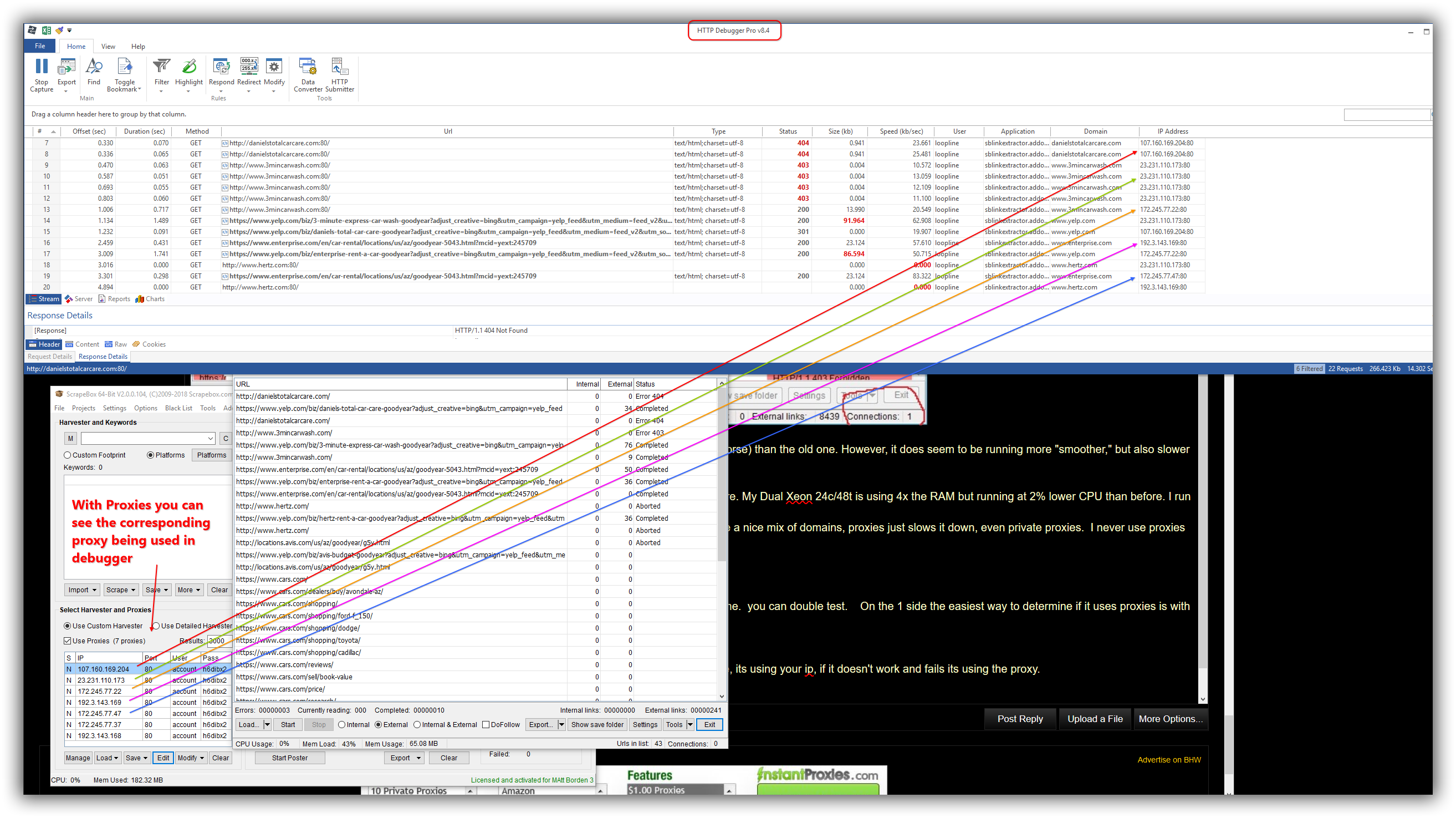
Also Im not sure how you came to the conclusion that it does not using proxies, because it uses proxies for me. you can double test. On the 1 side the easiest way to determine if it uses proxies is with a "negative" test.

Just put in a fake proxy, like 188.188.188.188:9090
and then make sure the use proxies box is checked and launch the link extractor. Then run it. If it works fine, its using your ip, if it doesn't work and fails its using the proxy.

Further with no proxies it works fine

and lastly it works with proxies as you can see in http debugger pro (which you can google and has a 14 day free trial, but is an indispensable tool for me in many applications).

Screenshots follow. So I don't know how you came to that conclusion, but Id be they didn't change the proxy code even by 1 character and it works fine for me in every test, as expected. So I think your just unlucky. hehe Just kidding. Try kicking your machine. (also just kidding, but might make you feel better.) :D

Should be able to enlarge the images and view them better, its a 32 in monitor at 2K res so it make big screenshots.

Also the last screenshot has rainbow colors to help you follow it, but sorry if it hurts you eyes, lol

Lastly I was working over top of this post, so there is text in the screenshots that won't make sense, so my text of this reply stops here.


YYYjyfr


bI1RjsJ


k70FJME
 
@loopline .... Come on .... Did you not notice my GUI looks 100% different than yours? Did you not notice then new colors?

1) Look at your version number... You're using the old version, not the new update. Your post is irrelevant to my warning message. .61 and .62 both worked with proxies no problem.

2) I have 3 servers running Link Extractor 24/7, I need proxies.

My WARNING messages stands 100%. Link Extractor version .63 is not using proxies. I know this for 100% fact, as I run Link Extractor through GSA Proxy Scraper Internal Server.. and the proxies are not switching at all. In addition, the links are still being scraped. In addition, I checked my router logs and can see clear as day, no proxies are being used.

Fortunately I have backups of version .61 that I will use until this issue is fixed... But this warning needs to get out to anyone using Link Extractor from their home ISP on multiple servers. If you don't want to get sued for scraping... you need proxies. Two years ago GSA SER was leaking proxies, my ISP called me and said I was running a "bot net". Trust me, you really don't want to get involved with that.
 
Last edited:
Update:

.63 has been pulled by the support team, and no longer shows as an available update. It seems they have found the issue and are working to resolve it.
 
Hey. In the Yandex search system, the metrics have changed, now there is no TIC parameter a and there is the IRS parameter

Can you upgrade?

Here is the display of a new parameter, example https://webmaster.yandex.ru/sqi/?host=https%3A%2F%2Fwww.blackhatworld.com
 
Status
Not open for further replies.
Back
Top