

- Feb 28, 2019
- 7,441
- 7,895
Adsense is a performance killer for Wordpress sites. One of my websites on shared hosting used to take over 10 seconds to load on mobile devices. I tried everything but Adsense doesn't allow site to load until the ads are loaded. The latest Adsense code cut the loading speed by half. It combined 2 js scripts into one and reduced clutter. After changing this code, my site started loading within 4-5 seconds. I'm already happy with the progress as this is enough for me.
I recently checked this thread by @Mr Positive which explains performance improvements by delaying js code. I didn't update WP-rocket since a long time as I don't bother much about updates. But I wanted to try this option and updated to latest version. This option further reduced my loading speed to 2-3 seconds. You can check the current stats below:
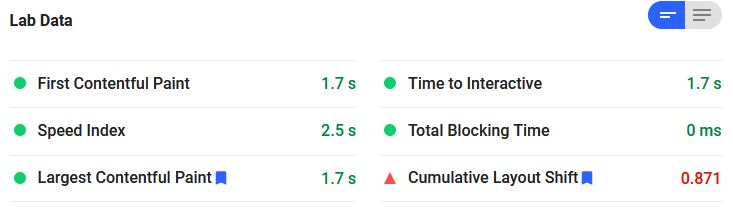
This is mobile speed test from Google page speed insights. The mobile score is 84 and desktop score is 87. It's difficult to get 100 as my initial server response time is high.

This is GT-metrix report. The performance didn't reach 100% due to CLS.
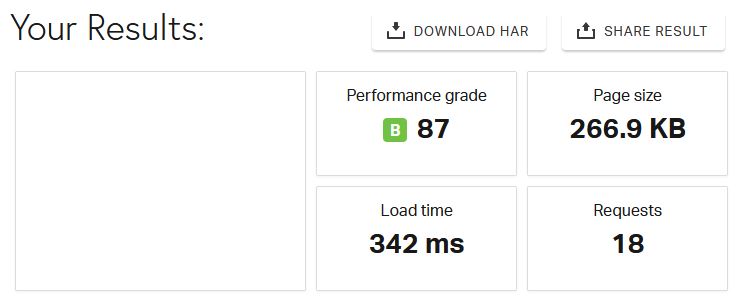
This is pingdom report. The score is not A because I'm using Brotli and Pingdom needs Gzip. Brotli is better than Gzip, so it's better to ignore this score.
I'm using WP-rocket version 3.9.1.1 and Cloudflare free plan. The following are my settings on WP-rocket:
Now you don't need a VPS just because Adsense is slowing down your site. WP-rocket can get you better performance even on shared hosting.
I recently checked this thread by @Mr Positive which explains performance improvements by delaying js code. I didn't update WP-rocket since a long time as I don't bother much about updates. But I wanted to try this option and updated to latest version. This option further reduced my loading speed to 2-3 seconds. You can check the current stats below:
This is mobile speed test from Google page speed insights. The mobile score is 84 and desktop score is 87. It's difficult to get 100 as my initial server response time is high.
This is GT-metrix report. The performance didn't reach 100% due to CLS.
This is pingdom report. The score is not A because I'm using Brotli and Pingdom needs Gzip. Brotli is better than Gzip, so it's better to ignore this score.
I'm using WP-rocket version 3.9.1.1 and Cloudflare free plan. The following are my settings on WP-rocket:
- Cache - Separate cache files for mobile devices
- File Optimization - Minify CSS files, and Optimize CSS delivery
- File Optimization - Minify JS files, Load JS deferred, and Delay JS execution
- Media - Lazy load for images (exclude your logo and favicon), and Add missing dimensions for images
Now you don't need a VPS just because Adsense is slowing down your site. WP-rocket can get you better performance even on shared hosting.


