[Tutorial] How to scrape targeted leads for FREE

Sheepp

Senior Member
Joined
Jan 15, 2018
Messages
935
Reaction score
566
Hi,

getting targeted leads that may be interested in your products or services is the primary data source of your sales pipeline. That's why you want to do it...

and here you will learn how to do it in an effective, cost-free way.

1. Find some laser-targeted sources

100.webp

First things first, you will need to select leads sources from where you will scrape. We will focus here (and you should to begin with) on popular social media websites eg. :

  • Twitter
  • LinkedIn
  • Instagram
  • Facebook
  • ...
If you need even more specific targeting, I recommend scraping niche-website by doing a custom scraper of your own (or bought), but that's not today's topic !

You will have to choose one of them and where to look within those websites. For example, if you choose Facebook, you could choose between scraping from :

  • Facebook group members
  • Users that commented on a specific post
  • Users that liked a specific post
  • ...
Here are a few ideas to get you started :
  • Followers / Friends of your competitors
  • Users that interacted with content within your niche
  • Users that used some #hashtags of your niche
2. Scrap' the f*** out of them !

giphy-downsized.gif

Now that you have your leads sources, go to PhantomBuster and signup for a free account. There's even a 14-days free trial of a higher plan without having to enter a credit card so you have some time to setup & scrape.

You will setup your first Phantom

TTg9pVT


A phantom is like an online specific task runner : you enter some settings, it does a job and you get an output.

There are many existing jobs from various social medias website, and here we will use the scraping ones.

So let's say your leads source was Twitter and that you want to get the followers of a profile. Simple !
Click on the "Twitter" category and choose "Twitter Follower Collector"
dLJ9k4v


You will then have to enter some settings so that it works :
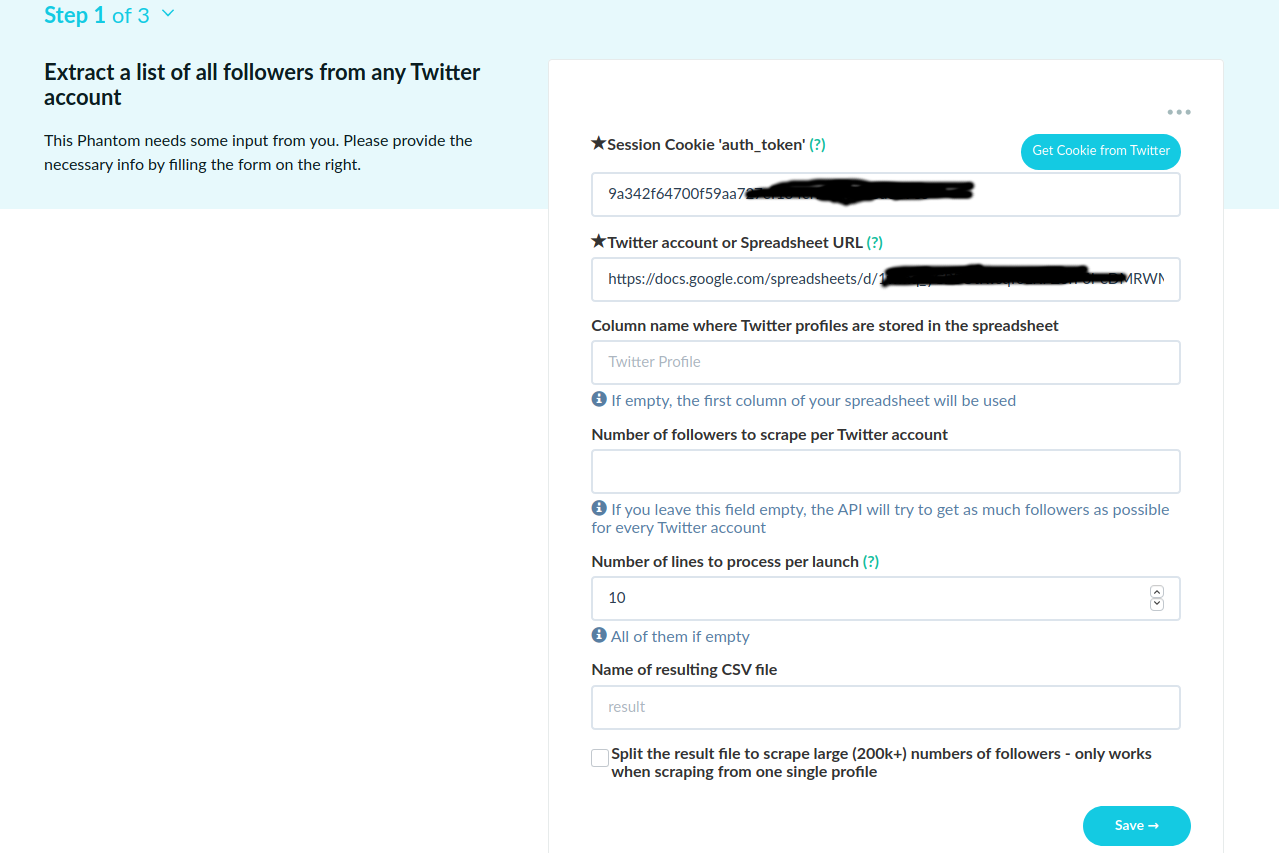
  • Session cookie : PhantomBuster uses your own account on social media to perform the task. To do that, they'll use your own session cookie so they can log in (for some limited time) without your credentials. They have an extension to install to get that cookie automatically through the button "Get cookie from Twitter" or you can enter it manually. For exemple on Firefox you can get it by pressing F12 > Storage Tab. For Twitter it's "auth_token" it can be another for other websites.
m80fNFG

  • Your run settings : which twitter profile to scrape, how many lines to scrape per run etc.. everything is quite self explanatory.

Save & launch, you will then have a resulting CSV file with all the resulting infos of your scrape.
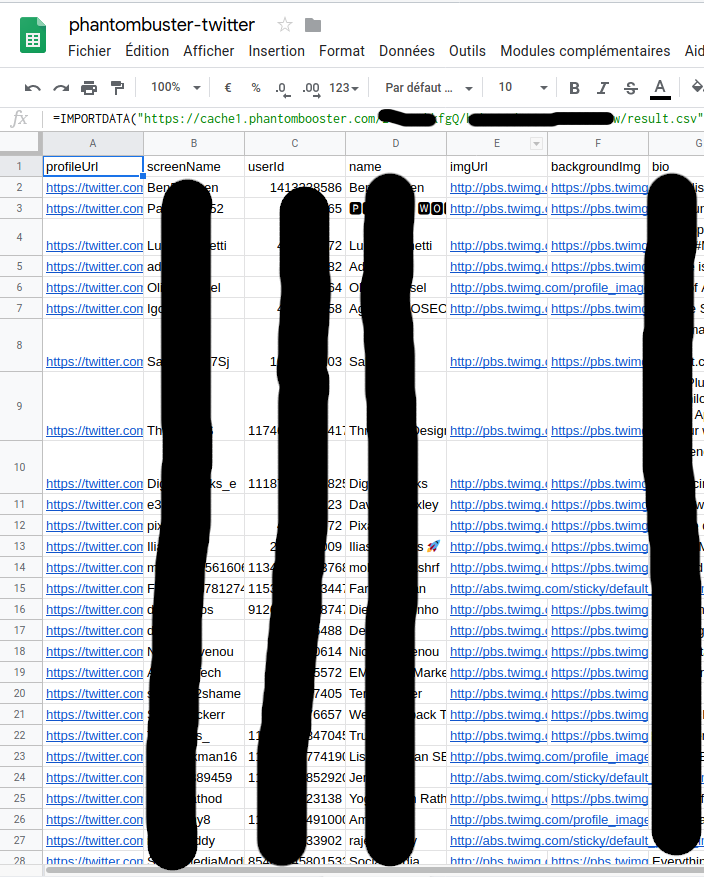
Here in our example of twitter scraping the resulting CSV file have : profileUrl,screenName,userId,name,imgUrl,backgroundImg,bio,website,location,createdAt,followersCount,friendsCount,tweetsCount,query,timestamp,certified ...


3. Exploit'

giphy.gif
Congrats' ! You now have targeted leads, for free !

But you may wonder

> what the fuck do I actually do with this

Now that you have your CSV file, you can first visualize it through google sheets.

  1. Create a new sheet.
  2. On your Phantom result page, where you have the "Download CSV" button, right click on that button and "Copy link location"
  3. Get back to your sheet, first cell and enter the following formula where you replace the URL by your own URL copied at step 2.
Code:
=IMPORTDATA("https://cache1.phantombooster.com/XXXXXX/YYYYYYY/result.csv")

All your data will be imported with the proper column :
4vlGMeB


So now you have all your data that you can exploit with filters etc. and what not.
The next step would be to import that data right into your CRM (if you have one) and to start your nurturing leads process :)

giphy.gif


And that's it for today folks !
Glad to hear your feedback on all of this and hope you learned a thing or two.

BONUS TIP :anyway: (it's christmas after all) :


When you do paid ads like Facebook Ads or LinkedIn ads for example, you can import known audience (eg. email list) as "lookalike" audience (or whatever you call them) so that Facebook/Linkedin etc. can show your ads to similar people. It is often very effective to use them, but you need a good source audience.
With that method it is very easy (and free) to get a targeted email list to use in your campaigns and boost your conversions !
 
So you basically get emails of those people? Can you send "cold emails" to them and will those emails go to inbox?
 
Been using phantom buster for over a year now and have recommended it many times on BHW, but no one seems to give a fuck lol.

It's great for building up your social media presence where you can deliver content on a regular basis. It does not collect email addresses (except for linkedin.)

Has anyone used phantom buster to scrape Facebook?

I've used it for quite a while now. It's great for add them to to a personal account or creating facebook groups.

So you basically get emails of those people? Can you send "cold emails" to them and will those emails go to inbox?

It only gets emails from linkedin. For social media, it only grabs their profile links.
 
I wanted to thank you for this, not for the method as i do think that these type of leads are weak at best, but for giving me a solution to an idea that i had a view weeks back but i c0ouold not figure out the logistics

Thanks mate

Dave
 
Thanks for the info, so there are no emails to scrape for campaigns, basically this would then work best for targeting facebook ads?
Scrape the members of similar interests/niches/pages and add them to your audience?
 
Very interesting tutorial, thank you

Thanks !

Great share. Bookmarked

Thanks !

Best Thread for quite some time, lol! Thanks for sharing.:)

Ahah thanks, appreciated

Has anyone used phantom buster to scrape Facebook?

Yes you can do it too ! Scraping people that reacted on a popular posts or from a specific group for instance

Great share mate, some valuable points. Appreciated

Thanks mate !

The Bonus Method is against the law I suppose.

No, you don't target ads to them and you don't send them emails or whatever, you just feed that data into facebook/linkedin/etc algorithm to find similar audience so that's 100% legal !

So you basically get emails of those people? Can you send "cold emails" to them and will those emails go to inbox?

Depends of your type of scraping as you can't always get the e-mail directly. Sometimes you need to add a 3rd party service email grabber like Hunter.io to collect e-mail.

This is an awesome Christmas/New Year gift :)

Enjoy :)

Smells like a paid post to me but it has some interesting points anyway. Using the data for Facebook or Adwords is gold.

Ahah I would be glad to be paid for writing this kind of tutorials :)

Been using phantom buster for over a year now and have recommended it many times on BHW, but no one seems to give a fuck lol.

Ahah well never heard of it on BHW although I spend quite some time here so I thought to share it. Feel free to write another tutorial on it if you have some techniques with it, I'm sure everyone (including me) would be interested !

I wanted to thank you for this, not for the method as i do think that these type of leads are weak at best, but for giving me a solution to an idea that i had a view weeks back but i c0ouold not figure out the logistics

Thanks mate

Dave

No problem ! :)

Great share. TY

Thanks :)

Thanks for the info, so there are no emails to scrape for campaigns, basically this would then work best for targeting facebook ads?
Scrape the members of similar interests/niches/pages and add them to your audience?

I'm not sure to get your first sentence but yes that's the idea.

Cool method OP

Thanks !
 
Hi,

getting targeted leads that may be interested in your products or services is the primary data source of your sales pipeline. That's why you want to do it...

and here you will learn how to do it in an effective, cost-free way.

1. Find some laser-targeted sources

100.webp

First things first, you will need to select leads sources from where you will scrape. We will focus here (and you should to begin with) on popular social media websites eg. :

  • Twitter
  • LinkedIn
  • Instagram
  • Facebook
  • ...
If you need even more specific targeting, I recommend scraping niche-website by doing a custom scraper of your own (or bought), but that's not today's topic !

You will have to choose one of them and where to look within those websites. For example, if you choose Facebook, you could choose between scraping from :
  • Facebook group members
  • Users that commented on a specific post
  • Users that liked a specific post
  • ...
Here are a few ideas to get you started :
  • Followers / Friends of your competitors
  • Users that interacted with content within your niche
  • Users that used some #hashtags of your niche
2. Scrap' the f*** out of them !

giphy-downsized.gif

Now that you have your leads sources, go to https://phantombuster.com/signup and signup for a free account. There's even a 14-days free trial of a higher plan without having to enter a credit card so you have some time to setup & scrape.

You will setup your first Phantom

TTg9pVT


A phantom is like an online specific task runner : you enter some settings, it does a job and you get an output.

There are many existing jobs from various social medias website, and here we will use the scraping ones.

So let's say your leads source was Twitter and that you want to get the followers of a profile. Simple !
Click on the "Twitter" category and choose "Twitter Follower Collector"

dLJ9k4v


You will then have to enter some settings so that it works :
  • Session cookie : PhantomBuster uses your own account on social media to perform the task. To do that, they'll use your own session cookie so they can log in (for some limited time) without your credentials. They have an extension to install to get that cookie automatically through the button "Get cookie from Twitter" or you can enter it manually. For exemple on Firefox you can get it by pressing F12 > Storage Tab. For Twitter it's "auth_token" it can be another for other websites.
m80fNFG

  • Your run settings : which twitter profile to scrape, how many lines to scrape per run etc.. everything is quite self explanatory.

Save & launch, you will then have a resulting CSV file with all the resulting infos of your scrape.
Here in our example of twitter scraping the resulting CSV file have : profileUrl,screenName,userId,name,imgUrl,backgroundImg,bio,website,location,createdAt,followersCount,friendsCount,tweetsCount,query,timestamp,certified ...


3. Exploit'

giphy.gif
Congrats' ! You now have targeted leads, for free !

But you may wonder

> what the fuck do I actually do with this

Now that you have your CSV file, you can first visualize it through google sheets.

  1. Create a new sheet.
  2. On your Phantom result page, where you have the "Download CSV" button, right click on that button and "Copy link location"
  3. Get back to your sheet, first cell and enter the following formula where you replace the URL by your own URL copied at step 2.
Code:
=IMPORTDATA("https://cache1.phantombooster.com/XXXXXX/YYYYYYY/result.csv")

All your data will be imported with the proper column :
4vlGMeB


So now you have all your data that you can exploit with filters etc. and what not.
The next step would be to import that data right into your CRM (if you have one) and to start your nurturing leads process :)

giphy.gif


And that's it for today folks !
Glad to hear your feedback on all of this and hope you learned a thing or two.

BONUS TIP :anyway: (it's christmas after all) :


When you do paid ads like Facebook Ads or LinkedIn ads for example, you can import known audience (eg. email list) as "lookalike" audience (or whatever you call them) so that Facebook/Linkedin etc. can show your ads to similar people. It is often very effective to use them, but you need a good source audience.
With that method it is very easy (and free) to get a targeted email list to use in your campaigns and boost your conversions !
I love this theme, what do you think is the downside of Phantom Buster?
 
I love this theme, what do you think is the downside of Phantom Buster?

One of the (inevitable) down side is that you have to use your own social media account. So don't be too agressive or you will be blocked.
Otherwise PhantomBuster is pretty good at what it does. I'm not an expert in that area myself so as a hobbyist it covers all my needs.

Thanks for the share

You're welcome :)
 
Thats only using PhantomBuster right?
I found several other Chrome Extensions that allow you to scrape data:
https://chrome.google.com/webstore/detail/scraper/mbigbapnjcgaffohmbkdlecaccepngjd?hl=en
https://chrome.google.com/webstore/detail/data-scraper-easy-web-scr/nndknepjnldbdbepjfgmncbggmopgden
https://chrome.google.com/webstore/detail/web-scraper/jnhgnonknehpejjnehehllkliplmbmhn?hl=en
 
Wait a minute... can you import that csv as a lookalike?

Depends on what CSV you're talking about. If you're talking about the twitter scraping example then no, I don't think an ad platform use Twitter profiles as a valid lookalike source. But you can using other Phantoms.


Yeah sure, that's probably not the only service doing that of course.
Some pros about it :
  • it runs in the cloud, meaning you can schedule to run it 8 times a day and it will run with your own account even though your own browser/computer is off.
  • popular social medias website scraping is already integrated so it is very easy and quick to get started even as a non-technical person. If I pick your first extension for instance, you need to start messing around with XPath expressions and so on.

But yeah again I'm sure there other tools out there to do that, pick the one you're must comfortable with and that match your scraping goal ! :)
 
That's looks like a great share. I do have couple of questions. What would be the best use case for thousands of accounts of which most are advertisers themselves. And how would you import this data into CRM (besides linkedin ofcourse which i thought actually patches ability to get emails)?
 
That's looks like a great share. I do have couple of questions. What would be the best use case for thousands of accounts of which most are advertisers themselves. And how would you import this data into CRM (besides linkedin ofcourse which i thought actually patches ability to get emails)?

I'm not sure how to answer that as it is too vague. Maybe you can precise your question ?
It's just a tool, you need to know what you want to do before you pick it up, not after.

Same thing for the CRM. Depends on which CRM you use, and which data you're after to personalize your campaigns.
 
I am using Phantombuster now. Need to ask some questions regarding data of Instagram follower scraping. Suppose I scrape a page which has more then 108k followers. So Phantom only scrapes 5k at a time from a single profile page. So I selected 4k and ran the thing for 3 times an hr to get unblocked. Now what it does it keeps giving me the same 4k again and again. I want to know how would I get the other 104k data of that page. 2nd thing I want to ask is once I have the followers data how do I send a message to all these 108k followers of that page individually. So which phantom should be used for that?
 
Been using phantom buster for over a year now and have recommended it many times on BHW, but no one seems to give a fuck lol.

It's great for building up your social media presence where you can deliver content on a regular basis. It does not collect email addresses (except for linkedin.)


I've used it for quite a while now. It's great for add them to to a personal account or creating facebook groups.


It only gets emails from linkedin. For social media, it only grabs their profile links.

@Daggermouthx, since you have been using all these years I wanted to ask can you extract the facebook followers data from a closed or a private or a secret VIP group which has more then 3-400k followers in it. Let me know yes or no
 
This, especially the Facebook lookalike part solves a problem I've been thinking about. I'll go ahead to work with this and be sure to maybe publish learnings and results on my use case once I get to work on it.
 
Back
Top