

Sheepp
Senior Member
- Jan 15, 2018
- 935
- 566
Hi,
getting targeted leads that may be interested in your products or services is the primary data source of your sales pipeline. That's why you want to do it...
and here you will learn how to do it in an effective, cost-free way.
1. Find some laser-targeted sources

First things first, you will need to select leads sources from where you will scrape. We will focus here (and you should to begin with) on popular social media websites eg. :
You will have to choose one of them and where to look within those websites. For example, if you choose Facebook, you could choose between scraping from :

Now that you have your leads sources, go to PhantomBuster and signup for a free account. There's even a 14-days free trial of a higher plan without having to enter a credit card so you have some time to setup & scrape.
You will setup your first Phantom

A phantom is like an online specific task runner : you enter some settings, it does a job and you get an output.
There are many existing jobs from various social medias website, and here we will use the scraping ones.
So let's say your leads source was Twitter and that you want to get the followers of a profile. Simple !
Click on the "Twitter" category and choose "Twitter Follower Collector"
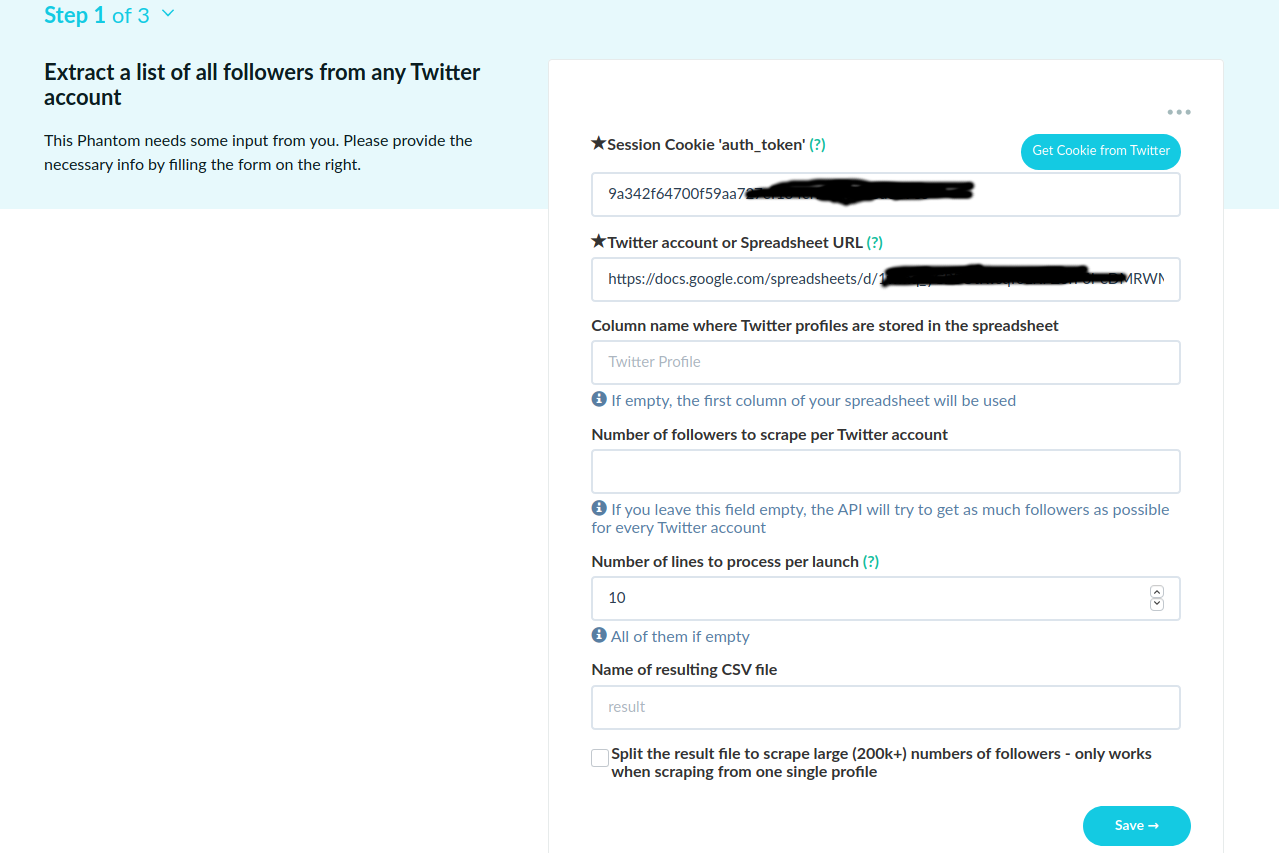
You will then have to enter some settings so that it works :

Save & launch, you will then have a resulting CSV file with all the resulting infos of your scrape.
Here in our example of twitter scraping the resulting CSV file have : profileUrl,screenName,userId,name,imgUrl,backgroundImg,bio,website,location,createdAt,followersCount,friendsCount,tweetsCount,query,timestamp,certified ...
3. Exploit'
 Congrats' ! You now have targeted leads, for free !
But you may wonder
> what the fuck do I actually do with this
Now that you have your CSV file, you can first visualize it through google sheets.
All your data will be imported with the proper column :
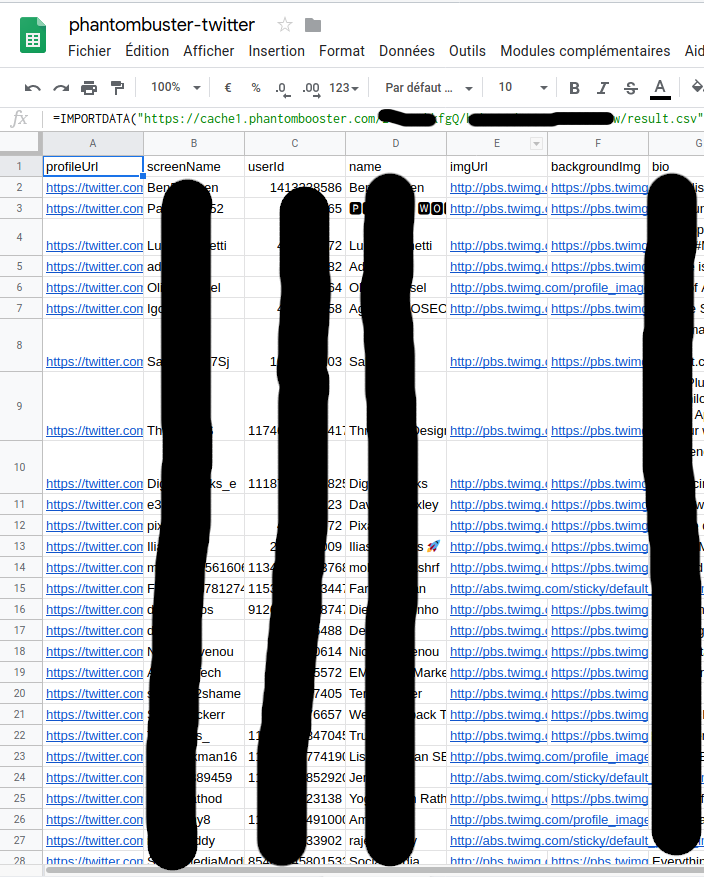
So now you have all your data that you can exploit with filters etc. and what not.
The next step would be to import that data right into your CRM (if you have one) and to start your nurturing leads process

And that's it for today folks !
Glad to hear your feedback on all of this and hope you learned a thing or two.
BONUS TIP (it's christmas after all) :
When you do paid ads like Facebook Ads or LinkedIn ads for example, you can import known audience (eg. email list) as "lookalike" audience (or whatever you call them) so that Facebook/Linkedin etc. can show your ads to similar people. It is often very effective to use them, but you need a good source audience.
With that method it is very easy (and free) to get a targeted email list to use in your campaigns and boost your conversions !
getting targeted leads that may be interested in your products or services is the primary data source of your sales pipeline. That's why you want to do it...
and here you will learn how to do it in an effective, cost-free way.
1. Find some laser-targeted sources
First things first, you will need to select leads sources from where you will scrape. We will focus here (and you should to begin with) on popular social media websites eg. :
- ...
You will have to choose one of them and where to look within those websites. For example, if you choose Facebook, you could choose between scraping from :
- Facebook group members
- Users that commented on a specific post
- Users that liked a specific post
- ...
- Followers / Friends of your competitors
- Users that interacted with content within your niche
- Users that used some #hashtags of your niche
Now that you have your leads sources, go to PhantomBuster and signup for a free account. There's even a 14-days free trial of a higher plan without having to enter a credit card so you have some time to setup & scrape.
You will setup your first Phantom
A phantom is like an online specific task runner : you enter some settings, it does a job and you get an output.
There are many existing jobs from various social medias website, and here we will use the scraping ones.
So let's say your leads source was Twitter and that you want to get the followers of a profile. Simple !
Click on the "Twitter" category and choose "Twitter Follower Collector"
You will then have to enter some settings so that it works :
- Session cookie : PhantomBuster uses your own account on social media to perform the task. To do that, they'll use your own session cookie so they can log in (for some limited time) without your credentials. They have an extension to install to get that cookie automatically through the button "Get cookie from Twitter" or you can enter it manually. For exemple on Firefox you can get it by pressing F12 > Storage Tab. For Twitter it's "auth_token" it can be another for other websites.
- Your run settings : which twitter profile to scrape, how many lines to scrape per run etc.. everything is quite self explanatory.
Save & launch, you will then have a resulting CSV file with all the resulting infos of your scrape.
Here in our example of twitter scraping the resulting CSV file have : profileUrl,screenName,userId,name,imgUrl,backgroundImg,bio,website,location,createdAt,followersCount,friendsCount,tweetsCount,query,timestamp,certified ...
3. Exploit'
But you may wonder
> what the fuck do I actually do with this
Now that you have your CSV file, you can first visualize it through google sheets.
- Create a new sheet.
- On your Phantom result page, where you have the "Download CSV" button, right click on that button and "Copy link location"
- Get back to your sheet, first cell and enter the following formula where you replace the URL by your own URL copied at step 2.
Code:
=IMPORTDATA("https://cache1.phantombooster.com/XXXXXX/YYYYYYY/result.csv")All your data will be imported with the proper column :
So now you have all your data that you can exploit with filters etc. and what not.
The next step would be to import that data right into your CRM (if you have one) and to start your nurturing leads process
And that's it for today folks !
Glad to hear your feedback on all of this and hope you learned a thing or two.
BONUS TIP
(it's christmas after all) :When you do paid ads like Facebook Ads or LinkedIn ads for example, you can import known audience (eg. email list) as "lookalike" audience (or whatever you call them) so that Facebook/Linkedin etc. can show your ads to similar people. It is often very effective to use them, but you need a good source audience.
With that method it is very easy (and free) to get a targeted email list to use in your campaigns and boost your conversions !


