

blackbrut
Regular Member
- Mar 21, 2016
- 392
- 308
Hello guys,
I will share my process to get CPA Landing Page + Hosting for free. I use this a lot when I start my CPA journey, I was really afraid to buy domains and hosting and it was a very good way to start CPA with almost 0$. It's a very very beginner tutorial, but I hope it will help some of you.
This method is based on CPABuild's template system, but most of the CPA networks offer the same service. Anyway, CPABuild's template comes with a lot of customizations and a commission system.
Step 1: Create and customize your Landing Page
You can start by creating your own custom landing page based on the different models offered by CPABuild. They have differents base templates, related to game hack niche / gift card / content locking. (the same model apply to content locker itself)

You can also use the template library build by the CPAbuild's user, which is really complete and is also a good way to get new niches ideas.

Step 2: Generate your landing page and URL
Let's say you want to use a public template related to the "Madden 20" mobile game. You just have to click on "use":

Then select the content locker you want to use with the landing page. You have an option to use a different locker for mobile devices, which is highly recommended btw.
Don't worry, you can change the locker attached to the landing page and URL at any time you want.
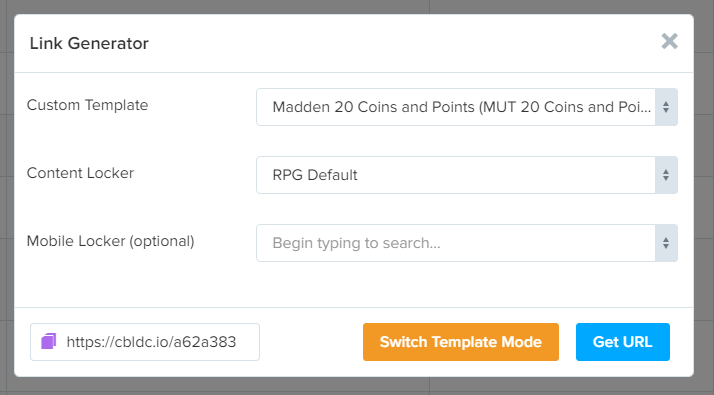
Now you have an URL that will send the user to the landing page, with a different locker depending on the devices. An important thing to do is to use the mirror URL offered by CPABuild, to reduce your spam warning and don't lose all your landing page if one mirror is dead.
You can find a complete list of mirrors and their current status. In 1.5y on Build, I've never seen a dead mirror so I don't think it's something very common.

note: There's also an option to use your own mirror with your own domain. You will have to use your own domain at a moment, to avoid the competitor to spy your niche. (check this thread to learn how to spy competitor with CPA's mirror URL: https://www.blackhatworld.com/seo/m...-steal-their-niche-haters-gonna-hate.1179941/)
One last step I commonly use before I promote my link and send traffic is to shorten my URL with bit.ly. I use this bit.ly URL directly in my video youtube description and I didn't have spam or flag problem.
You can have and high-quality landing page with free hosting in less than 2 minutes, easy and fast.
BONUS:
When you create a template on CPABuild, you can make it public and earn a 5% commission every time someone makes money with your landing page. I usually make public only the medium-high competitive niche on pretty known games to avoid my niche to be stolen.

I earn around 30-50$ per month for the last 12 months. CPABuild offers a 5% commission on every leads that are made with one of your templates.
I will share my process to get CPA Landing Page + Hosting for free. I use this a lot when I start my CPA journey, I was really afraid to buy domains and hosting and it was a very good way to start CPA with almost 0$. It's a very very beginner tutorial, but I hope it will help some of you.
This method is based on CPABuild's template system, but most of the CPA networks offer the same service. Anyway, CPABuild's template comes with a lot of customizations and a commission system.
Step 1: Create and customize your Landing Page
You can start by creating your own custom landing page based on the different models offered by CPABuild. They have differents base templates, related to game hack niche / gift card / content locking. (the same model apply to content locker itself)
You can also use the template library build by the CPAbuild's user, which is really complete and is also a good way to get new niches ideas.
Step 2: Generate your landing page and URL
Let's say you want to use a public template related to the "Madden 20" mobile game. You just have to click on "use":
Then select the content locker you want to use with the landing page. You have an option to use a different locker for mobile devices, which is highly recommended btw.
Don't worry, you can change the locker attached to the landing page and URL at any time you want.
Now you have an URL that will send the user to the landing page, with a different locker depending on the devices. An important thing to do is to use the mirror URL offered by CPABuild, to reduce your spam warning and don't lose all your landing page if one mirror is dead.
You can find a complete list of mirrors and their current status. In 1.5y on Build, I've never seen a dead mirror so I don't think it's something very common.
note: There's also an option to use your own mirror with your own domain. You will have to use your own domain at a moment, to avoid the competitor to spy your niche. (check this thread to learn how to spy competitor with CPA's mirror URL: https://www.blackhatworld.com/seo/m...-steal-their-niche-haters-gonna-hate.1179941/)
One last step I commonly use before I promote my link and send traffic is to shorten my URL with bit.ly. I use this bit.ly URL directly in my video youtube description and I didn't have spam or flag problem.
You can have and high-quality landing page with free hosting in less than 2 minutes, easy and fast.
BONUS:
When you create a template on CPABuild, you can make it public and earn a 5% commission every time someone makes money with your landing page. I usually make public only the medium-high competitive niche on pretty known games to avoid my niche to be stolen.
I earn around 30-50$ per month for the last 12 months. CPABuild offers a 5% commission on every leads that are made with one of your templates.


