
You are using an out of date browser. It may not display this or other websites correctly.
You should upgrade or use an alternative browser.
You should upgrade or use an alternative browser.
Permanently Closed Marketplace Sales Thread
- Thread starter Sweetfunny
- Start date
- Status
- Not open for further replies.


- Jan 25, 2009
- 6,378
- 3,774
what happen,, after update just have 1000 success comments blast in 2 hours+, it's like running super slow/hang
Nothing in the poster was even updated.
I've tried both. I still get 10054 error. I seem to get more errors when the proxy change is lower.
i've also tried the automator to see if it works. It works if my scrape is small enough but the automator crashes. Im using the seospartans setup. At this point i've also bought gscraper. if gscraper works i can no longer recommend scrapebox honestly.
-charles
Your ready to give up on a program that has been worked on literally 365 days a year for almost 7 years?
Personally Id be a tad more patient. Its not my program, but the SEO game is about change and adaptation. For starters you could update to the .82 and try it as its in the change log that they are trying to address the 10054 errors. STuff like that can take a couple/few updates to sort, but its clear they are on the path.
Also its like 1/1000th of what scrapebox is, just sayin.
is possible to revert back? i have many projects for comment blaster..
it didn't work with latest update, i see many processing status is stuck, that cause super slow & end by hang/crash!
please help
Sure go to help >> restore previous version.
How can I make the Page Authority addon check 5 instead of 10 and then a longer delay. After a while I start getting errrors, even though Im using multiple accounts and proxies.
Moz allows up to 10 urls per api call, so if you could adjust it to 5 it would still be the same number of api calls, which is all that matters.
The delay is 10 seconds, which is what moz requires. You are only allowed 1 conneciton per account so make sure your number of connections is the same or less then the number of accounts you have loaded, as thats the item you can control. Also its the only item that matters.

- Jan 25, 2009
- 6,378
- 3,774
Change Log of V 2.0.0.82
Automator command export urls as XML list added
I can't find it to be honest; Please add it if I'm correct.
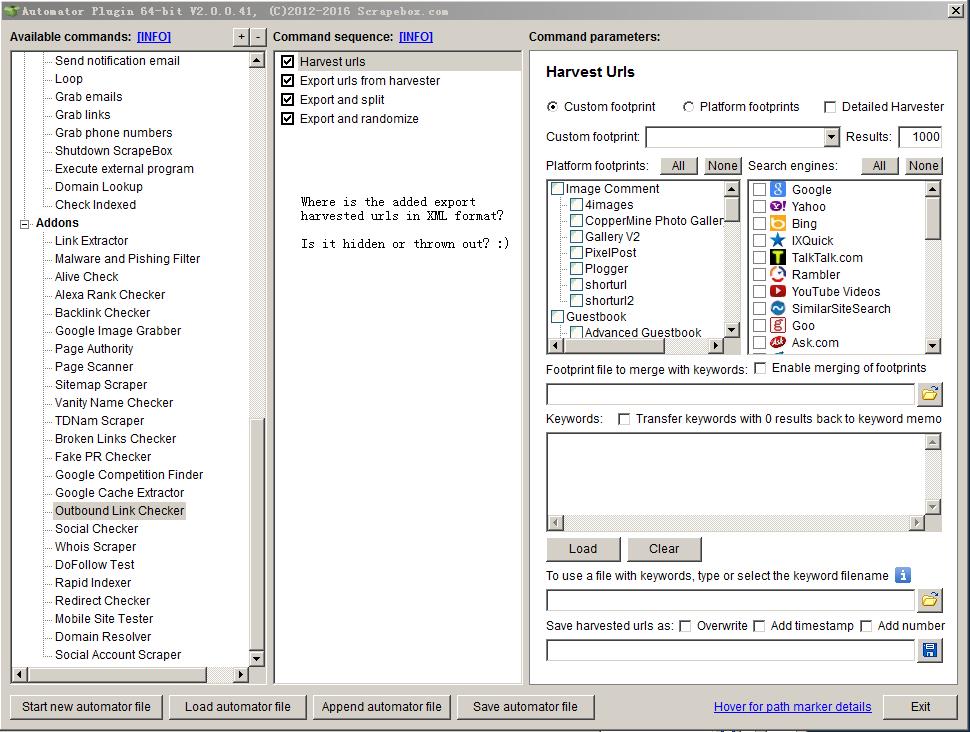
Well this might seem obvious but you clearly missed it... The latest version of the automator is .42 and your screenshot is still of .41 so you have to "update" the automator in order to get the features in the change log for the "update".

JinnyBolander
BANNED
- Jan 7, 2017
- 1
- 1
I forgot updated it now it's working fine.

JiveTurkeySammich
Regular Member
- Apr 6, 2014
- 288
- 48
Hey Friends and Comrads. Been a while.
Was wondering if there was anyway to set cookies with the custom data harvester. I need to be logged into a site to see the information and scrape it.
Thanks!!
Was wondering if there was anyway to set cookies with the custom data harvester. I need to be logged into a site to see the information and scrape it.
Thanks!!
JiveTurkeySammich
Regular Member
- Apr 6, 2014
- 288
- 48
Sorry loopline, I was referring to the custom data grabber, not the engines.. Thanks..Just go to settings >> harvester engine configuration - and on the additional header tab you can add anything you want, including cookies.
badboyilprimo
Newbie
- Dec 8, 2013
- 17
- 1
hey loopline
just bought the yellowpages plugin and i can't seem to find where i can activate that or add to my scrapebox
Thanks in advance
just bought the yellowpages plugin and i can't seem to find where i can activate that or add to my scrapebox
Thanks in advance
- Jan 25, 2009
- 6,378
- 3,774
Sorry loopline, I was referring to the custom data grabber, not the engines.. Thanks..
Oh, then no you can not add cookies to that, or header data.
hey loopline
just bought the yellowpages plugin and i can't seem to find where i can activate that or add to my scrapebox
Thanks in advance
Scrapebox activates it in 12 hours or less, and then you just have to go to the premium plugins menu at the top of scrapebox >> show available plugins >> and then install the yp scraper.

I2on4ld
Junior Member
- May 28, 2016
- 136
- 30
what happen,, after update just have 1000 success comments blast in 2 hours+, it's like running super slow/hang
Ameen to this, i just updated to last version and the poster become a major problem,.. really really slow and hang, i input premium sitelist from alaltaire and usually poster works like charm, but after update it tooks really slow to get only 8k success.
And when i Stop the poster, it hangs,.. all button is dark and i cannot close the poster window, so i have to force close from windows task manager and it means i cannot export URL that succeed.
I open a ticket about this problem and the answer i get is only "nothing change about the poster" when i`m sure last update, poster become sooo slow
Please check this problem since blog comment poster is main scrapebox function.
Regards

- Jan 25, 2009
- 6,378
- 3,774
Did you mean to write only what you wrote, because you were exceedingly unclear about your question. ??ive seen stuff like this all the time, can you tell me what it is used for and why I would need to use it or want to use it? thanks.
Ameen to this, i just updated to last version and the poster become a major problem,.. really really slow and hang, i input premium sitelist from alaltaire and usually poster works like charm, but after update it tooks really slow to get only 8k success.
And when i Stop the poster, it hangs,.. all button is dark and i cannot close the poster window, so i have to force close from windows task manager and it means i cannot export URL that succeed.
I open a ticket about this problem and the answer i get is only "nothing change about the poster" when i`m sure last update, poster become sooo slow
Please check this problem since blog comment poster is main scrapebox function.
Regards
There was 1 minute change in the most recent version, it was so small that support first forgot it had been done. Then they looked up the date of the change and realized it was done right before the most recent launch. It only had to do with displaying percent signs, but you can try to go into your scrapebox folder >> configuration >> scrapebox.ini - you can open it in notepad or similar. You need to do this with Scrapebox closed down.
And under the section labeled [Poster]
Add the value
StripPercent=1
On its own line. Then save the file.
Then launch Scrapebox and try it, does that work?

fb3003
Elite Member
- Aug 14, 2015
- 5,035
- 3,500
Did you mean to write only what you wrote, because you were exceedingly unclear about your question. ??
There was 1 minute change in the most recent version, it was so small that support first forgot it had been done. Then they looked up the date of the change and realized it was done right before the most recent launch. It only had to do with displaying percent signs, but you can try to go into your scrapebox folder >> configuration >> scrapebox.ini - you can open it in notepad or similar. You need to do this with Scrapebox closed down.
And under the section labeled [Poster]
Add the value
StripPercent=1
On its own line. Then save the file.
Then launch Scrapebox and try it, does that work?
to confirm the above solution fixed my issue. Over the last 2-3 weeks ago, my scrapebox was keep hanging while commenting. the strippercent solution fixed the issue.
I2on4ld
Junior Member
- May 28, 2016
- 136
- 30
Did you mean to write only what you wrote, because you were exceedingly unclear about your question. ??
There was 1 minute change in the most recent version, it was so small that support first forgot it had been done. Then they looked up the date of the change and realized it was done right before the most recent launch. It only had to do with displaying percent signs, but you can try to go into your scrapebox folder >> configuration >> scrapebox.ini - you can open it in notepad or similar. You need to do this with Scrapebox closed down.
And under the section labeled [Poster]
Add the value
StripPercent=1
On its own line. Then save the file.
Then launch Scrapebox and try it, does that work?
This confirmed fix the poster issue on latest scrapebox update, Loops.
I always use same poster settings before and after the latest update, but is significantly different on comment poster function before the update and latest update, latest update poster sooo slow and keep hang.
Before update:
15 connections > in 2 hours 4000-7000 comments (failed+success) > CPU uses dancing on 30-60%
After update:
15 connections > in 2 hours 700-1000 comments (failed+success, same sitelist) > CPU uses dancing on 85-99%
After reading your post above to revert back previous version, i did that and poster run smooth again as always.
Right now i updated again my scrapebox to latest version, did what you told to add "StripPercent=1" on scrapebox.ini and now confirmed, comment poster on latest update is run smooth.
When supporting ticket always keep saying "nothing change on poster function on latest update" without solution
Thanks Loops, you the man!
- Jan 25, 2009
- 6,378
- 3,774
to confirm the above solution fixed my issue. Over the last 2-3 weeks ago, my scrapebox was keep hanging while commenting. the strippercent solution fixed the issue.
This confirmed fix the poster issue on latest scrapebox update, Loops.
I always use same poster settings before and after the latest update, but is significantly different on comment poster function before the update and latest update, latest update poster sooo slow and keep hang.
Before update:
15 connections > in 2 hours 4000-7000 comments (failed+success) > CPU uses dancing on 30-60%
After update:
15 connections > in 2 hours 700-1000 comments (failed+success, same sitelist) > CPU uses dancing on 85-99%
After reading your post above to revert back previous version, i did that and poster run smooth again as always.
Right now i updated again my scrapebox to latest version, did what you told to add "StripPercent=1" on scrapebox.ini and now confirmed, comment poster on latest update is run smooth.
When supporting ticket always keep saying "nothing change on poster function on latest update" without solution
Thanks Loops, you the man!
Glad that fixed it for both of you guys.

dikkill
Power Member
- Jul 27, 2011
- 560
- 127
You should take this picture down, as one more thing is missing that could complete a full transfer to any pc from anyone.

DanTe_0101
Supreme Member
- Mar 2, 2012
- 1,329
- 1,028
Hey how much time does it usually takes to migrate the license, just got a vps and installed scrapebox on it.
Wondering how much time will it require to get the license transferred??
edit:
less than 1 hr i must say
Wondering how much time will it require to get the license transferred??
edit:
less than 1 hr i must say
Last edited:
A quick proxy question...
I understand the need for proxies, and that if I'm going to scrape Google, I need Google-passed proxies. If I'm using PIA (Private Internet Access, a VPN), do I need to have anonymous proxies? Apparently in the Automator plugin, I can discard proxies which do not pass the Google test, without testing whether the proxy is anonymous or not.
I could harvest a lot more proxies if I kept ones that pass the Google test - whether they're autonomous or not (since I'm behind a VPN). Any thoughts?
Thanks!
I understand the need for proxies, and that if I'm going to scrape Google, I need Google-passed proxies. If I'm using PIA (Private Internet Access, a VPN), do I need to have anonymous proxies? Apparently in the Automator plugin, I can discard proxies which do not pass the Google test, without testing whether the proxy is anonymous or not.
I could harvest a lot more proxies if I kept ones that pass the Google test - whether they're autonomous or not (since I'm behind a VPN). Any thoughts?
Thanks!
- Status
- Not open for further replies.