
You are using an out of date browser. It may not display this or other websites correctly.
You should upgrade or use an alternative browser.
You should upgrade or use an alternative browser.
My Wordpress Blog Is Very Slow
- Thread starter hari4u2
- Start date
-
- Tags
- slow wordpress wordpress


Franklin Hattchet
Senior Member
- Feb 10, 2015
- 987
- 987
I did some test and definitely points towards hosting... who is your hosting haha?

wordslinger
Regular Member
- Aug 9, 2014
- 295
- 50
Thank you OP for raising the question. I would never come to know if my site is running slow.
These tweaks were quite important to increase the speed of my website and I really appreciate your recommendation. The things are working great on my site and the loading speed has increased a bit as well.
Lol. That's the slowest site I've ever seen OP.
- Compress your images. Simply download them, run them through this tool: http://nikkhokkho.sourceforge.net/static.php?page=FileOptimizer and reupload them again.
- Install w3 total cache and enable browser caching. https://wordpress.org/plugins/w3-total-cache/
- Install speed booster pack to handle the render blocking scripts. https://wordpress.org/plugins/speed-booster-pack/
These tweaks were quite important to increase the speed of my website and I really appreciate your recommendation. The things are working great on my site and the loading speed has increased a bit as well.

InnovativeSEO
Senior Member
- Feb 5, 2013
- 1,049
- 4,060
Excellent post, and thank you all for the good information.
I just switched hosting providers and am interested in testing it for performance. My friend tells me he uses a benchmark file, but some quick searching for "php benchmark" and I am already in over my head. I understand various themes & plugins all contribute, but can someone point me in the right direction on how I can test my hosting performance. Appreciate your help.
I just switched hosting providers and am interested in testing it for performance. My friend tells me he uses a benchmark file, but some quick searching for "php benchmark" and I am already in over my head. I understand various themes & plugins all contribute, but can someone point me in the right direction on how I can test my hosting performance. Appreciate your help.

wizard04
Elite Member
- Apr 1, 2014
- 2,729
- 2,622
Excellent post, and thank you all for the good information.
I just switched hosting providers and am interested in testing it for performance. My friend tells me he uses a benchmark file, but some quick searching for "php benchmark" and I am already in over my head. I understand various themes & plugins all contribute, but can someone point me in the right direction on how I can test my hosting performance. Appreciate your help.
Why don't you use the site as OP to check your site performance, there is no need for over complicating it.


waitier
Power Member
- Sep 5, 2013
- 738
- 208
@InnovativeSEO fiverr
Lol. That's the slowest site I've ever seen OP.
Here's some advice:
- Change your server, first of all. Pagespeed reported a 9.1 second server response time.
- Compress your images. Simply download them, run them through this tool:FileOptimizer and reupload them again.
- Split your content between pages. There's a ton of stuff that is being loaded all at once, some additional pages will do you good.
- Install w3 total cache and enable browser caching.
- Install speed booster pack to handle the render blocking scripts.
Wow. Thanks dude. Very helpful for me.
InnovativeSEO
Senior Member
- Feb 5, 2013
- 1,049
- 4,060
Why don't you use the site as OP to check your site performance, there is no need for over complicating it.
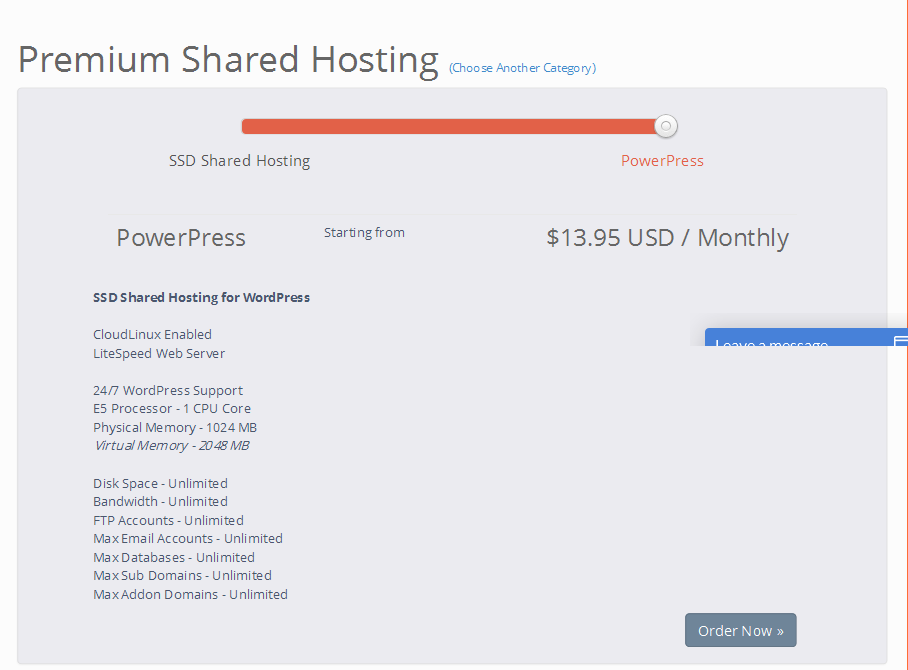
I actually did use it to test my new hosting account from Powerup Hosting I setup tonight and was pretty happy with the results. I got the SSD shared account for $13.95 and it's remarkably fact.
Check them out in the Hosting section. Good company
BabaServers
Newbie
- May 13, 2015
- 12
- 0
I can suggest you to use wp total cache plugin + free cloudfare cdn services.
Use wp smush to reduce the size of image
Remove unecessary plugin and widget and try to use compress image to make website load faster.
always minfy css and javascript to increase the speed you can go for premium version also
Use wp smush to reduce the size of image
Remove unecessary plugin and widget and try to use compress image to make website load faster.
always minfy css and javascript to increase the speed you can go for premium version also

mesbahuddin
Regular Member
- Nov 12, 2013
- 264
- 19
Choose a good host
Start with a solid framework/theme
Use an effective caching plugin
Use a content delivery network (CDN)
Optimize images (automatically)
Optimize your homepage to load quickly
Optimize your WordPress database
Disable hotlinking and leeching of your content
Add an expires header to static resources
Adjust Gravatar images
Add LazyLoad to your images
Turn off pingbacks and trackbacks
Make sure that you don't miss any of them.
Start with a solid framework/theme
Use an effective caching plugin
Use a content delivery network (CDN)
Optimize images (automatically)
Optimize your homepage to load quickly
Optimize your WordPress database
Disable hotlinking and leeching of your content
Add an expires header to static resources
Adjust Gravatar images
Add LazyLoad to your images
Turn off pingbacks and trackbacks
Make sure that you don't miss any of them.

adventgeek
Regular Member
- Apr 16, 2015
- 201
- 42
My Wordpress Blog Is Very Slow
Can any one please help me to fix this issue
http://goo.gl/zz2Dqs
My Pingdom Speed Checker Results
http://goo.gl/jzbIcu
Screen Shot
View attachment 64578
i have 50 posts but only 10 posts showing what to do
i checked everything setting are perfect pls help me
Please Help Me
Better Change your Host and Try to use the Following Plugin.
WP Total Cache
Auto Optimize
Smushit
Minify
tats it.
Kind Regards
Pm Me am also from Chennai. i may help you to optimize your website
kind Regards

Zwielicht
Elite Member
- Aug 31, 2013
- 21,128
- 40,576
Hey hari4u2, here's a link to a thread I created last night about 30 ways to speed up your site. I hope it helps!
http://www.blackhatworld.com/blackh...snail-cheetah-30-ways-speed-up-your-site.html
http://www.blackhatworld.com/blackh...snail-cheetah-30-ways-speed-up-your-site.html
adventgeek
Regular Member
- Apr 16, 2015
- 201
- 42
Better Change your Host and Try to use the Following Plugin.
WP Total Cache
Auto Optimize
Smushit
Minify
tats it.
Kind Regards
Pm Me am also from Chennai. i may help you to optimize your website
kind Regards
WP Total Cache
Auto Optimize
Smushit
Minify
tats it.
Kind Regards
Pm Me am also from Chennai. i may help you to optimize your website
kind Regards
Last edited:

Ambitious12
Elite Member
- Jun 26, 2014
- 3,109
- 616
Theme problem
Did you try free themes???
Did you try free themes???
Guys, its not a problem with a site optimisation. As I have investigates its not even the machines/host its being hosted. The DNS's are being slow as hell. Im getting PING response just under 200ms. Thats definitely way to much. Ask your current provider to take a look or try to reach the guys I have used (INTERNETUM). If you migrating to their server they can do it for you out of charge. Hopefully that will help you.

