

Zwielicht
Elite Member
- Aug 31, 2013
- 21,128
- 40,602
So one morning you wake up and decide to check the analytics data of all of your sites from the past week. Everything seems normal on the 1st site, the 2nd site is doing good, the 3rd site... Oi!
 All right, so you've got a bit of a problem here, but don't panic. Your first inclination might be to think, "Aww man, (insert animal algorithm update here) got me! Damn that Google, they're always trying to keep the little man down", however it's best to not jump to conclusions, otherwise you'll spend more time trying to fix something that's not broken rather than fixing something that is broken.
This is important as you don't want to go through the effort of searching through your Google Search Console data only to find out it was your social media traffic that dropped. To do this, go into your Google Analytics account, select the property you're concerned about, click on "Acquisition", click on "All Traffic", and then select "Source/Medium". Make sure you set the date range to the last week, and then compare it to the week before that (or to a time when your traffic was "normal".

Now, what you're looking for here is the source of traffic that has fewer sessions than before, which will be represented by a negative percentage of sessions. Once you find out which source lost traffic, you can then move on to properly diagnosing the issue.
This shouldn't surprise you. Rankings change, sites change, Google changes. If you were receiving most of your traffic from 1 or 2 keywords or keyword sets and you've been pushed to the second page, you can use the Search Analytics tool in Google Search Console or your own rank tracking software to figure this out. Another option is to just look at the SERPs for your keyword, but this can become cumbersome if you rank for keyword sets.
Check For Manual Actions In Google Search Console
To check your manual actions, go to your Search Console property, click on "Search Traffic", and then select "Manual Actions".
Now, based on several threads from members I've helped here on BHW, sometimes these manual actions won't appear in your Google Search Cosnole account for days or even weeks after they've been applied. However, if you've managed to rule out everything else, then it's best to wait a week or 2 to see if any of the manual actions below appear.
https://support.google.com/webmasters/answer/2604824?hl=en
Go to the "Links To Your Site" page of your Google Search Console property and analyse the links (you can also use your own link tracking/analysis software for this). If there are any unusual links (e.g., links from spam sites) or you see that there's a sudden surge in links, you'l have your answer.
Also, if you see a sudden surge in the number of indexed pages that you didn't create, consider that your site has been hacked.
There are also other causes of direct traffic drops in Google Analytics as Google will label any traffic in the list below as direct:
This one is easy. Just go to your Google Analytics account and click on the Social Overview page.
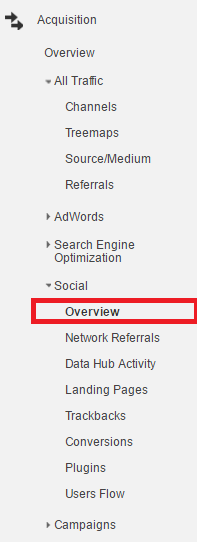
From there, you're going to want to do what we did when we were going over how to determine the type of traffic you lost. That is, you're going to want to compare the current week to the last week before your traffic dropped.
Determine The Cause Of The Issue
This could be because you recently switched to a different advertising method that rendered your campaign ineffective, or because you forgot to continue running your campaign. In other cases, you may have had a popular article that was shared on social media for a while, but for one reason or another, the popularity of that article died down.
Filter Out Referrer Spam
If your Google Analytics account is showing that you were receiving a large volume of sessions and for several weeks in a row and then it suddenly drops off back to what you were receiving before the spike in traffic, make sure you weren't receiving referrer spam in Google Analytics. I have several articles on one of my sites about referrer spam from a year ago as well as instructions on how to filter out referrer spam.
The first code is used in Google Analytics to fitler out referrer spam while the second code was used in your htacess file. Both of them contain outdated referrer spam sites that probably don't even spam any more.
Before We Begin
Tools You'll Need:- Google Analytics
- Google Search Console
- Any Rank Tracking software you're comfortable using (optional)
- Any Link analysis/tracking software your'e comfortable using (optional)
- Remember that Google Analytics Doesn't Track Every Visitor
- Remember that Google Search Console's data is delayed by a few days
This is important as you don't want to go through the effort of searching through your Google Search Console data only to find out it was your social media traffic that dropped. To do this, go into your Google Analytics account, select the property you're concerned about, click on "Acquisition", click on "All Traffic", and then select "Source/Medium". Make sure you set the date range to the last week, and then compare it to the week before that (or to a time when your traffic was "normal".
Now, what you're looking for here is the source of traffic that has fewer sessions than before, which will be represented by a negative percentage of sessions. Once you find out which source lost traffic, you can then move on to properly diagnosing the issue.
Diagnosing Organic Traffic Drops
Consider That You've Been OutrankedThis shouldn't surprise you. Rankings change, sites change, Google changes. If you were receiving most of your traffic from 1 or 2 keywords or keyword sets and you've been pushed to the second page, you can use the Search Analytics tool in Google Search Console or your own rank tracking software to figure this out. Another option is to just look at the SERPs for your keyword, but this can become cumbersome if you rank for keyword sets.
Check For Manual Actions In Google Search Console
To check your manual actions, go to your Search Console property, click on "Search Traffic", and then select "Manual Actions".
Now, based on several threads from members I've helped here on BHW, sometimes these manual actions won't appear in your Google Search Cosnole account for days or even weeks after they've been applied. However, if you've managed to rule out everything else, then it's best to wait a week or 2 to see if any of the manual actions below appear.
https://support.google.com/webmasters/answer/2604824?hl=en
Rule Out Negative SEOHacked Sites
If you see this message on the Manual Actions or Security Issues page in Search Console, it means that Google has detected pages that appear to have been hacked by a third party. Often a hacker will upload files or modify existing files, which then appear as spam in our index. In many cases, this malicious content is hidden through a process called cloaking. To protect users, your site's pages may be labeled as compromised or may not rank as highly in our search results.
User-Generated Spam
If you see this message on the Manual Actions page, it means that Google has detected user-generated spam on your site. Typically, this kind of spam is found on forum pages, guestbook pages, or in user profiles.
As a result, Google has applied a manual spam action to the affected portions of your site. Actions that affect your whole site are listed under Site-wide matches. Actions that affect only part of your site and/or some incoming links to your site are listed under Partial matches.
Spammy Freehosts
Google tries to be precise when taking manual action related to spam. However, if a significant fraction of the pages on sites hosted on a service are spammy, we may take manual action on the service as a whole.
Spammy Structured Markup
If you see this message on the Manual Actions page, it means that Google has detected that some of the markup on your pages may be using techniques that are outside our Rich snippets guidelines, for example: marking up content that is invisible to users, marking up irrelevant or misleading content, or other manipulative behavior.
As a result, Google has applied a manual action to the affected portions of your site, which may affect how your site is displayed in search results. Actions that affect how your whole site is displayed are listed under Site-wide matches. Actions that affect how only part of your site is displayed are listed under Partial matches.
Unnatural Links To Your Site
If you see this message on the Manual Actions page, it means that Google has detected a pattern of unnatural artificial, deceptive, or manipulative links pointing to your site. Buying links or participating in link schemes in order to manipulate PageRank is a violation of Google's Webmaster Guidelines.
As a result, Google has applied a manual spam action to your site.
Thin Content With Little To No Added Value
If you see this message on the Manual Actions page, it means that Google has detected low-quality pages or shallow pages on your site.
Here are a few common examples of pages that often have thin content with little or no added value:
- Automatically generated content
- Thin affiliate pages
- Content from other sources. For example: Scraped content or low-quality guest blog posts
- Doorway pages
- These techniques don't provide users with substantially unique or valuable content, and are in violation of our Webmaster Guidelines.
As a result, Google has applied a manual spam action to the affected portions of your site. Actions that affect your whole site are listed under Site-wide matches. Actions that affect only part of your site and/or some incoming links to your site are listed under Partial matches.
Cloaking and/or Sneaky Redirects
If you see this message on the Manual Actions page, it means that your site may be showing different pages to users than are shown to Google, or redirecting users to a different page than Google saw. Cloaking and sneaky redirects are a violation of Google's Webmaster Guidelines.
As a result, Google has applied a manual spam action to the affected portions of your site. Actions that affect your whole site are listed under Site-wide matches. Actions that affect only part of your site and/or some incoming links to your site are listed under Partial matches.
Unnatural Links From Your Site
If you see this message on the Manual Actions page, it means that Google has detected a pattern of unnatural artificial, deceptive, or manipulative outbound links. Buying links or participating in link schemes in order to manipulate PageRank is a violation of Google's Webmaster Guidelines.
As a result, Google has applied a manual spam action to the affected portions of your site. Actions that affect your whole site are listed under Site-wide matches. Actions that affect only part of your site and/or some incoming links to your site are listed under Partial matches.
Pure Spam
If you see this message on the Manual Actions page, it means that Google has detected that some of your pages may be using techniques that are outside our Webmaster Guidelines. The site appears to use aggressive spam techniques such as automatically generated gibberish, cloaking, scraping content from other websites, and/or other repeated or egregious violations of Google's quality guidelines.
As a result, Google has applied a manual spam action to the affected portions of your site. Actions that affect your whole site are listed under Site-wide matches. Actions that affect only part of your site and/or some incoming links to your site are listed under Partial matches.
Cloaked Images
If you see this message on the Manual Actions page, it means that some of your site's images may be displaying differently on Google's search results pages than they are when viewed on your site. Cloaking is the practice of presenting different content to human users than to search engines. Cloaking is considered a violation of Google's Webmaster Guidelines because it provides our users with different results than they expected. Cloaking images can provide a bad user experience for Google image search results, as obscured images and mismatched thumbnails do not present the user with the image that they are searching for.
As a result, Google has applied a manual action to the affected portions of your site, which will affect how your site's images are displayed in Google. Actions that affect your whole site are listed under Site-wide matches. Actions that affect only part of your site are listed under Partial matches.
Examples of cloaked images
- Serving images to Google that are obscured by another image, for example: a block of text.
- Serving images to Google that are different than the image served to a page visitor.
- Redirecting users away from the image on the site when the user clicks "view image" in Google search results.
Hidden Text and/or Keyword Stuffing
If you see this message on the Manual Actions page, it means that some of your pages may contain hidden text or keyword stuffing, techniques that are outside our Webmaster Guidelines.
As a result, Google has applied a manual spam action to the affected portions of your site. Actions that affect your whole site are listed under Site-wide matches. Actions that affect only part of your site and/or some incoming links to your site are listed under Partial matches.
Go to the "Links To Your Site" page of your Google Search Console property and analyse the links (you can also use your own link tracking/analysis software for this). If there are any unusual links (e.g., links from spam sites) or you see that there's a sudden surge in links, you'l have your answer.
Also, if you see a sudden surge in the number of indexed pages that you didn't create, consider that your site has been hacked.
Diagnosing Direct Traffic Drops
This one is a bit tougher than than diagnosing the other traffic sources. The only thing I can really say is to consider if you've made any changes to your update schedule or to your website that would cause users to stop coming back to your site, but this only applies to sites that receive returning visitors through direct traffic.There are also other causes of direct traffic drops in Google Analytics as Google will label any traffic in the list below as direct:
Source: https://www.optimizesmart.com/google-analytics-wrong-why/Whenever a referrer is not passed, the traffic is treated as direct traffic by Google.
#1 Mobile applications don't send a referrer.
#2 Word/PDF documents don't send a referrer.
#3 ‘302 redirects' sometimes caused the referrer to be dropped.
#4 Sometimes browsers don't pass the referrer.
#5 During http to https redirect (or vice versa) the referrer is not passed because of security reasons.
Diagnosing Social Media Traffic Drops
Find Out Which Social Media Network You've Lost Traffic OnThis one is easy. Just go to your Google Analytics account and click on the Social Overview page.
From there, you're going to want to do what we did when we were going over how to determine the type of traffic you lost. That is, you're going to want to compare the current week to the last week before your traffic dropped.
Determine The Cause Of The Issue
This could be because you recently switched to a different advertising method that rendered your campaign ineffective, or because you forgot to continue running your campaign. In other cases, you may have had a popular article that was shared on social media for a while, but for one reason or another, the popularity of that article died down.
Diagnosing Other Traffic Drops
Filter Out Referrer Spam
If your Google Analytics account is showing that you were receiving a large volume of sessions and for several weeks in a row and then it suddenly drops off back to what you were receiving before the spike in traffic, make sure you weren't receiving referrer spam in Google Analytics. I have several articles on one of my sites about referrer spam from a year ago as well as instructions on how to filter out referrer spam.
The first code is used in Google Analytics to fitler out referrer spam while the second code was used in your htacess file. Both of them contain outdated referrer spam sites that probably don't even spam any more.
Code:
guardlink.org|semalt.semalt.com|4webmasters.org|free-share-buttons.com|social-buttons.com|best-seo-offer.com|buy-cheap-online.info|get-free-traffic-now.com|event-tracking.com|trafficmonetize.org|webmonetizer.net|dailyrank.net|floating-share-buttons.com|site1.floating-share-buttons.com|site2.floating-share-buttons.com|site3.floating-share-buttons.com|site4.floating-share-buttons.com|site5.floating-share-buttons.com|site6.floating-share-buttons.com|site7.floating-share-buttons.com|site8.floating-share-buttons.com|site9.floating-share-buttons.com|site10.floating-share-buttons.com
Code:
RewriteEngine on
RewriteCond %{HTTP_REFERER} ^https?:\/\/([^.]+\.)*semalt\.com [NC,OR] RewriteCond %{HTTP_REFERER} ^https?:\/\/([^.]+\.)*Darodar\.com [NC,OR] RewriteCond %{HTTP_REFERER} ^https?:\/\/([^.]+\.)*Priceg\.com [NC,OR] RewriteCond %{HTTP_REFERER} ^https?:\/\/([^.]+\.)*7makemoneyonline\.com [NC,OR] RewriteCond %{HTTP_REFERER} ^https?:\/\/([^.]+\.)*Buttons-for-website\.com [NC,OR] RewriteCond %{HTTP_REFERER} ^https?:\/\/([^.]+\.)*Ilovevitaly\.com [NC,OR] RewriteCond %{HTTP_REFERER} ^https?:\/\/([^.]+\.)*Blackhatworth\.com [NC,OR] RewriteCond %{HTTP_REFERER} ^https?:\/\/([^.]+\.)*Econom\.co [NC,OR] RewriteCond %{HTTP_REFERER} ^https?:\/\/([^.]+\.)*Iskalko\.ru [NC,OR] RewriteCond %{HTTP_REFERER} ^https?:\/\/([^.]+\.)*Lomb\.co [NC,OR] RewriteCond %{HTTP_REFERER} ^https?:\/\/([^.]+\.)*Lombia\.co [NC,OR] RewriteCond %{HTTP_REFERER} ^https?:\/\/([^.]+\.)*hulfingtonpost\.com [NC,OR] RewriteCond %{HTTP_REFERER} ^https?:\/\/([^.]+\.)*cenoval\.ru [NC,OR] RewriteCond %{HTTP_REFERER} ^https?:\/\/([^.]+\.)*o\-o\-6\-o\-o\.com [NC,OR] RewriteCond %{HTTP_REFERER} ^https?:\/\/([^.]+\.)*humanorightswatch\.org [NC,OR] RewriteCond %{HTTP_REFERER} ^https?:\/\/([^.]+\.)*simple\-share\-buttons\.com [NC,OR] RewriteCond %{HTTP_REFERER} ^https?:\/\/([^.]+\.)*sharebutton\.org [NC,OR] RewriteCond %{HTTP_REFERER} ^https?:\/\/([^.]+\.)*s\.click\.aliexpress\.com [NC,OR] RewriteCond %{HTTP_REFERER} ^https?:\/\/([^.]+\.)*social\-buttons\.com [NC,OR] RewriteCond %{HTTP_REFERER} ^https?:\/\/([^.]+\.)*anticrawler\.org [NC,OR] RewriteCond %{HTTP_REFERER} ^https?:\/\/([^.]+\.)*site12\.social\-buttons\.com [NC,OR] RewriteCond %{HTTP_REFERER} ^https?:\/\/([^.]+\.)*adcash\.com [NC,OR] RewriteCond %{HTTP_REFERER} ^https?:\/\/([^.]+\.)*adviceforum\.info [NC,OR] RewriteCond %{HTTP_REFERER} ^https?:\/\/([^.]+\.)*anticrawler\.org [NC,OR] RewriteCond %{HTTP_REFERER} ^https?:\/\/([^.]+\.)*blackhatworth\.com [NC,OR] RewriteCond %{HTTP_REFERER} ^https?:\/\/([^.]+\.)*cenokos\.ru [NC,OR] RewriteCond %{HTTP_REFERER} ^https?:\/\/([^.]+\.)*cityadspix\.com [NC,OR] RewriteCond %{HTTP_REFERER} ^https?:\/\/([^.]+\.)*edakgfvwql\.ru [NC,OR] RewriteCond %{HTTP_REFERER} ^https?:\/\/([^.]+\.)*gobongo\.info [NC,OR] RewriteCond %{HTTP_REFERER} ^https?:\/\/([^.]+\.)*iskalko\.ru [NC,OR] RewriteCond %{HTTP_REFERER} ^https?:\/\/([^.]+\.)*kambasoft\.com [NC,OR] RewriteCond %{HTTP_REFERER} ^https?:\/\/([^.]+\.)*luxup\.ru [NC,OR] RewriteCond %{HTTP_REFERER} ^https?:\/\/([^.]+\.)*myftpupload\.com [NC,OR] RewriteCond %{HTTP_REFERER} ^https?:\/\/([^.]+\.)*prodvigator\.ua [NC,OR] RewriteCond %{HTTP_REFERER} ^https?:\/\/([^.]+\.)*resellerclub\.com [NC,OR] RewriteCond %{HTTP_REFERER} ^https?:\/\/([^.]+\.)*savetubevideo\.com [NC,OR] RewriteCond %{HTTP_REFERER} ^https?:\/\/([^.]+\.)*screentoolkit\.com [NC,OR] RewriteCond %{HTTP_REFERER} ^https?:\/\/([^.]+\.)*seoexperimenty\.ru [NC,OR] RewriteCond %{HTTP_REFERER} ^https?:\/\/([^.]+\.)*slftsdybbg\.ru [NC,OR] RewriteCond %{HTTP_REFERER} ^https?:\/\/([^.]+\.)*socialseet\.ru [NC,OR] RewriteCond %{HTTP_REFERER} ^https?:\/\/([^.]+\.)*superiends\.org [NC,OR] RewriteCond %{HTTP_REFERER} ^https?:\/\/([^.]+\.)*vodkoved\.ru [NC,OR] RewriteCond %{HTTP_REFERER} ^https?:\/\/([^.]+\.)*websocial\.me [NC,OR] RewriteCond %{HTTP_REFERER} ^https?:\/\/([^.]+\.)*ykecwqlixx\.ru [NC,OR] RewriteCond %{HTTP_REFERER} ^https?:\/\/([^.]+\.)*76brighton\.co\.uk [NC,OR] RewriteCond %{HTTP_REFERER} ^https?:\/\/([^.]+\.)*paparazzistudios\.com\.au [NC,OR] RewriteCond %{HTTP_REFERER} ^https?:\/\/([^.]+\.)*powitania\.pl [NC,OR] RewriteCond %{HTTP_REFERER} ^https?:\/\/([^.]+\.)*sharebutton\.net [NC,OR] RewriteCond %{HTTP_REFERER} ^https?:\/\/([^.]+\.)*tasteidea\.com [NC,OR] RewriteCond %{HTTP_REFERER} ^https?:\/\/([^.]+\.)*descargar\-musica\-gratis\.net [NC,OR] RewriteCond %{HTTP_REFERER} ^https?:\/\/([^.]+\.)*torontoplumbinggroup\.com [NC,OR] RewriteCond %{HTTP_REFERER} ^https?:\/\/([^.]+\.)*cyprusbuyproperties\.com [NC,OR] RewriteCond %{HTTP_REFERER} ^https?:\/\/([^.]+\.)*4webmasters\.org [NC,OR] RewriteCond %{HTTP_REFERER} ^https?:\/\/([^.]+\.)*ranksonic\.org [NC,OR] RewriteCond %{HTTP_REFERER} ^https?:\/\/([^.]+\.)*best\-seo\-solution\.com [NC,OR] RewriteCond %{HTTP_REFERER} ^https?:\/\/([^.]+\.)*get\-free\-traffic\-now\.com [NC,OR] RewriteCond %{HTTP_REFERER} ^https?:\/\/([^.]+\.)*googlsucks\.com [NC,OR] RewriteCond %{HTTP_REFERER} ^https?:\/\/([^.]+\.)*Buttons\-for\-your\-website\.com [NC,OR] RewriteCond %{HTTP_REFERER} ^https?:\/\/([^.]+\.)*Best\-seo\-offer\.com [NC,OR] RewriteCond %{HTTP_REFERER} ^https?:\/\/([^.]+\.)*offers\.bycontext\.com [NC,OR] RewriteCond %{HTTP_REFERER} ^https?:\/\/([^.]+\.)*www1\.social\-buttons\.com [NC,OR] RewriteCond %{HTTP_REFERER} ^https?:\/\/([^.]+\.)*website\-errors\-scanner\.com [NC,OR] RewriteCond %{HTTP_REFERER} ^https?:\/\/([^.]+\.)*free\-share\-buttons\.com [NC,OR] RewriteCond %{HTTP_REFERER} ^https?:\/\/([^.]+\.)*theguardlan\.com [NC,OR] RewriteCond %{HTTP_REFERER} ^https?:\/\/([^.]+\.)*buy\-cheap\-online\.info [NC,OR] RewriteCond %{HTTP_REFERER} ^https?:\/\/([^.]+\.)*netvibes\.com [NC,OR] RewriteCond %{HTTP_REFERER} ^https?:\/\/([^.]+\.)*guardlink\.org [NC,OR] RewriteCond %{HTTP_REFERER} ^https?:\/\/([^.]+\.)*securesuite\.co\.uk [NC,OR] RewriteCond %{HTTP_REFERER} ^https?:\/\/([^.]+\.)*securesuite\.net [NC,OR] RewriteCond %{HTTP_REFERER} ^https?:\/\/([^.]+\.)*sitevaluation\.org [NC,OR] RewriteCond %{HTTP_REFERER} ^https?:\/\/([^.]+\.)*forum20\.smailik\.org [NC] RewriteRule .* - [F]
Conclusion
I wanted to create this guide for those of you who can't seem to figure out why you've lost visitors to your website. Instead of posting a thread on Black Hat World asking someone to diagnose the issue for you, it's now possible for you to do it yourself. After all, you have your website's data.
Last edited: