[Guide] Speed up your Wordpress website with Redis + Free Nulled Plugin

hideath

Elite Member
Joined
Jun 16, 2019
Messages
6,620
Reaction score
7,370
There are a ton of guides shared here in BHW covering everything you need to do to speed up your wordpress website,
I won't be creating another duplicate thread with the same information,
With this guide, you'll learn how to use Redis in your WP website to get even faster loading speed & cache the wesbite/pages/posts queries

Before starting:
  • What's Redis: in simple terms, Redis is a caching software that can be used to cache most of the php & database queries in the server RAM,
    RAM is considered way faster than any type of disk storage, including NVME M2, you're queries will be served almost instantly
  • What's the requirements: you'll need a server that support Redis to be installed as well as some RAM to be allocated to the application, which can vary depending on the website
What's the best use of Redis:
  • Mainly it's best for websites with high traffic-to-pages ratio, meaning if you got too many pages (xxK+) each receiving a couple of visits daily it won't really be worth,
    Simply because you'll need too much RAM which could be costly, if your website have a few (=<1K) pages with a ton of traffic, this is right for you
  • Example of websites that shouldn't be using Redis: Any type of of auto blogs with thousands of pages & low traffic, movie/anime/manga/tv-shows type of websites, programmatic SEO type of websites with ton of pages, etc...
  • Example of websites that should consider using Redis: Landing pages websites, Most blog websites, E-commerce websites, Tool websites, Data reporting websites, etc...
How to install Redis:
I won't be making a full section for this as the case varies depending on the panel and/or server OS you're using, i personally use aaPanel and it's fairly easy to install & use,
but here are a few guides in most common panels & servers OS':
After installing Redis for the server, change the allocated RAM depending on your current usage, server & website, you can change this later as well, feel free to test,
You have to install the redis extension in PHP to be able to use it with your PHP scripts, in our case to be able to work with Wordpress

How to install Redis in Wordpress:
  • First, you'll need to download & install Redis cache pro plugin, the link for the nulled version is provided at the bottom of the thread along with VT Scan,
    If you're not comfortable with the provided plugin file(s), or want to get frequent updates of the plugin, you can always get Deleted member 752298 service for this ^^
  • After installing the plugin in Wordpress, you have to add the following lines in the wp-config.php file (located at the main website folder):
    PHP:
    define('WP_MEMORY_LIMIT', '1024M');define('WP_CACHE_KEY_SALT', 'string');
    define('WP_CACHE', true);
    define('WP_REDIS_CONFIG', [
        'host' => '127.0.0.1',
        'port' => 6379,
        'database' => 0, // change for each site
        'maxttl' => 3600 * 24 * 7, // 7 days
        'timeout' => 1.0,
        'read_timeout' => 1.0,
        'prefetch' => true,
        'split_alloptions' => true,
        'strict' => true,
        'debug' => false,
    ]);
    
    define('WP_REDIS_DISABLED', false);
    You can change the configuration depending on the server & website as well as your Redis server configuration,
    Whatever needed to cache most of the websites/pages queries,
    Remember to match the Redis server login details as well
  • Now, to make sure the plugin setup is in point and Wordpress is connected to Redis, go to Settings > Object Cache, it should look something like this:
    1707484410733.png
Redis is now installed, configured & working, it will be creating cached versions of your PHP/MySQL queries and your website should get faster in the next 24 Hours,
Depending on the website/server & usage, make sure to change the configuration of both Redis application & website allocated memory & cache to meet your needs

Download the plugin here:
Please let me know if any i need to add anything to the thread,
Don't hesitate to post any questions/suggestions as well!
 
Last edited:
I'm using it with Litespeed Cache Plugin - any advantage or disadvantage with this?
regular caching plugin won't cache the php/sql queries, only the html content,
here's more details about it: https://wp-rocket.me/wordpress-cache/object-caching/

there's not disadvantages apart from the server resources needed, which is mostly the RAM for Redis,
you'll speed up the queries execution time, get less load on the database & php applications which could potentially save resources as well,
all in one will give you better speed, you'll still need to use a content caching plugin as well, this is an addition not an alternative ^^
 
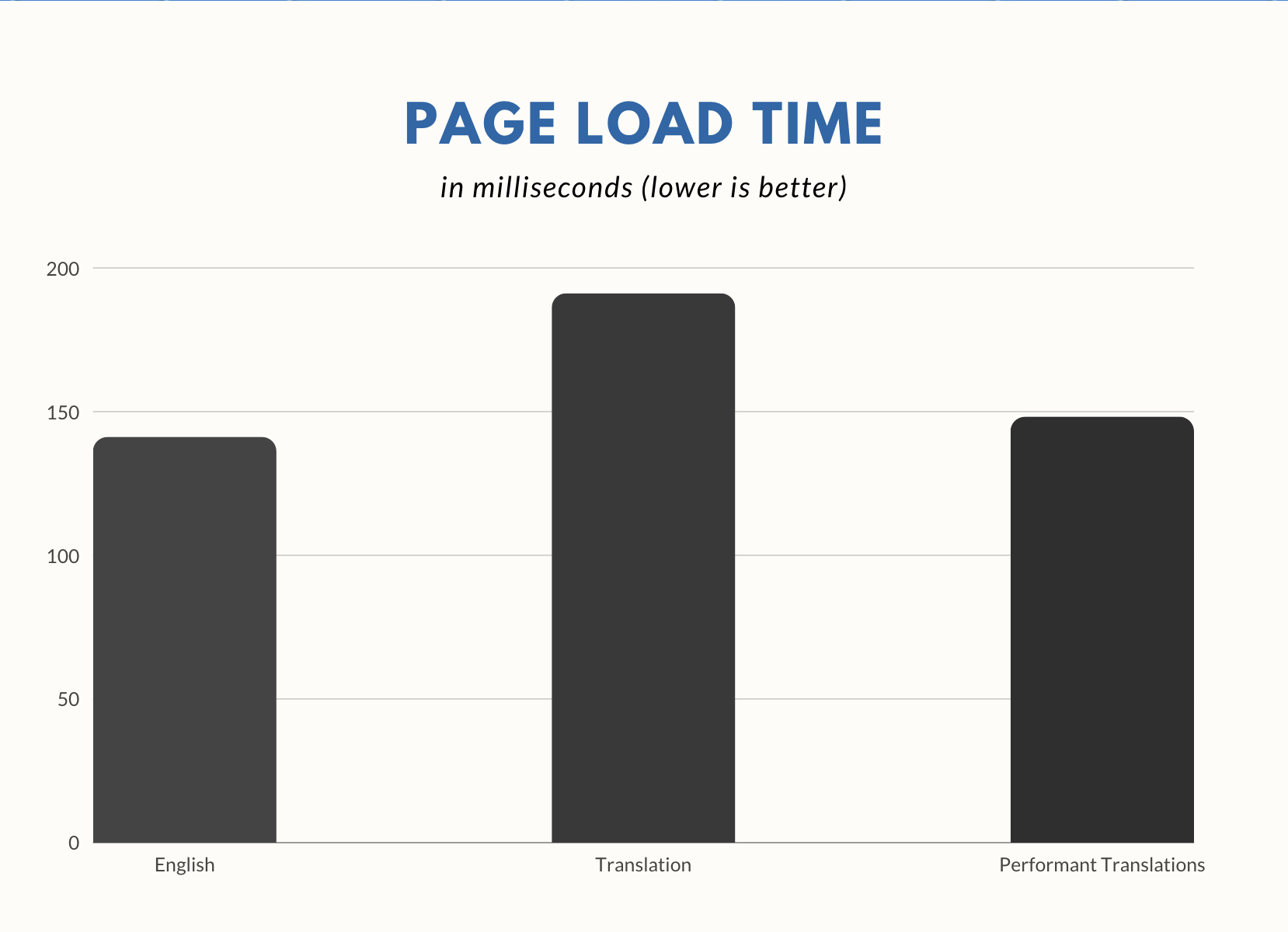
If you use another language than English, make sure you install Performant Translations too. It will be implemented in core later this year.

https://wordpress.org/plugins/performant-translations/
https://make.wordpress.org/core/2023/11/08/merging-performant-translations-into-core/
screenshot-1.png
 
My server has its own caching plugin activated on my website and I’m also using Ezoic caching system but yet, my website is slow. Can I use this plugin along with all these plugins mentioned above?
 
My server has its own caching plugin activated on my website and I’m also using Ezoic caching system but yet, my website is slow. Can I use this plugin along with all these plugins mentioned above?
Sure thing, just as explained above:
regular caching plugin won't cache the php/sql queries, only the html content,
here's more details about it: https://wp-rocket.me/wordpress-cache/object-caching/

there's not disadvantages apart from the server resources needed, which is mostly the RAM for Redis,
you'll speed up the queries execution time, get less load on the database & php applications which could potentially save resources as well,
all in one will give you better speed, you'll still need to use a content caching plugin as well, this is an addition not an alternative ^^

Also, any type of caching doesn't guarantee decent results, it depends on more factors,
You have to pick the right plugins/themes, optimize & minify the number of pictures & scripts, avoid using too many ads, etc...
Server specs & quality do play a big role in this as well, make sure you have the right one,

I personally don't use Ezoic for this particular reason,
and it caused some indexing problems in the past for some reason as well,
 
My problem is; I have namecheap highest hosting plan stella rbusiness a standard hestia theme wordpress site (no content on it not finished yet) +LS cache plugin and redis enabled, have fast google pagepeed cores of 98. I have a mac mini 2012 catalina OS.

site load fast in firefox and chrome, slow 12-20 seconds in bing edge - WTF ?
Now I test the 7g htaccess with speed rules, not works with Litespeed cache plugin, deactivate it

now site loads faster in Firefox and chrome , in Bing slow with 20 secods watiting....
WTF is wrong with the Bing edge browser ? Why is my wp loading so slow in bing edge?

Neilpatel.com site loads in 1 second in bing edge, chrome and FF.
What is wrong with my wp site? Does the 7G htaccess makes it load slower? Some Litespeed settings in my cpanel? Should I deactivate LS in cpanel?

Is the stellar business namecheap hosting plan so slow ? I can't believe it....
Now the 7G firewall htaccess with speed rules gives me 404 errors on pages and categories .... cry ;.(

First time load is slow, second time load is fast - what a crap....

Any tips ?
Happy weekend !
 
Last edited:
My problem is; I have namecheap highest hosting plan stella rbusiness a standard hestia theme wordpress site (no content on it not finished yet) +LS cache plugin and redis enabled, have fast google pagepeed cores of 98. I have a mac mini 2012 catalina OS.

site load fast in firefox and chrome, slow 12-20 seconds in bing edge - WTF ?
Now I test the 7g htaccess with speed rules, not works with Litespeed cache plugin, deactivate it

now site loads faster in Firefox and chrome , in Bing slow with 20 secods watiting....
WTF is wrong with the Bing edge browser ? Why is my wp loading so slow in bing edge?

Neilpatel.com site loads in 1 second in bing edge, chrome and FF.
What is wrong with my wp site? Does the 7G htaccess makes it load slower? Some Litespeed settings in my cpanel? Should I deactivate LS in cpanel?

Is the stellar business namecheap hosting plan so slow ? I can't believe it....
Now the 7G firewall htaccess with speed rules gives me 404 errors on pages and categories .... cry ;.(

First time load is slow, second time load is fast - what a crap....

Any tips ?
Happy weekend !
that will need some debugging to know what's the exact problem is,
try disabling each of the features/plugins & even change the theme 1 by 1 then check for whatever is causing the probem,
it's less likely to be related to the host as it's working fine with other browsers, more like a sever/config/script... is causing this
 
that will need some debugging to know what's the exact problem is,
try disabling each of the features/plugins & even change the theme 1 by 1 then check for whatever is causing the probem,
it's less likely to be related to the host as it's working fine with other browsers, more like a sever/config/script... is causing this
I'm little bit sad now....now I deleted LS cache setup normal standard htaccess + the speed rules from the 7G , now I will try to disable plugins to see if that will help I only have 7 plugins on it....

Ok on the other side each webhost has some down time where it loads a little bit slower, for a few hours or a day them must check it again tomorrow. Will all that not helps then I try to speak with their support and when is possible change my stellar business plan to their high EasyWP plan+superconic cdn that shcould help, with that I will lose my dedicated ip......

Now I disable plugins....see if that helps.
 
Now here is my feedback:


I deactivated these plugins

Antispam bee
Unique permalink ID
Rank Math SEO
Hello Dolly
Ls cache
WP Forms Lite
Yet another related posts

Only one plugin is active: Stop User EnumerationWP was slower with antispam bee plugin , LS cache and unique permalink ID plugin

Then now I setup new fresh standard htaccess
Now hestia theme loads in;

chrome 2 seconds
FF 3-5 seconds
Bing edge 3-5 seconds

With the Nevis theme it loads 1 sconds faster that's all...

it's suboptimal.......chrome speed is good, how these people make their wp load in 1 second? I think that would be possible only with a google cloud vm...and clean code and clean plugins+ theme

Since the last two years I tried different webhostings I'm tired of that....
 
Last edited:
Kadence theme loads fast in chrome 2 seconds and in Firefox too, Bind egde is slow with 5-6 seconds ???...Wghat is wrong with Bing edge ? Kadence has category description on frontpage. Most 98% of the other wp themes not.
 
Now here is my feedback:


I deactivated these plugins

Antispam bee
Unique permalink ID
Rank Math SEO
Hello Dolly
Ls cache
WP Forms Lite
Yet another related posts

Only one plugin is active: Stop User EnumerationWP was slower with antispam bee plugin , LS cache and unique permalink ID plugin

Then now I setup new fresh standard htaccess
Now hestia theme loads in;

chrome 2 seconds
FF 3-5 seconds
Bing edge 3-5 seconds

With the Nevis theme it loads 1 sconds faster that's all...

it's suboptimal.......chrome speed is good, how these people make their wp load in 1 second? I think that would be possible only with a google cloud vm...and clean code and clean plugins+ theme
try to install a fresh wp website, use a subdomain if you don't have other domain,
install wp rocket, perfmatters, some fast theme, try newspaper or any other known fast ones,
include several light weight images, disable any ads and check how it will perform,

you might want to wait for several hours before getting the actual results, caching takes some time depending on your website,
make sure to block everything in robots.txt to avoid any seo problems,

it didn't use namecheap for years now,
i've been using contabo VPS for multiple websites and the speed is great, many pages/websites loads under 1 sec, not aff,
there are many variables that can influence website speed,

also, testing the website loading speed from your browser(s) is not really optimal,
it could be something with your network/computer causing the slow loading speed
 
my thought is compare to site neilpatel.com a wordpress site will be load in 1 second when you remove all rendering loading scripts, today it not works anymore when you do that via function.php, there is a remote service who is doing this for $10 monthly or so, another step to pull out money of my tight budget...the service is nitro pack
 
remove rendering scripts or the cloudflare rule "cache all" comes with a catch: it can break your site, here using cloudflare will be the cheapest option I not like it to lose my beautiful dedicated ip...

Yesterday I enabled redis in the php settings in cpanel maybe this make the site loads slow with PHP version 8 ?
 
$10 monthly or so, another step to pull out money of my tight budget...the service is nitro pack
I would never install Nitro pack on any of my sites, some shitty service. Use a vps from Vultr HF combined with FlyWP free service 1 server+1 site only with nginx fastcgi s fullpage cache without any cache plugin and redis and your site will fly for only $6 a month in total.
 
Back
Top