

- Apr 26, 2020
- 1,711
- 994
1. Go to signup here -
https://dash.infinityfree.com/register
2. After signup verify email.
3. Go to accounts to make one -
https://dash.infinityfree.com/accounts/create4. After that write your keyword and choose your subdomain.

5. Then again click on create account button.

6. Then finally click on finish.

7. After that click on control panel.

8. then click on i approve.

9. After that simply go on file manager.
10. Open htdocs folder
11. Delete index2.html

12. Create a new file index.html
13. Put your link and code in that. for example -
<a href="https://google.com">bhw</a>Final link -
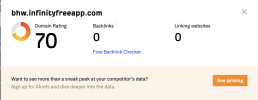
http://bhw.infinityfreeapp.com/It indexes too - search this to know -
site:http://*.infinityfreeapp.com/

