

tracksrail
Regular Member
- Feb 29, 2016
- 304
- 201
There was a time when guest posting was an alien technique for me and I use to buy guest post for my sites. And guest posts are way too expensive, I was paying between $70-$100 for a good guest post. The drain on my resources was tremendous. So I day when it got too much I decided to dive into the world of guest posting myself, and learn how to save my precious money.
I have learned a lot over years from this forum, so today I am sharing my guest posting technique via which I get the good quality guest post that has same or even better authority than those I was buying.
Also, this process will allow you to automate the guest posting process as much as possible, while keeping the quality intact, allowing you to scale up your guest posting efforts at minimal cost.
So here goes the method I use.
Step 1: The easiest and quickest way to find sites in your niche which accept guest post is to find popular sites in your niche. For example, if your site is food niche, find top sites in food niche.
For example – if I run a food blog and I want to do the guest post for my blog here is step by step process how I find the guest post.
Go to google and find – list of top food blogs
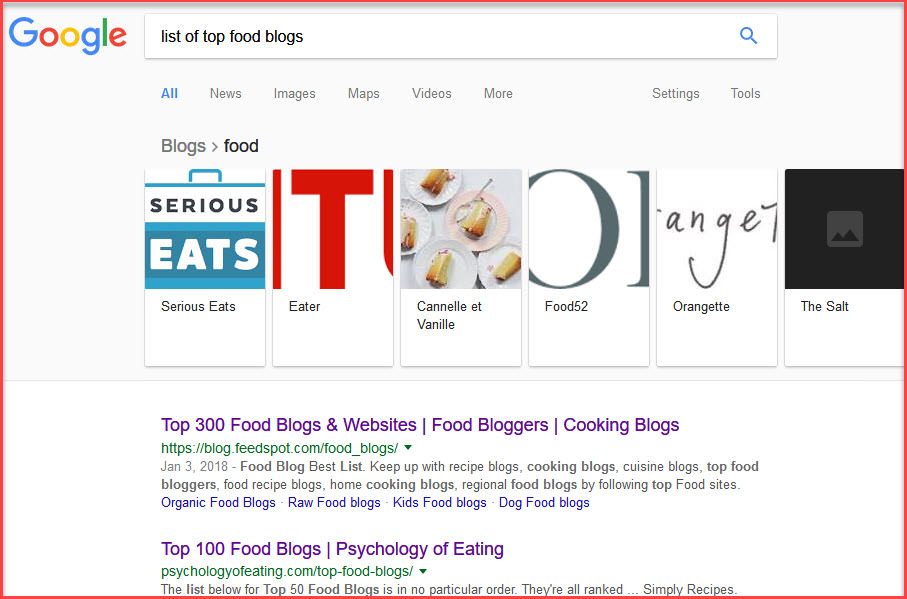
Click 2-3 results and start collecting blog/sites from it. list them in excel or notepad.
Step 2: Then you can put all the blog sites in dom detailer to check how many ref domains these sites are getting, you can use majestic or any other tool of your choice, I use dom.

Step 3: Now this is a good list and you can start one by one, I like to take the sites which have high no of referring domains.
For this example I have taken – thekitchn
Under historical it shows 91,483 referring domains, go ahead and download these ref. domains.

Step 4: Once you have downloaded the ref domain sheet, go ahead and filter it on domain rating basis to remove domains which you don’t want to target such as youtube, amazon, wordpress, Wikipedia etc. You can manually delete them as well, I like to filter them.
Using filter you can set which min or max domain rating sites you wish to target. You can see below screen how I do it.

Step 5: You can further clean the url list for removing .gov or .edu sites or free blog sites. I use scrapebox to do that.
Once you clean your list, load it on scrapebox. Using scrapebox we will find if we can also get a backlinks from these sites who have given a backlink to thekitchn.
Lets Harvest, using below guest post foot prints –
"guest Post"
"write for us"
"guest article"

Once completed you will get all the potential guest post sites –

Export them to excel and filter, you will get 1000s of sites which accept guest post.

Incase you don’t have scrapebox, you can do this task manually and can get the same result.

Step 6: Once you have all the sites which are accepting guest post, ask your staff to collect the names and email ids from the websites. I like to create a database of it for future use, I ask my staff to collect all this info manually for maximum accuracy.

Step 7: Once you have all the email data, you can set a email outreach campaign through mailshake or Gmass, I like mailshake as you can limit the no of emails going every hour so we can control the sending and also maintain email delivery rate.
Using mailshake, I set 3-4 follow up and I follow up almost a month, and 35-40% conversions I get by the automatic follow up which I set from mailshake.
Hope this help in your guest posting, let me know If you have any questions regarding my process.
I have learned a lot over years from this forum, so today I am sharing my guest posting technique via which I get the good quality guest post that has same or even better authority than those I was buying.
Also, this process will allow you to automate the guest posting process as much as possible, while keeping the quality intact, allowing you to scale up your guest posting efforts at minimal cost.
So here goes the method I use.
Step 1: The easiest and quickest way to find sites in your niche which accept guest post is to find popular sites in your niche. For example, if your site is food niche, find top sites in food niche.
For example – if I run a food blog and I want to do the guest post for my blog here is step by step process how I find the guest post.
Go to google and find – list of top food blogs
Click 2-3 results and start collecting blog/sites from it. list them in excel or notepad.
Step 2: Then you can put all the blog sites in dom detailer to check how many ref domains these sites are getting, you can use majestic or any other tool of your choice, I use dom.
Step 3: Now this is a good list and you can start one by one, I like to take the sites which have high no of referring domains.
For this example I have taken – thekitchn
Under historical it shows 91,483 referring domains, go ahead and download these ref. domains.
Step 4: Once you have downloaded the ref domain sheet, go ahead and filter it on domain rating basis to remove domains which you don’t want to target such as youtube, amazon, wordpress, Wikipedia etc. You can manually delete them as well, I like to filter them.
Using filter you can set which min or max domain rating sites you wish to target. You can see below screen how I do it.
Step 5: You can further clean the url list for removing .gov or .edu sites or free blog sites. I use scrapebox to do that.
Once you clean your list, load it on scrapebox. Using scrapebox we will find if we can also get a backlinks from these sites who have given a backlink to thekitchn.
Lets Harvest, using below guest post foot prints –
"guest Post"
"write for us"
"guest article"
Once completed you will get all the potential guest post sites –
Export them to excel and filter, you will get 1000s of sites which accept guest post.
Incase you don’t have scrapebox, you can do this task manually and can get the same result.
Step 6: Once you have all the sites which are accepting guest post, ask your staff to collect the names and email ids from the websites. I like to create a database of it for future use, I ask my staff to collect all this info manually for maximum accuracy.
Step 7: Once you have all the email data, you can set a email outreach campaign through mailshake or Gmass, I like mailshake as you can limit the no of emails going every hour so we can control the sending and also maintain email delivery rate.
Using mailshake, I set 3-4 follow up and I follow up almost a month, and 35-40% conversions I get by the automatic follow up which I set from mailshake.
Hope this help in your guest posting, let me know If you have any questions regarding my process.


