

hims.000
Senior Member
- Apr 10, 2020
- 1,030
- 588
I have fixed a nonworking python script. Now the python script is working well.
Ok, don't worry if you don't know to code. I have written the full tutorial
Step 1. download python-3.6.8
Step2. Copy the below script
Now open notepad++ and save it as new.py
Now go to the script folder where you save the above script for my case its C:\Users\himangshu\Documents\New folder
2. Next click on the upper bar and type cmd
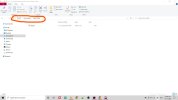
3. Cmd will open Next type pip install -r requirements.txt
4. Next install selenium with this command pip install selenium
5. Next type python insta.py

Log in with your insta username and password
6. wait for some seconds it will ask hashtag. Input any hashtag and next it will ask How many post you want to like and leave a comment . type as per your need.
But keep in mind that Instagram has some limitations for likes and comments per day.
type your comment and
enjoy.

Note- The problem you will face here - if someone has turned on limited comments on their photos then the script will stop working. Most of the time it works for me.
Note2. Anyone can develop this script and add new code. such as following this person or bypassing the limited comment option can post the updated script in the comment section.
Ok, don't worry if you don't know to code. I have written the full tutorial
Step 1. download python-3.6.8
Step2. Copy the below script
Python:
from selenium import webdriver
from webdriver_manager.chrome import ChromeDriverManager
from selenium.webdriver.common.by import By
from selenium.webdriver.common.keys import Keys
import random
import time

def sleep_for_period_of_time():
    limit = random.randint(7,10)
    time.sleep(limit)

user = input("Enter your username: ")
pwd = input("Enter your password: ")

def main():
    options = webdriver.ChromeOptions()
    options.add_argument("--lang=en")
    browser = webdriver.Chrome(executable_path=ChromeDriverManager().install(), options=options)
    browser.get("https://www.instagram.com")
    sleep_for_period_of_time()

    username_input = browser.find_element_by_css_selector("input[name='username']")
    password_input = browser.find_element_by_css_selector("input[name='password']")

    username_input.send_keys(user)
    password_input.send_keys(pwd)
    sleep_for_period_of_time()

    login_button = browser.find_element_by_xpath("//button[@type='submit']")
    login_button.click()
    sleep_for_period_of_time()

    hashtag = input("Enter your hashtag name: ")
    browser.get(f"https://www.instagram.com/explore/tags/{hashtag}")
    sleep_for_period_of_time()

    first_pic = browser.find_element_by_xpath("//div[@class='_aaq8']/div/div/div[1]/div[1]/a")
    first_pic.click()

    num_post = input("How many post you want to like and leave a comment: ")
    cmmt = input("Type your comment: ")
    sleep_for_period_of_time()

    for i in range(int(num_post)):

        # Like a post
        like_post = browser.find_element_by_xpath("//section[@class= '_aamu _ae3_ _ae47 _ae48']/span[1]/button")
        like_post.click()
        print("Liked!")
        sleep_for_period_of_time()

        #Comment on a post
        cmmt_post = browser.find_element_by_xpath("//textarea[@class='x1i0vuye xvbhtw8 x76ihet xwmqs3e x112ta8 xxxdfa6 x5n08af x78zum5 x1iyjqo2 x1qlqyl8 x1d6elog xlk1fp6 x1a2a7pz xexx8yu x4uap5 x18d9i69 xkhd6sd xtt52l0 xnalus7 x1bq4at4 xaqnwrm xs3hnx8']")
        cmmt_post.click()
        cmmt_post = browser.find_element_by_xpath("//textarea[@class='x1i0vuye xvbhtw8 x76ihet xwmqs3e x112ta8 xxxdfa6 x5n08af x78zum5 x1iyjqo2 x1qlqyl8 x1d6elog xlk1fp6 x1a2a7pz xexx8yu x4uap5 x18d9i69 xkhd6sd xtt52l0 xnalus7 x1bq4at4 xaqnwrm xs3hnx8 focus-visible']")
        cmmt_post.send_keys(cmmt)
        cmmt_post.send_keys(Keys.ENTER)
        print("Commented!")
        time.sleep(5)

        #Move on to the next Post
        next_post = browser.find_element_by_xpath("//button[@class='_abl-']//*[name()='svg' and @aria-label='Next']")
        next_post.click()
        print("post " + str(i) + " done!")
        print("Next!")
        sleep_for_period_of_time()

    #Quit the Program
    answer = input("The programm finished! Click on 'e' to exit.. ")
    if answer.lower().startswith("e"):
        browser.quit()
        exit()

if __name__ == "__main__":
    main()
Now open notepad++ and save it as new.py
Now go to the script folder where you save the above script for my case its C:\Users\himangshu\Documents\New folder
2. Next click on the upper bar and type cmd
3. Cmd will open Next type pip install -r requirements.txt
4. Next install selenium with this command pip install selenium
5. Next type python insta.py
Log in with your insta username and password
6. wait for some seconds it will ask hashtag. Input any hashtag and next it will ask How many post you want to like and leave a comment . type as per your need.
But keep in mind that Instagram has some limitations for likes and comments per day.
type your comment and
enjoy.
Note- The problem you will face here - if someone has turned on limited comments on their photos then the script will stop working. Most of the time it works for me.
Note2. Anyone can develop this script and add new code. such as following this person or bypassing the limited comment option can post the updated script in the comment section.


