(Get) Working Instagram Bot with python script (( with full guide))

Status
Not open for further replies.

hims.000

Senior Member
Joined
Apr 10, 2020
Messages
1,014
Reaction score
583
I have fixed a nonworking python script. Now the python script is working well.
Ok, don't worry if you don't know to code. I have written the full tutorial

Step 1. download python-3.6.8
Step2. Copy the below script


Python:
from selenium import webdriver
from webdriver_manager.chrome import ChromeDriverManager
from selenium.webdriver.common.by import By
from selenium.webdriver.common.keys import Keys
import random
import time

def sleep_for_period_of_time():
    limit = random.randint(7,10)
    time.sleep(limit)

user = input("Enter your username: ")
pwd = input("Enter your password: ")

def main():
    options = webdriver.ChromeOptions()
    options.add_argument("--lang=en")
    browser = webdriver.Chrome(executable_path=ChromeDriverManager().install(), options=options)
    browser.get("https://www.instagram.com")
    sleep_for_period_of_time()

    username_input = browser.find_element_by_css_selector("input[name='username']")
    password_input = browser.find_element_by_css_selector("input[name='password']")

    username_input.send_keys(user)
    password_input.send_keys(pwd)
    sleep_for_period_of_time()

    login_button = browser.find_element_by_xpath("//button[@type='submit']")
    login_button.click()
    sleep_for_period_of_time()

    hashtag = input("Enter your hashtag name: ")
    browser.get(f"https://www.instagram.com/explore/tags/{hashtag}")
    sleep_for_period_of_time()

    first_pic = browser.find_element_by_xpath("//div[@class='_aaq8']/div/div/div[1]/div[1]/a")
    first_pic.click()

    num_post = input("How many post you want to like and leave a comment: ")
    cmmt = input("Type your comment: ")
    sleep_for_period_of_time()

    for i in range(int(num_post)):

        # Like a post
        like_post = browser.find_element_by_xpath("//section[@class= '_aamu _ae3_ _ae47 _ae48']/span[1]/button")
        like_post.click()
        print("Liked!")
        sleep_for_period_of_time()

        #Comment on a post
        cmmt_post = browser.find_element_by_xpath("//textarea[@class='x1i0vuye xvbhtw8 x76ihet xwmqs3e x112ta8 xxxdfa6 x5n08af x78zum5 x1iyjqo2 x1qlqyl8 x1d6elog xlk1fp6 x1a2a7pz xexx8yu x4uap5 x18d9i69 xkhd6sd xtt52l0 xnalus7 x1bq4at4 xaqnwrm xs3hnx8']")
        cmmt_post.click()
        cmmt_post = browser.find_element_by_xpath("//textarea[@class='x1i0vuye xvbhtw8 x76ihet xwmqs3e x112ta8 xxxdfa6 x5n08af x78zum5 x1iyjqo2 x1qlqyl8 x1d6elog xlk1fp6 x1a2a7pz xexx8yu x4uap5 x18d9i69 xkhd6sd xtt52l0 xnalus7 x1bq4at4 xaqnwrm xs3hnx8 focus-visible']")
        cmmt_post.send_keys(cmmt)
        cmmt_post.send_keys(Keys.ENTER)
        print("Commented!")
        time.sleep(5)
        
        #Move on to the next Post
        next_post = browser.find_element_by_xpath("//button[@class='_abl-']//*[name()='svg' and @aria-label='Next']")
        next_post.click()
        print("post " + str(i) + " done!")
        print("Next!")
        sleep_for_period_of_time()

    #Quit the Program
    answer = input("The programm finished! Click on 'e' to exit.. ")
    if answer.lower().startswith("e"):
        browser.quit()
        exit()

if __name__ == "__main__":
    main()


Now open notepad++ and save it as new.py

Now go to the script folder where you save the above script for my case its C:\Users\himangshu\Documents\New folder
2. Next click on the upper bar and type cmd
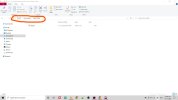
1.jpg


3. Cmd will open Next type pip install -r requirements.txt
4. Next install selenium with this command pip install selenium
5. Next type python insta.py
2.jpg

Log in with your insta username and password

6. wait for some seconds it will ask hashtag. Input any hashtag and next it will ask How many post you want to like and leave a comment . type as per your need.

But keep in mind that Instagram has some limitations for likes and comments per day.

type your comment and

enjoy.

4.jpg


Note- The problem you will face here - if someone has turned on limited comments on their photos then the script will stop working. Most of the time it works for me.

Note2. Anyone can develop this script and add new code. such as following this person or bypassing the limited comment option can post the updated script in the comment section.
 
An excellent tool, my friends. Whoever thinks that he is taking your account username or password, he cannot, because he connects the api server with the code, and thus he will reach Instagram, and he does not do a good job, my friend.
 
An excellent tool, my friends. Whoever thinks that he is taking your account username or password, he cannot, because he connects the api server with the code, and thus he will reach Instagram, and he does not do a good job, my friend.
yes, you can easily use this script. I do not need API.
 
نعم ، يمكنك بسهولة استخدام هذا البرنامج النصي. أنا لا أحتاج API.
Oh my friend that's what they use visual basic , sorry man .
 
Is my account safe doing this? since instagram is basically tearing down all third party apps
 
You can add this script to your above code to follow the person. But need to fix the code. The nonworking code is given below


Python:
#Follow the user of the post
        follow_user = browser.find_element(By.XPATH, '//button/div/div[contains(text(), "Follow")]')
        if follow_user.text == "Follow":
            follow_user.click()
            print("Followed!")
            sleep_for_period_of_time()
        else:
            pass

I have removed this code as it is not working.
 
I am not teachy enough to do this but thank u for sharing. I will probably send it to my dev.
great share
 
You can add this script to your above code to follow the person. But need to fix the code. The nonworking code is given below


Python:
#Follow the user of the post
        follow_user = browser.find_element(By.XPATH, '//button/div/div[contains(text(), "Follow")]')
        if follow_user.text == "Follow":
            follow_user.click()
            print("Followed!")
            sleep_for_period_of_time()
        else:
            pass
It's amazing how professional he it
 
There is some code that does similar, but with comments so anyone can modify it.
Python:
import requests
from getpass import getpass

# Constants
LOGIN_URL = "https://www.instagram.com/accounts/login/ajax/"
USERNAME = input("Enter your Instagram username: ")
PASSWORD = getpass("Enter your Instagram password: ")

# Log in to Instagram
session = requests.Session()
response = session.post(LOGIN_URL, data={
    "username": USERNAME,
    "password": PASSWORD
})

if response.status_code != 200:
    raise ValueError("Failed to log in to Instagram")

# Search for posts to like
response = session.get("https://www.instagram.com/explore/tags/yourhashtag/")
if response.status_code != 200:
    raise ValueError("Failed to search for posts")

# Like posts
for post in response.json()["posts"]:
    like_url = f"https://www.instagram.com/web/likes/{post['id']}/like/"
    response = session.post(like_url)
    if response.status_code != 200:
        print(f"Failed to like post with ID {post['id']}")

print("Finished liking posts")
 
There is some code that does similar, but with comments so anyone can modify it.
Python:
import requests
from getpass import getpass

# Constants
LOGIN_URL = "https://www.instagram.com/accounts/login/ajax/"
USERNAME = input("Enter your Instagram username: ")
PASSWORD = getpass("Enter your Instagram password: ")

# Log in to Instagram
session = requests.Session()
response = session.post(LOGIN_URL, data={
    "username": USERNAME,
    "password": PASSWORD
})

if response.status_code != 200:
    raise ValueError("Failed to log in to Instagram")

# Search for posts to like
response = session.get("https://www.instagram.com/explore/tags/yourhashtag/")
if response.status_code != 200:
    raise ValueError("Failed to search for posts")

# Like posts
for post in response.json()["posts"]:
    like_url = f"https://www.instagram.com/web/likes/{post['id']}/like/"
    response = session.post(like_url)
    if response.status_code != 200:
        print(f"Failed to like post with ID {post['id']}")

print("Finished liking posts")
Good job really
 
So is it good to promote links on comment on Insta or not? I'm fairly new to this, but I have some links I need to promote.
Thanks already for the people who will reply to my question.
 
How to use it ... i think its not with selenium
There is some code that does similar, but with comments so anyone can modify it.
Python:
import requests
from getpass import getpass

# Constants
LOGIN_URL = "https://www.instagram.com/accounts/login/ajax/"
USERNAME = input("Enter your Instagram username: ")
PASSWORD = getpass("Enter your Instagram password: ")

# Log in to Instagram
session = requests.Session()
response = session.post(LOGIN_URL, data={
    "username": USERNAME,
    "password": PASSWORD
})

if response.status_code != 200:
    raise ValueError("Failed to log in to Instagram")

# Search for posts to like
response = session.get("https://www.instagram.com/explore/tags/yourhashtag/")
if response.status_code != 200:
    raise ValueError("Failed to search for posts")

# Like posts
for post in response.json()["posts"]:
    like_url = f"https://www.instagram.com/web/likes/{post['id']}/like/"
    response = session.post(like_url)
    if response.status_code != 200:
        print(f"Failed to like post with ID {post['id']}")

print("Finished liking posts")
 
So is it good to promote links on comment on Insta or not? I'm fairly new to this, but I have some links I need to promote.
Thanks already for the people who will reply to my question.
Inst
So is it good to promote links on comment on Insta or not? I'm fairly new to this, but I have some links I need to promote.
Thanks already for the people who will reply to my question.
Insta comment link is not Clickable
 
So is it good to promote links on comment on Insta or not? I'm fairly new to this, but I have some links I need to promote.
Thanks already for the people who will reply to my question.
I do not advise you to promote only the link directly in the comments. Promote your account and put the link in your account box so that they do not think that you will do something bad with the link or hack their phones according to their idea.
 
I do not advise you to promote only the link directly in the comments. Promote your account and put the link in your account box so that they do not think that you will do something bad with the link or hack their phones according to their idea.
Thank you.
That is a sound advice.
 
  • Like
Reactions: f4g
That's great my friend, Hope you'll answer my questions as i explore it
 
Good one, can you make a script so that you can view your follower's stories when your followers see that you are viewing their stories they might come back and engage the content on your page.
 
Status
Not open for further replies.
Back
Top