

outscrape
Junior Member
- Nov 23, 2016
- 181
- 145
After the tutorial I wrote on basic scraping, I’ve been thinking a lot about the MANY times over the years that I’ve run into problems while web scraping, and so I wanted to put together a quick blog post that you can reference, basically a how-to, when you’re running into some basic problems.
First: What’s web scraping? Getting large amounts content from somewhere with the intention of reproducing it or examining it for trends or valuable information.
Second: Why ?
A million reasons, but mostly, because all this information and content is free, more or less, and you know that information is valuable, so let’s use that free, valuable information !
Now, I’m going to assume you’re here because you’ve actually gotten somewhere while web scraping, but you’ve run into a problem.
Let’s go through some of the problems, and solutions, that I’ve encountered and also seen others encounter.
So you’ve got paginated results, like what you see when you search for something on Google and you’ve got a ton of pages of results. But for some reason your web scraper is failing to “visit” the next pages. Sometimes, for various reasons, to thwart scraping intentionally, or more often because:

The above buttons are dumb, and in some cases, dumb buttons are hard to auto-click. You'll know this most of the time when your scraping software doesn't click them, or when the buttons move around or the whole slide show pops up in iframes.
Use URLS! It can be a much faster solution to simply set up your scraper to visit multiple urls, one after the other. You might be able to skip the search function entirely.
Just note the URL format for the pages, which often ends in variations like these:
website.com/blog/page/1
website.com/blog/page/2
sample.com/result?p=1
sample.com/result?p=2
https://site.com/search/code?q=test+query%3morestuff&page=1
https://site.com/search/code?q=test+query%3morestuff&page=2
So, instead of visiting a search page with the scraper, entering the terms, and searching, then clicking through to the results, you may be able to skip straight to the first result page (or the second, as sometimes the first results page doesn’t have the same formatted URL).
Another good idea to consider: Change the “Display X Per Page” which many paginated sites have. Once you do this, it will sometimes change the URL as well, adding a “&display?=50” or some related component. If you add this into the URLs you’re visiting, you can usually scrape much faster.

Slower is fine—fewer page loads is often better than 5x as many pages that load faster.
Alright, this is a catchall, but I want to throw out a few simple solutions for it anyway. By “too complicated” I mean — maybe the site uses infinite scroll, the formatting is very difficult to scrape correctly, or for various reasons the site just resists your web scraping attempts.
Sometimes, newer sites are just not built the way you want. The ideal site to scrape is craigslist, which has an absurdly low-tech style and source code, making it simple to scrape. But as HTML 5 sites increase and Ajax becomes more standard, you sometimes have to get around the more complicated sites.

What a complicated site! But on the mobile site, there's much more standardized data:


What a complicated site! But they have a classic site available, with the same data:

This one can be a doozy, as it really depends on what the specific error or problem you’re seeing is. The most likely factor, unfortunately, is that your scraper has malfunctioned. A quick solution is to break your scraping up into several different scraping jobs and see if you have the same issue. For example, instead of running the scraper on 500 pages, run it on the first 250 and then stop it (or set it to stop). Then run it again on pages 251-500. This could be happening because your session is expiring or the site is blocking you after accessing so many pages so fast.
If that’s the case, take a look at the next few solutions to (4).
Let’s take a step back. First, you need to know what an IP is. Every internet-connected device has an IP, and it can easily be tracked and even reveal your physical location, to some degree. This is how whole countries can be blocked from certain sites. (If you want to start at the very beginning, Mozilla has a good intro to “how the internet works” [https://developer.mozilla.org/en-US/docs/Learn/Common_questions/How_does_the_Internet_work])
Next, you need to know what happens when you load a web page. Basically, you send a bunch of data as a request to the site, including a whole bunch of information about your computer and web browser. Most of it is inside of the data request your browser sends known as the “header” (If you’re starting with the basics, you should check out Mozilla on “how the web works”. https://developer.mozilla.org/en-US/docs/Learn/Getting_started_with_the_web/How_the_Web_works)
You can see all the different values that can be in the header request here: https://en.wikipedia.org/wiki/List_of_HTTP_header_fields
So, when you connect to a site, you aren’t just saying “give me this info,” you’re saying “this is my computer, my internet-connected device and, to some extent, my location, as well as the browser I’m using.”
If you think you’re being blocked, the site may be simply using your IP to block you, or it may be using any amount of other “metadata”—info that’s not part of the actual data you’re requesting be sent, but which can be used to identify you as the same visitor who visited the last 100 pages—to block your request.
So, what are the solutions?
The best way to handle this difficult issue is to start at the source. You might be able to limit what you’re scraping to just get the data you need. Depending on your scraper, you’ve possibly selected the “wrong” data to scrape. Try selecting different information or viewing just the mobile version of the site. There may also be a button that lets you load an older version of the site, which might have a different HTML structure that’s easier to scrape.
However you’re scraping the data, there’s probably a different tool or way to do it that will let you select it differently. For example—if you’re using XPath vs CSS selectors [http://elementalselenium.com/tips/32-xpath-vs-css], you might get various amounts of data. If you’re using wildcards, you might get various amounts of data. If you’re using regular expressions, you might get various amounts of data. Either way, it’s helpful when you can’t find a way to select exactly the right data either dig into the code on the site and consider another selection option, or see if maybe there’s something going wrong with your tool, or if another tool might work better.
However, if you’re just going to end up with data that contains additional formatting, you should start to familiarize yourself with data hygiene. One of the most important things you’ll need to do web scraping effectively is a basic understanding of how to organize, or wrangle, and “clean” your scraped data. Data on the web can be imperfectly structured, so you’ll often have to do some cleanup. This can range from everything from using find and replace to replace the word “Rd” with the word “Road”, to using the text-to-columns feature in Excel or Google Sheets to split columns every time there’s a special character, like a period.

In a text file this data is a mess. But with some simple text-to-columns using delimiters like "-" and "|" you can get a lot cleaner data.

This can help you figure out how to get rid of data that’s overloaded with crap on either side, especially if that crap is offset by a comma, for example, or a weird paragraph break that you can CTRL-F for.
Sadly, there isn’t a quick solution to this problem. There’s a free Johns-Hopkins course available on Coursera that can help you learn data hygiene: https://www.coursera.org/learn/data-cleaning, and there are some data wrangling tools you might want to check out at https://blog.varonis.com/free-data-wrangling-tools/.
First—if the data you’re scraping is hierarchical and fairly complex, it’s possible that it’s just going to be formatted strangely. For example, if you’re scraping data on only a single series of results pages, and all the information is 1:1, such as a business with a phone number and an address, then weirdly formatted data probably probably means you’re scraping the data in a weird way.
However, if you’re scraping data on a single page that has a list of results, and then moving to the results pages and scraping more data, and then moving to a third-tier page from there and scraping more data, then going back to the initial page, probably the best way to format your data is going to be as a hierarchical JSON file. If you flatten it to a CSV, or scrape it that way, you’ll run into this problem:
Initial page data
Page 2 data
Page 2.1 data point 1, data point 2
Page 2.2 data
Page 2.3 data
Initial page data {same as first line}
Page 3 data
Page 3.1 data point 1, data point 2
Page 3.2 data
Page 3.3 data
Formatted as a hierarchical JSON, this might be fine. But as a CSV, this might end up looking like:
Initial page data, Page 2 data, Page 2.1 data point 1, data point 2, Page 2.2 data, Page 2.3 data
Initial page data, Page 3 data, Page 3.1 data point 1, data point 2, Page 3.2 data, Page 3.3 data
This may be fine, but it may also be the case that you really need data points 1 and 2 from page 2.1 and 3.1 to be separate from page 2.2 data and page 3.2 data. See the issue?
One solution for this: select as much data on a single page as possible.
A common mistake I see people make is selecting data in one place that’s actually quite complicated, instead of a place that’s less complicated and easier to scrape. Here’s an example.
If you’re scraping businesses on Yelp—do you HAVE to visit the businesses’ pages themselves? Maybe not. The data you need might be available on the results page without having to visit the actual business listing.
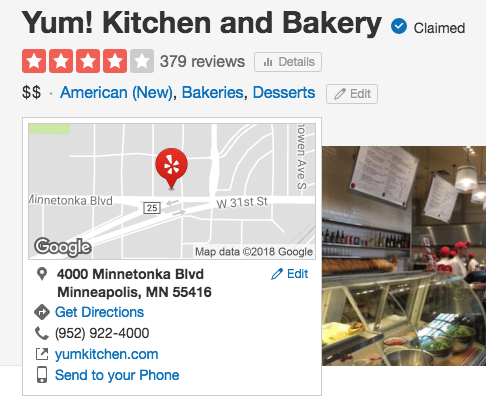
Above is the listing page for the Yelp business. But depending on what you need (like the address), you might be able to pull the data directly from the list of businesses, saving you from loading thousands of pages that you might not need to.

Again, the best option is to start at the source. However, there’s also the chance that your data is just structured badly. That’s where data hygiene and data wrangling comes in. You may also ask someone on a site like upwork to take a look at your data and re-format it for you, if it’s not too sensitive. Often people are much better and experienced at doing this and can do in a few minutes what might take you hours to figure out.
The best solution here usually depends on your tool/the site/the connection, but the nice thing is that almost all of the solutions above can help speed up your scraping. Take a look above and see if you can do any of these ideas — almost all of them could drastically speed up your scraping.
And finally, if you can—get a VPS with a super fast connection to run your scraping on. Don’t rely on your own machine if you don’t have to. Amazon (for example) has very fast VPS for fairly cheap, and you’ll find that the low cost if you do have to pay will quickly make up for it.
I hope some of these ideas help you. If you have any suggestions, please leave them in the comments!
Jon @ outscrape
First: What’s web scraping? Getting large amounts content from somewhere with the intention of reproducing it or examining it for trends or valuable information.
Second: Why ?
A million reasons, but mostly, because all this information and content is free, more or less, and you know that information is valuable, so let’s use that free, valuable information !
Now, I’m going to assume you’re here because you’ve actually gotten somewhere while web scraping, but you’ve run into a problem.
Let’s go through some of the problems, and solutions, that I’ve encountered and also seen others encounter.
1. The content you want is on several pages, but the web page doesn’t have an obvious “next” button or a clear way to get to the next page.
So you’ve got paginated results, like what you see when you search for something on Google and you’ve got a ton of pages of results. But for some reason your web scraper is failing to “visit” the next pages. Sometimes, for various reasons, to thwart scraping intentionally, or more often because:
- the “next” button is actually part of a weird-ass slideshow
- the button moves
- instead of a next button the site only has numbered pages that you have to click
- the “next button” is a weird javascript function that’s hard to click
- some other stupid reason that makes it hard to get to the next page
The above buttons are dumb, and in some cases, dumb buttons are hard to auto-click. You'll know this most of the time when your scraping software doesn't click them, or when the buttons move around or the whole slide show pops up in iframes.
Use URLS! It can be a much faster solution to simply set up your scraper to visit multiple urls, one after the other. You might be able to skip the search function entirely.
Just note the URL format for the pages, which often ends in variations like these:
website.com/blog/page/1
website.com/blog/page/2
sample.com/result?p=1
sample.com/result?p=2
https://site.com/search/code?q=test+query%3morestuff&page=1
https://site.com/search/code?q=test+query%3morestuff&page=2
So, instead of visiting a search page with the scraper, entering the terms, and searching, then clicking through to the results, you may be able to skip straight to the first result page (or the second, as sometimes the first results page doesn’t have the same formatted URL).
Another good idea to consider: Change the “Display X Per Page” which many paginated sites have. Once you do this, it will sometimes change the URL as well, adding a “&display?=50” or some related component. If you add this into the URLs you’re visiting, you can usually scrape much faster.
Slower is fine—fewer page loads is often better than 5x as many pages that load faster.
2. The website is “too complicated” and I can’t figure out how interact/scrape it
Alright, this is a catchall, but I want to throw out a few simple solutions for it anyway. By “too complicated” I mean — maybe the site uses infinite scroll, the formatting is very difficult to scrape correctly, or for various reasons the site just resists your web scraping attempts.
Sometimes, newer sites are just not built the way you want. The ideal site to scrape is craigslist, which has an absurdly low-tech style and source code, making it simple to scrape. But as HTML 5 sites increase and Ajax becomes more standard, you sometimes have to get around the more complicated sites.
- One very simple trick: Use the mobile site! Even if you aren’t sure if the site has a mobile site, try sending the URL to your phone and loading it there, just in case. If it looks way less complicated—check the URL that you’re on on your phone. It might have auto-switched to m.whatever.com, for mobile, or it may just be delivering the content differently. Either way, try to get that mobile version onto your scraper if possible.
What a complicated site! But on the mobile site, there's much more standardized data:
- Another option: See if there’s simply a lower-tech version of the site. Some sites will have upgraded to a newer version but archived the old formatting, and allow switching to it with the click of a button.
What a complicated site! But they have a classic site available, with the same data:
- One more option: Grab a line of the exact content you want to scrape, and enter it into Google “surrounded by quotation marks”, to see if there’s another version of it available somewhere. Sometimes you can grab the exact same content from an archive site that you didn’t know existed but you can find via Google, or from a mirror site that’s formatted differently.
- And lastly: Make sure you’re using the right scraping tool. I’ve tried most of the different tools, as well as lots of options like Python, and it can be simply that your scraping tool doesn’t offer the right features to scrape the site you want to scrape.
3. Scraping stops halfway through
This one can be a doozy, as it really depends on what the specific error or problem you’re seeing is. The most likely factor, unfortunately, is that your scraper has malfunctioned. A quick solution is to break your scraping up into several different scraping jobs and see if you have the same issue. For example, instead of running the scraper on 500 pages, run it on the first 250 and then stop it (or set it to stop). Then run it again on pages 251-500. This could be happening because your session is expiring or the site is blocking you after accessing so many pages so fast.
If that’s the case, take a look at the next few solutions to (4).
4. I think the site is blocking me
Let’s take a step back. First, you need to know what an IP is. Every internet-connected device has an IP, and it can easily be tracked and even reveal your physical location, to some degree. This is how whole countries can be blocked from certain sites. (If you want to start at the very beginning, Mozilla has a good intro to “how the internet works” [https://developer.mozilla.org/en-US/docs/Learn/Common_questions/How_does_the_Internet_work])
Next, you need to know what happens when you load a web page. Basically, you send a bunch of data as a request to the site, including a whole bunch of information about your computer and web browser. Most of it is inside of the data request your browser sends known as the “header” (If you’re starting with the basics, you should check out Mozilla on “how the web works”. https://developer.mozilla.org/en-US/docs/Learn/Getting_started_with_the_web/How_the_Web_works)
You can see all the different values that can be in the header request here: https://en.wikipedia.org/wiki/List_of_HTTP_header_fields
So, when you connect to a site, you aren’t just saying “give me this info,” you’re saying “this is my computer, my internet-connected device and, to some extent, my location, as well as the browser I’m using.”
If you think you’re being blocked, the site may be simply using your IP to block you, or it may be using any amount of other “metadata”—info that’s not part of the actual data you’re requesting be sent, but which can be used to identify you as the same visitor who visited the last 100 pages—to block your request.
So, what are the solutions?
- Solution one: Use throttling! This means you should set a wait or delay between each page that you visit, instead of moving as quickly as robotically possible through the pages like the Terminator. Sites can respond to scraping like they’re being DDOS’ed if you do it too fast, and there is scraping protection [https://www.distilnetworks.com/] that will stop you automatically. There’s no good answer for how long to wait, but there are scraping best practices that you can take a look at if you’re wondering where to start. Let’s say a few hundred milliseconds at a minimum and a few seconds if you’re being blocked. [https://www.promptcloud.com/blog/web-scraping-best-practices]
- Solution two: Use proxies! The most common way that sites track you and determine that you’re using automation is to record your IP and block it after it’s set off some sort of auto-block or alarm. [For info on how this might work, check out Cloudflare’s WAF https://www.cloudflare.com/waf/] It’s almost a given that if you’re scraping a popular site, you can’t use just any proxy. Publicly available proxy lists are well known. You’re going to need at least a few private proxies if you are doing any serious scraping. I recommend http://stormproxies.com/ as one option, but there are many, and maybe others will suggest some—also there are plenty of proxies sold on BHW. Buy local!
- Solution three: Change user agents! Your user agent is part of the header and metadata that’s sent along with your request to the server for the web page data. It’s basically info on what browser you’re using. It can be spoofed, generally, by many scraping tools. By default some servers might block or whitelist a limited number of user agents. You can find lists of the most common user agents online and using one of these is often enough to get around basic anti-scraping measures. Pick your favorite from this regularly updated list: https://techblog.willshouse.com/2012/01/03/most-common-user-agents/
5. My scraped data contains a whole bunch of crap I don’t need, like HTML markup or tags or additional fields.
The best way to handle this difficult issue is to start at the source. You might be able to limit what you’re scraping to just get the data you need. Depending on your scraper, you’ve possibly selected the “wrong” data to scrape. Try selecting different information or viewing just the mobile version of the site. There may also be a button that lets you load an older version of the site, which might have a different HTML structure that’s easier to scrape.
However you’re scraping the data, there’s probably a different tool or way to do it that will let you select it differently. For example—if you’re using XPath vs CSS selectors [http://elementalselenium.com/tips/32-xpath-vs-css], you might get various amounts of data. If you’re using wildcards, you might get various amounts of data. If you’re using regular expressions, you might get various amounts of data. Either way, it’s helpful when you can’t find a way to select exactly the right data either dig into the code on the site and consider another selection option, or see if maybe there’s something going wrong with your tool, or if another tool might work better.
However, if you’re just going to end up with data that contains additional formatting, you should start to familiarize yourself with data hygiene. One of the most important things you’ll need to do web scraping effectively is a basic understanding of how to organize, or wrangle, and “clean” your scraped data. Data on the web can be imperfectly structured, so you’ll often have to do some cleanup. This can range from everything from using find and replace to replace the word “Rd” with the word “Road”, to using the text-to-columns feature in Excel or Google Sheets to split columns every time there’s a special character, like a period.
In a text file this data is a mess. But with some simple text-to-columns using delimiters like "-" and "|" you can get a lot cleaner data.
This can help you figure out how to get rid of data that’s overloaded with crap on either side, especially if that crap is offset by a comma, for example, or a weird paragraph break that you can CTRL-F for.
Sadly, there isn’t a quick solution to this problem. There’s a free Johns-Hopkins course available on Coursera that can help you learn data hygiene: https://www.coursera.org/learn/data-cleaning, and there are some data wrangling tools you might want to check out at https://blog.varonis.com/free-data-wrangling-tools/.
6. My scraped data is ugly and formatted weirdly
First—if the data you’re scraping is hierarchical and fairly complex, it’s possible that it’s just going to be formatted strangely. For example, if you’re scraping data on only a single series of results pages, and all the information is 1:1, such as a business with a phone number and an address, then weirdly formatted data probably probably means you’re scraping the data in a weird way.
However, if you’re scraping data on a single page that has a list of results, and then moving to the results pages and scraping more data, and then moving to a third-tier page from there and scraping more data, then going back to the initial page, probably the best way to format your data is going to be as a hierarchical JSON file. If you flatten it to a CSV, or scrape it that way, you’ll run into this problem:
Initial page data
Page 2 data
Page 2.1 data point 1, data point 2
Page 2.2 data
Page 2.3 data
Initial page data {same as first line}
Page 3 data
Page 3.1 data point 1, data point 2
Page 3.2 data
Page 3.3 data
Formatted as a hierarchical JSON, this might be fine. But as a CSV, this might end up looking like:
Initial page data, Page 2 data, Page 2.1 data point 1, data point 2, Page 2.2 data, Page 2.3 data
Initial page data, Page 3 data, Page 3.1 data point 1, data point 2, Page 3.2 data, Page 3.3 data
This may be fine, but it may also be the case that you really need data points 1 and 2 from page 2.1 and 3.1 to be separate from page 2.2 data and page 3.2 data. See the issue?
One solution for this: select as much data on a single page as possible.
A common mistake I see people make is selecting data in one place that’s actually quite complicated, instead of a place that’s less complicated and easier to scrape. Here’s an example.
If you’re scraping businesses on Yelp—do you HAVE to visit the businesses’ pages themselves? Maybe not. The data you need might be available on the results page without having to visit the actual business listing.
Above is the listing page for the Yelp business. But depending on what you need (like the address), you might be able to pull the data directly from the list of businesses, saving you from loading thousands of pages that you might not need to.
Again, the best option is to start at the source. However, there’s also the chance that your data is just structured badly. That’s where data hygiene and data wrangling comes in. You may also ask someone on a site like upwork to take a look at your data and re-format it for you, if it’s not too sensitive. Often people are much better and experienced at doing this and can do in a few minutes what might take you hours to figure out.
7. Scraping is just taking too long
The best solution here usually depends on your tool/the site/the connection, but the nice thing is that almost all of the solutions above can help speed up your scraping. Take a look above and see if you can do any of these ideas — almost all of them could drastically speed up your scraping.
And finally, if you can—get a VPS with a super fast connection to run your scraping on. Don’t rely on your own machine if you don’t have to. Amazon (for example) has very fast VPS for fairly cheap, and you’ll find that the low cost if you do have to pay will quickly make up for it.
I hope some of these ideas help you. If you have any suggestions, please leave them in the comments!
Jon @ outscrape


