

- Apr 14, 2013
- 2,046
- 735
We all receive negative comments on our ads. Sometimes it’s a genuine concern, other times ignorance from the user’s end.
Negative comments, like any form of social proof can and does effect the conversion rate of an ad.
And all of us hate poor conversion rates, right?
So, if you see people commenting, “fake, scammer, can buy from AliExpress for $1 etc.” on your ads, use this list of the most common negative phrases to hide them from appearing on your ads, as soon as they are posted.
P.S. I found this on a Facebook group I was part of and it’s truly resourceful.
The below list is mostly for e-commerce store owners that dropship. However, the method works for everybody.
COPY-PASTE THE LIST BELOW TO YOUR FACEBOOK PAGE
This will automatically hide any comments that contain these words.
To apply this
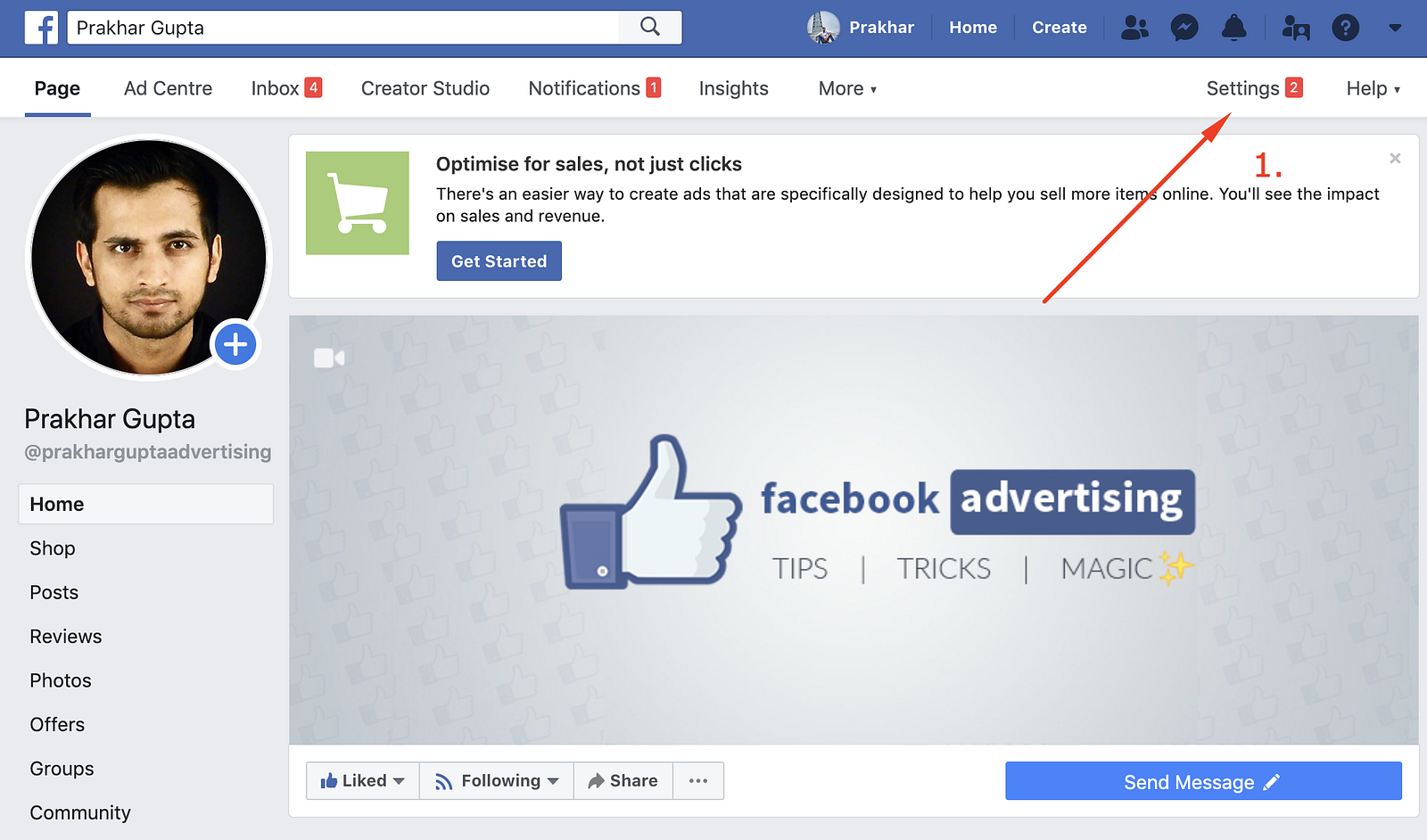
Step 1 — Go to your Page & then go to Settings
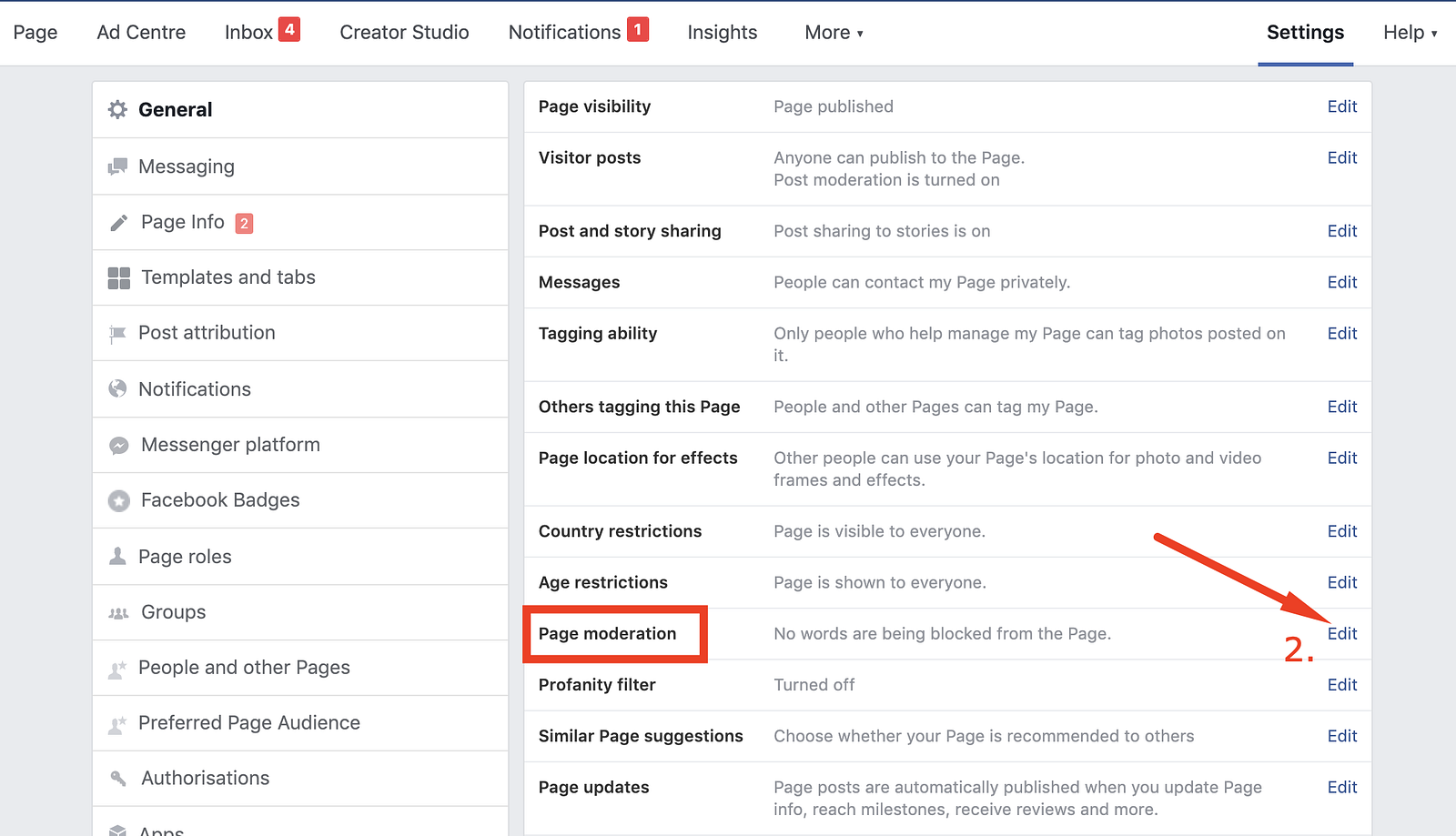
Step 2 — Tap the ‘Edit’ button next to ‘Page Moderation’
Step 3 — Copy-Paste the word list from the file you downloaded
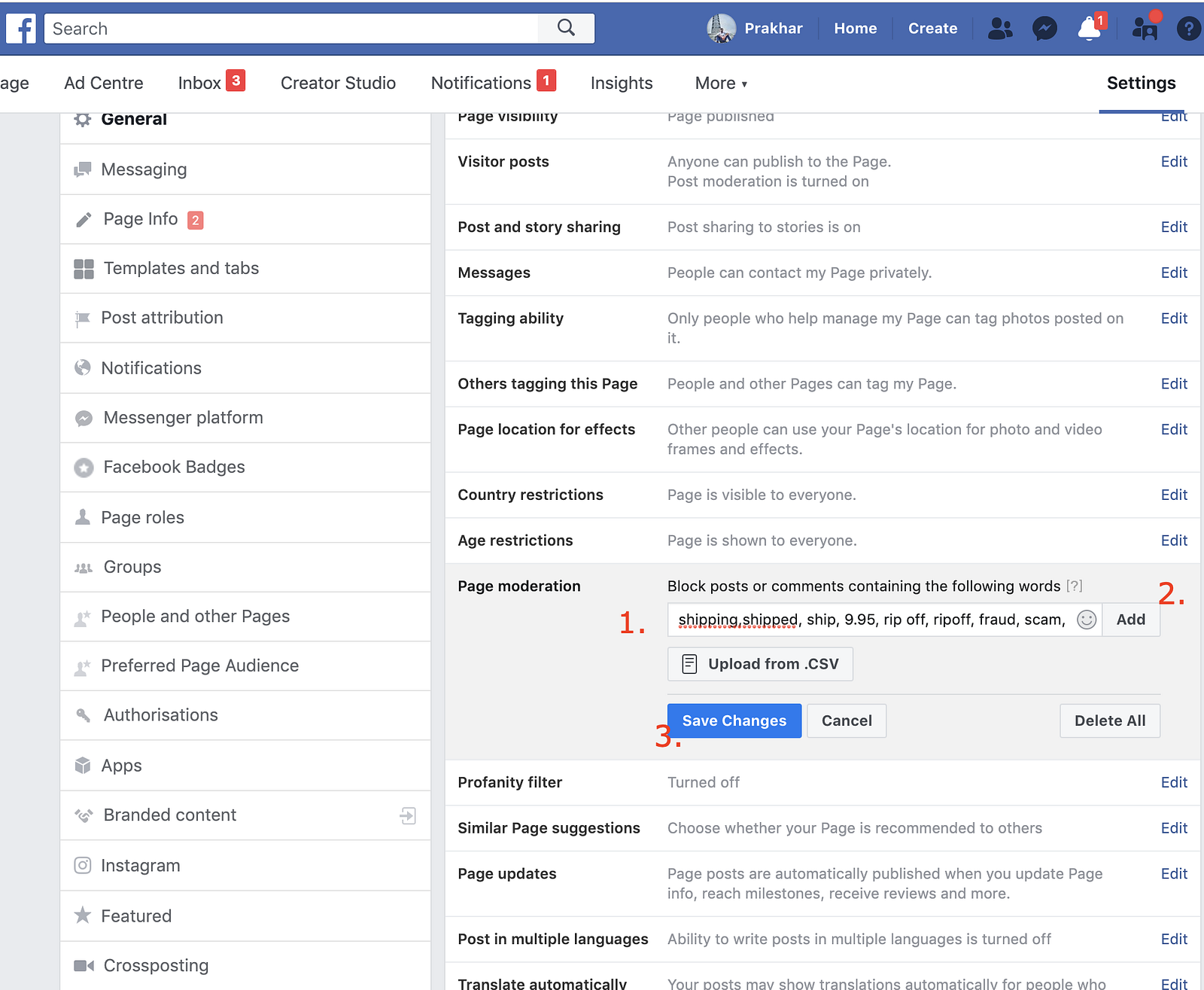
Press ‘Add’ and then tap “Save Changes” at the end.
That's it, you’re all set!
You can unhide comments that contain blocked words by going to the comment and clicking ‘Unhide’.
Disclaimer: Although Facebook allows us the option to censor comments, we should try to answer these comments & provide support
Negative comments, like any form of social proof can and does effect the conversion rate of an ad.
And all of us hate poor conversion rates, right?
So, if you see people commenting, “fake, scammer, can buy from AliExpress for $1 etc.” on your ads, use this list of the most common negative phrases to hide them from appearing on your ads, as soon as they are posted.
P.S. I found this on a Facebook group I was part of and it’s truly resourceful.
The below list is mostly for e-commerce store owners that dropship. However, the method works for everybody.
COPY-PASTE THE LIST BELOW TO YOUR FACEBOOK PAGE
shipping,shipped, ship, 9.95, rip off, ripoff, fraud, scam, scammers, china, aliexpress, ebay, 4.95, 6.95, 7.95, 20, sucks, fuck, thieves, thief, expensive, high, price, http, https, ://, www, shipping, ship, ships, shipped, shipping fees, how much to ship, 9.95, $9.95, $50, 50 bucks, no way, rippoff, ripoff, fraud, scam, scammers, beware, make these, make this, ebay, aliexpress, china, s & handling, s&handling, s& handling, 9.95, 995, 16, 37, 47, received it, gotten it, received theirs, received theres, gotten theres, recieved one, received one, 10, $10, 10.00, $10!, $10.00!, not free, where is it, where is my order, when will it come, how long will it take, how long, shipping, deliver, delivered, amazon, 19.90, $19.90, 50, $50, $20, 20, $30, 30, $40, 40, $29.85, 29.85, $39.80, 39.80, $49.75, 49.75, two weeks, 2 weeks, 3 weeks, three weeks, 4 weeks, four weeks, month, waiting, month ago, forever ago, still haven't gotten, still not here, still have not received, legit, paypal, paypal, sketchy, make mine, make my own, make one, has anyone ordered, cheap, cheaply, $7.95, ebay.com, www.ebay.com, www.aliexpress.com, amazon.com
This will automatically hide any comments that contain these words.
To apply this
Step 1 — Go to your Page & then go to Settings
Step 2 — Tap the ‘Edit’ button next to ‘Page Moderation’
Step 3 — Copy-Paste the word list from the file you downloaded
Press ‘Add’ and then tap “Save Changes” at the end.
That's it, you’re all set!
You can unhide comments that contain blocked words by going to the comment and clicking ‘Unhide’.
Disclaimer: Although Facebook allows us the option to censor comments, we should try to answer these comments & provide support


