
You are using an out of date browser. It may not display this or other websites correctly.
You should upgrade or use an alternative browser.
You should upgrade or use an alternative browser.
[METHOD] YouTube Comments Link Trick
- Thread starter savobaby
- Start date


savobaby
Marketplace abuse and threatening support agents
- May 29, 2011
- 1,139
- 777
Thank you.How many comments can we post from each each account per day?
as long as you're not posting a comment every 60 seconds, I think you're fine to post unlimited comments, as long as you're also rearranging your wording
savobaby
Marketplace abuse and threatening support agents
- May 29, 2011
- 1,139
- 777
I posted a few links from one account that were probably ghosted, I was testing some other redirect methods. Is that account worthless now or can I still use this method you think.
you can keep using your account, it's not worthless

girolamo
Regular Member
- Jan 12, 2016
- 410
- 120
This trick will die tomorrow morning lol... the same happened when someone made a thread with t.co links... you help noobs for one day, but destroy other people a long trick... they will all now start spamming worthless comments like idiots with this google links and yt will patch it lol
savobaby
Marketplace abuse and threatening support agents
- May 29, 2011
- 1,139
- 777
This trick will die tomorrow morning lol... the same happened when someone made a thread with t.co links... you help noobs for one day, but destroy other people a long trick... they will all now start spamming worthless comments like idiots with this google links and yt will patch it lol
Well I don't mind as long as I can help a noob make their first dollar, which will then motivate them to try other things

They already know about it. Go to any trending video and there is a ton of link spam. YT already knows about the tricks. This post won't make them patch it faster.
This trick will die tomorrow morning lol... the same happened when someone made a thread with t.co links... you help noobs for one day, but destroy other people a long trick... they will all now start spamming worthless comments like idiots with this google links and yt will patch it lol

foxlobo31
Registered Member
- May 23, 2011
- 84
- 18
hello savo how do i get the link from the giftcardrebel? i cant see it on ogads.Well I don't mind as long as I can help a noob make their first dollar, which will then motivate them to try other things
savobaby
Marketplace abuse and threatening support agents
- May 29, 2011
- 1,139
- 777
hello savo how do i get the link from the giftcardrebel? i cant see it on ogads.
It's not on OGADS, read my method again, it's GOOGLE DRIVE/DOCS

keenmobi
BANNED
- Mar 24, 2017
- 139
- 12
it's amazing! I have been thinking about, but didn't have actually chance to find such info - thank you for great tip!Hey guys, I've been a member on this forum since 2011, and I've never really shared anything "of value" so to speak. So I decided to share this little "trick" to getting a link in the YouTube comments without getting ghosted.
Yes, it's basically the same as a few other people have mentioned, using GoogleDrive. But instead I've added a simple twist that makes it a little bit easier to (almost) direct link to a CPA offer or something similar.
Step 1. Go to your GoogleDrive folder and click new, google document, blank document.
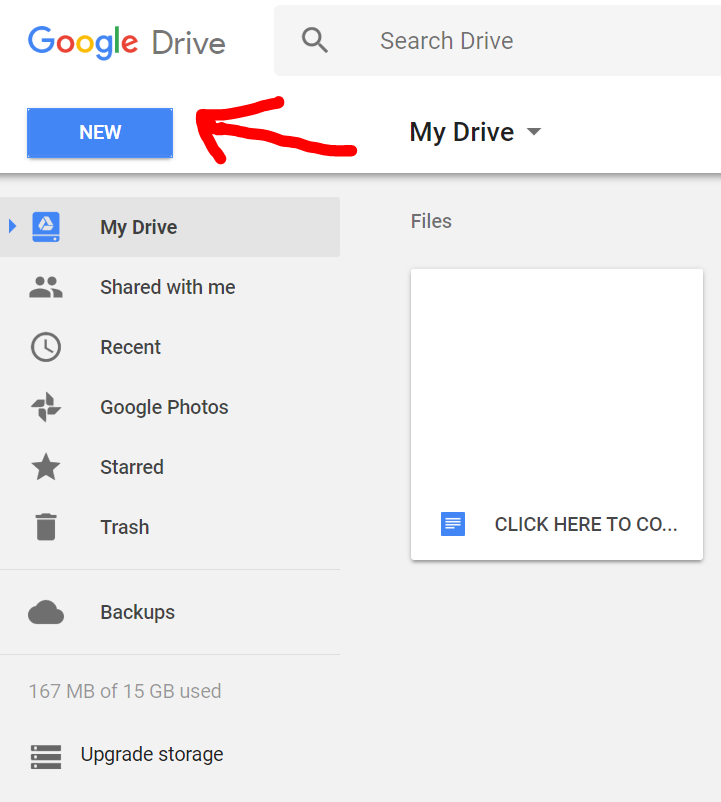
After you've done the above step, the rest is simple as. Basically now you're creating a "word document" but instead of it being on your computer, it's online (GoogleDrive/Docs) which you can share publicly (and it does work for YT comments, I've tested a couple of hours ago)
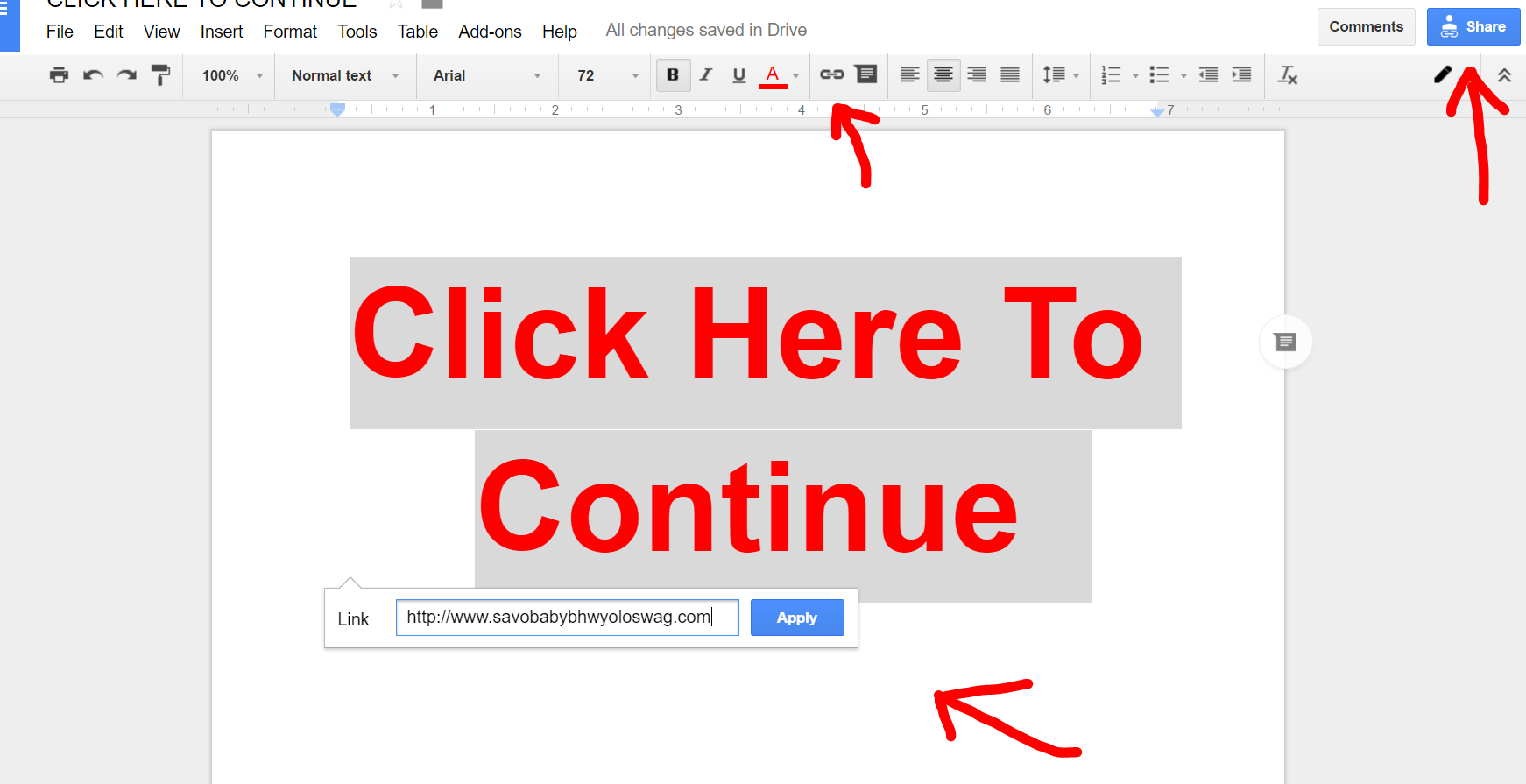
Step 2. Create a piece of test like "Click Here To Continue" or something else (mix it up, see which converts best for you), and then highlight that text and click the link button up the top on the toolbar and hyperlink it with any URL of your choice. It will save automatically. After that, click up in the top right "copy link" or "get shareable link" and that's the link that you can paste into the comments.
I know it's not the most amazing thing out there, but I guess it could help out newbies who don't have money to create a proper (pre)landing page to work with YT comments.
#getdatmoonay
savobaby
Marketplace abuse and threatening support agents
- May 29, 2011
- 1,139
- 777
it's amazing! I have been thinking about, but didn't have actually chance to find such info - thank you for great tip!
you're welcome

worldytraveler4
BANNED
- Jun 25, 2016
- 276
- 12
thank you, been keeping my eyes peeled and this method is amazing! Definitely subscribing to the panel and going to give it a shot any last pointers for monetizing comments before I get started? I think I have my ideas and twists almost ready to go. I want to build an email list first and foremost for niche specific topics.
Thanks Savo!
any last pointers for monetizing comments before I get started? I think I have my ideas and twists almost ready to go. I want to build an email list first and foremost for niche specific topics.Thanks Savo!

Review Papa
Registered Member
- Apr 22, 2017
- 93
- 7
Thanks bro, I was seeking this info to post my links under youtube videos
savobaby
Marketplace abuse and threatening support agents
- May 29, 2011
- 1,139
- 777
thank you, been keeping my eyes peeled and this method is amazing! Definitely subscribing to the panel and going to give it a shot
Thanks Savo!
The only tip I can think of off the top of my head is to reply to your own comments with other accounts, keeping a natural conversation, and don't make your comment "too spammy" make it fit in with what the video is. Comment something about the video, and then ease your link into the comment so it looks natural, that's the key for me.

Sephrata
Elite Member
- Mar 25, 2017
- 2,722
- 3,855
The only tip I can think of off the top of my head is to reply to your own comments with other accounts, keeping a natural conversation, and don't make your comment "too spammy" make it fit in with what the video is. Comment something about the video, and then ease your link into the comment so it looks natural, that's the key for me.
You don't think linking to a Google Drive doc with an embedded link looks spammy in the first place?
savobaby
Marketplace abuse and threatening support agents
- May 29, 2011
- 1,139
- 777
You don't think linking to a Google Drive doc with an embedded link looks spammy in the first place?
Depending on how you word your text in the document.
savobaby
Marketplace abuse and threatening support agents
- May 29, 2011
- 1,139
- 777
I mean more along the lines of a Google Doc link looking spammy as a comment.
What kind of traffic do you generate from this method?
well yeah, but the "average joe" will still click on it, especially when curiosity kicks in, and what do you mean about "kind of traffic" ?