Permanently Closed Marketplace Sales Thread

Status
Not open for further replies.
For some reason scrapebox has started ignoring my footprints. I load up my keywords, load up my footprints, go to the harvester and at the bottom is says footprints: 0. Results from harvesting are all over the place.
Upon trying to run Scrapebox again, actually it seems the harvester is ignoring all my settings. If I click to use my own settings, it still keeps reverting back to using server proxies, it doesn't remember my footprints and it only returns the same few urls all the time(13 for bing engine). Can anyone help me with this? I have no idea what I'm doing wrong..
 
I got exactly 54.40€ on paypal which is 60$ is there a way to get a 7$ discount >.<, please?


Either your proxies are dead or you're looking at it the wrong way, you wanna look for 404 errors which are the ones that have expired and u can register them

Ive never seen them give a discount. But if you go do some grunt work here on the forum you can probably have that 7 bucks pretty quick.

Upon trying to run Scrapebox again, actually it seems the harvester is ignoring all my settings. If I click to use my own settings, it still keeps reverting back to using server proxies, it doesn't remember my footprints and it only returns the same few urls all the time(13 for bing engine). Can anyone help me with this? I have no idea what I'm doing wrong..

maybe you can give some screenshots? But I would try a fresh download and unzip to a folder on your desktop or in your documents settings as it sounds like you may have bad permission settings and scrapebox can't write to file your new settings.

http://www.scrapebox.com/payment-received
 
maybe you can give some screenshots? But I would try a fresh download and unzip to a folder on your desktop or in your documents settings as it sounds like you may have bad permission settings and scrapebox can't write to file your new settings.

http://www.scrapebox.com/payment-received
Hi Loopline, thank you for your response. I did what you said and installed a fresh copy, but the same problem happened. I should also add that I've used scrapebox before a few days ago and did not encounter any problem.

I've taken screenshots and I'll walk you through what happens:
1. I loaded my keywords, I loaded my proxies. I then punched in my desired footprint and click on start harvesting. The first thing I notice here is that at the bottom it says footprints:0 even though I clearly entered one: http://i.imgur.com/zy6MCVo.png
2. In the harvester I select that I want to use my own proxies. I select them from my file that I also used on the main screen. there should be 29 proxies. I run the harvester on the bing engine(although the engine doesn't matter, I have problems on any) and straight away get 1266 proxies, which implies that my own selection was ignored: http://i.imgur.com/dPhPa3A.png
3. I run the harvester for a couple of minutes and stop at just over 8000 results. On the screen that follows I see each keyword only harvested exactly 13 urls: http://i.imgur.com/meMSwuJ.png
4. Back on the main screen I notice again that my footprint was ignored. The results do not have tumblr.com: http://i.imgur.com/TrClUAs.png
5. After removing duplicated I find that the 13 urls found for each keyword are exactly the same: http://i.imgur.com/nEArBwt.png

Now, it might just be that I'm doing something wrong, and if that's the case I will feel very stupid very soon. But if anyone can help me with this, that would be grand!
 
Hi Loopline, thank you for your response. I did what you said and installed a fresh copy, but the same problem happened. I should also add that I've used scrapebox before a few days ago and did not encounter any problem.

I've taken screenshots and I'll walk you through what happens:
1. I loaded my keywords, I loaded my proxies. I then punched in my desired footprint and click on start harvesting. The first thing I notice here is that at the bottom it says footprints:0 even though I clearly entered one: http://i.imgur.com/zy6MCVo.png

The counter will only show if you use the Platforms options and select any of the built in platforms, many of the platforms have multiple footprints for the one platform hence the need for a counter. If you use the custom option, you only enter one so it doesnt really need a counter.

2. In the harvester I select that I want to use my own proxies. I select them from my file that I also used on the main screen. there should be 29 proxies. I run the harvester on the bing engine(although the engine doesn't matter, I have problems on any) and straight away get 1266 proxies, which implies that my own selection was ignored: http://i.imgur.com/dPhPa3A.png

When the harvester window opens up click Proxies and untick "Use Server Proxies" and it won't download the pre-tested proxies from the server. So it will just use your own loaded proxies, or use no proxies if you dont load any.

3. I run the harvester for a couple of minutes and stop at just over 8000 results. On the screen that follows I see each keyword only harvested exactly 13 urls: http://i.imgur.com/meMSwuJ.png

It's working fine for me, perhaps you have outdated engine files. Go to Settings > Harvester Engines Configuration > Import > Download default engines from server. This will ensure all search engines are updated. This is what i receive from Bing for one of your keywords using site:tumblr.com http://i.imgur.com/u43sQva.png
 
Can we use captcha service while grabbing emails from URL. Also let me know, is there any feature to manual solve recaptcha. And what to do for solving recaptcha problem while grabbing emails from the URL list..
 
Last edited:
I am planning to buy it soon I heard about some extra plugins do I have to buy them separately or they come with it?
 
Can we use captcha service while grabbing emails from URL. Also let me know, is there any feature to manual solve recaptcha. And what to do for solving recaptcha problem while grabbing emails from the URL list..

There's no captcha solving feature when scraping emails from websites, there's the ability to handle captchas in the comment poster only.

I am planning to buy it soon I heard about some extra plugins do I have to buy them separately or they come with it?

There are 4 premium plugins listed here which can be purchased separately http://www.scrapebox.com/plugins

There are 31 free addons which are included with ScrapeBox http://www.scrapebox.com/addons
 
It's working fine for me, perhaps you have outdated engine files. Go to Settings > Harvester Engines Configuration > Import > Download default engines from server. This will ensure all search engines are updated. This is what i receive from Bing for one of your keywords using site:tumblr.com http://i.imgur.com/u43sQva.png
Okay, thank you for your response. My proxy issue is indeed sorted out now and that was indeed as I suspected me doing something wrong. :D

For point 3, I still have the same issue. Downloading the default engines hasn't changed anything. I didn't think it would have seeing as I had already tried to install a fresh copy.
I have a similar result scraping yahoo instead of bing: http://i.imgur.com/S3Hf9qo.png
 
Hello, i scraped my own list to GSA (articles) using scrapebox, but i have a problem to filter it. I was trying to find some tutorials and tried to figure it out by myself, but still got a big problem. I was trying to filter it by outgoing links,external links, how many pages are indexed, TF, CF etc. etc. i was using a lot of tools but i couldn't find any metrics how to recognize not spammed domains in bulk. Because it's easy to check anchor text of this domain, but you have to do it manually. Can you recommend me anything? I was thinking also about bad words filter
 
Hello, i scraped my own list to GSA (articles) using scrapebox, but i have a problem to filter it. I was trying to find some tutorials and tried to figure it out by myself, but still got a big problem. I was trying to filter it by outgoing links,external links, how many pages are indexed, TF, CF etc. etc. i was using a lot of tools but i couldn't find any metrics how to recognize not spammed domains in bulk. Because it's easy to check anchor text of this domain, but you have to do it manually. Can you recommend me anything? I was thinking also about bad words filter

Slightly confused about what your asking.

You scraped a list of urls to post to and your asking how to filter it based on certain metrics?

I mean Scrapebox is awesome, don't get me wrong, you don't have to look far to see I have not a word bad to say and I think my over 100 videos prove I have plenty of good to say. But you can do all this in GSA. You just have to set it up in your project and GSA will do all this on the fly.

I mean you can use Scrapebox, but its a lot more steps to get to the same end, personally I try to work smarter not harder. I would just set it all up in GSA and then let it do its thing. So what if it takes a few mins longer, its still going to be quicker then you trying to do all this in Scrapebox and compile it all together, not because scrapebox is slow, but we as humans aren't 100% efficient.

That said, if your scraping article targets for GSA in general you will notice its going to create a new page to post your content. So with your article and your link on its own page, you probably don't need most of those filters.

Also note if you start using a load of bad word filters and all these metrics and such you liable to eliminate your entire list or most of it. I sell lists and Ive had more then 1 user getting exactly 0 links because they set things so aggressive they eliminate 99.999999999% of the entire internet. (ok maybe I exaggerated a tiny bit, but they eliminate 100% of potential targets GSA SER can post to anyway).

The last note is that this is the scrapebox sales thread. your question was about Scrapebox and thats fine, but now that I have directed you towards GSA this isn't the thread for 300 GSA followup questions. However its a big forum and we have room for those questions in the right thread. :)


Okay, thank you for your response. My proxy issue is indeed sorted out now and that was indeed as I suspected me doing something wrong.
biggrin.png


For point 3, I still have the same issue. Downloading the default engines hasn't changed anything. I didn't think it would have seeing as I had already tried to install a fresh copy.
I have a similar result scraping yahoo instead of bing: http://i.imgur.com/S3Hf9qo.png

I typed up a nice long response and my browser decided to foul up and delete the whole thing (Im sure it was my fault but who wants to take the blame for that? Far better to blame the pc, LOL)

Anyway, I can't reproduce this and Ive spent a good long while trying. Try it with and without proxies, custom harvester and detailed harvester as well, does it do this in every case?

Do you have the engine so.com and sogou.com at the bottom of your engine list? You should or your not using the latest engine file.

Have you tried kicking your machine? just kidding, lol

Maybe you can give screens of the settings >> connection timeouts and other settings - all 4 tabs and the settings >> harvester engine configuration - and click on 1 of the engines like bing or yahoo that are giving you trouble.

Do other engines like deeperweb or google work?
 
Hello, thx for an answer. I have to be more precise. I have watched all your videos, and i know almost all functions of scrapebox and GSA. If i scraped for example joomla k2 , then i copy it to gsa post on whole my list-> i got list where gsa is able to post. Then this verified list i would like to filter a little bit just to avoid the most spammed domains, but i dont know how to recognize them (in bulk) and put them into trash. I was checking them in ahrefs bulk (to see external links and OBL links from whole domains), Majestic (i was sorting by TF but also these one with high TF were sometimes spammed to death), checking in netpeak and still i don't know how to recognize spammed domains using bulk mode.

In the past i was using your lists and it's obvious when selling list got one or two months it's very spammed (too many people are using it) and it doesnt give too much link juice (links don't want to index etc.) I was comparing stats(TF,CF,external links) of some your old lists with my new scraped, but i didn't see any difference. I just thought that if i will scrape my own list i will maybe better TF/CF ratio in these domains or maybe much less external links to these domains (because people didnt left their links and didn't do T3).
 
Last edited:
Hello, I am interested. What is the minimum requirements if I want to install and run on Windows VPS?
 
i would like to filter a little bit just to avoid the most spammed domains, but i dont know how to recognize them (in bulk) and put them into trash. I was checking them in ahrefs bulk (to see external links and OBL links from whole domains), Majestic (i was sorting by TF but also these one with high TF were sometimes spammed to death), checking in netpeak and still i don't know how to recognize spammed domains using bulk mode.

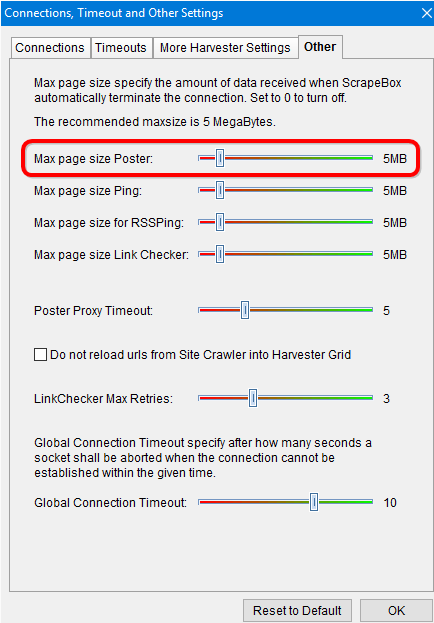
One thing you can do instead of checking various metrics is under Settings > Connections, Timeouts and Other Settings > Other Tab

You can set the maximum size of the page for the poster:

0EnClAv


Pages that are heavily spammed with thousands of comments get very large, like 10MB or more due to the huge amount of HTML and comments. So by limiting the size of the pages you comment on your can avoid heavily spammed pages. But this will obviously reduce the number of successful posts the lower you set this value.

Hello, I am interested. What is the minimum requirements if I want to install and run on Windows VPS?

It depends on what features you intend to use, and how you use them. A VPS with 1GB RAM will work, ScrapeBox is quite memory efficient. However the more RAM the better, it means you can load huge lists and work with larger amounts of data.
 
Hello, thx for an answer. I have to be more precise. I have watched all your videos, and i know almost all functions of scrapebox and GSA. If i scraped for example joomla k2 , then i copy it to gsa post on whole my list-> i got list where gsa is able to post. Then this verified list i would like to filter a little bit just to avoid the most spammed domains, but i dont know how to recognize them (in bulk) and put them into trash. I was checking them in ahrefs bulk (to see external links and OBL links from whole domains), Majestic (i was sorting by TF but also these one with high TF were sometimes spammed to death), checking in netpeak and still i don't know how to recognize spammed domains using bulk mode.

In the past i was using your lists and it's obvious when selling list got one or two months it's very spammed (too many people are using it) and it doesnt give too much link juice (links don't want to index etc.) I was comparing stats(TF,CF,external links) of some your old lists with my new scraped, but i didn't see any difference. I just thought that if i will scrape my own list i will maybe better TF/CF ratio in these domains or maybe much less external links to these domains (because people didnt left their links and didn't do T3).

Well thats a loaded question. Using my list or anyone elses list vs your own could make a difference or could not. You noted you don't see a difference and thats due in part to the fact that I scrape my list like anyone else does and just like you. Yes I sell it so those targets get hit, but my list comes from a public internet, as does what you scrape.

So just because a bunch of targets you scrape aren't on my list, doesn't mean they aren't on the next guys list and getting hit. The internet is public so its how it goes. Plus it doesn't also mean that you won't find some great targets today that you post your links on that aren't on anyones list and then tomorrow myself and a half dozen other list sellers get the same targets and all of a sudden your great targets are in the hands of 500 people.

I mean on my live sync service when my servers find a target it is literally synced into my end users GSA within mins. So you could literally find a awesome unspammed target right this minute and then I find it 1 min from now and within less then 30 mins my users already can have links on it.

~~~

Now on the note of metrics, let me burst your bubble. I took some domains in experimenting and used my lists, the same ones I sell, and built a bunch of links to them. These are brand new, or rather sub domains of domains I own to be precise. They don't even resolve to anything, as I just picked random sub domains that doesn't exist.

I was able to drive page authority and domain authority over 50, well here, just have a look

http://s19.postimg.org/saufudwz7/ddd.png

http://s19.postimg.org/ietcuqr77/gggg.png

That subdomain resolves to nothing and I just recently purchased that domain in general. At any rate, thats no Tiers, just straight spam, and I have better ones then that, just with my lists.

Point being, when my lists with no tiers and to a subdomain that doesn't resolve, can produce those kinds of metrics, how trust worthy are the metrics?

Ultimately you can get the best non spammed sites and great metrics you want and tomorrow they might be spammed to death before google even found your link.

So I say test. Make a test site or six and run different link methods to them and see what ranks. Then just put good content or ads or wahtever your doing on the site that ranks and then also use the same method on your money site.

I don't have a magic answer for you on how to bulk check for awesome links, if it were that easy people would be doing it as a service and then of course google would just alter course to compensate etc..
 
Hello, thx a lot for your answer and your time :) It's a lot for me, because i know a direction which way should i go :)
Last week i opened two new blogs with exactly same niches, beacuse i am starting to do a lot of A/B with my buddy. Each test we will do twice, so together 4 times. We're going to check a lot of things :) I will share with you after month :)
 
Did you guy's disable the "use server proxies" feature? For some reason I just cannot get it to work... When trying to run a scrape with it enabled, scrapebox automatically shows 0 results, as if I did not even try to harvest. When I use other proxies or direct IP, everything works fine...
 
Hi Matt, could you help me properly setup the automator?
Im not getting it work properly, i would like to do the following:
Import keywords from a file
Scrape relevant keywords
merge keywords with footprints
scrape
remove duplicate urls
save results

Seems simple, but it's not working properly on my end. Might be something very easy to fix this :)
 
I typed up a nice long response and my browser decided to foul up and delete the whole thing (Im sure it was my fault but who wants to take the blame for that? Far better to blame the pc, LOL)

Anyway, I can't reproduce this and Ive spent a good long while trying. Try it with and without proxies, custom harvester and detailed harvester as well, does it do this in every case?

Do you have the engine so.com and sogou.com at the bottom of your engine list? You should or your not using the latest engine file.

Have you tried kicking your machine? just kidding, lol

Maybe you can give screens of the settings >> connection timeouts and other settings - all 4 tabs and the settings >> harvester engine configuration - and click on 1 of the engines like bing or yahoo that are giving you trouble.

Do other engines like deeperweb or google work?
Aye, I did that. Soz.

Okay, with my ow proxies it keeps happening, with the server proxies it happens too, but without proxies apparently it doesn't. Same result for the detailed harvester. So it must have something to do with proxies in general.

I do have those two new engines. I kick my machine on a daily basis. Maybe you're onto something there.

I'll get you some more screens tomorrow.
 
Hello, thx a lot for your answer and your time :) It's a lot for me, because i know a direction which way should i go :)
Last week i opened two new blogs with exactly same niches, beacuse i am starting to do a lot of A/B with my buddy. Each test we will do twice, so together 4 times. We're going to check a lot of things :) I will share with you after month :)

Your welcome. I look forward to hearing about your results from your tests.

Did you guy's disable the "use server proxies" feature? For some reason I just cannot get it to work... When trying to run a scrape with it enabled, scrapebox automatically shows 0 results, as if I did not even try to harvest. When I use other proxies or direct IP, everything works fine...

When you try to use server proxies, does it show XXX or XXXX proxies in the proxies column or does it show 0 proxies?

Its not disabled, most likely whats happening is something on your machine is blocking scrapebox from accessing the server that distributes the server proxies.

Hi Matt, could you help me properly setup the automator?
Im not getting it work properly, i would like to do the following:
Import keywords from a file
Scrape relevant keywords
merge keywords with footprints
scrape
remove duplicate urls
save results

Seems simple, but it's not working properly on my end. Might be something very easy to fix this :)

Yes it should work fine. What isn't working? You can mail me the automator file you have at loopline (at] scrapeboxmarketplace [dot) com

Aye, I did that. Soz.

Okay, with my ow proxies it keeps happening, with the server proxies it happens too, but without proxies apparently it doesn't. Same result for the detailed harvester. So it must have something to do with proxies in general.

I do have those two new engines. I kick my machine on a daily basis. Maybe you're onto something there.

I'll get you some more screens tomorrow.

Ok send some screens. Are you using a VPN or anything?

So harvesting is great without proxies but with your proxies and server proxies you only get the 1 result and/or its all/mostly all the same thing?

Any chance you can do a short video? Doesn't need audio.

Also I lost track is this on a home pc or a VPS/Server?
 
Status
Not open for further replies.
Back
Top