Permanently Closed Marketplace Sales Thread

Status
Not open for further replies.
Hi, where do you generally announce update releases and make them available. I have only ever come to this thread if I need anything. Want to make sure I don't totally miss the update if I have not been looking here.

Cheers

Emails, Forum threads (here) and our homepage ... update is coming out shortly ;)
 
Captcha Sniper X has been released!

Here's what's new ...

56 New Captcha Types in CDK - with these new additions, there is no need for the ones created by Andrei, they are replaced by these
AchimWinkler Guestbook, Advanced Guestbook, Article Directory Pro, Basti Guestbook, BeepWorld Guestbook, Blogspot.es, Burning Book, ClipBucket, ClipShare, Coppermine Photo Gallery, Datso Gallery, Easy Guestbook, EasyLink, Firebook Guestbook, flat PHPBook, FluxBB, FUDForum, GA Gaestbuch, Gaijin Guestbook, General Blogs (5 variants), Hyperbook Guestbook, Icybook, iDocScript, Jax Guestbook, Link Bid Script, LINKER, Maian Guestbook, maxxibook, Meneame, miniBB, MyEngines, Nuke Guestbook, PHP Fusion Guestbook, PHPBookmark, PHPMotion, Piwigo, PixelPost (new variant), Scarbook, ShareMixer, TPK Guestbook, Ultimate Guestbook, Unknown Directory, Unknown Guestbook, Viral Socializer Script, vShare, Xeobook Guestbook


'Use captcha_platform for detection' - option from the settings menu
CS now accepts a new parameter passed within the http post API to tell CS exactly which captcha type its being passed. This means that you will not have to select any captcha types and as a result will have no size conflicts and much higher success rate.


Currently the only tool using this new feature is GSA Search Engine Ranker. If you have not heard of it, I highly recommend you check it out. It's currently the most diverse backlinking tool available at an incredible price. I've also heard from Vince, the developer of AMR, that he will be adding this as well.


To use this feature in conjunction with CDK, just make sure that the value being passed matches exactly the captcha type name.


'Save Solved Captchas' - option from the settings menu
This will allow you to save the captchas sent to CS along with the answer. This eliminates the need for the multiple panes in the GUI. These will appear in the solvedcaptchas folder.


Bug fixes
Additional handling of the tesseract popup errors... they should almost be non existent now.


CDK - Import Database
As the description says, you can now import additional CDK databases which should make sharing others algorithms a lot easier.


CDK - Character Segmentation and Derotation
Character segmentation now accepts an additional parameter to define the minimum width of a character. In addition, you can derotate characters for captchas with rotated characters. There is no 100% solution for this, however this algorithm works very well on the majority of rotated characters. In addition, you can specify the maximum degree of rotation to check.


Installation:
IMPORTANT - if you have added any of your own captchas in CDK, please copy CaptchaSniper.mdb to a different location and then use the new import feature to add them back. The install will overwrite your existing database!


1. Use the uninstaller inside the CS folder to uninstall.
2. Delete everything inside the CS folder EXCEPT the .lic file
3. Download CaptchaSniper X here
4. Reinstall in the old folder

Enjoy!
 
Last edited:
Captcha Sniper X has been released!

Here's what's new ...

56 New Captcha Types in CDK - with these new additions, there is no need for the ones created by Andrei, they are replaced by these
AchimWinkler Guestbook, Advanced Guestbook, Article Directory Pro, Basti Guestbook, BeepWorld Guestbook, Blogspot.es, Burning Book, ClipBucket, ClipShare, Coppermine Photo Gallery, Datso Gallery, Easy Guestbook, EasyLink, Firebook Guestbook, flat PHPBook, FluxBB, FUDForum, GA Gaestbuch, Gaijin Guestbook, General Blogs (5 variants), Hyperbook Guestbook, Icybook, iDocScript, Jax Guestbook, Link Bid Script, LINKER, Maian Guestbook, maxxibook, Meneame, miniBB, MyEngines, Nuke Guestbook, PHP Fusion Guestbook, PHPBookmark, PHPMotion, Piwigo, PixelPost (new variant), Scarbook, ShareMixer, TPK Guestbook, Ultimate Guestbook, Unknown Directory, Unknown Guestbook, Viral Socializer Script, vShare, Xeobook Guestbook


'Use captcha_platform for detection' - option from the settings menu
CS now accepts a new parameter passed within the http post API to tell CS exactly which captcha type its being passed. This means that you will not have to select any captcha types and as a result will have no size conflicts and much higher success rate.


Currently the only tool using this new feature is GSA Search Engine Ranker. If you have not heard of it, I highly recommend you check it out. It's currently the most diverse backlinking tool available at an incredible price. I've also heard from Vince, the developer of AMR, that he will be adding this as well.


To use this feature in conjunction with CDK, just make sure that the value being passed matches exactly the captcha type name.


'Save Solved Captchas' - option from the settings menu
This will allow you to save the captchas sent to CS along with the answer. This eliminates the need for the multiple panes in the GUI. These will appear in the solvedcaptchas folder.


Bug fixes
Additional handling of the tesseract popup errors... they should almost be non existent now.


CDK - Import Database
As the description says, you can now import additional CDK databases which should make sharing others algorithms a lot easier.


CDK - Character Segmentation and Derotation
Character segmentation now accepts an additional parameter to define the minimum width of a character. In addition, you can derotate characters for captchas with rotated characters. There is no 100% solution for this, however this algorithm works very well on the majority of rotated characters. In addition, you can specify the maximum degree of rotation to check.


Installation:
IMPORTANT - if you have added any of your own captchas in CDK, please copy CaptchaSniper.mdb to a different location and then use the new import feature to add them back. The install will overwrite your existing database!


1. Use the uninstaller inside the CS folder to uninstall.
2. Delete everything inside the CS folder EXCEPT the .lic file
3. Download CaptchaSniper X here
4. Reinstall in the old folder

Enjoy!

this is great! will you send a download URL? or will you contact your customer base with information on how to get it?

thanks
 
Hi Mike,
where can I find the link to the new version? I haven't received any emails.
Thanks
 
How do you make this automatically work with GSA now? Or does it just work without touching anything?
 
Last edited:
Hi there,

yes, I can confirmed I've got an email with the URL location to download the update and everything is working just fine.

cheers
 

Bug fixes
Additional handling of the tesseract popup errors... they should almost be non existent now.


I was getting all excited there in the hope that we'd seen the last of this problem, however, I installed CSX and within ten minutes of running it with GSA I got my first tesseract pop up!
 
I was getting all excited there in the hope that we'd seen the last of this problem, however, I installed CSX and within ten minutes of running it with GSA I got my first tesseract pop up!

shoot me an email or ping me on skype .. as stated this shouldnt be happening. Could be something wrong with your setup.
 
New update installation works fine for me. Will test later :)

Thanks for the update mikey...
 
Updated the program last night. Everything seems to be working but I still received a tesseract failed popup at some point through the night.
 
can i buy it through paypal?
can not found it ...

Sure can, check your PM

New update installation works fine for me. Will test later :)

Thanks for the update mikey...

Youre welcome :)

Updated the program last night. Everything seems to be working but I still received a tesseract failed popup at some point through the night.

Could be something wrong with your setup, ping me on skype and ill take a look. At any rate, these popups have no effect on CS whatsoever, just an annoyance. Also if you search the thread there have been several solutions posted to not show them.
 
Not only captcha sniper is awesome but support is also fabulous.. after few email exchanges the support logged into VPS and fixed the issue (apparently nothing to do with captcha sniper rather with other application which was using it).. have not seen such a support for any other tool.. Thanks again..:) Greatly appreciated..
 
Mikey,

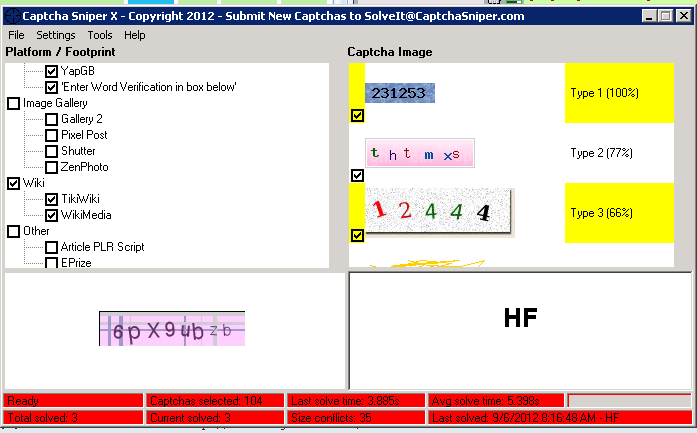
I'm a new user. I likt to know, to use the 'Use captcha_platform for detection' feature, i have to select all the captcha that i use for GSA and now it show SIZE CONFLICT = 35 on the status bar. Is it ok? here is the screenshot.

d0fUQ


advice please...
 
uncheck all engines first -> settings -> just check "use captcha platform" for detection.
 
Could someone send me details how to pay via PayPal please?

Also if i want to test it at home then move onto a server is that allowed, or is there a transfer fee or similar?
 
Status
Not open for further replies.
Back
Top