

pankajjangir
Power Member
- Mar 28, 2013
- 656
- 293
Hey everyone,
If you're tired of spam comments on your WordPress site, here's a quick method to block most of them using Cloudflare, without installing any extra plugins.
What This Does:
This method stops spam bots that directly target:
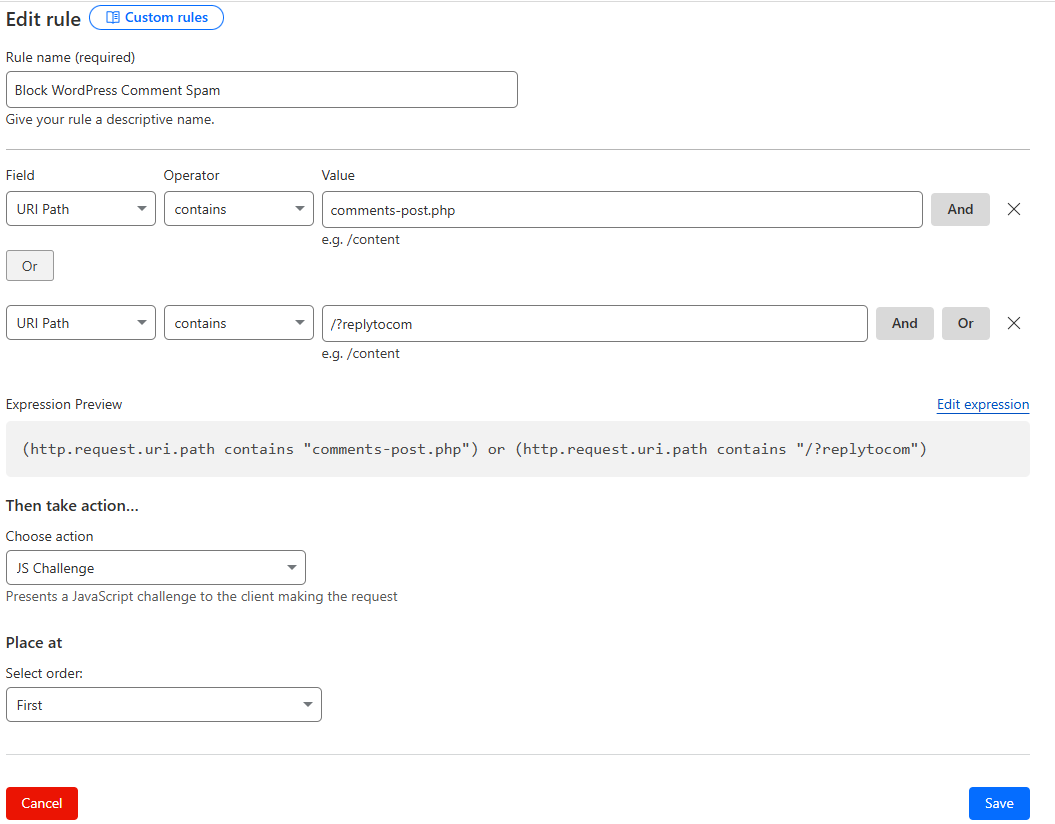
That’s it! Most bot-generated comment spam should stop hitting your site. I am personally using it on many WordPress websites I own.
Let me know if you try it out or have questions!
If you're tired of spam comments on your WordPress site, here's a quick method to block most of them using Cloudflare, without installing any extra plugins.
What This Does:
This method stops spam bots that directly target:
- comments-post.php
- /?replytocom URLs (used in threaded comments)
- Log into Cloudflare (or create a free account at cloudflare.com)
- Add your website to Cloudflare (skip if already added)
- Go to: Security → WAF → Custom Rules
- Click on + Create Rule
- Fill out the rule as follows:
Rule Name: Block WordPress Spam Comments
Conditions:
- URI Path → contains → comments-post.php
- Click Or, then add:
- URI Path → contains → /?replytocom
- Choose Action: JS Challenge
(This challenges bots with JavaScript — most spam bots fail this.) - Save the rule and set its order to First
That’s it! Most bot-generated comment spam should stop hitting your site. I am personally using it on many WordPress websites I own.
Let me know if you try it out or have questions!
