Permanently Closed Marketplace Sales Thread

Status
Not open for further replies.
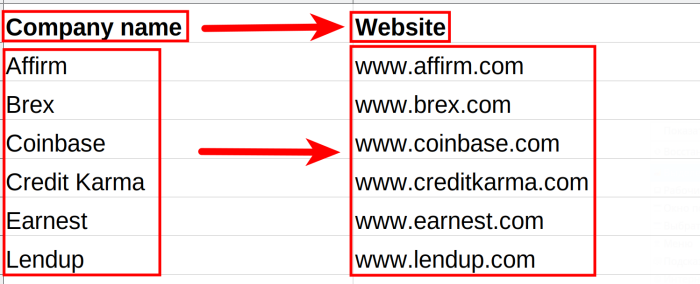
FINDING WEBSITES BY COMPANY NAMES

Even though this bot's name doesn't imply it, it's the Google First Result Finder that can help you find company websites by only their names! It bulk-exports the first Google Search results for a provided set of search queries, and if you enter company names, then their websites will be the first results. Test this feature NOW!
1707377431247.png


Other than that, the Google First Result Finder can help you:
  • Get to know your competition
  • Analyze your competitors’ meta titles and meta descriptions
  • Improve your own meta tags
  • Quickly extract domains from longer site URLs
  • And much more!

The Google First Result Finder will grab the following details:
  • Query
  • URL
  • Domain
  • Title
  • Description

SIGN UP for Botster.io and get FREE credits now!

DM us your Botster User ID and get 300 more credits for free!
 
Any DENTISTS reading this? We've just published a post on how to do local SEO for dentists with 12 (!) automation tools - check it out!

If you aren’t seeing tangible results with your dentist's site optimization efforts, this article contains valuable insights into local SEO for dentists - good practices, smart marketing tips and powerful automation tools to help you accomplish more.

Our step-by-step guide includes:
  • The best SEO keywords research tips for dentists
  • 100% working SEO marketing tips for dentists
  • A guide on how to use automation tools to increase local SEO rankings of your dentist’s site
Read it NOW!

SIGN UP for Botster.io and get FREE credits!

DM us your Botster User ID and get 300 more credits for free!
 
MONITORING PRODUCT QUANTITY ON SHOPIFY

If you have a trade business and deal with Shopify professionally, you may need to monitor product quantity on Shopify-driven websites regularly. This is why we've developed the Shopify Product Quantity Monitor - an amazing online bot that will do this job for you! It monitors item quantities changes of a Shopify store.
Check it out NOW!

You can set up daily checks and receive sold and stocked quantities to your email, Slack, or Telegram.

SIGN UP for Botster.io and get FREE credits!

DM us your Botster User ID and get 300 more credits for free!
 
MONITORING BAD REVIEWS

Whenever your business gets a bad review, you must be informed about it asap! This is exactly what the Google Review Extractor can do for you.

1707986265873.png


The Google Review Extractor can retrieve reviews about your (or your competitor's) business once or on a regular basis. It will send you the following details:
  • Keyword
  • Position
  • Review text
  • Reviewed at
  • Owner's answer
  • Profile name
  • Profile URL
  • Profile image URL
  • Rating
  • Reviews count
  • Photos count
  • Is local guide? (yes / no)

SIGN UP for Botster.io and get FREE credits!

DM us your Botster User ID and get 300 more credits for free!
 
HOW TO DO INFLUENCER OUTREACH

Looking for influencers to toot your horn? This shouldn’t be the only task you’ll spend the whole day on! Learn which automation tools you can use to make a list of bloggers and influencers in just a couple of minutes. Like this:

1708155588175.png


In our brand-new blog post, you'll find a step-by-step guide on:
  • Which 3 automated influencer outreach tools to use
  • How to find influencers' social media and emails
  • How to build an effective outreach strategy
Check it out NOW!

SIGN UP for Botster.io and get FREE credits!

DM us your Botster User ID and get 300 more credits for free!
 
VALIDATING LINKEDIN BUSINESS PHONES

Use a smart combination of 2 bots to check if the business phones published on LinkedIn are valid.

Bots to combine:

  1. Linkedin Company Info Extractor
  2. Phone Number Validator

Step 1️⃣
  • Open the Linkedin Company Info Extractor's start page
  • Paste companies' LinkedIn profile URLs
  • Extract phone numbers of different businesses

Step 2️⃣
  • Open the Phone Number Validator's start page
  • Paste the phone numbers retrieved in Step 1
  • Check if these phone numbers are valid

SIGN UP for Botster.io and get FREE credits!

DM us your Botster User ID and get 300 more credits for free!
 
Hello, @Perb ,

I've given you 300 bonus credits, happy scraping!

Anyone else here eager to get 300 free credits? Just let me know your Botster User ID!

To find out your Botster User ID, do the following:

  1. Sign up on BOTSTER.IO
  2. Click on your user avatar (the robot image in the top right corner)
  3. Click on "Settings"
  4. Copy your ID from the settings page and post it here!
 
SMART TOOLS FOR GOOGLE MAPS

We've got several convenient online bots for those who often deal with Google Maps professionally. Automate your work and enjoy!

Below you will find the descriptions of our most demanded Google Maps bots. Should you have further ideas, you are always welcome to order a custom bot that will suit your needs.


SIGN UP for Botster.io and get FREE credits!

DM us your Botster User ID and get
300 more credits for free!
 
SMART KEYWORD GROUPING TECHNIQUES

We've developed several keyword grouping bots for those who often deal with search keywords professionally. Keyword grouping has never been faster!

1708709237454.png


Below you will find the descriptions of several bots that will facilitate the task of keyword grouping for you:

  1. The Smart Keyword Grouping tool groups your SEO and PPC keywords according to their topical relevance.
  2. The N-gram Keyword Grouping tool groups keywords by their bigrams and trigrams.
  3. The Keyword Cross-Generator generates complex cross-matching keywords based on your inputs.

SIGN UP for Botster.io and get FREE credits!

DM us your Botster User ID and get 300 more credits for free!
 
HOW TO EXTRACT DATA FROM GOOGLE TRENDS?

If you are looking for a quick and easy way to export A LOT of data from Google Trends, the simple Google Trends Exporter from BOTSTER is for you! This bot bulk-extracts data from Google Trends.

We've prepared a step-by-step video tutorial to explain to you how to use the bot. Check it out!

To extract Google Trends data, you need to follow these easy steps:
  • Sign up for BOTSTER
  • Head to the bot's start page
  • Input your search queries
  • Select geolocation
  • Select time period
  • Click the "Start this bot" button

That's it!

SIGN UP for Botster.io and get FREE credits!

DM us your Botster User ID and get 300 more credits for free!
 
MONITORING LINK PRESENCE

If you practice linkbuilding, you know how time-consuming it is to monitor if your links are still present on the websites where you've published them.

This is why our keen programmers have developed an outstanding Link Presence Monitoring bot that will do this job for you! It periodically checks whether a certain link is present on a web page and sends you a notification if something goes wrong. Check it out NOW!

All you need to do is insert the URL you’d like to check for AND the host URL which should contain the link.

SIGN UP for Botster.io and get FREE credits!

DM us your Botster User ID and get 300 more credits for free!
 
SMART TOOLS FOR GOOGLE SEARCH

We've developed several smart bots fthat retrieve Google Search data IN BULK. Improve and speed up your work with data!

Below you will find the ultimate list of our Google Search bots. Should you have further ideas, you are always welcome to order a custom bot that will suit your needs.

  1. Google Index Checker checks if a set of URLs is present on Google, Bing, Yahoo and Yandex.
  2. Google Search Results Scraper returns Google SERP snippets for a provided list of keywords.
  3. Google First Result Finder returns a list of first Google results for a provided set of search queries.
  4. Google Total Indexed Documents displays a total amount of documents indexed by Google.
  5. Search Volume and CPC Finder shows Google search volume and CPC for a list of keywords.
  6. Google Pagespeed Bulk Checker returns Pagespeed score for a list of provided URLs.
  7. Google Rank Checker checks a website's keywords rankings.
  8. Google Ads Extractor scrapes ads from Google for a list of keywords.
  9. Google Trends Scraper extracts data from Google Trends in bulk.
  10. Google Image Scraper retrieves a list of links from Google Images for a set of keywords.
And there are more!

SIGN UP for Botster.io and get FREE credits!

DM us your Botster User ID and get
300 more credits for free!
 
MARCH UPDATES

Exporting product images from Amazon reviews

Amazon Sellers! Did you know you can export every review image and video posted by your buyers (or your competitors' buyers)? You can easily do this using the Amazon Review Extractor!

On the bot’s page, tick “with media only.” The columns “Review image” and “Review video” will contain the links to the product photos and videos made by the buyers.

New video

Watch how you can monitor content theft and protect your copyright with 3 plagiarism image checker tools.

In this video, you’ll learn:
  • How to detect picture plagiarism using image URLs
  • How to disclose photo plagiarism using keywords
  • How to reveal new cases of image plagiarism in real-time mode
  • How to detect image leaks
The video spotlights the following tools:

Read our full guide on how to monitor photo plagiarism.

On the blog

Read our selection of posts on logistics automation:

SIGN UP for Botster.io and get FREE credits!

DM us your Botster User ID and get 300 more credits for free!
 
EXTRACTING YOUTUBE COMMENTS

If you deal with YouTube professionally, you may need to analyze tons of YouTube comments on a regular basis. This is why our first-class programmers have developed the YouTube Comment Extractor - a brilliant online bot that will do this job for you! It extracts comments from any YouTube video and exports them into a spreadsheet.
Check it out NOW!

All you need to do is paste the link to the YouTube video and specify the number of comments to retrieve (up to 500 000).

1709534881359.png


SIGN UP for Botster.io and get FREE credits!

DM us your Botster User ID and get 300 more credits for free!
 
TOOLS FOR LINKEDIN DATA EXTRACTION

We've developed several convenient LinkedIn bots for those who often deal with LinkedIn professionally. Automate your work and enjoy!

Below you will find some of our most demanded LinkedIn bots. Should you have further ideas, you are always welcome to order a custom bot that will suit your needs.

  1. LinkedIn Email Miner retrieves emails from LinkedIn profiles based on location and keywords.
  2. Linkedin Profile Extractor exports all data from LinkedIn user profiles.
  3. Linkedin Company Info Extractor exports company information from LinkedIn.
  4. Linkedin Company Finder finds links to companies' LinkedIn profiles using titles or URLs.
  5. LinkedIn Employee Extractor exports LinkedIn company employees details.
  6. Linkedin Jobs Extractor exports posted job offers from a list of companies.

SIGN UP for Botster.io and get FREE credits!

DM us your Botster User ID and get 300 more credits for free!
 
FINDING SITE SUBDOMAINS

A super quick and easy way to find ALL subdomains of a website is to use the Subdomain Finder tool by Botster.

How to use this bot? Simply input your URL, and the Subdomain Finder will return up to 1000 real subdomains which it is aware of, along with some helpful metrics:
  • ⭐️ Total IPs - the number of IP addresses pointing to the subdomain
  • ⭐️ Total subnets - the number of subnets pointing to the subdomain
  • ⭐️ Total domains - the total amount of external domains pointing to the subdomain
  • ⭐️ Total unique links - total external unique links pointing to the subdomain
  • ⭐️ Total links in - total number of external links pointing to the subdomain
  • ⭐️ Link rank - subdomain link health (more is better)

We've prepared a step-by-step video tutorial to explain to you how to use the bot.
Check it out!

SIGN UP for Botster.io and get FREE credits!

DM us your Botster User ID and get 300 more credits for free!
 
Status
Not open for further replies.
Back
Top