
You are using an out of date browser. It may not display this or other websites correctly.
You should upgrade or use an alternative browser.
You should upgrade or use an alternative browser.
Permanently Closed Marketplace Sales Thread
- Thread starter Cognitive
- Start date
- Status
- Not open for further replies.


Jack Payne846
Newbie
- Sep 19, 2022
- 6
- 1
Samples and coupon code
Baxter Macy
BANNED
- Sep 3, 2022
- 4
- 2
PM me plz for detail review
CarlosLouis1006
Newbie
- Sep 22, 2022
- 7
- 0
Count me in for a review copy

Cognitive
Regular Member
- Mar 11, 2015
- 401
- 222
Autopilot extended free trial
Samples and coupon code
PM me plz for detail review
can i get a free trial please thank you
Count me in for a review copy
AutoPilot Extended Free Trial details sent via PM.
Please note that we do not offer review copies, samples, coupon codes etc.
If you need the extended BHW free trial, please post: AutoPilot Extended Free Trial in this thread
WatsonRodney5145
Newbie
- Sep 20, 2022
- 6
- 2
AutoPilot Extended Free Trial
WatsonRodney5125
Newbie
- Sep 20, 2022
- 7
- 2
Autopilot extended free trial

manjeetsingh1
Regular Member
- Aug 28, 2022
- 270
- 59
AutoPilot Extended Free Trial

Simon Vasquez
Newbie
- Sep 7, 2022
- 6
- 1
Coupon code

Wrath Of God
Senior Member
- Sep 3, 2019
- 1,019
- 515
AutoPilot Extended Free Trial


DeveloperCreamp
Newbie
- Sep 30, 2022
- 3
- 0
Hello , This possible to use Autopilot for rewrite with high quality SEO content ? I would like to test before buy please. Thank's you !
AutoPilot Extended Free Trial
AutoPilot Extended Free Trial

- Dec 16, 2020
- 13,480
- 6,864
Update: Thread Edited
The seller has contacted us to change the content of the opening post in their sales thread. The old content and the new content can be found in the spoilers below.

User Reviews:
https://www.blackhatworld.com/seo/s...guages-long-form-conten.1382244/post-15034038
https://www.blackhatworld.com/seo/s...guages-long-form-conten.1382244/post-15009422
https://www.blackhatworld.com/seo/s...guages-long-form-conten.1382244/post-15024139
https://www.blackhatworld.com/seo/s...guages-long-form-conten.1382244/post-15038005
https://www.blackhatworld.com/seo/s...guages-long-form-conten.1382244/post-15097800
https://www.blackhatworld.com/seo/s...guages-long-form-conten.1382244/post-15058671
https://www.blackhatworld.com/seo/s...guages-long-form-conten.1382244/post-15100474
https://www.blackhatworld.com/seo/s...guages-long-form-conten.1382244/post-15064735
https://www.blackhatworld.com/seo/s...guages-long-form-conten.1382244/post-14978807
https://www.blackhatworld.com/seo/s...guages-long-form-conten.1382244/post-14991421
https://www.blackhatworld.com/seo/s...guages-long-form-conten.1382244/post-14991558
https://www.blackhatworld.com/seo/s...guages-long-form-conten.1382244/post-15013510
https://www.blackhatworld.com/seo/s...guages-long-form-conten.1382244/post-15020388
https://www.blackhatworld.com/seo/s...guages-long-form-conten.1382244/post-15027073
https://www.blackhatworld.com/seo/s...guages-long-form-conten.1382244/post-15029160
https://www.blackhatworld.com/seo/s...guages-long-form-conten.1382244/post-15034684
https://www.blackhatworld.com/seo/s...guages-long-form-conten.1382244/post-15058401
https://www.blackhatworld.com/seo/s...guages-long-form-conten.1382244/post-15065372
https://www.blackhatworld.com/seo/s...guages-long-form-conten.1382244/post-15069509
https://www.blackhatworld.com/seo/s...guages-long-form-conten.1382244/post-15092772
https://www.blackhatworld.com/seo/s...guages-long-form-conten.1382244/post-15094568
https://www.blackhatworld.com/seo/s...guages-long-form-conten.1382244/post-15109557
https://www.blackhatworld.com/seo/s...guages-long-form-conten.1382244/post-15111570
https://www.blackhatworld.com/seo/s...guages-long-form-conten.1382244/post-15404420
https://www.blackhatworld.com/seo/s...guages-long-form-conten.1382244/post-15482217
How to get the AutoPilot Free Trial?
Please post “AutoPilot Extended Free Trial” in this thread. The extended free trial doubles the count of articles you can generate with AutoPilot (6 articles instead of just 3 with the standard free trial). Furthermore, the BHW Free Trial will remove the AI generations count limit/ 30 minutes that is applied to to the standard free account and you'll get access to all our modules, including AutoPilot, CoPilot, RePilot, Long-Form Pilot, Translate and the other 9 additional AI modules. You will receive the activation and usage instructions via PM*
How to extend the AutoPilot Free Trial?
After using our BHW free trial offer, post your honest review in this thread, send us the link to your review via PM and we will reset your free trial so you could use it again in the same terms.
Please note that you will not be able to access the AutoPilot modules if you just sign-up for the Sensit Assistant Free or Paid plans.
Questions
If you have questions regarding our service please drop us an email or use the messenger on our website.
Refund Policy
Only for BHW users we will offer a 7 days money back guarantee if the user has not generated more than 10k characters in Assistant modules and/ or 3 Articles in AutoPilot module (please contact us via the indicated email address when requesting a refund). Please use the free trial before deciding to subscribe to our services.
*Your BHW account must be at least 1 Month old and your post count must be higher than 30. Older accounts/ with higher post count are prioritized. We reserve the right to select the members for whom these offers/ deals are available.
[align=center]
 [/align]
[align=center]
[align=center]
User Reviews:
How to get the AutoPilot Free Trial?
Please post “AutoPilot Extended Free Trial” in this thread. The extended free trial doubles the count of articles you can generate with AutoPilot (6 articles instead of just 3 with the standard free trial). Furthermore, the BHW Free Trial will remove the AI generations count limit/ 30 minutes that is applied to to the standard free account and you'll get access to all our modules, including AutoPilot, CoPilot, RePilot, Long-Form Pilot, Translate and the other 9 additional AI modules. You will receive the activation and usage instructions via PM*
How to extend the AutoPilot Free Trial?
After using our BHW free trial offer, post your honest review in this thread, send us the link to your review via PM and we will reset your free trial so you could use it again in the same terms.
Please note that you will not be able to access the AutoPilot modules if you just sign-up for the Sensit Assistant Free or Paid plans.
Questions
If you have questions regarding our service please drop us an email or use the messenger on our website.
Refund Policy
Only for BHW users we will offer a 7 days money back guarantee if the user has not generated more than 10k characters in Assistant modules and/ or 3 Articles in AutoPilot module (please contact us via the indicated email address when requesting a refund). Please use the free trial before deciding to subscribe to our services.
*Your BHW account must be at least 1 Month old and your post count must be higher than 30. Older accounts/ with higher post count are prioritized. We reserve the right to select the members for whom these offers/ deals are available.
[align=center]
[align=center]
User Reviews:
I was about to buy the 60 article subscription when @Cognitive offered to give me a review copy.
After checking out the demo video for the 1-Click article tool, I wanted to give it a shot. I’m super impressed. This tool is incredible.
I wrote some list type articles with the tool and they came out great. You just need to add a content brief and some keywords that you want to include in the article and click generate.
You can set up an entire site with 60 posts in one day. It just takes a couple of minutes to create an article. I recommend adding relevant keywords and even providing the outline for the article to get the best results.
I’ve posted a few articles already and I’d love to see how they rank.
Overall, 99 bucks for 60 articles is a no brainer. Highly recommended!!!
Alright, so review time:
Summary:
I was given a free trial by @Cognitive to give this new AI article generator a try.
Impression:
Sensei.ai is one of the better article generators I’ve used thus far. It requires very little effort to generate a full article that will only need to be edited for on-page SEO in less than a minute. It has some information that you need to input in order to make it work better but the software even comes with an AI to generate even that for you.
Readability: 9/10.
Flow: 9/10.
TAT: 10/10.
Conclusion: I was thoroughly impressed by each aspect of this. I took the finished article to copyscape and low & behold, completely unique. I purchased the middle monthly plan soon thereafter to keep my tier 2 links stocked with good content. If you’re serious about the content on your websites, you may want to look into this.
For people who want a comparison Sensit vs Jarvis.
I just bought Sensit and Jarvis BOSS pack and compared them. Well I have to say I am impressed with SENSIT, Cognitive you made a gangster tool bro niceee.
Here’s an example of two small tests I ran with both software and you can see the outcome of Sensit sounds a lot more humane.
THIS ONE IS JARVIS
[ATTACH type=”full” alt=”jarvis test.png”]201348[/ATTACH]
AND THIS ONE IS SENSIT
View attachment 201349
Then I used sensit’s autopilot for the same subject. Well this shit is next level niceee… Guys I’m definitely not promoting this guy but his tool is gangster.
Jarvis charges $60 for 50,000 words while sensit is unlimited. that’s a lot and then you get a bazooka (autopilot) ready for the army.
I give such a good review I hope cognitive takes this tool seriously and makes it even stronger. Good luck
Some feedback! Loving the tool! Definitely better than the competition, especially the 1 click article feature.
I have a question about a possible feature, not sure if possible.
Would it be possible to implement like, the 1 click article feature but instead of it being capped to 1.5k words it would expand/write infinitely as long as we provided enough outlines/headings? This way we could write a ton of outlines and it would pump out 2000-3000 words long articles which for some keywords/niches its pretty much a necessity.
Just a thought
Review Time:
I was given a 7-day trial plan by @Cognitive with the option to create up to 6 articles with the AutoPilot feature. I created 6 articles and I have no words other than Check-F***ing-Mate to any other AI programs out there.
A Little Background:
I have been using Conversation.ai/Jarvis/Jasper (not as much as I should be) but I have been using it. I really have nothing bad to say about Jarvis, other than it doesn’t even remotely come close to Sensit.ai. Jarvis is good for what it does but still could use some work on a few things. Comparing Jarvis to the slew of other AI writers out there I think Jarvis wins hands down, with one caveat, I have personally not used any other AI writer out there. But I have watched a crap TON of YouTube videos on about every other AI writer out there, and just based on that, IMO they suck.
Is it fair to compare AIs if you have never tried them? No, but from watching the videos and seeing the output they produce, Jarvis wins hands down in my book. I know Jarvis and many of the other AI writers get TONs of flack on the output and how they are still 10 years from actually being a useful AI writer. The only thing I have to say to that is if you feel that way, you really do not know how to correctly use Jarvis or any AI writer for that matter. I don’t get why so many people think that all these AI writers are just, push a button and get a 2,000-word perfect article. Ain’t gonna happen, BUT if you know how to correctly use an AI writer, you can easily guide it and get a nice 2~3K-word article ready to post. (Granted it will take some niche research and a few hours of work of your time.)
Impressions:
Will Sensit.ai give you a 1,000~1,500-word article with the push of a button and a few minutes of wait time? 100% YES.
Will that said article be perfect? NO.
My Results:
I made 6 articles, the first one which I thought would be a good niche, but it turns out I was wrong. The article read VERY well. MUCH better than the content I have been getting from Jarvis.
BUT... I was getting dates and other info that at first glance looked just fine until I ran some of it through Google. The ‘facts’ and dates were quite a bit off. Like everyone else knows that have used AI tools, they are NOT fact-checkers. So since that niche relies heavily on facts and dates, I didn’t write anymore for that niche.
Article #1 - A wash. (A wasted Article, no biggie)
Article # 2, 3, 4 & 5 I picked another niche that is more evergreen(ish) in nature and doesn’t rely too much if at all on dates or facts. I’m not going to go through each article, but I will do a summary of them all because they were all about the same. I think I spent (on the high end) probably 1 hour at most to have 5 articles fully ready to post on my site. Article word length is as follows: 1,273 / 1,263 / 1,354 / 1,256 / 1,317. I found my Title from ahrefs, I let Sensit auto-generate my description and then I used “Inspire Me”. I then opened the results and got some keywords and added that to the Keywords box, and then used Google Suggest to get a list of questions and made an outline to put in the Outline box. I recommend doing that all to get some amazing results. I then generated the article which took a minute or two. I put that article into Grammarly Premium, and spent about less than 5 minutes cleaning up any grammar issues it found, thus putting my score at 99 out of 100. Then I checked for plagiarism and the results for each article were as follows: 5% / 3% / 4% / 4% / 4%. Virtually 0 plagiarism. All it found were a couple of commonish phrases that were on sites completely unrelated to my niche.
Could I just click on every button to have the AI generate pretty much everything but the title for me? YES
Could I then just take that article and post it on my website and still have it be very readable and of excellent quality? YES
Was it worth it to spend an hour doing a little extra work to get 5, 1,300 ish-word high-quality articles ready to post? YES
Could I hire and train a VA to do exactly what I did to get the same quality of output and churn out another 600+ 1,300 ish word, high-quality articles to dominate this niche? More than likely, yes
Conclusion:
1,000% blown away.
Picture Time:
From Grammarly - The article score
[ATTACH type=”full” alt=”Grammarly 01.jpg”]203784[/ATTACH]
From ahrefs - My website
I bought this expired domain back in Nov 2021 and posted 31 Articles on it in Dec 2021.
When I got it there was 0 Organic Traffic and 0 Organic Keywords, the rest of the stats were the same.
From Jan & Feb 2022 the Organic Traffic is up to 15 and Organic Keywords is now at 45.
Also looks like I have a few things to clean up in my health score as well.
[ATTACH type=”full” alt=”Grammarly 03.jpg”]203785[/ATTACH]
I tested this tool during its beta-phase and @Cognitive gave me access to the final iteration of the tool today.
I was expecting a lot from this tool...and boy, it did deliver a lot more than expected. This tool is a game-changer.
The flow of the article is perfect, if you ask me. The words count...1300 in 1 minute is excellent. But the most important thing is that the article is relevant and it always stays on topic. As I know a few things about AI models, I can tell you that this is one of the most difficult things: making the AI to stay on topic when writing long-form content without human intervention. I guess this is the reason they’re using 6 different models.
I didn’t do any proper research before asking the AI to write on my topic and I didn’t use the research option inside this tool either. ( although this is a very interesting addition, it uses AI to scan a few competitors and gathers data from like Google Trends, People also asked, Related Searches etc). I just wrote my topic in its designated box, and asked the AI to generate the rest of the details: description, keywords, outlines. All the process took less than 5 minutes and I got this:
I will paste here the entire article:
Here there are the screenshots from their website:
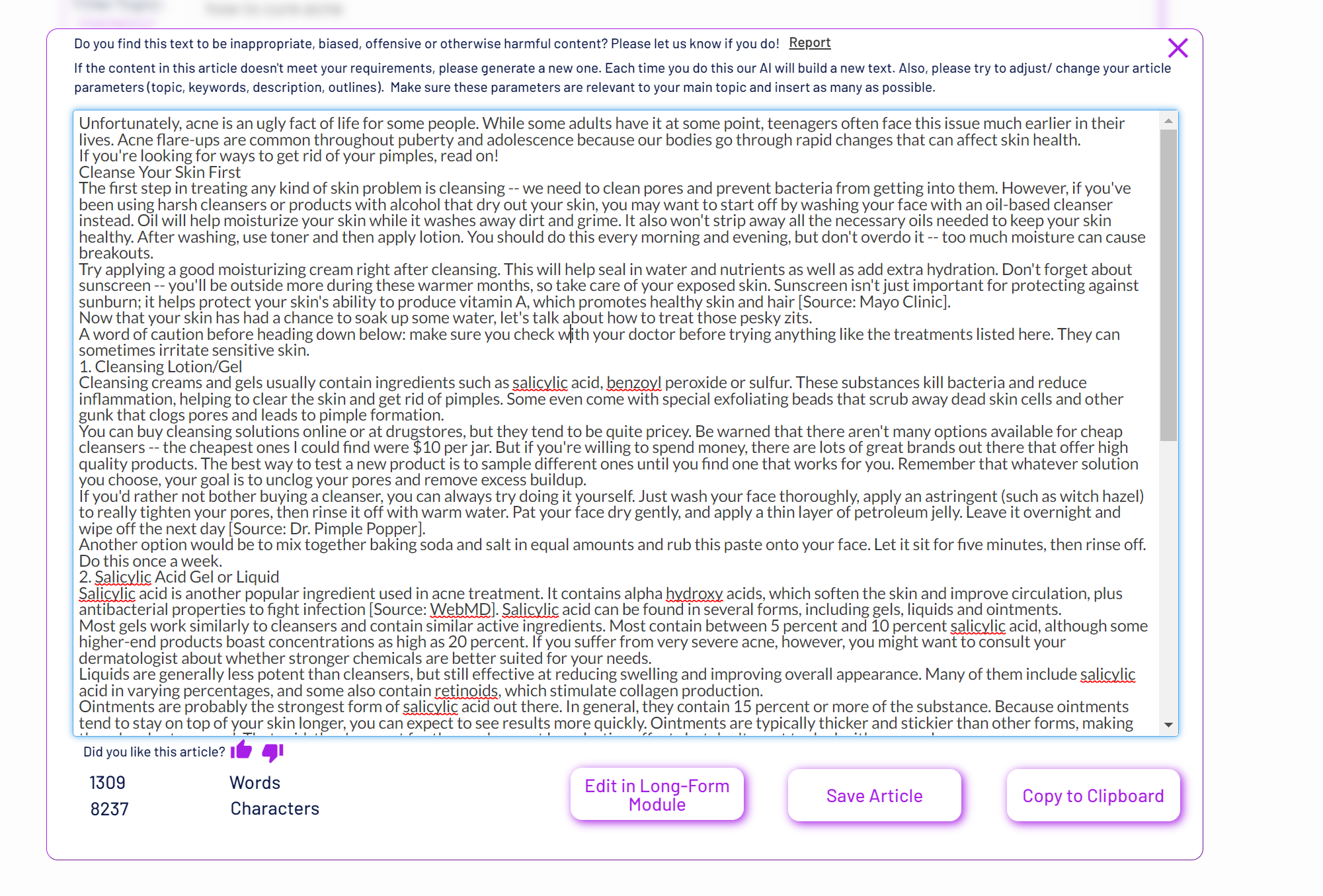

I can’t think of any drawbacks related to this tool. Also, there is no point comparing it with other AI tools because, at least for now, there’s no other GPT-3 tool able to compete with this Autopilot.
However, I can write a few features suggestions: a fact-checking tool, a grammar model, an image selection option. These would be some nice additions to this tool.
Guys, this is check-mate to Jarvis and other similar tools.
REVIEW:
Goosebumps! THIS IS EXACTLY WHAT I HAVE BEEN LOOKING FOR! PERIOD.
So, firstly, I messaged @Cognitive about this tool. OP was so down-to-earth and not a one-word person, meaning he explained things well and i felt welcomed. Secondly, once i got my trial on, i just entered my keywords and description( really simple ones), and boom! within 1-2 mins, i got my article. It is so humanly written and it made me want to read the article myself. I did not see any repeating sentences or nonsense facts like i have seen in other tools. Of course, you may want to tweak it a little, but nothing major! Such a time saver for me and i think with this tool, i can go on creating many articles as i want in a short time! I can assure you the quality is good and most importantly, it sounded like a HUMAN!
I WISH ALL THE BEST OF LUCK TO THE OP!
So, I was given a 5 days trial plan. I tried creating 2 articles with the autopilot 1-click article feature. I’m speechless...
I’m a boss mode user of Jarvis. I regularly use it so I know its capabilities pretty much. And I’m telling you what Sensit’s autopilot just created is way better than whatever you can get with Jarvis.
Sensit doesn’t repeat itself, it connects ideas and paragraphs hence building logical interconnection throughout the article. I literally could not believe that was a thing written by an AI. I run it on multiple plagiarism checkers (I suspected that the tool is just taking pieces from different articles online and constructing a new full article out of them), it was clean.
So my first impressions are very positive. Looking forward to running a few more tests and maybe starting a new niche site filled with only Sensit created articles as a case study.
Thoroughly enjoying messing with this service; why not build a bank of articles you know you will need in future?
Tool is great for throwing a product/article brief at and leaves you with some good content to mix, mash and edit.
Thanks @Cognitive
I got a trial for 1-Click articles and I’m super impressed.
This was a awesome tools, I input my keyword, They automatically generate descriptions, LSI keywords, Outline, and Long Full Articles.
Even, No grammar error No need to proofread
I’ve posted a few articles already on my trail AI-related sites.
Overall the tool works great and one shouldn’t hesitate to buy it
I got a trial for 1-Click articles and I’m impressed.
Below is a sample of my input

Output without editing (In 2 minutes)
The night is approaching fast, and you’re already feeling tired. You know the drill—you have to get up early for work tomorrow or school in an hour. Your mind races with thoughts of what needs done, but instead of going over it again, try relaxing before bed.
Here are eight ways to make sure your pre-bedtime ritual helps you calm down and get into bed sooner.
1. Take a hot bath
Taking a warm bath can be soothing and relaxing. Baths naturally relax muscles, which means less strain on your body as you sleep. And if you want to take things even further, add some candles or oils to the mix. Try lavender oil, chamomile tea, lemon balm, mint, or eucalyptus essential oils. Add about two tablespoons of these oils to a few drops of water and heat them until they’re warm enough to immerse yourself in comfortably. Then soak away!
If baths aren’t your thing, try taking a shower instead. Showers are also great because they allow you to wash your face without getting soap everywhere (which could wake you during the night). If you prefer showers, keep the temperature low by adding scented soaps and/or using a gentle shower head.
2. Read a book
Reading a good book can be one of the best forms of relaxation therapy out there. Reading puts you in a different mindset than when you’re normally awake. It gives you time to think, reflect, and visualize. Plus, reading stimulates the brain and encourages creative thinking. So pick up a favorite novel, short story collection, or mystery series. Or read a nonfiction book related to something that excites you.
You may find that choosing not to read actually causes you to feel restless at bedtime. That’s normal. In fact, it’s often recommended that people who suffer from insomnia choose not to read books that involve characters solving mysteries or other complex scenarios. Instead, opt for novels like The Fault in Our Stars, Where’d You Go, Bernadette?, or Me Before You, which offer a simple plotline.
3. Listen to calming music
Music has been proven to reduce stress, anxiety, and tension. Listening to music while you clean, cook, drive, walk, exercise, or do anything else can help put you in a better mood and promote relaxation. One study showed that listening to music lowered cortisol levels and improved subjects’ ability to fall asleep faster.
To maximize relaxation benefits, use soft melodies and slow tempos, and avoid loud noises around you. Music doesn’t need to sound perfect; it just needs to provide a consistent tone. Some of our favorites include:
White Noise: This app provides sounds that replicate natural sources of noise, such as waves lapping against the shore and rain falling onto leaves.
Relax Melodies: This app offers hundreds of free sounds of nature, meditation sessions, yoga, breathwork, and more.
Rainy Mood: RainyMood is a fun app that lets you play ambient rainfall sounds and customize their volume level.
Download: Android | iOS (Free)
4. Journal about your day’s events
Journaling is another way to release pent-up emotions and experiences by writing them out. For many people, this practice is especially helpful when they experience mental health issues. But journaling is effective for anyone looking for relief from stress, worry, sadness, anger, frustration, and depression.
When you write about negative feelings, you give them space. They don’t become trapped inside you where they continue to fester. By releasing negative emotions through writing, you can focus on positive ones instead.
Start by writing three main themes: What happened today? How did I react? What would I change about my behavior? Then go deeper by asking yourself questions like: Why am I upset? Is the situation resolved? Do I need to talk to someone? Make a list of everything that happened today, including things you were grateful for. Keep a pen nearby to jot down any ideas or insights that come to mind throughout the evening.
5. Meditate
Meditation activates parts of the brain associated with relaxation and reduces heart rate and blood pressure. Meditation isn’t complicated. All it takes is five minutes each morning and evening. Start with breathing exercises, then move on to guided meditations.
Try these apps to get started:
Headspace: Headspace features guided meditations designed by mindfulness experts. There are also plenty of resources for newbies trying to learn how to meditate.
Breathe 2 Calm: Breathe 2 Calm offers thousands of easy meditations and audio tracks to aid in quiet reflection.
Calm: Calmsignal is a beautiful app that offers guided meditations and stories to help users relax.
Download: Android | iOS ($9.99/month)
6. Turn off all electronics
It might seem difficult to resist checking social media, watching TV shows, playing games, etc., after a long day, but we shouldn’t let our devices control us. When our brains are bombarded with light signals coming from screens, it makes it harder to wind down and get into a relaxed state.
Turn off all electronic devices 15 minutes before bedtime. Use blackout curtains or shades to block out light completely.
And remember that phones emit blue light, which stimulates alertness. To counteract its effects, use red filters or Apple Watch “Night Shift” feature to turn the screen orange.
7. Stick to a routine
A regular sleeping schedule is important for regulating hormones and maintaining circadian rhythms. Going to bed earlier only works if you wake up later. Otherwise, you’ll end up tossing and turning, unable to fall asleep despite being exhausted.
Instead, create a pre-bedtime routine. A proper routine will help ensure your bedroom is ready for sleep. Here are a few suggestions:
Avoid caffeine after noon. Caffeine stays active in your system longer than alcohol does. Plan your afternoon activities accordingly. Alcohol should be consumed well before bedtime.
Have all your essentials within reach. Have a comfortable place to sit, a lamp, maybe a small table, and nothing distracting within arm’s reach. Also, stay away from foods and drinks high in sugar and salt.
Eat dinner no less than four hours prior to bedtime. Eating too close to bedtime increases insulin production, which prevents you from falling asleep. Eat slowly, chew thoroughly, and stay away from junk food.
Exercise regularly. Exercise releases endorphins, which improve overall mood. It also boosts energy, improves sleep quality, and relieves pain.
Keep the room dark and cool. Room temperatures between 60 and 67 degrees Fahrenheit are ideal for sleep.
8. Avoid drinking caffeinated beverages
Coffee, soda, and alcohol contain stimulants that prevent you from falling asleep easily. Avoid them several hours before bedtime. Even though you may still crave coffee in the mornings, having caffeine late at night disrupts your sleep cycle.
Some scientists believe that caffeine interferes with melatonin production, causing difficulty falling asleep. Others argue that caffeine keeps you awake by blocking adenosine receptors. Adenosine is a chemical released during hypoxia — periods of lack of oxygen — and triggers drowsiness. When caffeine binds to adenosine receptors, it blocks the binding process, preventing hypoxia from occurring.
Alcohol can cause similar problems. Drinking alcohol late at night can lead to fragmented sleep, which can result in poor daytime functioning.
So what can you drink instead? Water is always safe, along with herbal teas, green teas, unsweetened cocoa powder, and milky oatmeal. Coffee lovers should consider switching to decaf. Lastly, it’s best to stick to alcoholic beverages at least two hours before bedtime.
Overall the tool works great and one shouldn’t hesitate to buy it
I received a free full article written by a GPT-3 AI type in exchange for a review.
Review
The content seemed legible and well organized. It made sense and was an easy read; much better than some of the non-native writers that produce content.
I’m thoroughly surprised that the seller’s tool claims to be able to make these types of articles within 1 minute. If the OP decides to sell a lifetime access then I would consider trying it out as well.
I signed up for the AutoPilot Extended Free Trial today and created six articles for my blog. The process was fast and intuitive.
Out of the six articles, five were basically ready to publish as is to my website. Relevancy was amazing, there were no grammar or spelling issues, sentences made sense and the content was not factually wrong, which cannot be said about other AI wirting services. I tried three different ones of those before, Jarvis, Writesonic and Wordhero. They cannot compare to this service. The sixth article was lacking somewhat in relevancy, but it was a somewhat obscure topic.
As for potential to improve, I would like to see proper formatting of headers etc. that the copy paste process is more smooth, but that is a minor inconvenience. If the AI could somehow find related pictures from stock image sites, that would be amazing.
Overall, this blew my expectations out of the water and I will continue to stay subscribed to the AI Autopilot Plus. 60 articles that can be created in one day and are of higher quality than most content writers, all for 100 bucks. I paid writers 6c/word in the past, who created inferior content. That is 60$ for one 1000 words article... go figure.
I’ve used this tool and compared it to similar tools + my own tool + content providers and can say the results are beyond excellent. Highly recommended.
Few words about this servie:
- I’ve got the free trial from @Cognitive and after testing it for 6 articles, I’m impressed .I want to mention that in the beginnig the first article that i tried to generate wasnt what i expected but after talking with him and following his advice everything worked perfectly. Also, because you have limited number of articles you can generate per month he reset my account after that incident so that nobody loss.
- I never tried to other AI writting service before but i use to pay someone 10gbp/ 1000-1200 words for someone to write for me and i can say that this tool is as good as a human in most of the cases.
- I want to mention aswell that i havent played with all functions yet , my main focus was article generator but im pretty sure the other features are as good as article generator
- Overall i will give it a 9/10 overall and i will remain custumer for a while
- I would like to come with a suggestion for the creator : If you can add a feature that can look for images while generating the article it would be great.
I recommend to everyone that doesnt have time to write. Game changer
QUICK REVIEW: So, I got the free trial and was blown away by the quality of the output. I’ve used a bunch of similar tools and never felt confident enough to actually use the results on a real site. Sensit is the real deal and honestly feels like two steps ahead of the others. It managed to pull in stats/facts to back up sentences! - I even checked the facts and they were accurate. (e.g. 82% of users recorded... or this app has 2.5 million users... etc.)
Needless to say, jumped on the paid plan straight away. Their new Autopilot Answers aspect is genius too - I used it to accompany one of the articles like an FAQ element as it covered all the kinds of related questions G likes to see answered in content.
Good job folks, keep up the insanely good product!
Review:
We tried this tool and i can say the content 100% looks like it was written by a human.
You should tweak title, keywords and outlines to get what you want.
Not to offend Article Forge and Jarvis - but this service feels like it is miles ahead.
When you read the articles you don’t have a feeling that is something retarded.
I like the writing style flow and the content is really useful. I read some parts of the articles with a real interest.
After creating a bunch of articles this weekend here’s what I came up with. You’re going to put in the title of your article, and if you have the AI do the rest (add Keywords, add Description, Create the Article) it will take about 5~7 minutes total to have an article to post. I run mine through Grammarly after that to just checking basic grammar stuff, so worst case about 10 minutes total to have a completely cleaned up article ready to post. Now, that being said, you CAN just put in a title, add no other information, and click “create” and you will get an article in 1~3 minutes later.
REVIEW:
I was searching for a way to increase my blog posts before coming across this article. So first I tried outsourcing to other people on BHW. However, I had to fact-check most of their work and had many grammatical and spelling mistakes in the articles.
I asked OP for the trial and in no time, I got the steps to get started. I was really amazed by the quality of the articles. I have made 5 articles in total (still haven’t made the 6th one) most of them, if not all, got done in a matter of minutes and they’re ready to be posted articles!
If we’re also comparing pricing. OP wins all the way! 60$ for 30 articles 1500 words is just insanely cheap for whatever those writers were asking for! Just amazing!
Great tool OP and would totally recommend it!
I asked OP for the trial and I got the steps to get started.
I got the trial, and entered my keywords and description. In 5-10 minutes, I got a perfectly usable blog.
I can say the content looks like it was written by a human. The quality is fairly good. However one sentence needed some work.
I like the writing style flow. A time saver!
Thanks for this wonderful tool. I think really a good breakthrough among other ai writer tools. I did use other tools, but your ai pilot module really impressive with easy to use interface, good formatting, readable conten.t
I tried the tool and man oh man, it was great, it can generate everything just from the title under 4mins. Can also add my own keywords for better results but when you feeling lazy just leave it to it.
I’d like the Autopilot Extended Free Trial to try it more a day then for sure get a subscription.
Thanks a lot
I’ve purchased several products on BHW..some I’ve been satisfied with..some I’ve been not so satisfied with. This product..blows them all out of the water. This is a game changer. The way the articles are crafted is far and away miles above any other AI platform (I was using Jarvis/jasper). I signed up for the free trial a couple of days ago and quickly tested the One click feature...amazing. So far everything I’ve tested has been top notch. I’ll be purchasing the monthly plan that includes the highest amount of One click articles.
My review:
I have used all the 6 free trial articles, and I am very satisfied with sensit. I was comparing this tool with Jasper and peppertype and to be honest sensit is still the best writing tool out there, miles ahead of its competition!
the 1 click autopilot article feature is very helpful. You only need to put the article title, description, and put some outlines. The AI will need a few minutes before it generates your content instantly! However, I do not recommend you to just post the article after you generate the article from sensit.
You still need to check the article thoroughly and edit some of the sentences because some of the information presented by the article might be false, and sometimes the AI repeat itself way too much on certain points.
That being said, you will still save tons of time by using this tool compared to if you write everything manually. I can confidently say you will save at least 70% of your writing time by using this tool (again, compared to if you write everything manually)
Highly recommended, score: 9.5/10
I really had a hard time wanting to give up my unlimited keywords, Jarvis Boss Mode.. But once I saw the quality from Sensit there was just no point in keeping Jarvis
How to get the AutoPilot Free Trial?
Please post “AutoPilot Extended Free Trial” in this thread. The extended free trial doubles the count of articles you can generate with AutoPilot (6 articles instead of just 3 with the standard free trial). Furthermore, the BHW Free Trial will remove the AI generations count limit/ 30 minutes that is applied to to the standard free account and you'll get access to all our modules, including AutoPilot, CoPilot, RePilot, Long-Form Pilot, Translate and the other 9 additional AI modules. You will receive the activation and usage instructions via PM*
How to extend the AutoPilot Free Trial?
After using our BHW free trial offer, post your honest review in this thread, send us the link to your review via PM and we will reset your free trial so you could use it again in the same terms.
Please note that you will not be able to access the AutoPilot modules if you just sign-up for the Sensit Assistant Free or Paid plans.
Questions
If you have questions regarding our service please drop us an email or use the messenger on our website.
Refund Policy
Only for BHW users we will offer a 7 days money back guarantee if the user has not generated more than 10k characters in Assistant modules and/ or 3 Articles in AutoPilot module (please contact us via the indicated email address when requesting a refund). Please use the free trial before deciding to subscribe to our services.
*Your BHW account must be at least 1 Month old and your post count must be higher than 30. Older accounts/ with higher post count are prioritized. We reserve the right to select the members for whom these offers/ deals are available.
Notes: This service was not re-tested.
vanceotto547
Newbie
- Sep 23, 2022
- 11
- 3
Count me in for review copy
ramosfranco3489
BANNED
- Sep 26, 2022
- 9
- 2
AutoPilot Extended Free Trial
Cognitive
Regular Member
- Mar 11, 2015
- 401
- 222
AutoPilot Extended Free Trial
AutoPilot Extended Free Trial
AutoPilot Extended Free Trial
Coupon code
AutoPilot Extended Free Trial
Autopilot extended free trial
Hi. AutoPilot cannot rewrite text but RePilot can. You can you use the free trial (details sent via PM) to test it.Hello , This possible to use Autopilot for rewrite with high quality SEO content ? I would like to test before buy please. Thank's you !
AutoPilot Extended Free Trial
Count me in for review copy
AutoPilot Extended Free Trial
AutoPilot Extended Free Trial details sent via PM!

- Status
- Not open for further replies.