
You are using an out of date browser. It may not display this or other websites correctly.
You should upgrade or use an alternative browser.
You should upgrade or use an alternative browser.
It's my birthday today, here some presents
- Thread starter Rachmaninoff
- Start date
- Status
- Not open for further replies.


Stripeholic
BANNED
- Oct 28, 2019
- 15
- 10
You are sharing very good stuff mate. Many thanks.
The
Hi so what is the logic behind not placing the links in the wesite field??Hey guys, today is my birthday, and here is my special presents for you as promised.
CatchThemes DR92

Register atCode:https://catchthemes.com/my-account/
Then go to this link below. Replace yourusername with your own username.
Code:https://catchthemes.com/support-forum/users/yourusername/edit/
Place your article, hyperlink and image into the Biographical Info field. Hit the Update Profile button.
To see the result, click the Profile link on the left sidebar.
Link indexed on google

KhaleeJTimes DR81

Signup atCode:https://buzzon.khaleejtimes.com/register/
It's a classified ads, but you're not going to post ads there as they don't allow a live link on their ads.
Go to My dashboard. Click Edit profile on the right sidebar. Leave the Website field empty. Place your articleand hyperlinks into the 'About me' field. Add your Twitter and Facebook usernames if any. Then hit Update Profile button.
Link indexed on Google

Localendar D78
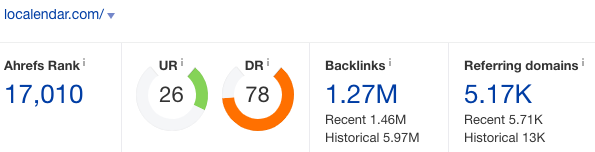
Signup atCode:https://localendar.com/calendar/signup
On the left sidebar, click Add Event. Add your article, image and links into the description field. Fill in the rest of the details. Then Save.
To see the result, go to this link below, and replace username with your own username.
Code:localendar.com/public/username
Click the date of your published event. Copy the link. And voila!
Link indexed on google

DocHub DR71
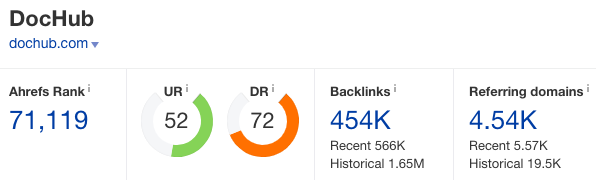
Signup atCode:https://dochub.com/
No, I have never shared this one before. You might have mistaken it with other sites I've shared before.
Click import a document or hit the ‘New’ green button. Drop your file. It could be doc or pdf file.
Then you will be asked for a phone verification number. You may use a free service like receive-smss.com if your country is not listed there.
Once verified, you can drop your file again. Once it’s uploaded. Click Share or send. Click ‘Get shareable link’ and copy your link.
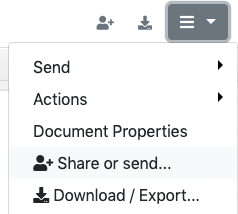
Make sure you set your link as Public!

Link indexed on google

Splice DR72

Signup atCode:https://splice.com/accounts/sign-up
On the top bar, click View your profile, then click Edit profile. Place your article and hyperlinks into BIO field. Hit the Update button.
Link indexed on google

Mappery DR66

Signup atCode:http://www.mappery.com/
Go to My Map Room menu. Click Edit my account button. Add a profile picture. Place your article and hyperlinks into About me section. Leave the ‘My website’ field empty. Hit the Save button.
Link indexed on google

Poptype DR58

Signup atCode:https://poptype.co
Click Write a new story. Once you’re done adding your content, click the Post button.
You can publish unlimited posts there for two weeks. Once the 14-days trial ended, you won’t be able to publish anymore but your posts will not be removed. So create another account to publish more posts.
Link indexed on google

ArtMight DR57

Signup atCode:https://artmight.com/user/registration
Go to Profile page menu. Add your title on Name field. Leave the Website field empty. Place your article, image and hyperlinks into ‘Information about you’ field. Then hit the Update button.
Click View Profile link to see the result.
Link indexed on google

Nuclino DR53

Signup atCode:https://app.nuclino.com/signup
Once you signed up, Create item. Place your article, links and images there. It's autosaved.
To get the live link, click the three dots on the right side, then click Share. Copy the link.

Link indexed on google

====================================================================
Tips: For indexing, you can either use Tier2 links or indexing services like speed-links and bulkaddurl. If you have issue with indexing, just let me know, I'd be glad to help you out.


Area 51 Man
Power Member
- Sep 15, 2019
- 534
- 136
Hahaha well I got a birthday cake and presents too thoAnd it's quite tradition on my place to give something in return especially when you're an adult, for example visiting the children's hospital and playing some music to cheer em up. Give money to some homeless men, or any random acts of kindness that will make your birthday more blessed and meaningful.
Where you live? This type of traditions are very supportive and very difficult to see nowdays...
Best regards.

Rachmaninoff
Elite Member
- Jan 19, 2011
- 3,634
- 5,426
Your links are always awesome, thank you! Also, is it ok to do it all in the same day for all of the article?
Also Rach, Happy Birthday! you are a great guy and I'm sure great thing will always be with you!
Might be good if you dripfeed them in a few days. Let's say one or two links per day.
Thanks for you kind words. Much appreciated.
HBD. Just curious, how you find these gems and what strategy you adopt to index these backlinks.
I did reverse engineering with Ahrefs. You can either use video sitemap, building tier 2 links or list them on expired domains. All should do the tricks.
Happy birthday bro.
Is this safe for adsense website?
Thanks. Yes it is.
OP, I wanted to message you to ask you some questions in private regarding some other topic but I'm not able to message you ? Any way I can contact you ?
You can't message anyone as your post counts are low and you are new here. If you have any questions, you can ask here on this thread so everyone can see too.
The
Hi so what is the logic behind not placing the links in the wesite field??
In most cases, it's set as no-follow link. You can place your social media links on the website field instead.
Where you live? This type of traditions are very supportive and very difficult to see nowdays...
Best regards.
Somewhere over the rainbow.
Yeah it's quite rare nowadays. They planted this "the more we give, the more we have" mindset inside my head.
Teddy Herlambang
Registered Member
- Jul 10, 2019
- 68
- 47
happy birthday boss, wish more link come to you

102030
Newbie
- Apr 30, 2019
- 30
- 11
Really helpful. Youre my god.
But im kinda new here so i just wanted to know 2 things:
1. Why youre asking to leave the website field empty in lot of the websites.
2. The information entered in the BIO section only takes naked URL and not the hyperlink. So should i paste my naked URL there or what?
But im kinda new here so i just wanted to know 2 things:
1. Why youre asking to leave the website field empty in lot of the websites.
2. The information entered in the BIO section only takes naked URL and not the hyperlink. So should i paste my naked URL there or what?

whysee
Registered Member
- Aug 22, 2019
- 96
- 28
Happy belated birthday to OP. Mine was on the 28th Oct. Lol...
Thanks partly to the links provided by him over the months, as well as indexing services. I managed to rank my site to pg 1 on Google serp. Will bookmark this thread again for future reference!
Thanks partly to the links provided by him over the months, as well as indexing services. I managed to rank my site to pg 1 on Google serp. Will bookmark this thread again for future reference!
Area 51 Man
Power Member
- Sep 15, 2019
- 534
- 136
Somewhere over the rainbow.
Keep thinking like that, mate. I have always admired that way of thinking, especially nowadays that it's quite difficult to find one.
Best regards.

hamama ghilass
Newbie
- Oct 24, 2019
- 4
- 0
Great tutorial
kenjosimmons
Newbie
- Jul 29, 2018
- 45
- 11
Happy Birthday and more to come!
Quick question: Would these gems be utilized as the main landing page or as tier two links to the real landing page/money site?
thanks so much again!
Quick question: Would these gems be utilized as the main landing page or as tier two links to the real landing page/money site?
thanks so much again!
The Inevitable
BANNED
- Oct 29, 2019
- 19
- 3
Niiice. Time to get to work.


Subham Chhetri
Newbie
- Oct 29, 2019
- 2
- 0
Great tutorialHey guys, today is my birthday, and here is my special presents for you as promised.
CatchThemes DR92
Register atCode:https://catchthemes.com/my-account/
Then go to this link below. Replace yourusername with your own username.
Code:https://catchthemes.com/support-forum/users/yourusername/edit/
Place your article, hyperlink and image into the Biographical Info field. Hit the Update Profile button.
To see the result, click the Profile link on the left sidebar.
Link indexed on google
KhaleeJTimes DR81
Signup atCode:https://buzzon.khaleejtimes.com/register/
It's a classified ads, but you're not going to post ads there as they don't allow a live link on their ads.
Go to My dashboard. Click Edit profile on the right sidebar. Leave the Website field empty. Place your articleand hyperlinks into the 'About me' field. Add your Twitter and Facebook usernames if any. Then hit Update Profile button.
Link indexed on Google
Localendar D78
Signup atCode:https://localendar.com/calendar/signup
On the left sidebar, click Add Event. Add your article, image and links into the description field. Fill in the rest of the details. Then Save.
To see the result, go to this link below, and replace username with your own username.
Code:localendar.com/public/username
Click the date of your published event. Copy the link. And voila!
Link indexed on google
DocHub DR71
Signup atCode:https://dochub.com/
No, I have never shared this one before. You might have mistaken it with other sites I've shared before.
Click import a document or hit the ‘New’ green button. Drop your file. It could be doc or pdf file.
Then you will be asked for a phone verification number. You may use a free service like receive-smss.com if your country is not listed there.
Once verified, you can drop your file again. Once it’s uploaded. Click Share or send. Click ‘Get shareable link’ and copy your link.
Make sure you set your link as Public!
Link indexed on google
Splice DR72
Signup atCode:https://splice.com/accounts/sign-up
On the top bar, click View your profile, then click Edit profile. Place your article and hyperlinks into BIO field. Hit the Update button.
Link indexed on google
Mappery DR66
Signup atCode:http://www.mappery.com/
Go to My Map Room menu. Click Edit my account button. Add a profile picture. Place your article and hyperlinks into About me section. Leave the ‘My website’ field empty. Hit the Save button.
Link indexed on google
Poptype DR58
Signup atCode:https://poptype.co
Click Write a new story. Once you’re done adding your content, click the Post button.
You can publish unlimited posts there for two weeks. Once the 14-days trial ended, you won’t be able to publish anymore but your posts will not be removed. So create another account to publish more posts.
Link indexed on google
ArtMight DR57
Signup atCode:https://artmight.com/user/registration
Go to Profile page menu. Add your title on Name field. Leave the Website field empty. Place your article, image and hyperlinks into ‘Information about you’ field. Then hit the Update button.
Click View Profile link to see the result.
Link indexed on google
Nuclino DR53
Signup atCode:https://app.nuclino.com/signup
Once you signed up, Create item. Place your article, links and images there. It's autosaved.
To get the live link, click the three dots on the right side, then click Share. Copy the link.
Link indexed on google
====================================================================
Tips: For indexing, you can either use Tier2 links or indexing services like speed-links and bulkaddurl. If you have issue with indexing, just let me know, I'd be glad to help you out.

- Nov 25, 2017
- 11,570
- 7,546
Lets have some ROCKmaninoff to celebrate your birthday!!!

steffenreffer
Newbie
- Oct 29, 2019
- 2
- 0
Great tutorial
- Status
- Not open for further replies.