Rachmaninoff
Elite Member
- Jan 19, 2011
- 3,634
- 5,426
Hey guys, today is my birthday, and here is my special presents for you as promised.
CatchThemes DR92

Register at
Then go to this link below. Replace yourusername with your own username.
Place your article, hyperlink and image into the Biographical Info field. Hit the Update Profile button.
To see the result, click the Profile link on the left sidebar.
Link indexed on google

KhaleeJTimes DR81

Signup at
It's a classified ads, but you're not going to post ads there as they don't allow a live link on their ads.
Go to My dashboard. Click Edit profile on the right sidebar. Leave the Website field empty. Place your articleand hyperlinks into the 'About me' field. Add your Twitter and Facebook usernames if any. Then hit Update Profile button.
Link indexed on Google

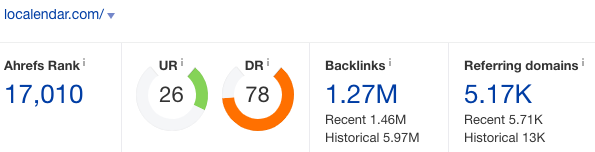
Localendar D78
Signup at
On the left sidebar, click Add Event. Add your article, image and links into the description field. Fill in the rest of the details. Then Save.
To see the result, go to this link below, and replace username with your own username.
Click the date of your published event. Copy the link. And voila!
Link indexed on google

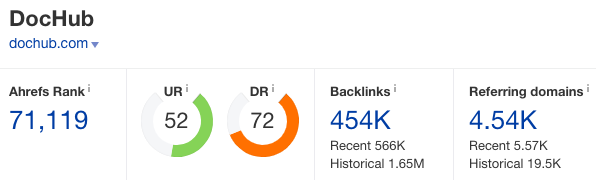
DocHub DR71
Signup at
No, I have never shared this one before. You might have mistaken it with other sites I've shared before.
Click import a document or hit the ‘New’ green button. Drop your file. It could be doc or pdf file.
Then you will be asked for a phone verification number. You may use a free service like receive-smss.com if your country is not listed there.
Once verified, you can drop your file again. Once it’s uploaded. Click Share or send. Click ‘Get shareable link’ and copy your link.
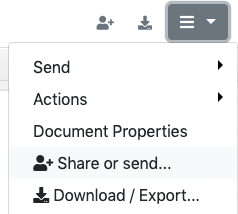
Make sure you set your link as Public!

Link indexed on google

Splice DR72

Signup at
On the top bar, click View your profile, then click Edit profile. Place your article and hyperlinks into BIO field. Hit the Update button.
Link indexed on google

Mappery DR66

Signup at
Go to My Map Room menu. Click Edit my account button. Add a profile picture. Place your article and hyperlinks into About me section. Leave the ‘My website’ field empty. Hit the Save button.
Link indexed on google

Poptype DR58

Signup at
Click Write a new story. Once you’re done adding your content, click the Post button.
You can publish unlimited posts there for two weeks. Once the 14-days trial ended, you won’t be able to publish anymore but your posts will not be removed. So create another account to publish more posts.
Link indexed on google

ArtMight DR57

Signup at
Go to Profile page menu. Add your title on Name field. Leave the Website field empty. Place your article, image and hyperlinks into ‘Information about you’ field. Then hit the Update button.
Click View Profile link to see the result.
Link indexed on google

Nuclino DR53

Signup at
Once you signed up, Create item. Place your article, links and images there. It's autosaved.
To get the live link, click the three dots on the right side, then click Share. Copy the link.

Link indexed on google

====================================================================
Tips: For indexing, you can either use Tier2 links or indexing services like speed-links and bulkaddurl. If you have issue with indexing, just let me know, I'd be glad to help you out.
CatchThemes DR92
Register at
Code:
https://catchthemes.com/my-account/Then go to this link below. Replace yourusername with your own username.
Code:
https://catchthemes.com/support-forum/users/yourusername/edit/Place your article, hyperlink and image into the Biographical Info field. Hit the Update Profile button.
To see the result, click the Profile link on the left sidebar.
Link indexed on google
KhaleeJTimes DR81
Signup at
Code:
https://buzzon.khaleejtimes.com/register/It's a classified ads, but you're not going to post ads there as they don't allow a live link on their ads.
Go to My dashboard. Click Edit profile on the right sidebar. Leave the Website field empty. Place your articleand hyperlinks into the 'About me' field. Add your Twitter and Facebook usernames if any. Then hit Update Profile button.
Link indexed on Google
Localendar D78
Signup at
Code:
https://localendar.com/calendar/signupOn the left sidebar, click Add Event. Add your article, image and links into the description field. Fill in the rest of the details. Then Save.
To see the result, go to this link below, and replace username with your own username.
Code:
localendar.com/public/usernameClick the date of your published event. Copy the link. And voila!
Link indexed on google
DocHub DR71
Signup at
Code:
https://dochub.com/No, I have never shared this one before. You might have mistaken it with other sites I've shared before.
Click import a document or hit the ‘New’ green button. Drop your file. It could be doc or pdf file.
Then you will be asked for a phone verification number. You may use a free service like receive-smss.com if your country is not listed there.
Once verified, you can drop your file again. Once it’s uploaded. Click Share or send. Click ‘Get shareable link’ and copy your link.
Make sure you set your link as Public!
Link indexed on google
Splice DR72
Signup at
Code:
https://splice.com/accounts/sign-upOn the top bar, click View your profile, then click Edit profile. Place your article and hyperlinks into BIO field. Hit the Update button.
Link indexed on google
Mappery DR66
Signup at
Code:
http://www.mappery.com/Go to My Map Room menu. Click Edit my account button. Add a profile picture. Place your article and hyperlinks into About me section. Leave the ‘My website’ field empty. Hit the Save button.
Link indexed on google
Poptype DR58
Signup at
Code:
https://poptype.coClick Write a new story. Once you’re done adding your content, click the Post button.
You can publish unlimited posts there for two weeks. Once the 14-days trial ended, you won’t be able to publish anymore but your posts will not be removed. So create another account to publish more posts.
Link indexed on google
ArtMight DR57
Signup at
Code:
https://artmight.com/user/registrationGo to Profile page menu. Add your title on Name field. Leave the Website field empty. Place your article, image and hyperlinks into ‘Information about you’ field. Then hit the Update button.
Click View Profile link to see the result.
Link indexed on google
Nuclino DR53
Signup at
Code:
https://app.nuclino.com/signupOnce you signed up, Create item. Place your article, links and images there. It's autosaved.
To get the live link, click the three dots on the right side, then click Share. Copy the link.
Link indexed on google
====================================================================
Tips: For indexing, you can either use Tier2 links or indexing services like speed-links and bulkaddurl. If you have issue with indexing, just let me know, I'd be glad to help you out.