

Byzance
Regular Member
- Mar 29, 2017
- 236
- 42
Hello BHW people
Im really curious about this thing, i already try searching for this solution like 3hr++ but my head start to get dizzy. i just cant get my head arround this.
Ussually when im making article for my site, i always looking for reffrence to work with. And i found one of my competitor site. i don't know what kind of builder he/she put on their website. But when i see this "border?" its actually make the site looks good and i want to copy that thing and put that in my article.
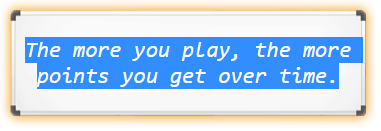
What i realize that border is not a picture cause i can block the text.
even this one got some arrow pointing on the border

when i try to inspect and copy the whole html and put in my HTML/Text editor the border didn't show up. just the text it self that appear. (The more you play, the more points you get over time.)
HTML for first image
HTML for 2nd image
From what i know after searching, it's have something to do with CSS? can anyone give me some advice to get this thing working?
The main point here is i want to apply that kind of border in my site.
P.S Sorry for my suck english i already try my best to make it readable and understandable.
Im really curious about this thing, i already try searching for this solution like 3hr++ but my head start to get dizzy. i just cant get my head arround this.
Ussually when im making article for my site, i always looking for reffrence to work with. And i found one of my competitor site. i don't know what kind of builder he/she put on their website. But when i see this "border?" its actually make the site looks good and i want to copy that thing and put that in my article.
What i realize that border is not a picture cause i can block the text.
even this one got some arrow pointing on the border
when i try to inspect and copy the whole html and put in my HTML/Text editor the border didn't show up. just the text it self that appear. (The more you play, the more points you get over time.)
HTML for first image
<div class="center spacer"><div class="white_board"><em>The more you play, the more points you get over time.</em></div></div>
HTML for 2nd image
<div class="center spacer"><div class="mm_blue_box yellow big_font h_spacer pos_relative generic_tittle_padding arkgl_left_gray_arrow ov">You can enjoy yourself much more easily if you take this approach.</div></div>
From what i know after searching, it's have something to do with CSS? can anyone give me some advice to get this thing working?
The main point here is i want to apply that kind of border in my site.
P.S Sorry for my suck english i already try my best to make it readable and understandable.


