
You are using an out of date browser. It may not display this or other websites correctly.
You should upgrade or use an alternative browser.
You should upgrade or use an alternative browser.
Permanently Closed Marketplace Sales Thread
- Thread starter Sweetfunny
- Start date
- Status
- Not open for further replies.


- Jan 25, 2009
- 6,378
- 3,774
Tumblr is hard because at this point they have so many ones they have blocked and they give no marker on the page that it can't be registered. So the ones you can't register look just like the ones you can. I don't have a solution for you other then try different metrics or if it looks to good to be true it probably is.Hi. I've been trying all day to register 404 tumblr blogs, but none of them is available. I tried like more than 50 times with diverse keywords but no luck. Could you please help with this?

kasumi009
Regular Member
- Feb 4, 2017
- 295
- 100
Okay. Anything you suggest that might work?Tumblr is hard because at this point they have so many ones they have blocked and they give no marker on the page that it can't be registered. So the ones you can't register look just like the ones you can. I don't have a solution for you other then try different metrics or if it looks to good to be true it probably is.

SuperSaiyanGod
Registered Member
- Oct 10, 2015
- 54
- 3
Well, i got corrupt windows after moving to new VPS.. Reinstall & my license not working..
i mean, i am using SB for many years..last time i transfer my license maybe even 2 or 3 years ago i can't remember..
For this once, would you sir could helping little brother here?
i mean, i am using SB for many years..last time i transfer my license maybe even 2 or 3 years ago i can't remember..
For this once, would you sir could helping little brother here?
- Jan 25, 2009
- 6,378
- 3,774
Okay. Anything you suggest that might work?
The only thing I know is you could grind it out. But I don't really work on tumblr so I am no expert of little tricks when it comes to that platform. you can seek out others here and/or perhaps go to the BST section here and look for people that sell them. Then Pm them and just kindly ask for tips.
Well, i got corrupt windows after moving to new VPS.. Reinstall & my license not working..
i mean, i am using SB for many years..last time i transfer my license maybe even 2 or 3 years ago i can't remember..
For this once, would you sir could helping little brother here?
You would need to contact support:
http://www.scrapebox.com/contact-us
kasumi009
Regular Member
- Feb 4, 2017
- 295
- 100
Okay. Thank you.The only thing I know is you could grind it out. But I don't really work on tumblr so I am no expert of little tricks when it comes to that platform. you can seek out others here and/or perhaps go to the BST section here and look for people that sell them. Then Pm them and just kindly ask for tips.
- Jan 25, 2009
- 6,378
- 3,774
your welcome. Cheers!Okay. Thank you.
hi
Is there a feature on scrapebox to scrape related searches from Google?
http://prntscr.com/k5gacd
Thanks
Is there a feature on scrapebox to scrape related searches from Google?
http://prntscr.com/k5gacd
Thanks
- Jan 25, 2009
- 6,378
- 3,774
please send samples
There are over 100 videos here
https://www.youtube.com/user/looplinescrapebox/videos
hi
Is there a feature on scrapebox to scrape related searches from Google?
http://prntscr.com/k5gacd
Thanks
No but I have seen people build engines that can do that. You could probably modify the main scrapebox engine to do it. Just to go settings >> harvester engine configuration >> then just find the google engine and modify it and save it as a new engine. If you foul it all up the safety is just on that same screen go to import >>> download default engines and your back to square 1.

nycdude
Power Member
- Oct 1, 2009
- 650
- 730
Hi,
I'm having trouble with the automator plugin. When I test proxies, and check to 'test against google' and to 'delete failed proxies' for google and anonymous, the automator will neither test against google OR remove all the failed anonymous proxies.
I've even tried manually to set it up in the scrapebox.ini fie.
I tried making the project smaller and simpler to see what would happen, and the test proxy action still doesn't work properly (for me anyway).
Thanks
SB 2.0.0.102 and latest automator update.
I'm having trouble with the automator plugin. When I test proxies, and check to 'test against google' and to 'delete failed proxies' for google and anonymous, the automator will neither test against google OR remove all the failed anonymous proxies.
I've even tried manually to set it up in the scrapebox.ini fie.
I tried making the project smaller and simpler to see what would happen, and the test proxy action still doesn't work properly (for me anyway).
Thanks
SB 2.0.0.102 and latest automator update.
nycdude
Power Member
- Oct 1, 2009
- 650
- 730
so what do you get? I mean do you get an error or does it just not test proxies or does it look like its testing proxies and then just sets there or?
screenshot is welcome.
I ran it, and the first time it didn't even enable the proxies! But after trying it again I duplicated the problem.
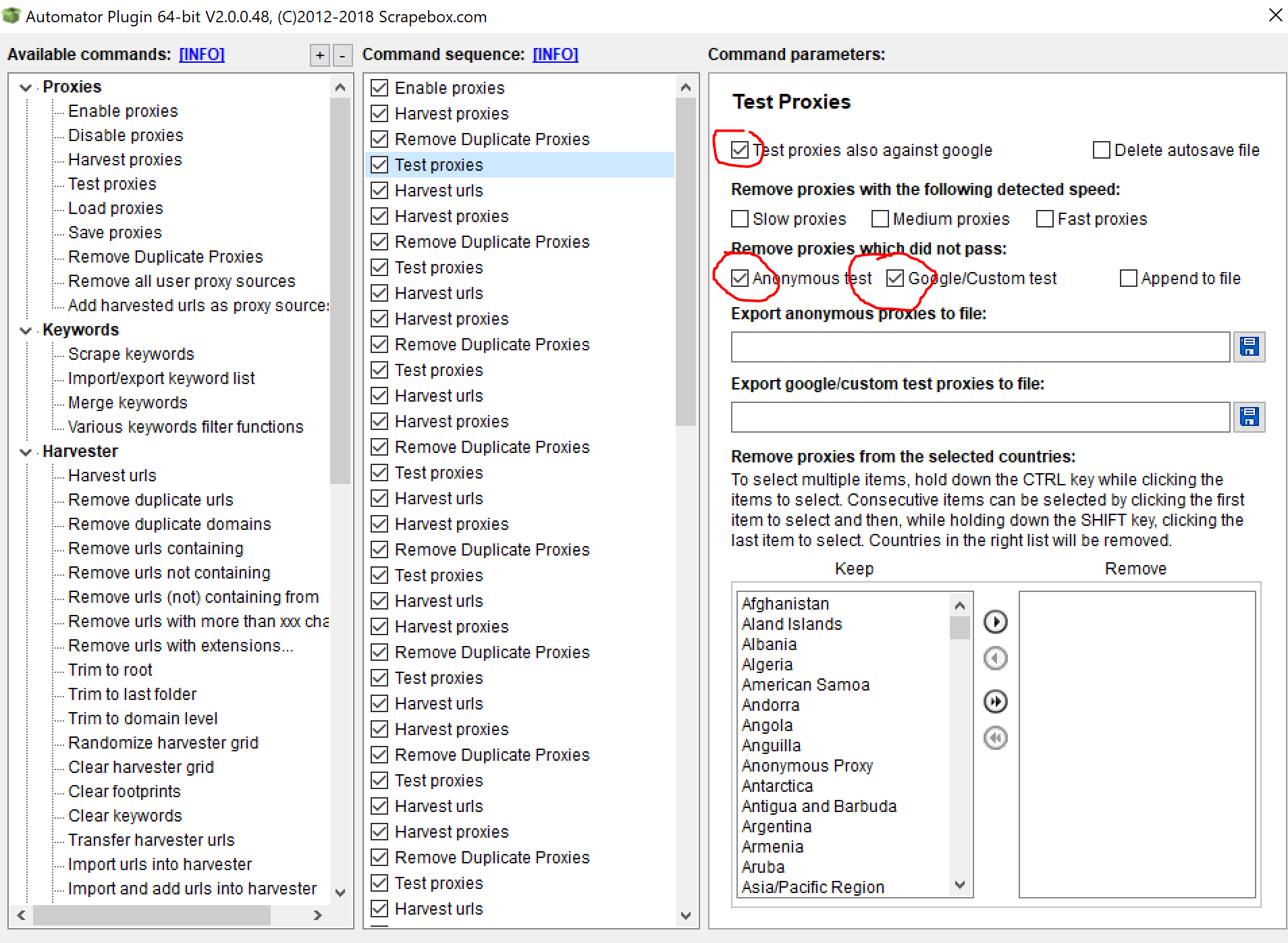
They don't get googe checked.

And here the failed proxies don't get filtered out.

Thanks for the help Loopline.

- Jan 25, 2009
- 6,378
- 3,774
I ran it, and the first time it didn't even enable the proxies! But after trying it again I duplicated the problem.
They don't get googe checked.
And here the failed proxies don't get filtered out.
Thanks for the help Loopline.
In your main proxy configuation, so just in the main scrapebox window - click the mange button in the proxy area. Then click on configuration. Do you have skip google test turned on there? If so turn that off. That will likely solve the fact its not testing against google.
the fact that its not being filtered is just due to your setup. You need to export those proxies to file and then import them. If you just filter them and move to the next step they are not being exported back to scrapebox.
If it helps, technically I believe the proxy manager is a complete stand alone program, so its just being executed from the main scrapebox, but think about running a completely seperate proxy tester, you would need a way to save the proxies from that other program and import them into scrapebox. If that helps to think of it.
When you are in the proxy manager manually you have the option to save them back to scrapebox, but if you do not choose that then it won't save them to scrapebox. Same thing here, the automator equivilant of that is export to file. Then just load proxies from file.
Hey, also what happened to the pause button to get more proxies? I remember I used to be able to pause during scraping to do this. I think must be missing something in settings.
Under that proxies drop down, if you click it, you can see multiple options to auto load proxies. So you can load proxies after X minutes or load proxies from file etc..
So thats the best way to do that. Also you could have 1 instance of scrapebox always running testing proxies and saving to file and then another one doing the actual scraping. I have a video
nycdude
Power Member
- Oct 1, 2009
- 650
- 730
In your main proxy configuation, so just in the main scrapebox window - click the mange button in the proxy area. Then click on configuration. Do you have skip google test turned on there? If so turn that off. That will likely solve the fact its not testing against google.
Yes, I have BOTH made sure that the setting to skip google is off and I am checking the .ini fiIe also making sure skip google test set to '0'. Still has the problem.
Code:
[ProxyManager]
Connections=1500
Timeout=3000
SkipGoogle=0
CustomTest=0
CustomUrl=
CustomString=
FollowRedirect=0
ProxyType=0
SlowSpeedMin=1500
SlowSpeedMax=99999
MedSpeedMin=800
MedSpeedMax=1499
FastSpeedMin=1
FastSpeedMax=799
AutoSaveProxies=0
AutoSaveTime=60
AutoSaveFilename=C:\XXXXX.txt
AllowPorts=
DenyPorts=
EnablePortFilter=0
EnableCountryFilter=0
MinThreads=0- Jan 25, 2009
- 6,378
- 3,774
Yes, I have BOTH made sure that the setting to skip google is off and I am checking the .ini fiIe also making sure skip google test set to '0'. Still has the problem.
Code:[ProxyManager] Connections=1500 Timeout=3000 SkipGoogle=0 CustomTest=0 CustomUrl= CustomString= FollowRedirect=0 ProxyType=0 SlowSpeedMin=1500 SlowSpeedMax=99999 MedSpeedMin=800 MedSpeedMax=1499 FastSpeedMin=1 FastSpeedMax=799 AutoSaveProxies=0 AutoSaveTime=60 AutoSaveFilename=C:\XXXXX.txt AllowPorts= DenyPorts= EnablePortFilter=0 EnableCountryFilter=0 MinThreads=0
So its possible that there is just some setting that is off.
I would try a fresh copy of scrapebox. Just download it and then install the automator and then try it.
If it works, great.
If it fails, try kicking your machine (not really, lol).
But let me know. Ill try a test as well, although thus far Ive not had this issue.
Edit: Just to confirm I tested and if you have "custom test" enabled in the regular proxy manager and you select to test google in the automator it will test the custom test not google, as its not really saying to test "google" in the automator just to test that slot and its either google or custom, depending on what you have set.
However that won't skip it.
I even tried to leave the check box in the main proxy manager set to skip google, but set the automator to test google and google tested. I can't get it to skip at all.
So it sounds like a file that has messed up write permissions or some other issue.
you can go thru and make sure you have write permissions and your running scrapebox from the C drive from a folder on your desktop or in your documents folder and check 20 other things.
But I suspect if you just download a fresh copy of scrapebox to a new folder on your desktop or in your documents folder, that it will work as you want. So long as you don't have the main proxy manager set to do a custom test.
Last edited:
nycdude
Power Member
- Oct 1, 2009
- 650
- 730
I would try a fresh copy of scrapebox. Just download it and then install the automator and then try it.
Yup. that fixed it. Thanks.
- Jan 25, 2009
- 6,378
- 3,774
Great! Glad that sorted it.Yup. that fixed it. Thanks.
- Status
- Not open for further replies.