

WhizBee
Junior Member
- Jul 2, 2016
- 196
- 269
Hi guys,
Let me try making your Thursday super wonderful.
I joined BHW almost two years back and have read many wonderful email marketing posts here. They usually talk about Sendy, MailChimp, Sendgrid etc.. MailChimp, Sendgrid are nice tools but highly costly when it comes to sending more emails frequently.
But nothing can beat the affordability and reliability of Amazon SES. I have heard Amazon SES works best when you want your emails in the Priority tab of your subscribers.
It can easily cost you $149 or more to send 100K emails using any well-known email marketing tools like MailChimp etc. With Amazon SES, it costs just $10 to send 100K emails.
Sendy works in integration with Amazon SES and hence really affordable. But Sendy needs reliable online hosting and technical knowledge for setting it up correctly.
But what about those who don't have the technical knowledge or don't want to pay extra for recurring server costs? Let me tell you a new way.
Recently, I discovered a Desktop app called MailSwift which is similar to Sendy. But it can be installed on your windows or Mac computer. Sounds fantastic? To me too
I never knew about any such tools ever before. The most affordable tool was Sendy for till now. Well, let me tell you the exact way to use it and have your own bulk-email machine on your own computer.
1. Go to https://mailswift.io/#buy and buy this App. You just need to pay once to buy this tool and you will receive lifetime support and updates.
Thankfully there is a lifetime deal going on for a limited time. With coupon code LIFETIME you can get $299 Pro plan for just $39 and $749 Agency Plan for just $79

The main difference between both plan is - Agency plan comes multiple sender identities while Pro plan comes with a single sender identity. So, I suggest you buy Agency Plan to make it future proof.
2. Once purchased, connect MailSwift with Amazon SES using the Access Key ID and Secret Key. For this, open MailSwift App, go to New – Sender Identity and register Amazon SES with appropriate key details.
If you don't have Amazon SES account. Fellow BHW member ksk71119 have described the method of signing up and getting Access Key ID and Secret ID in this thread really well
3. Once set up, you can create a new email from Blank or import custom HTML from outside.

4. Once the email is created, now you can load .csv file of your contact list to send emails.
Here you will notice two good features –
– Do not send “To” emails in disposable/high bounce domains
– Do not send “To” emails in nonexisting TLDs (Ex: .con)
MailSwift team keeps updating the list of disposable/high bounce domains and provide an option to avoid sending emails to any of these domains. Also, if there are any non-existing TLDs like .con ( not .com), it will automatically skip these domains from your emails list.

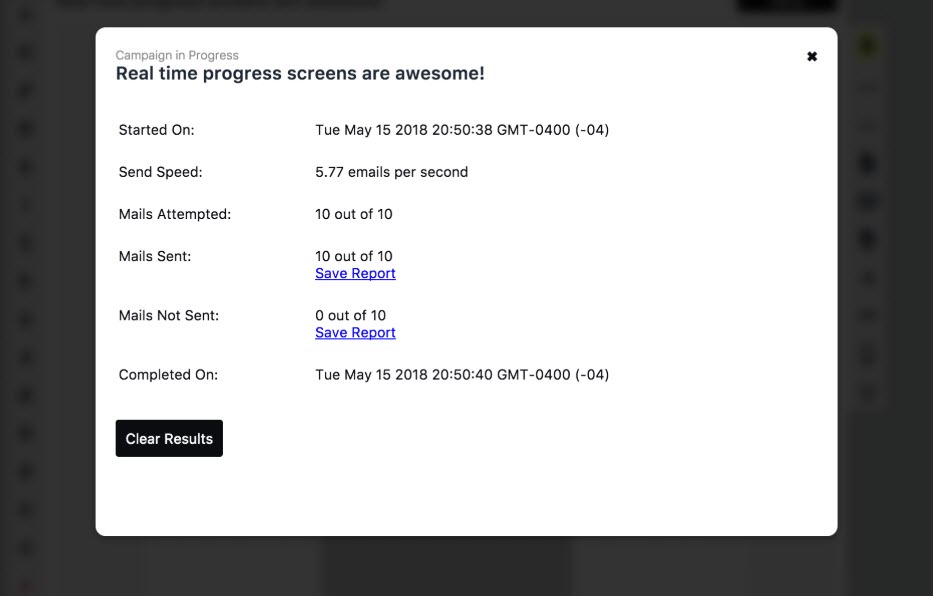
5. It's time to track your emails. With 'Real-time Progress Screen’ feature. you can see accurate send speed, the number of emails attempted, sent and failed in real time as your campaign is being completed.
Once the campaign complete, you can check the performance of your campaigns. It creates a beautiful report which displays data like emails sent, deliveries, unique opens, unique clicks, bounces, rejects and spam complains.

Here is video demo of this whole setup that found on this site.
6. That's it, with just a one-time cost of MailSwift and super affordable price of Amazon SES ( $0.10 per 1000 emails ), you have just created your own email marketing machine, right on your computer.
Now, send emails and win new customers.
Happy Emailing.
PS: I will update this article if I got any more info about this tool. If you know about any other similar tools, let us know in the comment section.
Let me try making your Thursday super wonderful.
I joined BHW almost two years back and have read many wonderful email marketing posts here. They usually talk about Sendy, MailChimp, Sendgrid etc.. MailChimp, Sendgrid are nice tools but highly costly when it comes to sending more emails frequently.
But nothing can beat the affordability and reliability of Amazon SES. I have heard Amazon SES works best when you want your emails in the Priority tab of your subscribers.
It can easily cost you $149 or more to send 100K emails using any well-known email marketing tools like MailChimp etc. With Amazon SES, it costs just $10 to send 100K emails.
Sendy works in integration with Amazon SES and hence really affordable. But Sendy needs reliable online hosting and technical knowledge for setting it up correctly.
But what about those who don't have the technical knowledge or don't want to pay extra for recurring server costs? Let me tell you a new way.
Recently, I discovered a Desktop app called MailSwift which is similar to Sendy. But it can be installed on your windows or Mac computer. Sounds fantastic? To me too
I never knew about any such tools ever before. The most affordable tool was Sendy for till now. Well, let me tell you the exact way to use it and have your own bulk-email machine on your own computer.
1. Go to https://mailswift.io/#buy and buy this App. You just need to pay once to buy this tool and you will receive lifetime support and updates.
Thankfully there is a lifetime deal going on for a limited time. With coupon code LIFETIME you can get $299 Pro plan for just $39 and $749 Agency Plan for just $79
The main difference between both plan is - Agency plan comes multiple sender identities while Pro plan comes with a single sender identity. So, I suggest you buy Agency Plan to make it future proof.
2. Once purchased, connect MailSwift with Amazon SES using the Access Key ID and Secret Key. For this, open MailSwift App, go to New – Sender Identity and register Amazon SES with appropriate key details.
If you don't have Amazon SES account. Fellow BHW member ksk71119 have described the method of signing up and getting Access Key ID and Secret ID in this thread really well
3. Once set up, you can create a new email from Blank or import custom HTML from outside.
4. Once the email is created, now you can load .csv file of your contact list to send emails.
Here you will notice two good features –
– Do not send “To” emails in disposable/high bounce domains
– Do not send “To” emails in nonexisting TLDs (Ex: .con)
MailSwift team keeps updating the list of disposable/high bounce domains and provide an option to avoid sending emails to any of these domains. Also, if there are any non-existing TLDs like .con ( not .com), it will automatically skip these domains from your emails list.
5. It's time to track your emails. With 'Real-time Progress Screen’ feature. you can see accurate send speed, the number of emails attempted, sent and failed in real time as your campaign is being completed.
Once the campaign complete, you can check the performance of your campaigns. It creates a beautiful report which displays data like emails sent, deliveries, unique opens, unique clicks, bounces, rejects and spam complains.
Here is video demo of this whole setup that found on this site.
6. That's it, with just a one-time cost of MailSwift and super affordable price of Amazon SES ( $0.10 per 1000 emails ), you have just created your own email marketing machine, right on your computer.
Now, send emails and win new customers.
Happy Emailing.
PS: I will update this article if I got any more info about this tool. If you know about any other similar tools, let us know in the comment section.
Last edited:


