Permanently Closed Marketplace Sales Thread

Status
Not open for further replies.
Hi mate,

purchased your theme few days ago. When I use the extension for Google Chrome for direct import and click on the "Edit" button it just scrolls down and up, but nothing happens.
 
Ok Newbie Alert.Can someone cleara doubt for me.When a customer places an order do we have to manually order it on aliexpress?
 
Hi mate,

purchased your theme few days ago. When I use the extension for Google Chrome for direct import and click on the "Edit" button it just scrolls down and up, but nothing happens.

Probably you are using AliDropship Woo plugin (not original one). This Edit feature will be available for Woo version soon.
Ok Newbie Alert.Can someone cleara doubt for me.When a customer places an order do we have to manually order it on aliexpress?
 
Hey
This plugin looks great!
I'd love to take a review copy if there are any left.
 
Also, what about things like automatic currency conversion and scarcity ?
When using Shopify, there are plugins available which will convert the price of the product into the visitors local currency.
Shopify also offers plugins to create sale timers and purchase notifications on the website whenever a product is sold.

Does this plugin support the above mentioned things?
 
When I click on the purchase link it says
AliDropship Plugin + Woo version
So do I get both the original and woo versions or just the woo one?
 
When I click on the purchase link it says
AliDropship Plugin + Woo version
So do I get both the original and woo versions or just the woo one?

as per my knowledge, you can either use original or the woo version, since you get only one license key, even if your able to download bother the versions and the key works on only 1 site at a time.
 
OK so are there any Indian users here?If yes,could you tell me what kind of payment method you are adapting?
 
Also, what about things like automatic currency conversion and scarcity ?
When using Shopify, there are plugins available which will convert the price of the product into the visitors local currency.
Shopify also offers plugins to create sale timers and purchase notifications on the website whenever a product is sold.

Does this plugin support the above mentioned things?
Currency converter is available with the plugin. As for other marketing tools you mentioned now we are working on such add-ons that will be free for AliDropship users.

When I click on the purchase link it says
AliDropship Plugin + Woo version
So do I get both the original and woo versions or just the woo one?
Yes, you get both plugins with purchase.

What's the difference?

You can check it here: https://alidropship.com/codex/8-alidropship-vs-alidropship-woocommerce-choose/

Is there any license for multiple sites?
There is no such option.
 
Last edited by a moderator:
Hi Yarrosss,

I thinking about buying the plugin.
Do I need more to setup a dropshipping site with everything running with it? So also variations of products and so on.
Is there a way to buy the program for several sites for a one time offer price ;) ??

Whould also like a review copy.

Regards,
Ray
 
Hi Yarrosss,

I thinking about buying the plugin.
Do I need more to setup a dropshipping site with everything running with it? So also variations of products and so on.
Is there a way to buy the program for several sites for a one time offer price ;) ??

Whould also like a review copy.

Regards,
Ray
It is all-in-one solution with all necessary features. Product variations, reviews, etc. are available. One license is valid for one domain only.
 
The only problem I see with aliexpress is that shipping takes forever. I am in Canada and the average it takes is 1.5 months is what I'm hearing.
 
The only problem I see with aliexpress is that shipping takes forever. I am in Canada and the average it takes is 1.5 months is what I'm hearing.

I use epacket shipping option for Canada - it takes 7-12 days to deliver.

I want to show you one of my recently launched stores as an example and share some ideas and experience with you.

What niche did I choose?

Initially I had an idea to launch a jewelry store offering different cool but cheap stuff from AliExpress. Then I analysed my current stores in various niches and my best selling products. This research helped me to come to a conclusion that there is no point to search for new items but it’s better to focus on proven products. So, I decided to combine my best sellers in one site (and of course add some new pieces). As a result, I got superblings.com.

I expect you will have questions regarding copyright issues since this store has many branded items. I tried to avoid any brand name in the domain and not to devote the whole site idea to any specific brand (like Harry Potter), but decided to include branded products. Stripe approved my store.

What is my profit?

I started working on this site one month ago, so I have not got any outstanding results so far. However, the store has already generated 22 sales and brought around $250 in net profit. I consider it as a good result for such a fresh site and see a potential here.

How do I promote?

I am using two main methods for this store – Instagram shoutouts and Instagram ads.

1. Instagram shoutouts

We have already described Instagram shoutouts strategy in details on our blog. I just want to focus your attention on the link we use on shoutouts now to send potential clients to our stores.

Before we used the link that sent users directly to a product page. Then we found out that it is better to combine several items in one shoutout and set the link to a product category page. Now we see better conversions when we add a link to search results page on our stores.

Here is an example:

BnNeloU


Text:
Best Game Of Thrones Theme Items from @superblings
Click LINK IN MY PROFILE to get it!
FREE SHIPPING worldwide
Money back guarantee ✅

And here is a link: Online shopping for fan merch with free worldwide shipping

1Q08uZ0


2. Instagram Ads

Another great strategy that we discovered recently is official advertising on Instagram. Low cost and good ROI so far.

To start running such ads first you need to switch your store Instagram account to a business one. Here is the instruction:

1. Go to settings

xUon009


and switch to business account.

PNzKk73


Having a business account will give you access to different analytical tools. You can learn about your most popular posts, users activity, demography, etc. You will receive first stats after a week approximately.

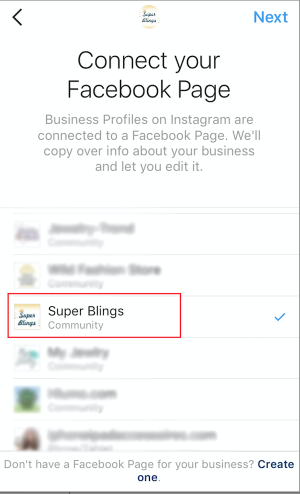
2. Log in your Facebook profile and connect your Facebook page.

HGuXmBT


Add your contact details and you are done. Your business account is created.

Now it's time for promotion.

Select one of your already published posts and click Promote.

ZIXH2FX


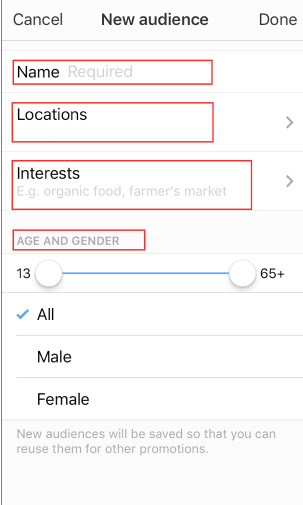
Then you need to setup your campaign and select your audience.

I0vJUZU


osPuInd


After it's done, Instagram will calculate advertising costs and period for running your promo. You can accept these conditions or can make changes. You will need to add your credit card to pay for every click. Your advertising campaign will launched after moderation.

If you decide to try this method, I strongly recommend that you review advertising Policies first. I know about situations when people got their commercial accounts suspended after moderation of their ads.

gSHpuDw


Leave your comments and ask questions if you need more details!
 
Status
Not open for further replies.
Back
Top