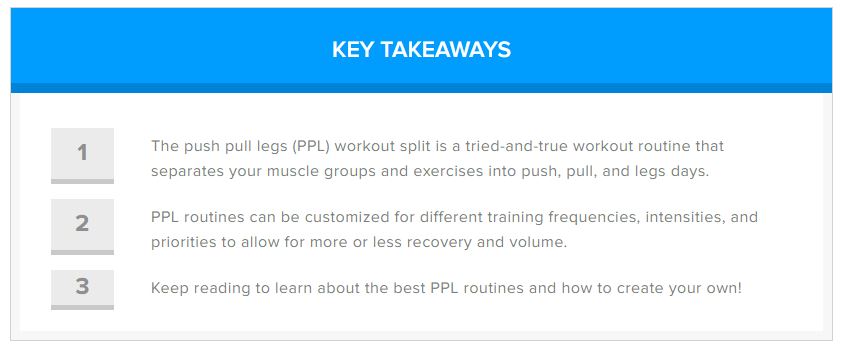
Which Plugin are this site using?

Vinit panchal

Registered Member
Joined
Dec 22, 2018
Messages
90
Reaction score
17
I tried finding the plugin used by the site but none of it shows in plug-in detector.(check image)

I want to make a product review exactly like this or similar.

Does any one know which plug-in can do this? or how to do it manually?

I tried using every WP Plugin Detector out there but no one works or tell which plugin they are using!

Site 1

img1.JPG


Site 2
img2.JPG


Moderator can moved this post if it is not in correct place.

TIA.
 
I don't think they're using any special plugins.

The first image looks like a regular ordered list in Wordpress with the first word bolded.

The second is also a regular list I believe, except they have used CSS to style it a lot better.
 
Most likely not a plugin, just some css-styling. Like Sweely wrote.

There is a plugin called ultimate shortcode that has a lot of useful shortcodes. It has a shortcode called [su_note] that looks more or less like your first example.

But, as with most third-party plugins, it will also worsen your site performance.

The best approach is to create your own shortcode. :)

A quick solution is to add the following to your function file in Theme editor:

function my_infobox_sc($atts, $content = null) {
extract(shortcode_atts(array(
"style" => ""
), $atts));

$output = '<div class="infobox" style="'.$style.'">'.do_shortcode($content).'</div>';
return $output;

}
add_shortcode("my_infobox", "my_infobox_sc");

Add this css-class, to your style.css file:

.infobox {
background-color: #eef7fe;
border-left: solid 5px #b4def7;
padding: 2rem;
margin-bottom: 20px;
border-radius: 5px;
}

Then you can simply do:

[my_infobox]

1. info
2. more info
3 even more info

[/my_infobox]

If you want the box colours to be aligned with your website colours, simply update the colours in "background-color" and the "border-left" in the css class above.

Bonus: If you want to change the colours for a specific box.

You can add the following to the shortcode [my_infobox style="background-color: black; border-left-color: red;"]

Happy coding! ;)
 
Most likely not a plugin, just some css-styling. Like Sweely wrote.

There is a plugin called ultimate shortcode that has a lot of useful shortcodes. It has a shortcode called [su_note] that looks more or less like your first example.

But, as with most third-party plugins, it will also worsen your site performance.

The best approach is to create your own shortcode. :)

A quick solution is to add the following to your function file in Theme editor:

function my_infobox_sc($atts, $content = null) {
extract(shortcode_atts(array(
"style" => ""
), $atts));

$output = '<div class="infobox" style="'.$style.'">'.do_shortcode($content).'</div>';
return $output;

}
add_shortcode("my_infobox", "my_infobox_sc");

Add this css-class, to your style.css file:

.infobox {
background-color: #eef7fe;
border-left: solid 5px #b4def7;
padding: 2rem;
margin-bottom: 20px;
border-radius: 5px;
}

Then you can simply do:

[my_infobox]

1. info
2. more info
3 even more info

[/my_infobox]

If you want the box colours to be aligned with your website colours, simply update the colours in "background-color" and the "border-left" in the css class above.

Bonus: If you want to change the colours for a specific box.

You can add the following to the shortcode [my_infobox style="background-color: black; border-left-color: red;"]

Happy coding! ;)

Thank you so much for detail guide for making my own short-code. & also thank you to not use third party plugin which worse my site's performance. bdw do you've any video reference for this as I don't have any programming background. If yes, great, if No, it's fine.
 
Thank you so much for detail guide for making my own short-code. & also thank you to not use third party plugin which worse my site's performance. bdw do you've any video reference for this as I don't have any programming background. If yes, great, if No, it's fine.

Hmm, no I don't. But there is plenty of tutorials on youtube if you search for "add custom shortcode to Wordpress". But first, make sure you got a child theme, otherwise - install a child theme (plenty of guides how to do this as well). Best of luck!
 
Back
Top