
You are using an out of date browser. It may not display this or other websites correctly.
You should upgrade or use an alternative browser.
You should upgrade or use an alternative browser.
What are nameservers, and how do you change them?
- Thread starter sdreatech
- Start date

- Oct 28, 2020
- 11,662
- 14,618
it's a section / button / whatever that you will see in your Domain Registrar account.
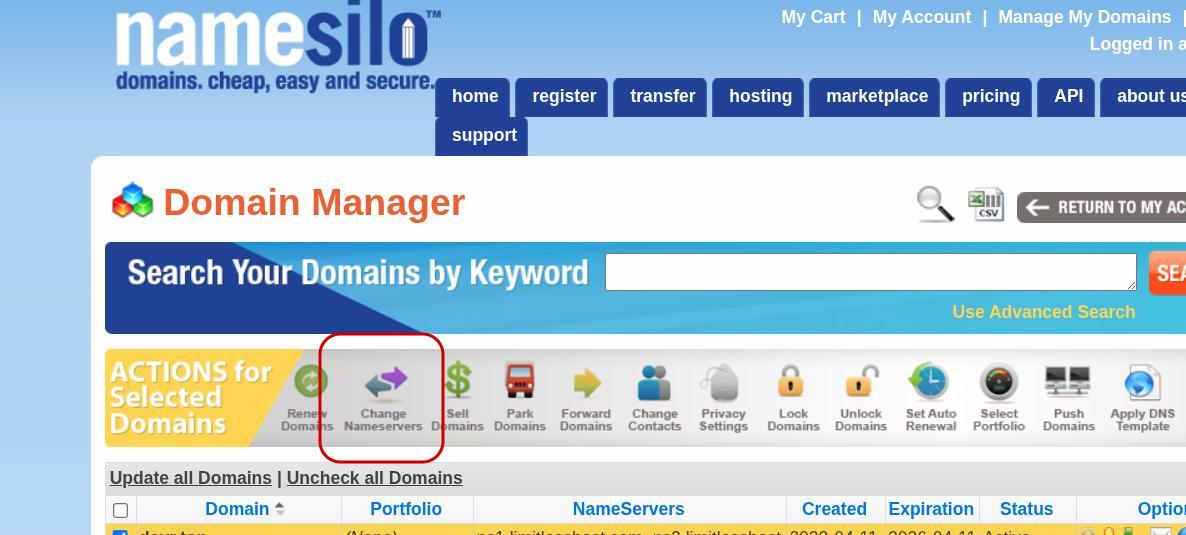
In the image below is my Namesilo account (I use Namesilo to buy domain names from them), and you can see the "Change Nameservers" button circled in red, that's where you click to change the address of the server(s) that's hosting your site. Of course, you would first need to buy hosting from somewhere in order to get those addresses, otherwise there's nothing you can do inside of your Change Nameservers section of your domain registrar
After you buy a domain name, and the domain name shows up in your account (Namesilo if you buy it from there, or Namecheap if you buy from Namecheap, or Porkbun if you buy the domain from Porkbun, etc.... so it depends on which site you buy from / register the domain with, so the button is probably different, but it should still mention Nameservers somewhere)...
So anyway, after you buy a domain name and the domain name shows up in your registrar's account (Namesilo, Porkbun, etc), you select the domain whose nameservers you wish to change (if you don't select the domain first the "Change Nameservers" button might not be usable, so you need to select the domain name first, and when you click on the "Change Nameservers" button you should see some fields (like in the image below) that you can use to populate with the addresses of the server(s) that your hosting provider gives you...
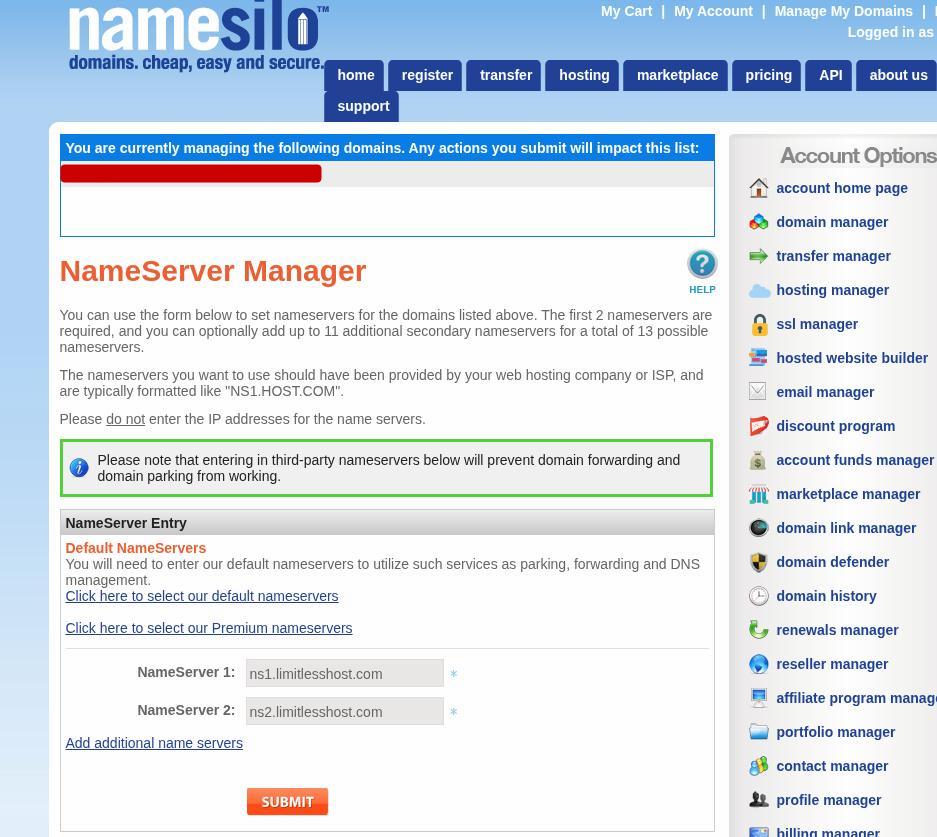
As you can see in the image above, the nameservers of my hosting account are already there (ns1.limitlesshost.com and ns2.limitlesshost.com) because I already linked my domain name (that you can't see in the above image because I blurred it out) with the nameservers (my hosting provider is Limitlesshost and those are the nameservers that they gave me, but you obviously need to grab your own nameservers from inside of your cpanel (if you are on cpanel, otherwise I don't know, you might need to look for those nameservers somewhere else).... Or, if you've received the welcome / account set-up email from your hosting company you will have your nameservers in that email, whenever you buy hosting from someone they almost always send you an email with all of the important information about your hosting account (like FTP details, nameservers, username and password for your cpanel account, temporary IP addresses, etc...)
And usually, nameservers almost always follow the format that you see above (ie. ns1.yourhostingprovider.com and ns2.yourhostingprovider.com) so they're pretty easy to see / find out
In the image below is my Namesilo account (I use Namesilo to buy domain names from them), and you can see the "Change Nameservers" button circled in red, that's where you click to change the address of the server(s) that's hosting your site. Of course, you would first need to buy hosting from somewhere in order to get those addresses, otherwise there's nothing you can do inside of your Change Nameservers section of your domain registrar
After you buy a domain name, and the domain name shows up in your account (Namesilo if you buy it from there, or Namecheap if you buy from Namecheap, or Porkbun if you buy the domain from Porkbun, etc.... so it depends on which site you buy from / register the domain with, so the button is probably different, but it should still mention Nameservers somewhere)...
So anyway, after you buy a domain name and the domain name shows up in your registrar's account (Namesilo, Porkbun, etc), you select the domain whose nameservers you wish to change (if you don't select the domain first the "Change Nameservers" button might not be usable, so you need to select the domain name first, and when you click on the "Change Nameservers" button you should see some fields (like in the image below) that you can use to populate with the addresses of the server(s) that your hosting provider gives you...
As you can see in the image above, the nameservers of my hosting account are already there (ns1.limitlesshost.com and ns2.limitlesshost.com) because I already linked my domain name (that you can't see in the above image because I blurred it out) with the nameservers (my hosting provider is Limitlesshost and those are the nameservers that they gave me, but you obviously need to grab your own nameservers from inside of your cpanel (if you are on cpanel, otherwise I don't know, you might need to look for those nameservers somewhere else).... Or, if you've received the welcome / account set-up email from your hosting company you will have your nameservers in that email, whenever you buy hosting from someone they almost always send you an email with all of the important information about your hosting account (like FTP details, nameservers, username and password for your cpanel account, temporary IP addresses, etc...)
And usually, nameservers almost always follow the format that you see above (ie. ns1.yourhostingprovider.com and ns2.yourhostingprovider.com) so they're pretty easy to see / find out

DorthyHorn1791992JUL
BANNED
- Mar 12, 2025
- 99
- 31
Nameservers are specialized servers that are an important part of the Domain Name System (DNS) that translate human-readable domain names (such as example.com) into machine-readable IP addresses (such as 192.0.2.1). They act as a directory, telling the internet where to find the DNS records for a domain name, such as where its website or email service is hosted. Each domain name is assigned nameservers, which store and manage its DNS settings. Changing nameservers requires updating your domain's DNS settings to point to a new set of nameservers, which are typically provided by your hosting provider, a CDN (such as Cloudflare), or a third-party DNS service.