
You are using an out of date browser. It may not display this or other websites correctly.
You should upgrade or use an alternative browser.
You should upgrade or use an alternative browser.

thekingmaker
Power Member
- Jan 15, 2013
- 513
- 332
- Sign in to Google Webmaster Tools.
- Click on the blog title for which you want to add sitemap.
- Click on sitemap button as shown below.

- At the top right corner of the page, press Add/Test sitemap button.
- Once you click on the button, a small box will appear as shown in the screenshot below.
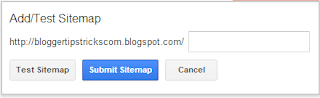
- Add the below code in the text field.
atom.xml?redirect=false&start-index=1&max-results=500
This is the sitemap code for your blogger blog which you need to add.- Press "Submit Sitemap" button.
- Refresh the page.
Source:
Code:[URL]http://www.bloggertipstricks.com/2013/02/submit-blog-sitemap-to-webmaster-tools.html[/URL]

hootsparta
Elite Member
- Aug 23, 2012
- 1,646
- 349
How to get sitemap for blogger users ?
Add sitemap plugin it will automatically updated..
Add sitemap plugin it will automatically updated..
hmmm since when blogger can add plug in?