
You are using an out of date browser. It may not display this or other websites correctly.
You should upgrade or use an alternative browser.
You should upgrade or use an alternative browser.
Permanently Closed Marketplace Sales Thread
- Thread starter yenerich
- Start date
- Status
- Not open for further replies.


YoungGooner
Junior Member
- Aug 6, 2014
- 193
- 23
@yenerich, i remember u from gsa forum  ,i'd like to test out your software
,i'd like to test out your software
yenerich
Supreme Member
- May 26, 2013
- 1,322
- 204
Hey,
I can do another round of testing for you with the review copy.
Thanks!
@yenerich, i remember u from gsa forum
Sure, as soon as we open more review copies we will contact you, thanks
Last edited:
YoungGooner
Junior Member
- Aug 6, 2014
- 193
- 23
Sure, as soon as we open more review copies we will contact you, thanks
I thought 1 more spot is available?
yenerich
Supreme Member
- May 26, 2013
- 1,322
- 204
I thought 1 more spot is available?
Very soon...
--------------------------

YoungGooner
Junior Member
- Aug 6, 2014
- 193
- 23
@yenerich i ordered and sent u a pm, please check it out asap
yenerich
Supreme Member
- May 26, 2013
- 1,322
- 204
@yenerich i ordered and sent u a pm, please check it out asap
Ok.
-------------------------------
For eveybody:
We do not recommend to use Google Analytics to check your results, its not accurated at all.
Its much more accurated to use Google Webmaster Tools. Its not real-time, it has a delay of 3 to 5 days,
but we find that is much more accuranted and will provide better information about CTR.
Last edited:
YoungGooner
Junior Member
- Aug 6, 2014
- 193
- 23
@yenerich,i have tested your software and to be honest its poor,it needs a lot of work to be done!
you say it emulates like "real humans" yet,you say,we shouldnt check on google analytics,it doesnt make sense at all.
i never give negative reviews,but honestly,you need to work on your software,for now,its pretty much useless and it doesnt provide any value whatsover.
i really hope u can make those changes.
Best Of Luck
you say it emulates like "real humans" yet,you say,we shouldnt check on google analytics,it doesnt make sense at all.
i never give negative reviews,but honestly,you need to work on your software,for now,its pretty much useless and it doesnt provide any value whatsover.
i really hope u can make those changes.
Best Of Luck
yenerich
Supreme Member
- May 26, 2013
- 1,322
- 204
@yenerich,i have tested your software and to be honest its poor,it needs a lot of work to be done!
you say it emulates like "real humans" yet,you say,we shouldnt check on google analytics,it doesnt make sense at all.
i never give negative reviews,but honestly,you need to work on your software,for now,its pretty much useless and it doesnt provide any value whatsover.
i really hope u can make those changes.
Best Of Luck
Its you opinion, you tried one day (you really tried just a few hours) and you send me at least 10 or 12 PMs telling things that are not true at all, per example, that DeathByCaptcha was not working, and it was not a failure.
I think that you simply does not understand the software. The software emulate different browsers.
About Google Analytics for checking CTR there is no better choice that go to Google Webmaster Tools that show much info that Analytics CANT show, per example in how many searches your results shows, how many clicks receives in the searches, and the CTR.
Analytics does not show the CTR of the Google search. Analytics and Google Webmaster Tools are 2 different thing that show 2 different kind of information: Analytics show what does the user does in your site and Webmaster Tools show whats does te user do in Google and for what we are doing here, Webmaster Tools is what we need. Maybe you dont understand it, but its a very imporant difference.
I will not continue this discussion (and i ask you to avoid continue the discussion please), but i dont think that you can says if it is useless or not in les then 24 hrs, the results takes much more time.
However thanks for your time and effort, please dont answer, this is not a discussion and its against the rules to start a discussion, this is a sales thread.
Again, thanks for your time and effort. Also i tried to be very helpfull with you: i answer 10 or 12 times your PMs last night.
Best Regards
-------------------------------------------------------------------
About Webmaster Tools, i will explain a little more for everybody:
Webmaster tools show us how many times our results show up in the searches, which keywords was used to bring up our results and how percent (CRT) receives finally a click.
For what we are doing with this software, its much more usefull this kind of information.
In fact it shows the average position that our result for any specific keyword that was used.All this information is very usefull if we are thinking about CTR.
Because we are trying to have a better CTR (on the Google results page) and all the info that Webmaster Tools show us if we are going in the right way, and we can check it daily and compare.
See the next image:

Its show valuable information. You can know how many impression each of your results get, with which queries it shows (here i cover the query with a rectangle), you can also see how many of those impressions finally get a click, the average position and the CTR.
This is not what happends in your site, but in Google. Its information about whats going on in Google Search Engine Results.
If you check it often, you can see if the CTR grows or not. Ofcourse it will take some days to see the effect of the software, but in lets say, 10 days, you will finally start to notice that the CTR grows and how much does it grows, etc.
Thats why i recommend to use Webmaster Tools to check this tool instead using Analytics. Its very easy to understand.
Last edited:

Drakkko
Registered Member
- Jan 22, 2014
- 52
- 18
I was a BETA tester for Insane Google Ranker and I saw the results after 1 week of 24/24 use of this software. My keyword "crynew tech" have come from position 189 to 2 after using it. I'm planing to use this software again 24/24 and to make money using it on my money sites. Now I'm asking the ADMIN to offer me [FONT="]40% off coupon as BETA tester.
[/FONT]
[/FONT]
yenerich
Supreme Member
- May 26, 2013
- 1,322
- 204
I was a BETA tester for Insane Google Ranker and I saw the results after 1 week of 24/24 use of this software. My keyword "crynew tech" have come from position 189 to 2 after using it. I'm planing to use this software again 24/24 and to make money using it on my money sites. Now I'm asking the ADMIN to offer me 40% off coupon as BETA tester.
Coupon sent by PM.
Thanks for your review
YoungGooner
Junior Member
- Aug 6, 2014
- 193
- 23
Its you opinion, you tried one day (you really tried just a few hours) and you send me at least 10 or 12 PMs telling things that are not true at all, per example, that DeathByCaptcha was not working, and it was not a failure.
I think that you simply does not understand the software. The software emulate different browsers.
About Google Analytics for checking CTR there is no better choice that go to Google Webmaster Tools that show much info that Analytics CANT show, per example in how many searches your results shows, how many clicks receives in the searches, and the CTR.
Analytics does not show the CTR of the Google search. Analytics and Google Webmaster Tools are 2 different thing that show 2 different kind of information: Analytics show what does the user does in your site and Webmaster Tools show whats does te user do in Google and for what we are doing here, Webmaster Tools is what we need. Maybe you dont understand it, but its a very imporant difference.
I will not continue this discussion (and i ask you to avoid continue the discussion please), but i dont think that you can says if it is useless or not in les then 24 hrs, the results takes much more time.
However thanks for your time and effort, please dont answer, this is not a discussion and its against the rules to start a discussion, this is a sales thread.
Again, thanks for your time and effort. Also i tried to be very helpfull with you: i answer 10 or 12 times your PMs last night.
Best Regards
-------------------------------------------------------------------
About Webmaster Tools, i will explain a little more for everybody:
Webmaster tools show us how many times our results show up in the searches, which keywords was used to bring up our results and how percent (CRT) receives finally a click.
For what we are doing with this software, its much more usefull this kind of information.
In fact it shows the average position that our result for any specific keyword that was used.All this information is very usefull if we are thinking about CTR.
Because we are trying to have a better CTR (on the Google results page) and all the info that Webmaster Tools show us if we are going in the right way, and we can check it daily and compare.
See the next image:
Its show valuable information. You can know how many impression each of your results get, with which queries it shows (here i cover the query with a rectangle), you can also see how many of those impressions finally get a click, the average position and the CTR.
This is not what happends in your site, but in Google. Its information about whats going on in Google Search Engine Results.
If you check it often, you can see if the CTR grows or not. Ofcourse it will take some days to see the effect of the software, but in lets say, 10 days, you will finally start to notice that the CTR grows and how much does it grows, etc.
Thats why i recommend to use Webmaster Tools to check this tool instead using Analytics. Its very easy to understand.
It doesnt make sense,if its REAL search traffic,then it SHOULD appear as REAL search traffic on Google analytics as well.
I told you yesterday to join me for a teamviewer session for u to see but u ignored.
But your software doesnt work as stated on the OP,so ,better improve to make it work because it looks promising,but it needs work.
yenerich
Supreme Member
- May 26, 2013
- 1,322
- 204
It doesnt make sense,if its REAL search traffic,then it SHOULD appear as REAL search traffic on Google analytics as well.
I told you yesterday to join me for a teamviewer session for u to see but u ignored.
But your software doesnt work as stated on the OP,so ,better improve to make it work because it looks promising,but it needs work.
We are NOT talking about real traffic, we are talking about what happends in Google, in their Search results page. Analytics does not measure THAT, and THAT is the important thing here. Get it?
Webmaster Tools show you the impressions of your link in the Google searches, Analytics DONT.
Did you see it now?
Webmaster Tools shows the CTR on the Google Search results. Analytics DONT.
Did you see it now?
Google Webmaster Tools measure and shows the CTR of Google searches page, you can't find that information in Analytics.
Did you see it now?
The CTR that Google measures to increase your ranking position is the percent of clicks on Google's page, not on your site. Thats why you must use Google Webmaster Tools. Google show this info there. period.
Please stop this discussion here. Im just explaining because maybe other people could have the same confussion, but will not accept any discussion here, read the rules please, this is a sales thread.
Last edited:
Hi OP, I'm a programmer and I do SEO too. I understand what you're talking about and I'm really excited by your idea. Could you please give me a review copy so I can test it? I have my Windows VPS and a list of private proxies here. I'll try different browser UA and will take note if there's a bug.
Thank you,
Thank you,

liberox
Power Member
- Jun 8, 2012
- 726
- 264
OP, do You still have review copies?
Could You create a video with the tool in action.. I still don`t understand do we have a control over sessions durations (could we have 3-5-7 minutes per session) and could we set an internal browsing during that time? If we want good duration the tool must offer multiple visits simultaneously - does it?
Could You create a video with the tool in action.. I still don`t understand do we have a control over sessions durations (could we have 3-5-7 minutes per session) and could we set an internal browsing during that time? If we want good duration the tool must offer multiple visits simultaneously - does it?
yenerich
Supreme Member
- May 26, 2013
- 1,322
- 204
OP, do You still have review copies?
Could You create a video with the tool in action.. I still don`t understand do we have a control over sessions durations (could we have 3-5-7 minutes per session) and could we set an internal browsing during that time? If we want good duration the tool must offer multiple visits simultaneously - does it?
The software have a HELP button that drives to a help file that have explanation and one video.
Yes, you can set the time that the softyware will be on the site.
If the visit time is too long, yes, you could have more than one visit at the same time.
This video is for one of the first versions, but the bounce timming is covered, you will be able to see where to set it. Remember that values are in seconds, so 60 means 60 seconds.
In short, in the project window you can set the minimun and max time that the software will be in the site:
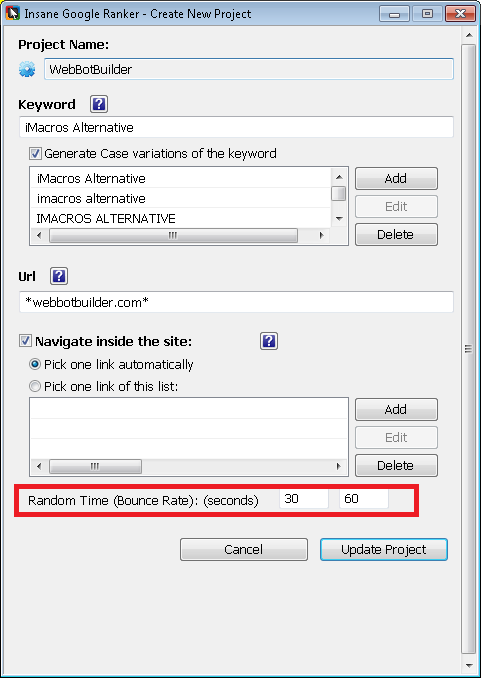
In this case, the min time is 30 seconds and max time is 60 seconds.
Last edited by a moderator:

blackhatpc
Regular Member
- Dec 5, 2014
- 478
- 114
Any review Copy For me
- Status
- Not open for further replies.