
- Sep 7, 2024
- 519
- 247
Has anyone else experienced this? I've tried many different methods but still can't add the card, and I don't know what the problem is.
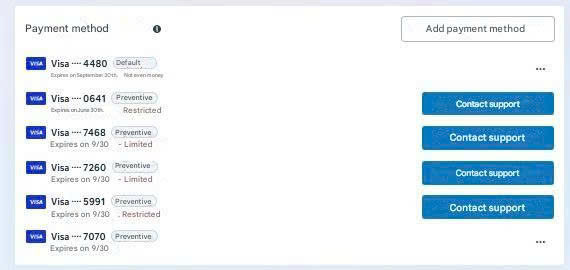


I had to click the Help button at the bottom.Has anyone else experienced this? I've tried many different methods but still can't add the card, and I don't know what the problem is.View attachment 498377


I'm experiencing a similar issue with some accounts, and I haven't found a fix yet. I'll try your method. Thanks.Try changing your IP address or fixing your VPN; I've tried it before and it worked.
I contacted support, and they only gave me a vague response.If the payment error is not resolved even after changing the payment card, the best option is to contact support directly to clearly understand what the issue is.
My account and card are still working normally; there's no message saying he's experiencing any errors.this can be due to several reasons, usually an account issue or a faulty payment card. you should try adding the card to a different account to check, or continue using your current card

There are quite a few reasons. Look at the number of cards you've added and their status. I recommend using cards from a reputable bank to minimize the risk of being banned or spammed. Leave it for 48 hours, then you can try adding the card again.Has anyone else experienced this? I've tried many different methods but still can't add the card, and I don't know what the problem is.View attachment 498377

