payment error

HA Marketing Agency

Regular Member
Jr. VIP
Premium Member
Joined
Sep 7, 2024
Messages
494
Reaction score
247
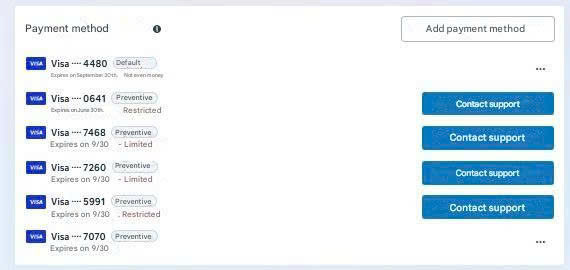
Has anyone else experienced this? I've tried many different methods but still can't add the card, and I don't know what the problem is.
f23af6c51a379569cc26.jpg
 
this can be due to several reasons, usually an account issue or a faulty payment card. you should try adding the card to a different account to check, or continue using your current card
 
I'm also experiencing this problem, but in my experience, it's because the account is too old, so I can't add a card. I've also encountered situations where new accounts couldn't add cards, but I think that's due to the card itself.
 
If the payment issue persists even after updating the card, the next step is to reach out to support directly so they can review the account and clarify the exact cause of the problem.
 
Has anyone else experienced this? I've tried many different methods but still can't add the card, and I don't know what the problem is.View attachment 498377
I had to click the Help button at the bottom.
They showed suggestions for help, I selected "Payment method problem," then a dialog box appeared asking me to add a card. I added the card there and it was successful.
 
Based on the images you sent, I can only assess the following:
1. Remove all cards and then add them back, as I see many cards are being restricted.
2. Incorrect CVV information.
3. The ad account failed to add the card.
 
I've noticed that this usually happens because the ad account or Bm is flagged for payment risk, so any card added gets restricted. Try contacting Facebook support so they can remove the restricted cards, and comply with Facebook's account regulations to minimize risk.
 
Please try clicking on Contact support and following Facebook's instructions, I think that should solve the problem.
 
Common reasons for payment cards not being added: bank limits/blocks, card type, browser issues, or platform limitations.
Solution: Check your bank, use a different card or browser, file a Support ticket if necessary.
 
This can happen for a few different reasons, most commonly related to an account-level issue or a problem with the payment method. You can try testing the card on another account to see if it works there, or continue using the same card if everything appears normal.
 
This might be due to some of your tags being faulty; please remove some of your tags that are currently in your ad account and
 
This often happens when the ad account or Business Manager is flagged during a payment risk review, which can cause any newly added cards to be limited. Reaching out to Facebook Support can help clarify or remove restricted payment methods. Following Facebook’s policies and keeping the account setup clean also helps reduce future risk.
 
Where are you getting your cards from?
 
Try changing your IP address or fixing your VPN; I've tried it before and it worked.
 
If the payment error is not resolved even after changing the payment card, the best option is to contact support directly to clearly understand what the issue is.
I contacted support, and they only gave me a vague response.
 
this can be due to several reasons, usually an account issue or a faulty payment card. you should try adding the card to a different account to check, or continue using your current card
My account and card are still working normally; there's no message saying he's experiencing any errors.
 
Please check if your card can be added to multiple accounts; on average, one card can be added to a maximum of 5 advertising accounts.
 
Has anyone else experienced this? I've tried many different methods but still can't add the card, and I don't know what the problem is.View attachment 498377
There are quite a few reasons. Look at the number of cards you've added and their status. I recommend using cards from a reputable bank to minimize the risk of being banned or spammed. Leave it for 48 hours, then you can try adding the card again.
 
Back
Top