[NPS] NiX Proxy Suite looking for testers and translators

Status
Not open for further replies.
OK, the leeching is working fine.
But the php error still exists, even after redownloading,
basically when i try to click on the second button below to download the list, i get the above sourceguarian error.
image of the button that's not working is attached

FIM2l


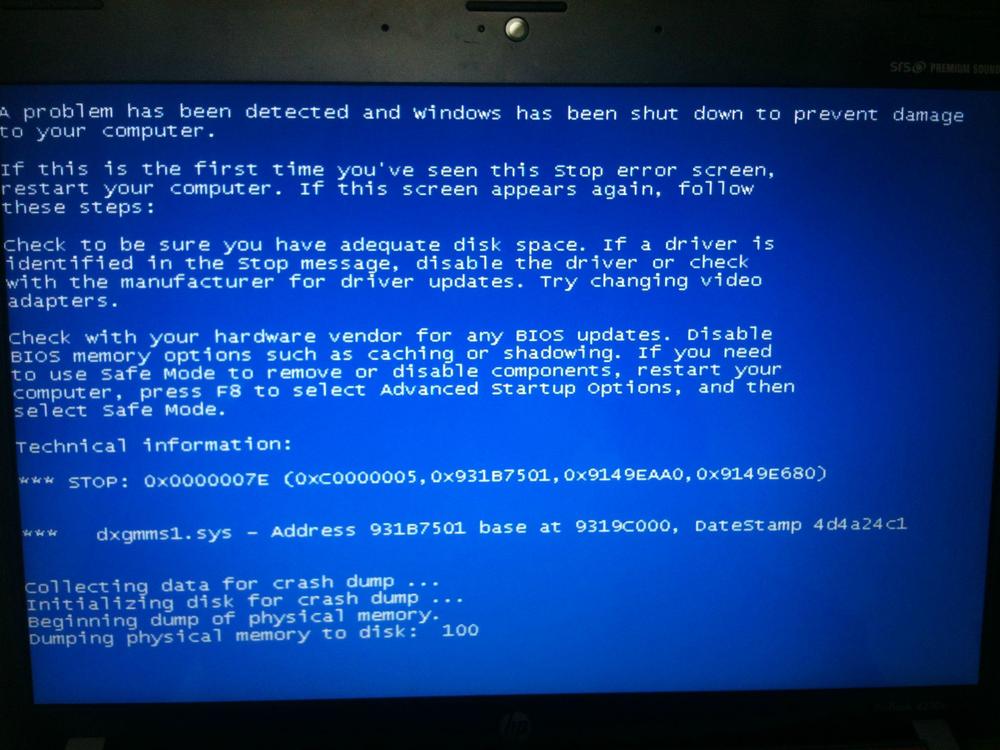
Also, I can't really check all the proxies, as my computer crashes with blue screen.
I thought something else might be causing the crash, but after restarting and running a clean proxy check, it still crashes.
Can't really continue checking on this laptop because of this crash.
My laptop specs are:
Windows 7 home premium 32 bit
CPU: i3 2.3 GHZ
RAM: 4GB

cvjeb


gDFUa
 

Attachments

  • cvjeb.jpg
    cvjeb.jpg
    52.9 KB · Views: 1
To add:
The first button to download the list works fine. It's only second button that gives that error
 
i will clean leeched lists harvest and test google pass proxies as soon as possible
my test this morning was with latest version 1.2.2
 
To add:
The first button to download the list works fine. It's only second button that gives that error

Please overwrite all PHP files from the package expect connect.php and try again. I am almost sure that you were first to test this with a laptop. Your blue screen is something what with I can't help you out. Here's what I suggest for you. Do memtest on that laptop. Download http://www.memtest.org/download/4.20/memtest86+-4.20.iso.zip and burn the ISO to CD. Reboot with the CD and let the full test run. If you see anything during the test in red, your laptop memory is broken. This is likely the reason for your bluescreen.

NPS is memory intensive but speed is not coming for free ;)
 
i will clean leeched lists harvest and test google pass proxies as soon as possible
my test this morning was with latest version 1.2.2

My bad. Nothing comes freely, I've spent significant amount of time for my ranges. If you are after for a large amount of SB proxies, you must work hard on those ranges. That's anyway where the checking speed and built-in subnet scan feature will help you out. The next update will make your life easier but im afraid I'll take a few days coding break and relax.
 
i ran all tests on work laptop.
can i try running on home laptop?
will there be any issues with licensing?
 
You're allowed to test it on your all computers/servers. Just don't share it. Thanks.
 
The following BHW users are no longer testers of NPS: LeviathanW, nYXem, bashx and kelvin.thechamp
Lol, sorry mate. After the linux failure, I didn't get to reinstalling Windows immediately. I lost quite some days on the linux experiment and waiting for an update/answer/fix.
I only noticed it now, I reinstalled a pc, installed xampp and wanted to download NPS from my e-mail, but it didn't work anymore. Had a busy time the last few days, quite unexpected.

Anyway, I might give your older version a shot, if I still have the rar on my main pc. Just to see what I am missing out on.

Sorry, but good luck with the programming :)
 
Test 06/27

Same proxies list ... different settings

1) settings :
Asynchronous connection timeout: 500 ms Connection timeout: 3 Timeout: 10 Threads: 70 Sub-threads: 25 Retries: 1 Protocol: Auto-detect

Proxy check has finished.Checked 2828 proxies.Operation completed in 0 days 00 hours 13 minutes 19 seconds
Working proxies: 668
19 Google Passed proxies

2) settings :
Asynchronous connection timeout: 500 ms Connection timeout: 3 Timeout: 10 Threads: 40 Sub-threads: 15 Retries: 1 Protocol: Auto-detect

Proxy check has finished.Checked 2828 proxies.Operation completed in 0 days 00 hours 14 minutes 27 seconds
Working proxies: 556
12 Google Passed proxies

So decreasing threads didn't help find more proxies .. on the contrary

The 2nd test was done right after the first test was over.
 
Your latest proxy test implies that your connection can handle properly tested threads and it also prove that NPS is reliable when using higher amount of threads.

I've been developing NPS Linux CLI version and here are my results. I used the following settings:

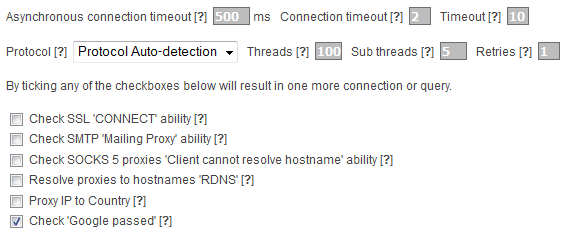
Asynchronous connection timeout: 500 ms Connection timeout: 2 Timeout: 10 Threads: 200 Sub-threads: 100 Retries: 1 Protocol: Auto-detect

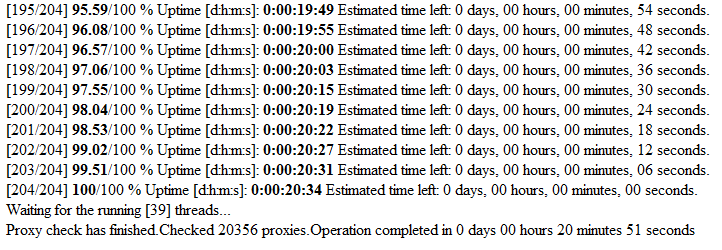
Checked 164,592 proxies in 0 days 00 hours 42 minutes 17 seconds

Attached also a screenshot image of that check. Using a simple math, 24x164k == 4M proxy will get scanned in 24 hours ;) Do not try this with your home connection, it will end up in your connection suspension. As an addition to this check, scanned also 1M list of proxies using the same settings: Checked 981,391 proxies in 0 days 05 hours 33 minutes 28 seconds

Needless to say, my latest test implies that NPS on linux server is not to be underestimated. If someone can beat this speed with any other tool, let me know.

To LeviathanW: Let me know when you've got it working on your windows. I can re-include you after that in testers.
 

Attachments

  • NPS_Linux_CLI.png
    NPS_Linux_CLI.png
    6.7 KB · Views: 3
OK, I managed to install the NPS on my home laptop.
Everything seems to be working except that second download button as described earlier.
The proxy check went through without the blue screen of death.

wOnad


gsvvC


RsTdP


The settings were as below:

Y3h76
 
Also, one suggestion:
It would be good if during mysql setup, user could just import one whole database, rather than individual tables. That would be more convenient.
Thanks
 
Have you considered web install, like with wordpress?
Step 1. database settings/import database
Step 2. Username/pass
Step 3 settings.
Step 4 etc.

That way, non techy users could do a setup much faster. Right now, the setup may be a bit complicated for some.
 
Thank you for brief tests and reports. I know the installation process is currently complicated and I'll create wordpress style setup.php to speed it up. A lot faster option for me is to provide full database as you suggested. What comes to bluescreens, it is very likely that bluescreen is a good sign of broken hardware (most commonly broken RAM chip).

Do you mean by the second download button: You are not able to download lists as an attachment? If so, what browser you're using with NPS? I've just verified that there is no issues with downloading files. I've tried with the following browsers: IE 8.0, Firefox 3.6.28 and Opera 12.00

PS. What comes to your speed, using 100/5 thread is quite pointless, that makes the main thread wait for your 5 sub-threads making a big bottleneck. Try threads 100/25. Remember though, on windows one sub-thread use about 9MB of RAM. If you run out of memory while checking, in worst case you may end up with bluescreen if your windows is old.

I forgot to tell this, I verified yesterday NPS under wmware using WinXP SP3 (i lifted the half-open connection limit using TCP-Z which allowed me to test with 100 threads without issues), it worked amazingly well. However native windows is always better. So now I can say for sure that 'WinAll' and Linuxes are fully supported, no matter 32 or 64bit. It will work on them all.
 
Do you mean by the second download button: You are not able to download lists as an attachment? If so, what browser you're using with NPS?

Yes, the download button, when clicked, gives the sourceguardian error. I used Firefox and IE, and the same problem happened on both laptops. So I think the piece of code in the version which you sent me, has something messed up.

Are you sure I am using the version that every other tester uses? You mentioned something about mine being different from others'. Maybe that's the issue.

What comes to your speed, using 100/5 thread is quite pointless, that makes the main thread wait for your 5 sub-threads making a big bottleneck. Try threads 100/25. Remember though, on windows one sub-thread use about 9MB of RAM. If you run out of memory while checking, in worst case you may end up with bluescreen if your windows is old.

Yes, I will test with these settings, and report back.

In addition, would be great to have some instructions for mac users, since there are many IMers using mac. I'm one of them as well, and had to use bootcamp for the NPS.

There is a xampp alternative for mac - wamp. I guess, we just need to find the remaining code and fire it up. Maybe I can make this a weekend project and see if I can make it work, then report back here.
 
you may end up with bluescreen if your windows is old

not so - i scan on xp sp1 with my port scanner havnt
had a blue screen in yrs. if he wasnt having blue screen
b4 the software but is after. probably software issue
i use xp made in 2002 10 yrs old no blue screens
 
Some more suggestions:

1. To be able to sort out the list by type, ping, anonym level, country, ssl, etc and then export the list (csv, txt) with the applied filters, both with the proxy information orjust the clean list.

2. Where to get the IP database? Clear instructions would be appreciated. Seems ip2location db3 adds extra cost. Isn't it possible to find some free/cheap alternatives to recognize the ips? at least by country, without region, city, for those who don't need? For example get the country ip ranges from http://ipinfodb.com/ip_country_block.php
 
Run the test with increased threads/subs
Was not able to input higher than 100 threads. System does not save more than 100 threads setting

78ku6


PTnV3


Nefqb
 
Yes, the download button, when clicked, gives the sourceguardian error. I used Firefox and IE, and the same problem happened on both laptops. So I think the piece of code in the version which you sent me, has something messed up.

Re-download NPS_1_2_2.zip and overwrite 'attachment.php' on your both laptops, and the download button should work.

What comes to mac, I've no idea about that OS. Im curious to hear did you got it working.
 
Some more suggestions:

1. To be able to sort out the list by type, ping, anonym level, country, ssl, etc and then export the list (csv, txt) with the applied filters, both with the proxy information orjust the clean list.

2. Where to get the IP database? Clear instructions would be appreciated. Seems ip2location db3 adds extra cost. Isn't it possible to find some free/cheap alternatives to recognize the ips? at least by country, without region, city, for those who don't need? For example get the country ip ranges from http://ipinfodb.com/ip_country_block.php

NPS has built-in feature 'Proxy IP to Country'. Just tick that checkbox in 'Proxy Checker settings'. What comes to region/city information check the 'General settings' and read the tooltip's description, it will explain it in full.

For your feature request, gotcha. At the moment im working on CLI version, at somewhere in next week, GUI version will have the next update.

To summarize requested features:

1) Make the setup process easier for a less experienced users
2) After applying the filters, make the list also in CSV format and allow download filtered list as an attachment
3) Allow user to import built-in sources for leech list if the license key is valid

If there is something else, let me know.
 
Status
Not open for further replies.
Back
Top